



Enterprise field service, without the enterprise price.

FieldEx is field service management software that sends each job to the right technician, closes it on a phone app with photos and a signature, and keeps every machine's history. We can set it all up for you, with training included.

Used by teams from 4 to 700 users in 16 countries4.6 on Capterra, 4.7 for customer service
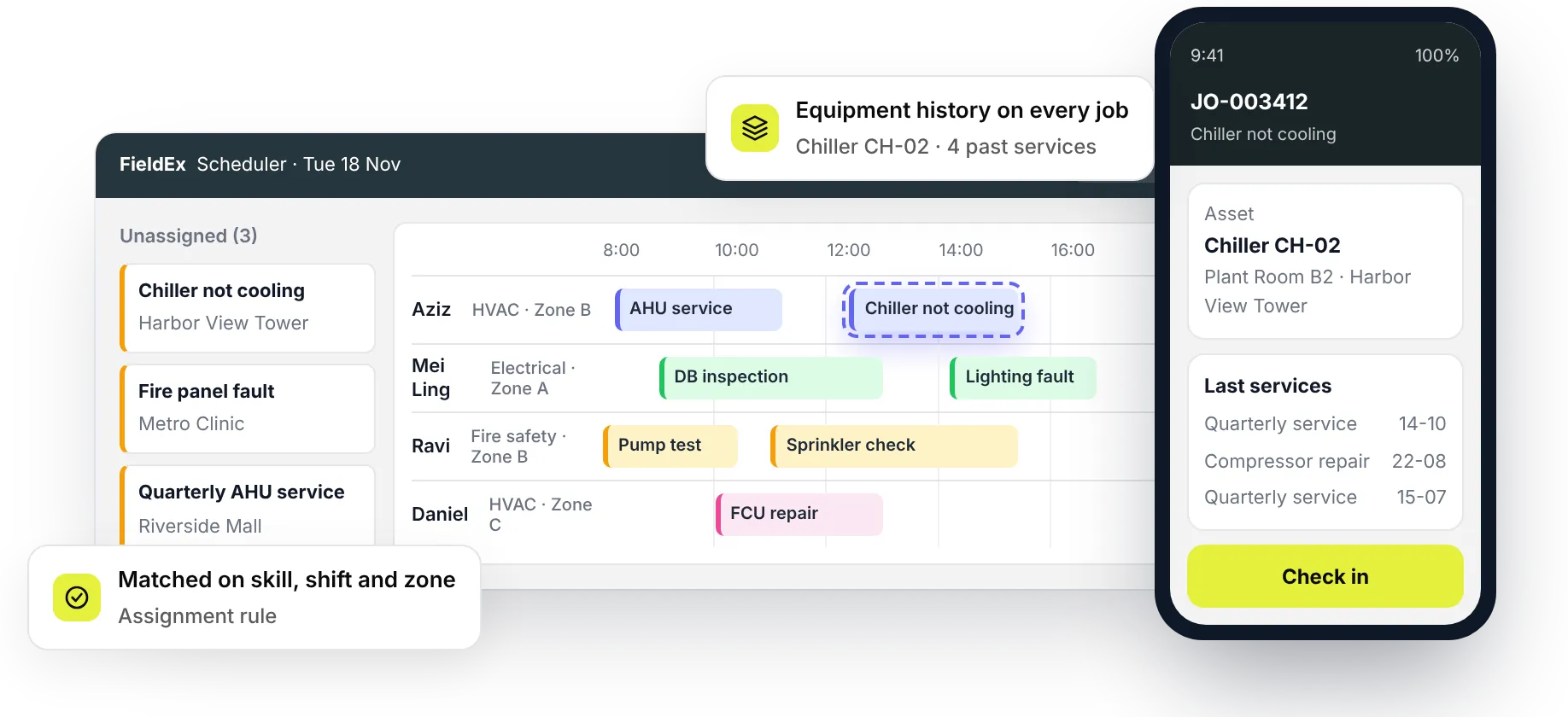
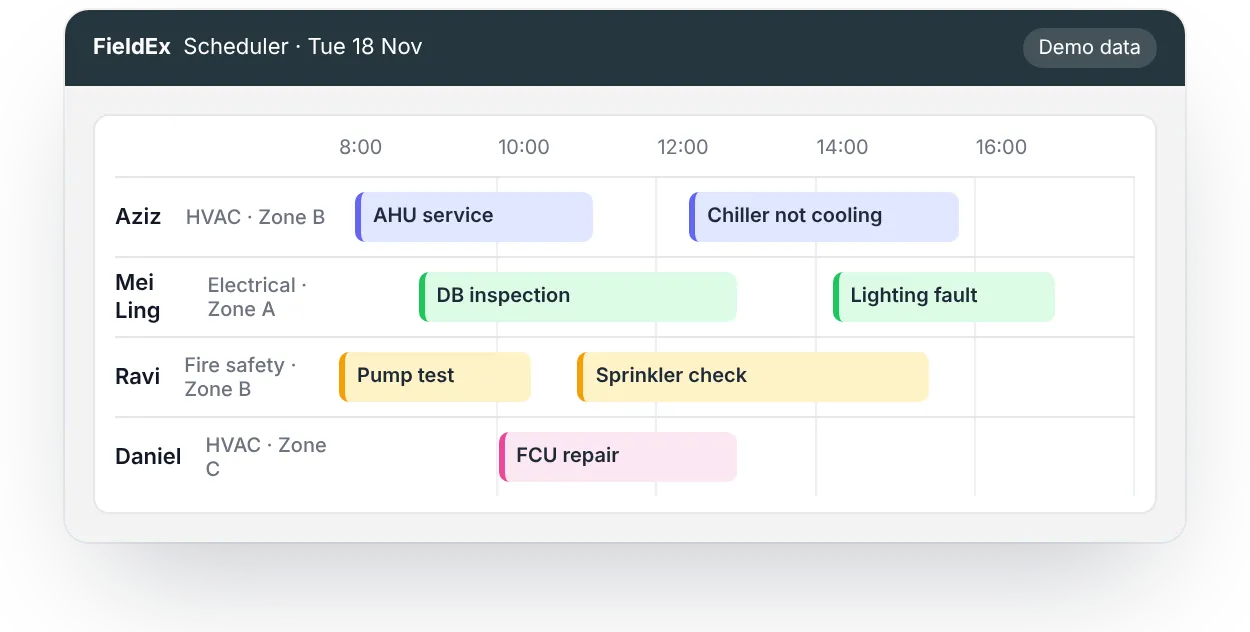
FieldEx Scheduler showing technicians’ days, a job matched on skill, shift and zone, and the technician’s phone showing the asset’s last servicesFieldEx Scheduler showing four technicians’ jobs across the day

Maintenance and field teams running on FieldEx

Royal Facilities Management logoChubb logoEC Solutions logoAlanDick logoTapEffect logoCoffex logo

Field service management (FSM) software schedules jobs, sends each one to a technician and guides the work on a phone app. It then records proof of every visit for the customer. FieldEx is field service management software with maintenance management (CMMS) built in. It matches jobs to technicians, works offline on site and keeps a history for every customer machine.

The right technician for each job, by skill, shift and zone.
A signed completion report after every visit.
Each job sits on the equipment's own service record.
The product

What FieldEx does as field service management software

Scheduling and dispatch

Every job reaches a technician who holds the right skill and is on shift.

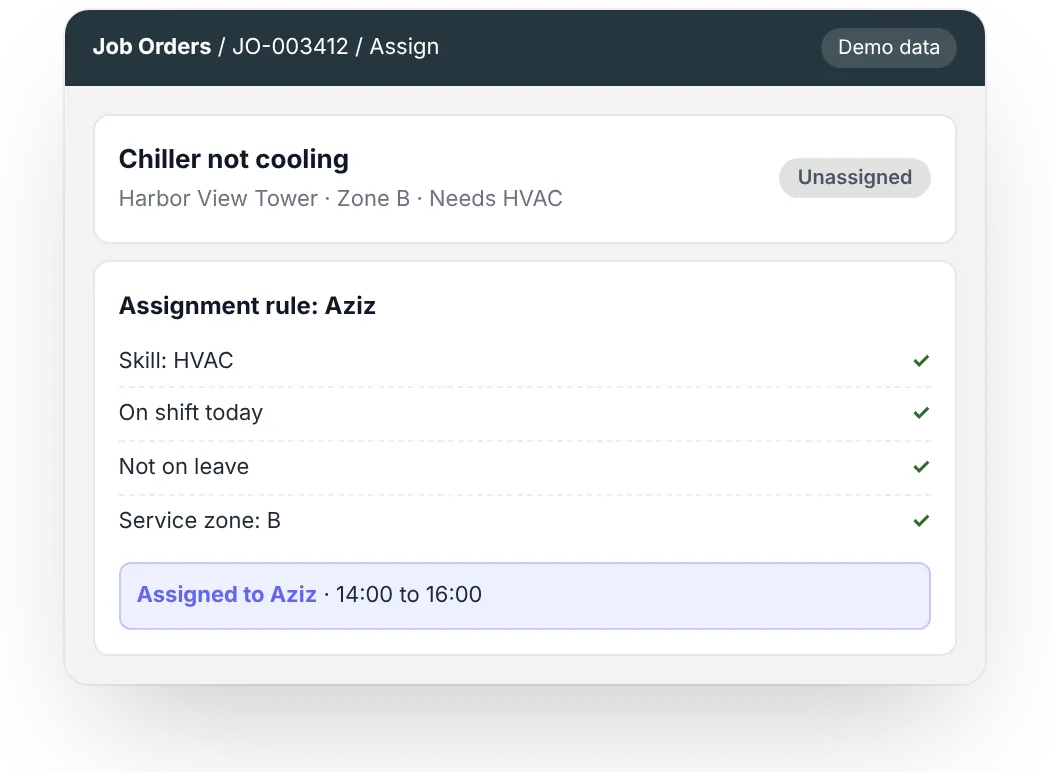
  • Rules match jobs on skill, availability, shift, leave and service zone, then choose the nearest and least busy.
  • Unassigned jobs wait in a backlog, and dispatchers drag them onto a technician's calendar.
Scheduling & Dispatch
FieldEx assignment rule matching a job to a technician on skill, shift, leave and service zone

Work orders and job types

Each kind of work follows its own steps, forms and sign-off.

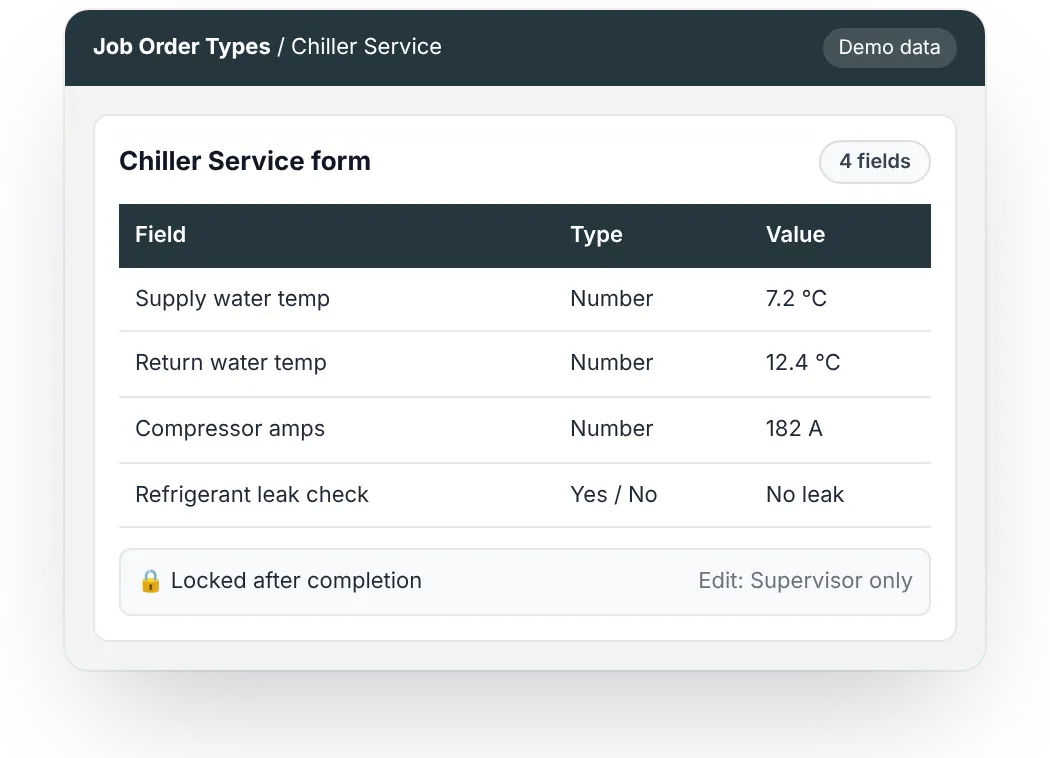
  • Job forms record the exact values your team needs, such as readings.
  • Completed jobs can lock, so only chosen roles can edit them.
Work Order Management
FieldEx job type form recording readings, locked after completion so only a supervisor can edit it

The technician app

Technicians see their day, do the work and close the job on their phone.

  • Jobs can be downloaded and worked offline, with check-in, check-out and travel synced later.
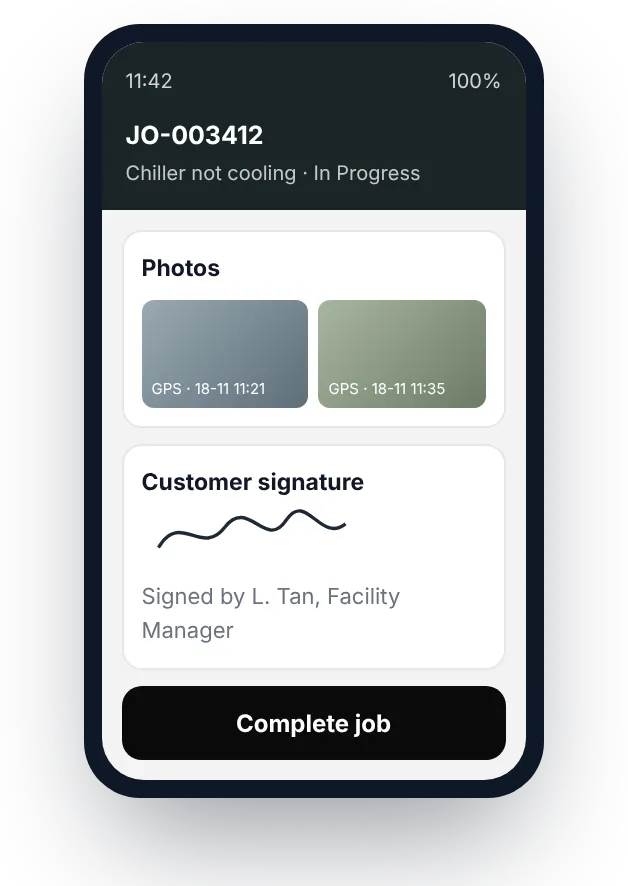
  • Photos and video carry a location and time watermark, and customers sign on the phone.
Mobile App & Field Execution
FieldEx technician app with location and time stamped photos and the customer’s signature

Customer portal and requests

Customers raise requests and follow their jobs without phoning the office.

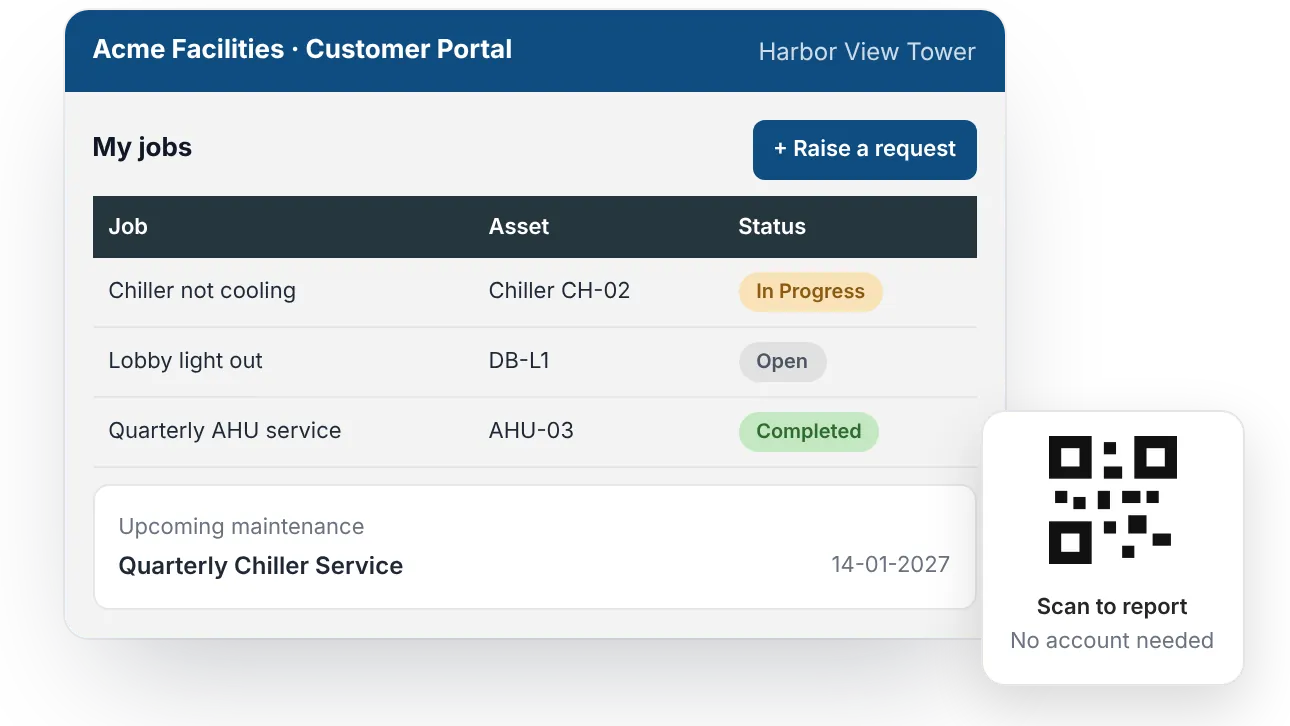
  • A portal with your logo and colors shows each customer's jobs, status and upcoming maintenance.
  • Anyone can scan an asset's QR code and report a fault, with no account needed.
Service Requests & Customer Portal
Branded FieldEx customer portal showing jobs, status and upcoming maintenance, with a QR code to report a fault

Contracts and service levels

Response and fix times are tracked against each customer's contract.

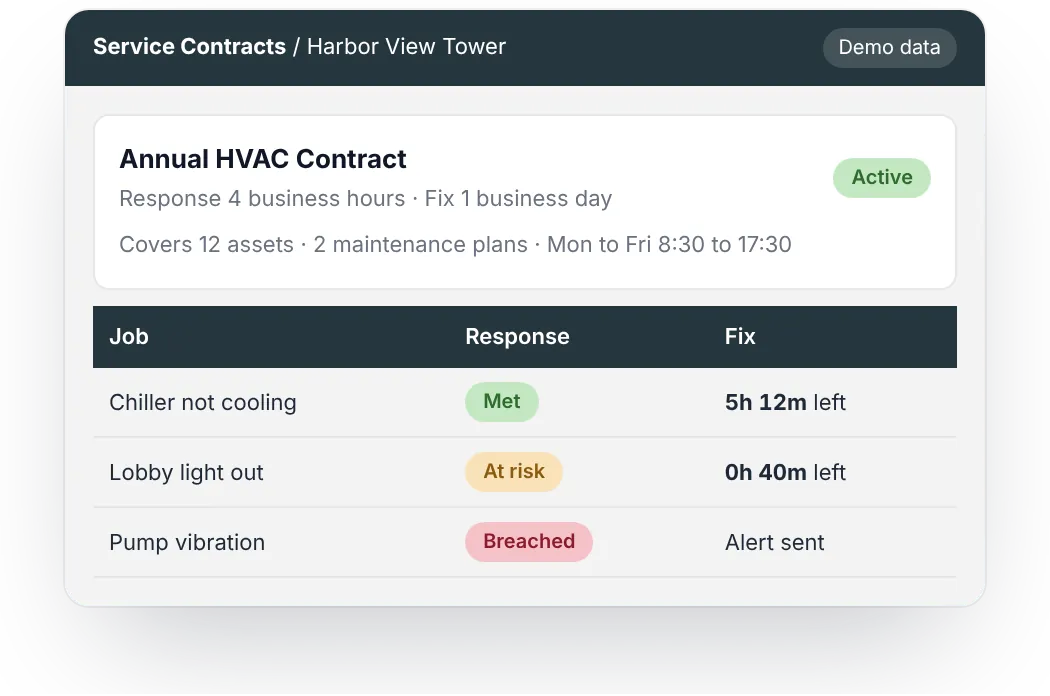
  • Service-level timers run on business-hours calendars, with at-risk and breach warnings.
  • A contract ties a customer to the assets and maintenance plans it covers.
Service Contracts & SLAs
FieldEx service contract with response and fix times tracked on each job, showing met, at risk and breached

Equipment history and maintenance

Each visit adds to the machine's record, not only the customer's.

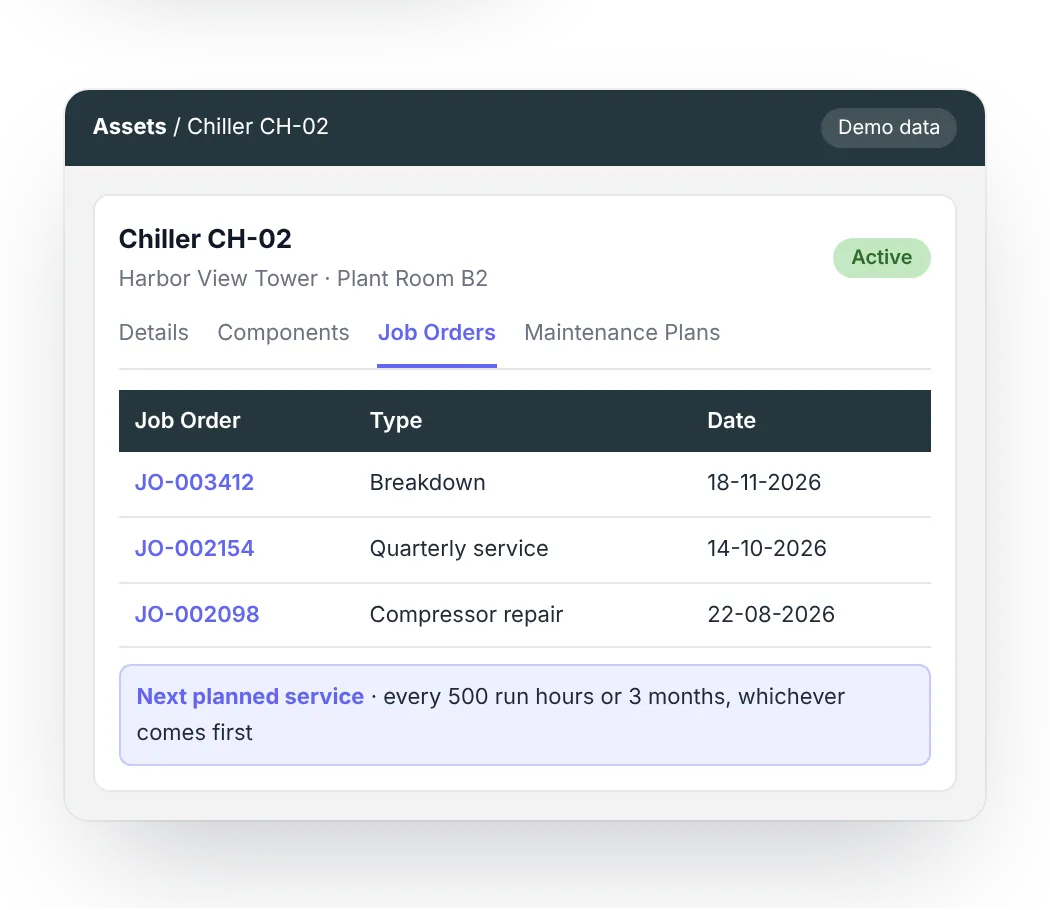
  • Every asset keeps its own history, with components under their parent.
  • Maintenance plans create jobs before each service is due, by date, meter reading or both.
Asset & Machine Management
FieldEx asset record with its job history and the next planned service by run hours or date
100+technicians and contractors moved off paper reports

A large facilities management firm in Singapore moved more than 100 technicians and contractors from paper reports to FieldEx. Its mechanical and electrical work and its cleaning teams now run in one system, and managers follow the day's work on a live dashboard.

See one of your own job types set up in FieldEx.

Book a demo
The basics

What is field service management software?

Field service management software plans, assigns and proves work done at customer sites, so the office knows where every job stands.

FSM software takes a request, turns it into a job and sends it to a technician. The technician gets the details on a phone, does the work and records what was done. The office then sees the result, the time spent and the customer's signature, and the customer receives a report.

What FSM software doesWhat it replaces
Jobs scheduled and assigned to techniciansWhiteboards and phone calls
Job details and checklists on a phone appPrinted job sheets
Photos, times and signatures on every jobWhatsApp photos and paper timecards
Completion reports sent to the customerReports typed up after the visit
Requests from a customer portal or QR codeCalls and messages to the office
Response and fix times tracked per contractSpreadsheets checked at month end
FieldEx is a field service and asset management (FSM+CMMS) application. FSM software centers on the job and the customer site. A CMMS centers on the equipment and its maintenance. If your technicians service machines, you need both on the same records, and the two are compared in FSM vs CMMS.
Buyer's checklist

Which features should field service management software have?

Seven features decide whether FSM software works in practice. Check each one in a demo, using your own jobs.

Automatic assignment.

Jobs go to a qualified technician who is on shift.

Scheduling & Dispatch
A dispatch board.

Dispatchers see every technician's day and move jobs by drag and drop.

Scheduling & Dispatch
An app that works offline.

Technicians download their jobs before they go, then finish them without signal.

Mobile App & Field Execution
Proof of every visit.

Photos, check-in and check-out times and a signature go into the completion report.

Work Order Management
Service levels.

Response and fix times run against each contract.

Service Contracts & SLAs
A customer portal.

Customers raise requests and see their job status.

Service Requests & Customer Portal
Equipment records.

Each job links to the machine, its parts and its history.

Asset & Machine Management
Why it matters

Field service with the equipment record

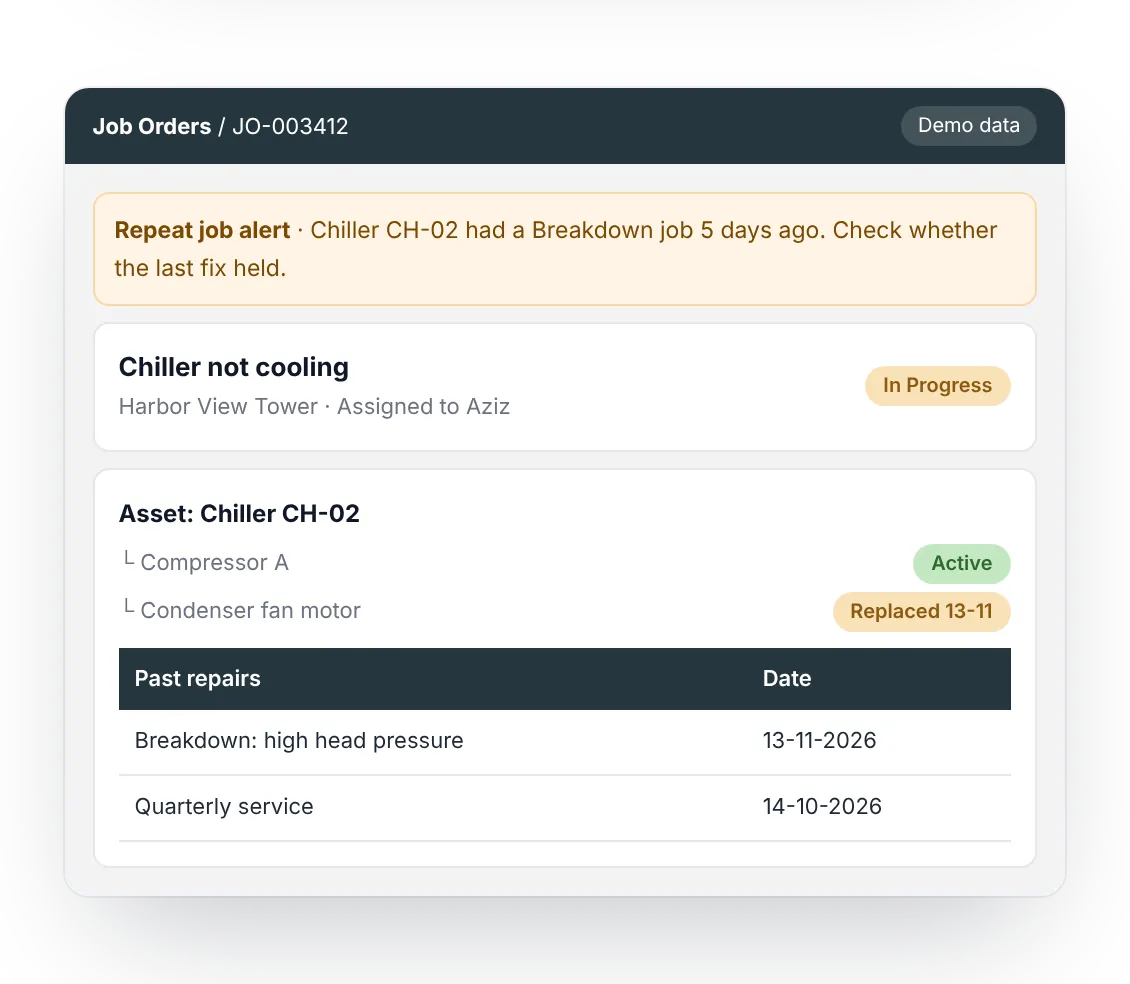
FieldEx keeps the machine on the same record as the customer and the site. When a technician opens a job, they see the asset, its components and its past repairs. If the same asset gets another job of the same type within a set number of days, the office sees an alert. That points to a fix that didn't hold. Planned services for each machine create their own jobs before they fall due.

FieldEx job showing the asset’s components, past repairs and a repeat job alert
Evaluation

How do you choose the right field service management software?

Choose FSM software by how your work arrives and how your technicians work on site, then test it with your own jobs.

  1. 1

    Start with how work arrives.

    List your calls, emails, contract visits and planned services.

  2. 2

    Write down your assignment rules.

    Note the skills, zones and shifts that decide who goes.

  3. 3

    Close a real job on the phone.

    Have a technician complete a job with photos and a signature.

  4. 4

    Check what the customer receives.

    Look at the completion report and the portal through the customer's eyes.

  5. 5

    Decide whether you service equipment.

    If you do, you need machine records and maintenance plans on the same system.

Side by side

How does FieldEx compare with other field service management software?

The FSM tools below are built mainly around the job and the trade. FieldEx also runs equipment maintenance on the same records.

ToolBest forEquipment maintenance on the same recordsPublished starting price
FieldExService teams of 4 to 700, including those that maintain customers' equipmentIncluded: asset history, and maintenance plans on dates, meter readings or bothFrom US$15 per user a month. Maintenance plans, the customer portal and contracts from US$55, and service levels from US$85
JobberHome service businesses that quote, schedule and invoiceRecurring jobs repeat visits on a set scheduleUS$29 a month for one user, plus US$29 per added user
ServiceTitanCommercial and residential tradesEquipment records, with recurring service events booked into jobs by handOn request
SimproTrade contractors who quote and run projectsMaintenance Planner, a paid add-onOn request, plus a setup fee
Salesforce Field ServiceOrganizations already running on SalesforceMaintenance plans, with asset lifecycle as a paid add-onUS$175 per user a month for dispatchers and technicians, plus at least one Service Cloud license
Dynamics 365 Field ServiceOrganizations already invested in MicrosoftCustomer assets and agreementsUS$105 per user a month

Prices are per month, billed annually where the vendor says so. They come from each vendor's pricing page on 16 Nov 2026: Jobber pricing, ServiceTitan pricing, Simpro pricing, Salesforce Field Service pricing and Dynamics 365 Field Service pricing. Maintenance details come from each vendor's help center, checked 19 Oct 2026, for example the ServiceTitan help center.

The full side-by-side for each tool:

Off WhatsApp

Can field service software replace WhatsApp groups and spreadsheets?

Yes. Each job gets one record with its photos, times and signature, so nothing is lost in a chat thread.

WhatsApp keeps messages. It doesn't keep jobs. FieldEx keeps the same photos, times and notes, attached to the job they belong to.

Jobs instead of messages.

Each request becomes a job with an owner, a due time and a status.

Photos on the job.

Pictures attach to the job, watermarked with location and time.

Reports that send themselves.

The completion report goes to the customer when the job closes.

Your spreadsheets as the start.

Customers, contacts, sites, assets and past jobs can be uploaded.

Read more on Replacing WhatsApp and Spreadsheets.

Multi-site

How does FSM software handle many customers and sites?

It works when every job belongs to a customer, a site and an asset. FieldEx keeps each customer's sites, equipment and contracts apart.

Adding a customer in FieldEx means adding their sites and assets, not another spreadsheet tab.

  • History per customer and site.Each site keeps its own job and equipment records.
  • Stock with each technician.Every technician or van holds its own parts, with transfers recorded.
  • A contract for each customer.Each contract lists the sites, assets and maintenance plans it covers.
  • Reports by customer.Completion reports and scheduled reports go to the right people automatically.

Read more on Multi-Site Operations. For contractors, see Building Services Contractors, Facilities & Building Management, HVAC Service Software and Fire, Security & CCTV. Moving from another system? Read Replacing FSM Software.

Pricing

How much does field service management software cost?

Among the tools compared here, published prices run from US$29 a month for one user to US$175 per user a month. FieldEx starts at US$15 per user a month, with setup and training included.

On 16 Nov 2026, Jobber started at US$29 a month for one user, billed annually, plus US$29 for each added user (Jobber). Dynamics 365 Field Service cost US$105 per user a month, paid yearly (Microsoft). Salesforce charged US$175 per user a month for dispatchers and technicians, billed annually, and needs at least one Service Cloud license (Salesforce). ServiceTitan and Simpro price on request, and Simpro adds a setup fee. Ask each vendor what setup, data import, training and support cost on top.

What each price covers: work orders, assignment rules, the technician app, signed completion reports, asset history and GPS mileage from US$15. Maintenance plans, the customer portal, contracts and the QuickBooks and Xero connectors from US$55. Service levels and quotation and invoice documents from US$85.

US$15per user / month

Billed annually, or US$20 billed monthly

  • There's no setup fee. Standard setup, data import and training are included.
  • Choose monthly or annual billing, with no minimum term and no notice period: you simply don't renew when your term ends. Annual billing costs less than monthly.
  • FieldEx offers volume discounts for larger teams.
  • Custom workflows and integrations are quoted separately.
Implementation

How long does it take to set up field service management software?

As little as a week for a small team on standard features, and typically 1 to 3 months for larger rollouts.

Once we know your requirements and your data is ready, FieldEx can be implemented in as little as a week with standard features for small businesses. Larger setups and custom work take longer.

01Free

Show us how you work.

Start with a free demo, online.

02From 1 week

Set it up.

Do it yourself with our help, or let us build it for you.

031 to 3 months for larger rollouts

Train and go live.

Start with one team or one region, then add the rest.

What you can upload to start:

CustomersContactsSitesAssetsPast jobs

FieldEx helps with setup, and training is included. Details are on Setup and Training.

How Royal Facilities Management gives property owners a view of every request

Royal Facilities Management runs facilities management contracts for property owners in Oman. Site staff report problems by QR code, and owners follow progress in the portal.

"FieldEx offers a well-organized and user-friendly platform for managing field service and maintenance activities. I particularly like the job order management, preventive maintenance, and overall visibility of service activities."

Mohamed A., Senior Manager, Royal Facilities Management

More on Customer Stories.
Questions about field service management software

What is the best field service management software?

The best FSM software fits how your work arrives and how your technicians work on site. Home service businesses look for quoting and online booking first. Teams that service equipment for customers also need machine records, maintenance plans and service levels. FieldEx covers field service and equipment maintenance in one system.

Field service companies use FSM software with a phone app for technicians, connected to their accounting system. Teams without FSM software run jobs through WhatsApp groups and spreadsheets. FieldEx replaces both and connects to QuickBooks and Xero, and to other systems through its REST API.

Yes. Technicians can download their jobs and tasks before they go, work offline on site, and sync check-in, check-out and travel when they're back in signal.

Yes, as documents. FieldEx generates quotation and invoice documents, but they aren't part of a finance system. For accounting, FieldEx connects to other systems through its REST API and has ready-made connectors for QuickBooks and Xero.

Yes, for checklists. Describe the checklist you need, or upload a PDF or PNG of an existing one, and FieldEx creates it for you to review.

No. Technicians open the app to their own jobs, in their own language, with your team's labels. The app runs in English, Bahasa Malaysia, Chinese, German, Spanish and more.

A small team needs scheduling, a phone app and completion reports without a long rollout. Look for published prices, no setup fee and a short setup. FieldEx has all three, and you can start with one team.

Produced by Nathan Burriston, Product Director. Reviewed by Andrew Thomas, Founder. Updated November 2026.

See FieldEx running with your own jobs

Bring two or three real job types and your technicians' skills. We'll set up one job type during the demo.