
Requests from clients
- Clients choose the type of work and describe the issue.
- Photos or video attached to the request.
- A preferred appointment date chosen by the client.
Clients raise requests in your branded portal or by scanning a QR code on site. Every request lands as a job your team can schedule.
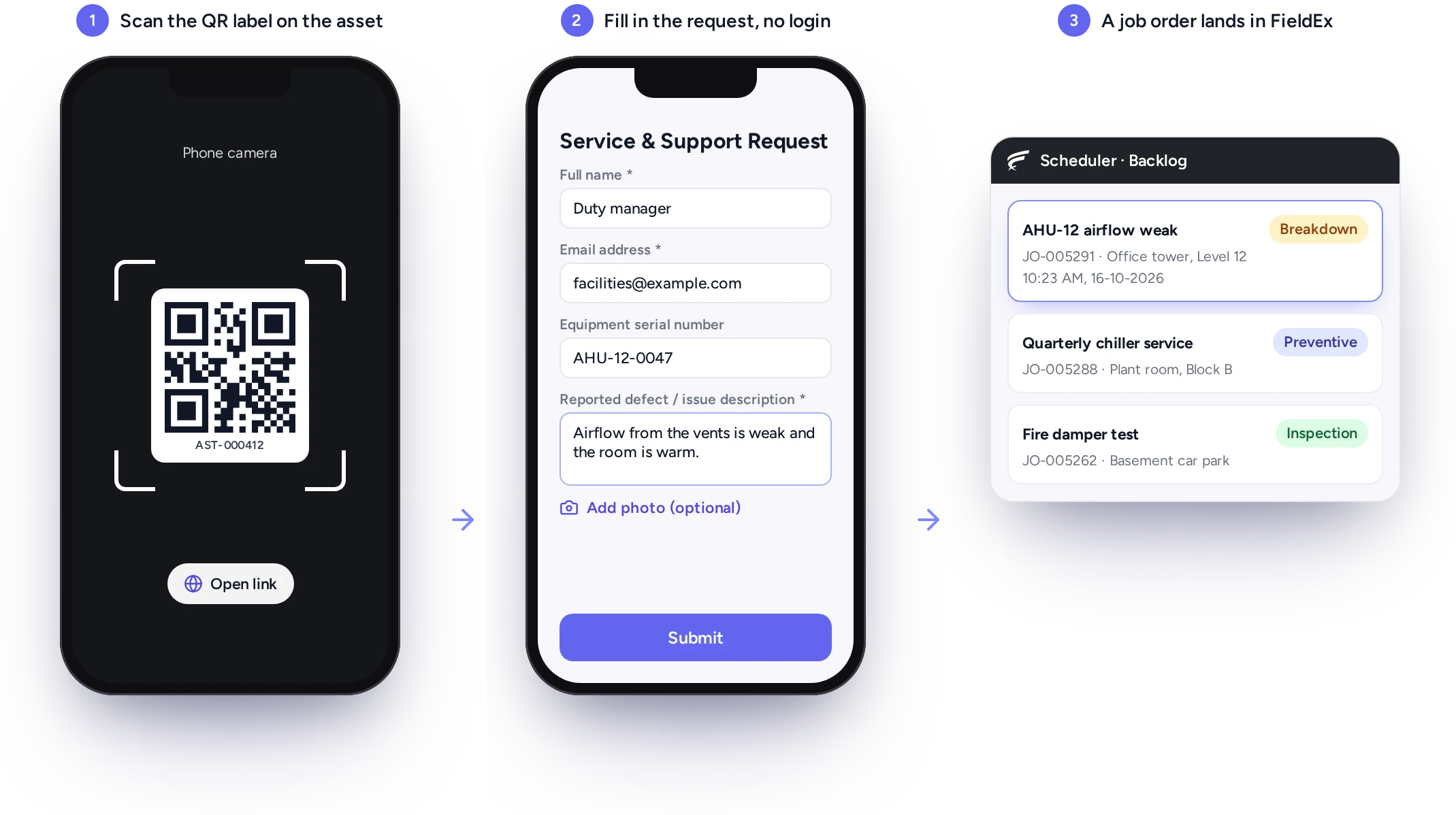
FieldEx is a field service and asset management (FSM+CMMS) application. Its customer portal software gives clients a branded portal to raise service requests and track their jobs. Clients also see upcoming maintenance and reschedule visits. QR codes on site let anyone report a fault. Every request arrives as a job.
Requests from the portal or a QR code arrive as jobs.
Clients track their jobs and upcoming maintenance themselves.
Your brand, your status names, your choice of what clients see.
FieldEx gives your clients one place to ask for work and follow it, and gives your team every request as a job.
Nothing waits in an inbox or a chat group.
A request becomes a job the moment it is submitted, so the clock starts from a recorded time, not an unread email.
Many response targets start from the moment you are told. In FieldEx, a portal request or a QR report creates a job straight away. The job holds the date and time, the description and any photos or video the client attached. Your team logs requests taken by phone as jobs.
Because every request is a job from the start, nothing depends on someone forwarding an email or a chat message before work can be planned.
Clients log in to a portal with your logo, colors and web address, and see only their own jobs, equipment and maintenance.
Clients then see their own jobs, their equipment and their upcoming maintenance, without phoning your office.
Clients increasingly expect to see records without asking. The FieldEx portal sits on its own web address with your logo, colors and font. You choose which client contacts get access, which job types they can see, and which kinds of request they can raise.
Place a QR code at each site, and staff, tenants or visitors can report a fault in seconds, without an app or a login.
The people who notice a fault are rarely the ones with a portal login. A tenant sees the leak, a receptionist hears the alarm and a cleaner finds the broken door.
In FieldEx, each site has its own QR code. Anyone can scan it with a phone camera, describe what is wrong, add a photo or video and leave their name and contact details. The site is filled in from the code, so the report can't land against the wrong building.
Each report arrives as a job created from the template you choose, ready to be scheduled.
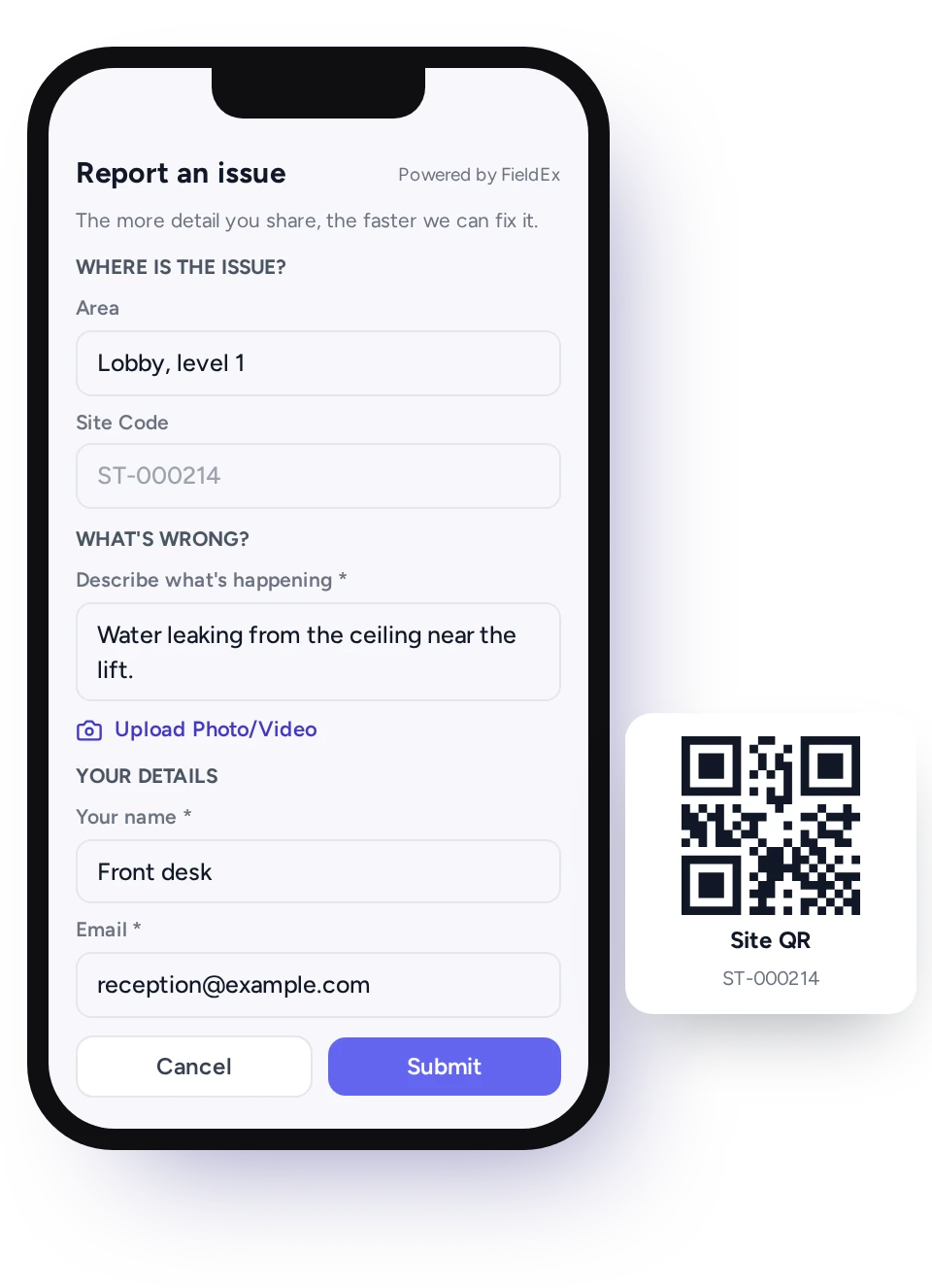
New requests wait in the scheduling backlog as jobs, so a dispatcher can assign them without retyping anything.
Some faults carry their own clock, so a new request can't wait in an inbox. In FieldEx, portal and QR requests land as new, unassigned jobs in the scheduling backlog. Portal requests notify your team automatically.
You can also set up alerts for QR reports, by email or in the app, as soon as a report comes in. When a client picks an appointment date, the schedule is updated.
From there, the dispatcher assigns the job like any other, and the technician sees it on the phone.
Clients follow each job as open, in progress or completed, under the status names you choose, and download a summary when they need one.
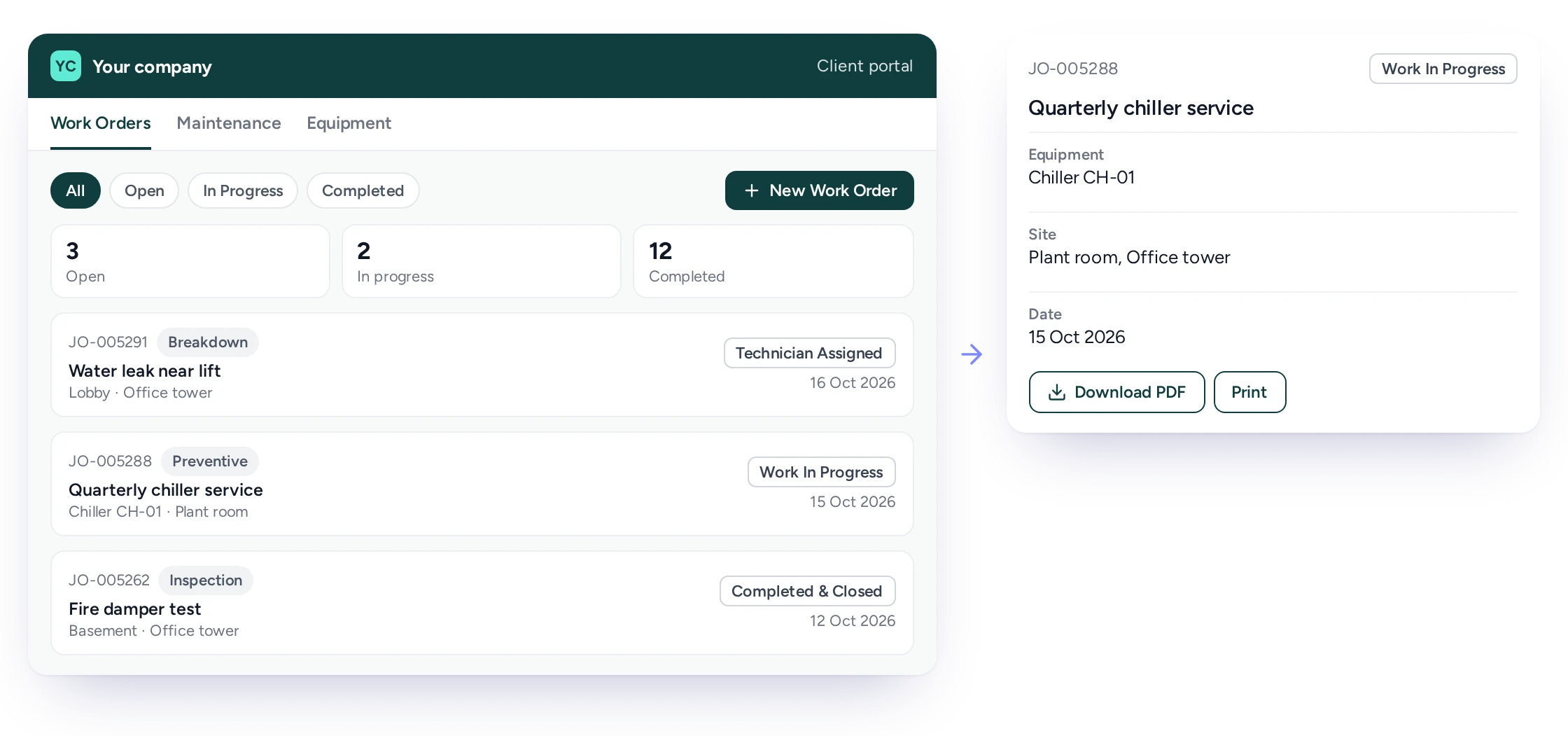
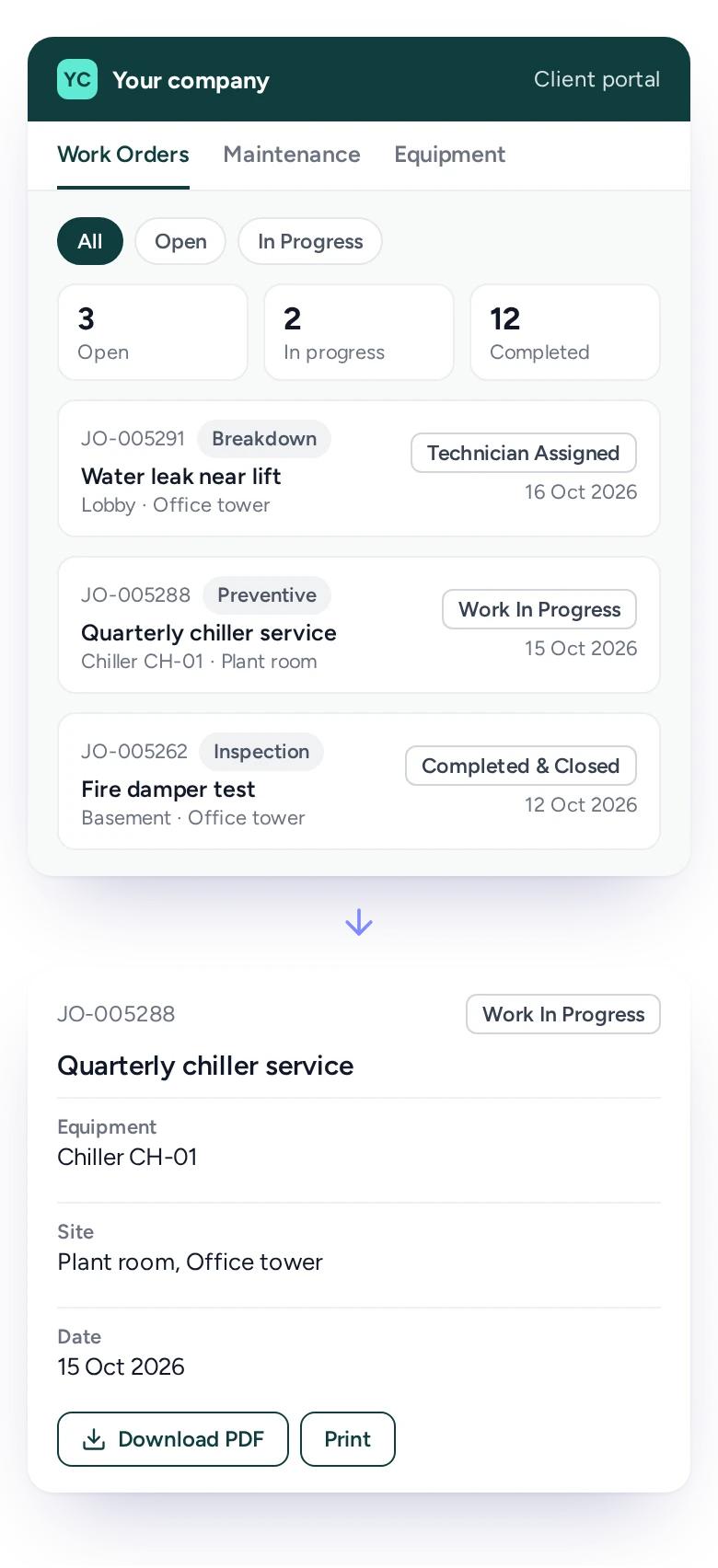
Most status calls are one question: has anyone picked this up? In the FieldEx portal, clients see every job they are entitled to see. Each job shows its status, date, equipment and site. You choose the names clients see for each stage. They can open a job, view its parts if you allow it, and download or print a summary.
Fewer status calls leave your coordinators more time for scheduling.
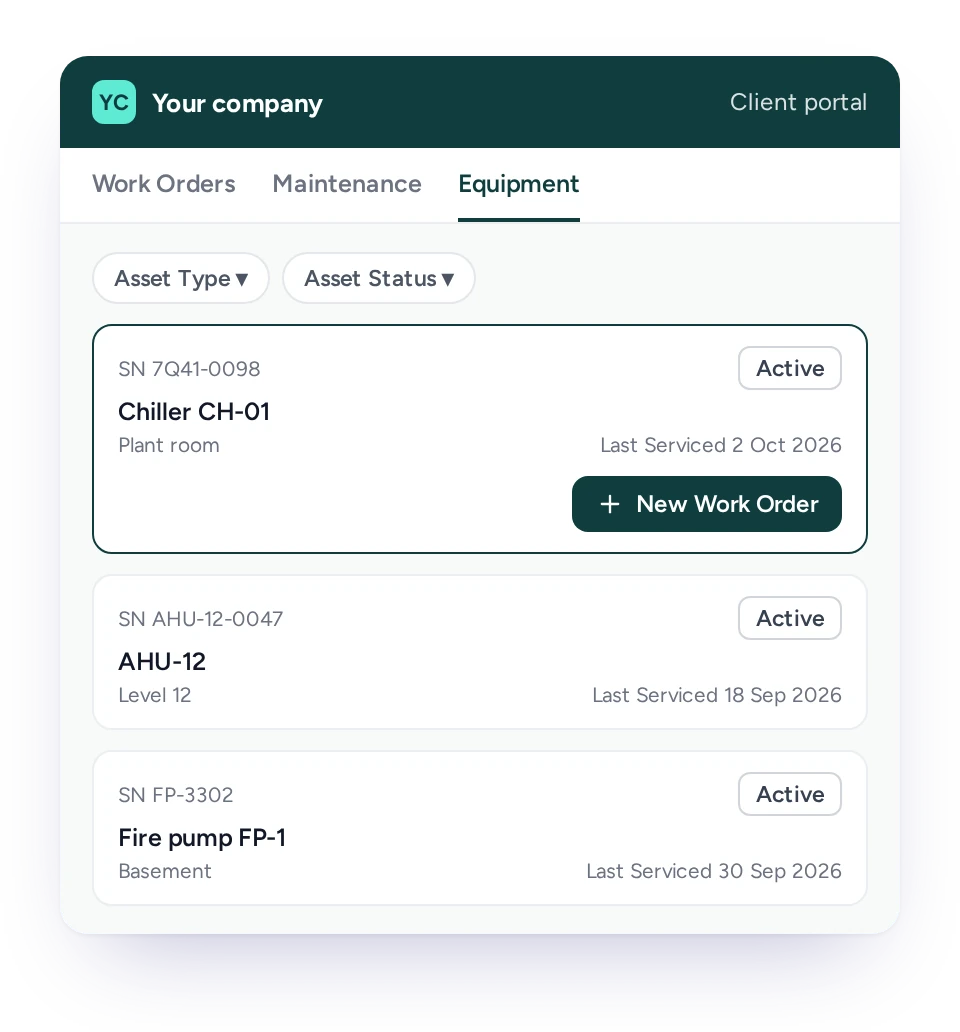
Each client sees their own equipment, when it was last serviced and the maintenance coming up this week and later.
Clients who own the equipment you maintain want to know two things: when was it last serviced, and when is the next visit?
In the FieldEx portal, the equipment view shows each client's registered assets with their site, status and last serviced date. The maintenance view lists the planned jobs due this week and the upcoming schedule, created from the client's maintenance plans.
A client can raise a request straight from a piece of equipment, so the job arrives with the right asset already attached.
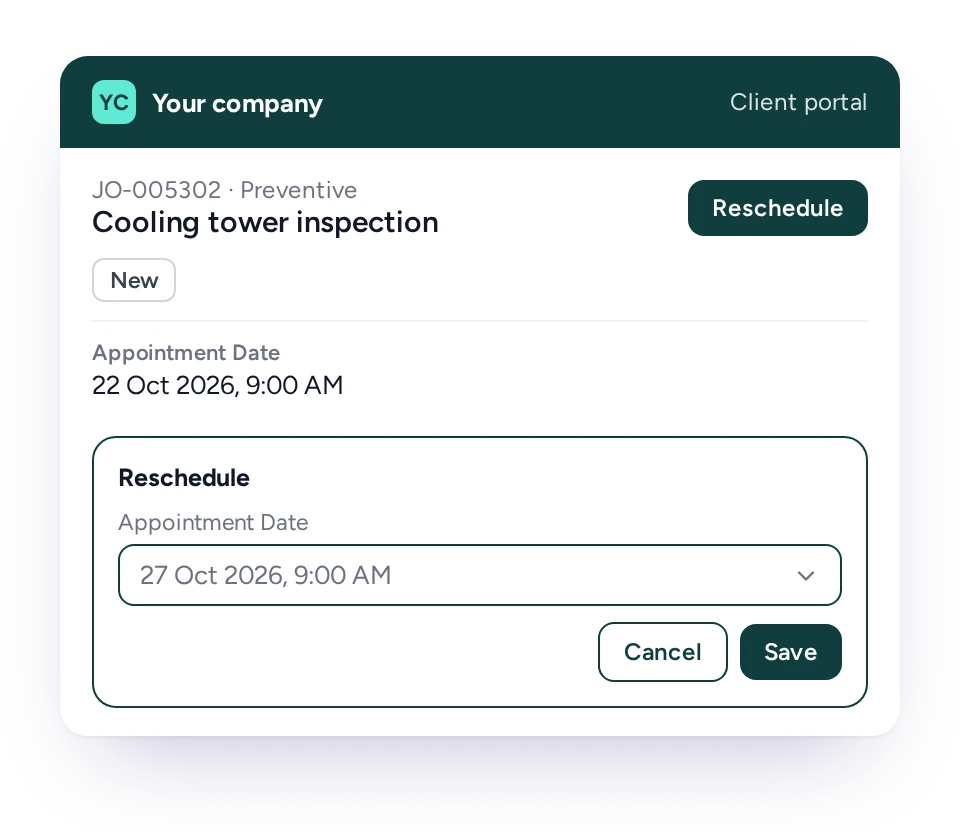
Clients can move an open job to a new date in the portal, and the change goes straight onto your schedule.
Rearranging a visit by phone takes two people and often several calls. A client who knows the site will be closed can simply pick a better day.
In FieldEx, rescheduling is available on open jobs, and you can switch it on or off for your portal. When a client picks a new date, the schedule updates and your team is notified in the app.
Clients can't move jobs already in progress, so a visit under way isn't disrupted.
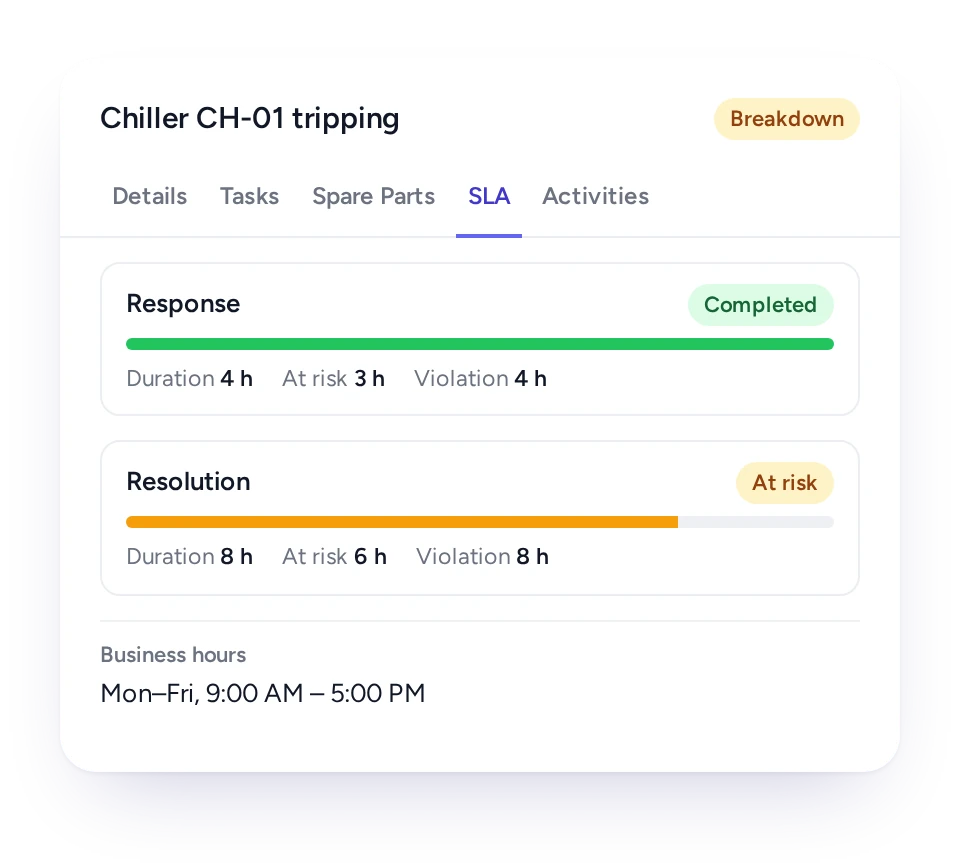
Jobs that fall under a service agreement carry SLA timers, so your team sees which requests are at risk before a target is missed.
A request from a client on a service agreement often has a response or completion target attached. In FieldEx, service level agreements are set up for all clients or for chosen ones, with business hours and targets for each stage.
When a matching job is created, from the portal, a QR code or your office, its SLA status shows on the job. The people you choose are alerted when it is at risk and when it is past its target.
Service contracts and SLAs have their own page, linked below.
Clients raise and follow requests themselves, coordinators get every request as a job, and managers see response targets on each one.
Client
Requests, job progress, equipment and upcoming maintenance in one portal.
Site staff or tenant
A QR code to report a fault without a login.
Coordinator
Every request as a job in the backlog, ready to assign.
Dispatcher
Appointment dates and reschedules already on the schedule.
Service manager
SLA status on contract clients' jobs.
Subcontractor
Their own account, seeing only the work that involves them.
FieldEx is field service management and a CMMS in one system, so clients see their breakdown requests and their planned maintenance in the same portal.
When requests run through email and maintenance runs from a spreadsheet, clients get two partial pictures. In FieldEx, a request becomes a job on the asset, the planned maintenance for that asset sits beside it, and both show in the portal.
The same jobs feed the asset's history, so the record your client sees and the record your team uses are the same.
See how requests connect to Scheduling and Dispatch, Work Order Management and Preventive Maintenance. They also connect to Asset Management and Service Contracts and SLAs. Or read what to look for in Field Service Management Software.
Royal Facilities Management (facilities management, Oman) found that property owners and site staff had no simple way to submit service requests. They also couldn't follow a job's progress or view completed work.
With FieldEx, QR codes at each client site let site staff and tenants submit a work request or report an equipment malfunction instantly. They need no app or login. A dedicated portal gives property owners access to log issues, track technician progress and review completed service reports.
Lamarsa Coffee Machine Company, a Malaysian coffee equipment retailer and authorized service center, received repair and servicing requests via WhatsApp. That often led to miscommunication and incorrect job arrangements.
With FieldEx, service requests and job creation now happen within a single platform. "After implementing FieldEx, there’s proper information being recorded down and we are able to delegate jobs much easier."
Bryan, After-Sales Specialist Technician, Lamarsa Coffee Machine Company
The best one turns every client request into a job your team can schedule. FieldEx gives clients a branded portal to raise requests, follow their jobs and see their equipment and upcoming maintenance. Clients can also reschedule visits, and every request arrives as a job. Because it is also maintenance software, the portal shows planned maintenance alongside breakdown work.
Yes. In the portal, clients choose the type of work, describe the issue, attach photos or video and pick a preferred date. The request arrives as a new job.
Yes. Each site has a QR code. Anyone can scan it, describe the fault and add a photo or video. They submit without an app or login, and the report arrives as a job.
Into the scheduling backlog as new jobs, ready to assign. Portal requests notify your team automatically, and alerts for QR reports can be set up by email or in the app.
Yes. Clients see each job as open, in progress or completed, using the status names you choose, and can download or print a job summary.
Yes. The portal shows maintenance due this week and the upcoming schedule, along with each piece of equipment and when it was last serviced.
Yes, if you allow it. Clients can move an open job to a new date, and your schedule updates straight away.
Yes. The portal has its own web address, your logo, your colors and a choice of fonts.
Yes. You choose which client contacts get access, which job types they see and which request types they can raise. You also choose whether parts and prices show on their jobs.
Yes. Subcontractors get their own accounts, with roles and a hierarchy that control what they see and do. Clients who run their own inspections can have a FieldEx user account too.
Yes. Jobs that match a service agreement show their SLA status, and chosen people are alerted when a job is at risk or past its target.
Yes. A request raised from the equipment view arrives with that asset already filled in.
Clients use it to ask for work and follow it without calling you. In FieldEx, that means raising requests, checking each job's status and seeing their equipment and upcoming maintenance. They can also move a visit and download a job summary.
Yes. The site is filled in from the QR code itself, so a report can't land against the wrong building. The job is created from the template you choose for QR reports.
Customers, sites, assets and past jobs can be uploaded. FieldEx helps with setup, and training is included. See Setup and Training.
Once we know your requirements and your data is ready, FieldEx can be implemented in as little as a week with standard features for small businesses. Larger setups and custom work take longer.
There's no setup fee. Customers, sites, assets and past jobs can be uploaded. FieldEx helps with setup, and training is included. See Setup and Training.
You can also set FieldEx up yourself with guides, videos and the in-app AI assistant, which answers questions as you go.
Once we know your requirements and your data is ready, FieldEx can be implemented in as little as a week with standard features for small businesses. Larger setups and custom work take longer.
