Field service software migration without missed visits or billing gaps

Changing your field service or job-management software puts three things at risk: the next customer visit, the next invoice and your technicians' trust. Move customers, sites, recurring jobs and history across first, and the schedule keeps running through the switch.

Book a demo
Updated 15 Oct 2026
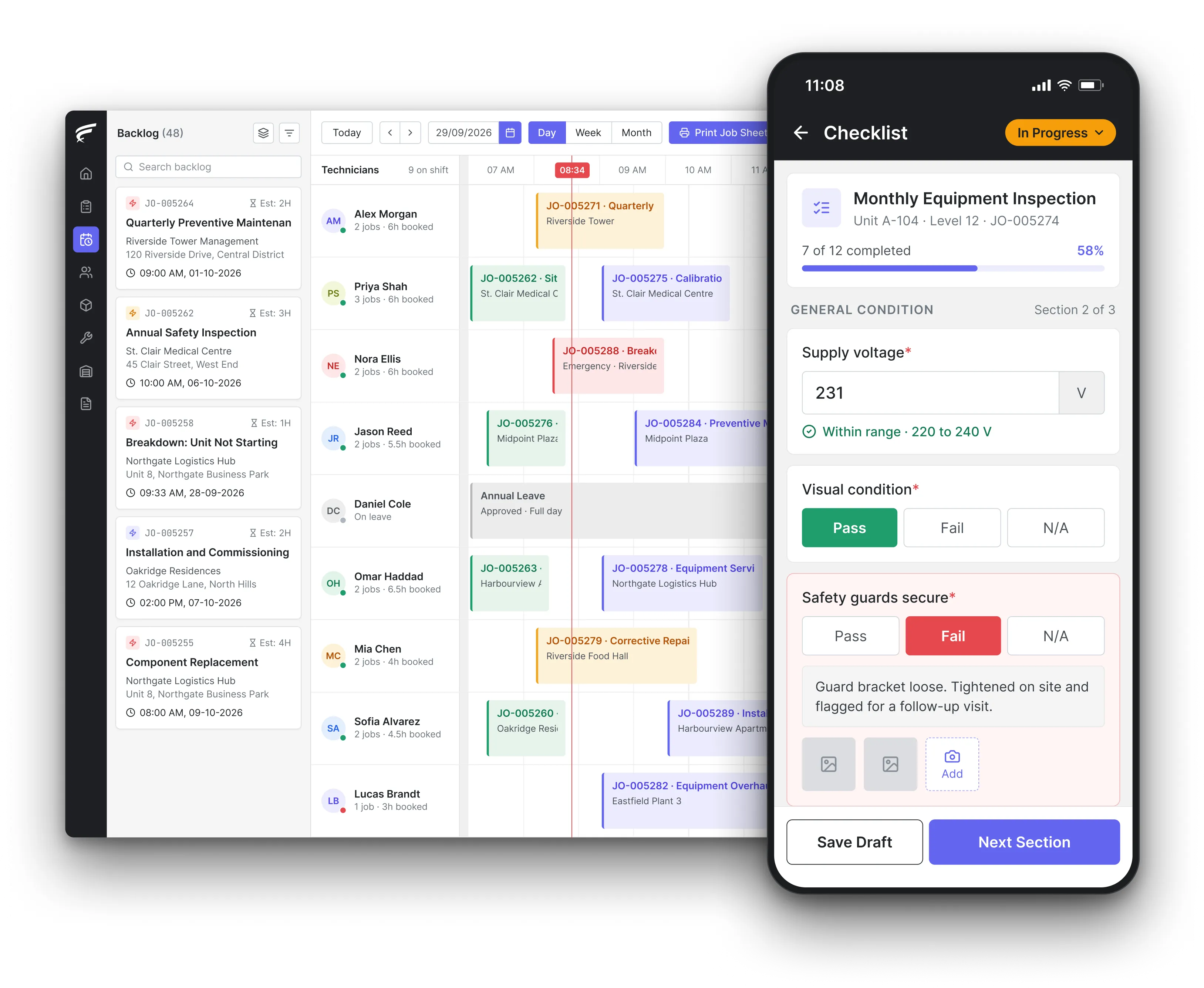
FieldEx scheduling board on desktop with a technician's inspection checklist open on the mobile app, as used by field service teams switching software

FieldEx is field service management and maintenance management (CMMS) in one system. A field service software migration to FieldEx brings customers, contacts, sites, recurring service visits and past jobs across. Dispatchers schedule from a calendar and backlog on day one, and technicians work from the Android or iOS app.

What FieldEx does for service companies switching field service software

Service companies change software when the old tool stops fitting the work: scheduling that lives in someone's head, a technician app that crashes, or contract visits tracked in a spreadsheet beside the system. FieldEx loads the customer side first, then the schedule, then the field team.

Customers, sites and contacts

  • Customer accounts uploaded, with billing and shipping addresses and their map locations.
  • Several contact persons per customer, with the billing and shipping contacts marked.
  • Sites and branches with address, map pin, service zone and their own extra contacts.
  • Customers grouped by your own classifications, such as contract, ad hoc or key account.

Recurring work and contracts

  • Recurring service plans that raise jobs by days, weeks, months or years, with or without an asset attached.
  • A fixed anchor for each plan, such as the second Tuesday of the month, or a floating date counted from the last completed visit.
  • Customer contracts with start and end dates and the service plans they cover.
  • Service level agreements (SLAs) for all customers or chosen ones, with alerts to a manager or the job owner.

The schedule and open jobs

  • A technician calendar in day or week view, with unassigned jobs in a backlog beside it, in scheduling and dispatch.
  • Backlog jobs dragged onto a technician and time slot, and resized to change the duration.
  • Jobs reassigned or rescheduled in one step, with the technician notified automatically.
  • Job sheets for one or more technicians printed or emailed as PDFs.

Technicians, skills and shifts

  • Skills named after any licence or qualification, used to match the right technician to each job.
  • Jobs assigned automatically on skills, zone and availability first, including shift and leave; then nearest first and least busy.
  • Shift patterns, including overnight shifts, assigned to people or teams, and uploaded in bulk.
  • Technicians see their own shift on the phone.

The technician app from day one

  • Jobs, customer details, site maps and asset history on Android and iOS phones, in the FieldEx mobile app.
  • Check-in and check-out, journey time and distance, and watermarked photos on every job.
  • The customer's signature captured at completion.
  • Work downloaded to the phone, done without a signal and uploaded when the connection returns.

Customers kept in the loop

  • A branded customer portal where clients see their jobs, upcoming asset maintenance and completed reports, in service requests and customer portal.
  • Service requests raised by customers, with photos, a contact number and a preferred date.
  • A QR code at each site that lets staff or tenants report a fault without logging in.

Reports, PDFs and accounts

  • Completion PDFs with job and equipment details, fault and resolution, parts with quantities and prices, and the signature.
  • Sales orders linked to the customer and the contract they belong to.
  • Customer, job and site data exported as CSV, Excel or PDF, with recurring exports emailed on a schedule.

What data should you move when you change field service software?

Billing records have the clearest rules. HM Revenue & Customs (HMRC) VAT Notice 700/21 says you must keep all business records, including orders and delivery notes, purchase invoices, copy sales invoices, and credit or debit notes. Records that form part of your electronic account must be kept digitally in functional compatible software.

The order matters as much as the list. Customers come first, then their sites and contacts, then assets at those sites, then recurring plans, then open jobs, then history. Each later record needs the earlier one to attach to.

The safe order is clients, then sites and contacts, then equipment, then contract plans, then open jobs, then history.

What FieldEx does about it

  • One upload for the customer side: customers, contacts, sites and past completed jobs can all be uploaded, each job linked to the right customer and site.
  • Open jobs on the board: open work can be loaded or created as jobs and placed in the backlog, ready for dispatchers to assign on the first morning.
  • Uploads included: customers, sites, recurring plans and past jobs can all be uploaded, and setup is part of the subscription.

How do you keep recurring service visits on schedule through the switch?

Some recurring visits are set in law. Under the UK Gas Safety (Installation and Use) Regulations 1998, regulation 36, a landlord must have each gas appliance and flue checked at intervals of not more than 12 months since it was last checked. A record of each check must be kept until two further checks have been made.

A service company carrying those visits for landlords can't let the switch push a date past its limit. The same applies to every contract that promises quarterly or monthly visits.

Export each recurring plan with its last completed date and next due date. Check ten of them by hand after the upload.

What FieldEx does about it

  • Fixed or floating dates: a plan can keep a fixed anchor, such as the first Monday of each quarter, or float from the last completed visit.
  • Plans without an asset: recurring jobs can run for a customer or site without an asset attached, which suits cleaning rounds, patrols and contract visits.
  • Missed visits handled: a missed visit is rescheduled automatically after the overdue period you set, so it doesn't drop off the schedule.
  • Contracts tied to the work: each contract carries its dates and the plans it covers, so a renewal shows the visits behind it.

How do you avoid missed or double-booked jobs in the cutover week?

The risk in a field service switch is a job that lives in both systems, or in neither. Dispatchers book a visit in the old tool while the upload is running, and the technician never sees it. The fix is a clear cutover: one date after which every new job is booked in the new system only.

A short checklist helps. List open jobs the day before. Load them into the new board. Confirm each technician's next 3 days. Then switch the old tool to read-only.

FieldEx can host your data locally in Malaysia where data residency is required.

What FieldEx does about it

  • One backlog for open work: unassigned jobs sit in a backlog beside the technician calendar, so nothing waits in an inbox.
  • Assign by dragging: a dispatcher drags a job onto a technician and time slot, and the technician is notified on the phone.
  • Repeat visits flagged: when a new job repeats a recent job on the same asset, the office is alerted, which catches a visit booked twice.

How do you get technicians to use a new field service app?

Technicians decide whether a new system works. FieldEx plans training around them: it trains your supervisors or lead technicians, who train the rest, and for larger teams it runs the sessions itself. Training runs online wherever you are.

Starting with one team or one site, then adding the rest, gives the first group time to become the experts others ask.

What FieldEx does about it

  • Works on their phones: the FieldEx app runs on Android and iOS, and every licence includes it, office users and technicians alike.
  • Works without a signal: jobs and tasks can be downloaded and worked offline, with check-in, check-out and travel synced later.
  • Less typing on site: technicians scan a QR code to find the asset, take watermarked photos and capture the customer's signature.
  • Their own schedule on the phone: each technician sees their shift and can apply for leave from the same screen.

What happens to customer personal data held by your old provider?

Under UK GDPR Article 28(3)(g), as set out by the Information Commissioner's Office (ICO), a contract with a data processor must require it to delete or return all personal data at the end of the service, at the controller's choice. The processor must also delete existing copies unless UK law requires it to keep them.

For a field service company, that data is customer names, contacts, addresses, signatures and photos on job records. Ask for the return first, check it loaded into FieldEx, then confirm the deletion in writing.

FieldEx can connect to any open system through REST APIs and has connectors for QuickBooks and Xero.

What FieldEx does about it

  • Contacts land in the right place: contact persons are uploaded under each customer and site, with billing and shipping contacts marked.
  • Files with their records: photos and documents attach to the customer, site or job they belong to.
  • Access decided by role: permission profiles set who can read, create, edit or delete customer records, and who can use the web app, the mobile app or both.

How long must you keep old job sheets, invoices and service records?

RecordHow long
UK company and accounting records6 years from the financial year end
UK VAT business records6 years
US tax records, general rule3 years
US employment tax recordsAt least 4 years

Sources: GOV.UK company and accounting records; HMRC VAT Notice 700/21; IRS, How long should I keep records?

GOV.UK adds that records must be kept longer for equipment expected to last more than 6 years. Job sheets that support an invoice or a warranty claim fall under these periods.

Pick a cutover day. Stop booking in the old system the day before. Load open jobs and recurring plans. Confirm every technician's next 3 days.

What FieldEx does about it

  • History inside FieldEx: past completed jobs can be uploaded, so a customer dispute about a visit 3 years ago is answered from the job record.
  • Completed jobs locked: completed jobs lock automatically, and delete rights are set per role, so job history stays protected.
  • The report as sent: every regenerated completion PDF is kept, so you can show what the customer received.

What should you do with technicians' old phones and tablets after switching?

NIST Special Publication 800-88 Revision 2 (September 2025), the US National Institute of Standards and Technology's media sanitisation guide, sets three levels. Clear protects against simple, non-invasive recovery. Purge makes recovery infeasible even with state-of-the-art laboratory techniques. Destroy does the same and leaves the media unusable.

Old job apps often hold customer addresses, photos and signatures offline. Sign each device out of the old tool, then choose the level for its next use.

What FieldEx does about it

  • Same phones, new app: technicians install the FieldEx app on the Android or iOS phones they already carry.
  • Access switched off centrally: a permission profile controls whether someone can use the mobile app at all, so a leaver loses access straight away.
  • Location under the technician's control: technicians can switch location tracking off at any time by setting their app status to unavailable.
  • Location in their hands: technicians can switch location tracking off at any time by setting their app status to unavailable.

How do you keep invoicing running when you change job management software?

HMRC's VAT record-keeping notice says records that form part of your electronic account must be kept digitally in functional compatible software, and that your records must be complete and up to date. A switch that breaks the link between a finished job and its invoice leaves gaps in both.

Run one week of jobs through to invoices in a test before the cutover, and compare totals with your accounting system.

FieldEx can connect to any open system through REST APIs and has connectors for QuickBooks and Xero.

What FieldEx does about it

  • Parts and prices on the job: the completion PDF lists the spare parts used, with quantities and prices, so billing matches the work.
  • Sales orders tied to contracts: sales orders link to the customer and to the contract they belong to.
  • Exports for finance: job and customer data export as CSV, Excel or PDF whenever finance needs a copy.
Customer story

Royal Facilities Management delivers hard and soft services across commercial and residential properties in Oman. The other software it considered didn't offer built-in preventive maintenance scheduling or a way for clients to check in on their properties.

With FieldEx, site staff report faults by scanning a QR code, and property owners track technician progress and completed reports in their own portal.

Read the Royal Facilities Management story

Chubb, an integrated security provider with 18 branches across Malaysia, used to receive technician photos and updates through WhatsApp, and weekly reports took several systems and manual work. With FieldEx, planners see active, pending and completed jobs on one dashboard.

Read the Chubb customer story

Questions service companies ask before switching to FieldEx

Can we bring our customers, sites and past jobs into FieldEx?

Yes. Customers, contacts, sites and past completed jobs can all be uploaded. Each job links to its customer and site, so the office and the technician both see the history from day one.

Will our recurring visits keep their dates?

Yes. Each recurring plan can keep a fixed anchor, such as a weekday or calendar date, or float from the last completed visit. Bring the last visit date across and the next job is raised on time.

Can FieldEx assign jobs by skill or licence?

Yes. Skills can be named after any licence or qualification, such as a Gas Safe registration or a manufacturer's training, and carry an expiry date. FieldEx uses skills, availability, shifts, leave and service zones to match the right technician to each job.

Do technicians need new phones?

No. The FieldEx app runs on Android and iOS phones. Every licence is priced the same, whether for a technician or an office user, and every licence includes the mobile app.

Can technicians work where there is no signal?

Yes. Jobs and tasks can be downloaded and worked offline, with check-in, check-out and travel synced later.

Can our customers book and follow visits online?

Yes. The customer portal lets clients see their jobs and upcoming asset maintenance, raise requests and reschedule visits. Requests arrive as unassigned jobs in your backlog.

Can FieldEx connect to our accounting software?

FieldEx can connect to any open system through REST APIs and has connectors for QuickBooks and Xero.

Is there a minimum contract term?

No. Choose monthly or annual billing, with no minimum term and no notice period: you simply don't renew when your term ends. Annual billing costs less than monthly.

Most switches take 1 to 3 months, mostly depending on how quickly your data is ready. There is no setup fee, and training is at your office or online. See FieldEx implementation.

How long does it take to move to FieldEx from another field service tool?

Once we know your requirements and your data is ready, FieldEx can be implemented in as little as a week with standard features for small businesses. Larger setups and custom work take longer.

Most moves take 1 to 3 months, depending mainly on how long your data takes to prepare. Setup, data upload and training are included, with no setup fee. See FieldEx implementation.

See your own customers and recurring jobs in FieldEx

Book a demo