Fleet maintenance software for vans, trucks, buses and the workshops servicing them

Safety inspections planned months ahead, driver checks and defects that reach the workshop the same day, and a full history on every vehicle, from one system.

Book a demo
Updated 15 Oct 2026
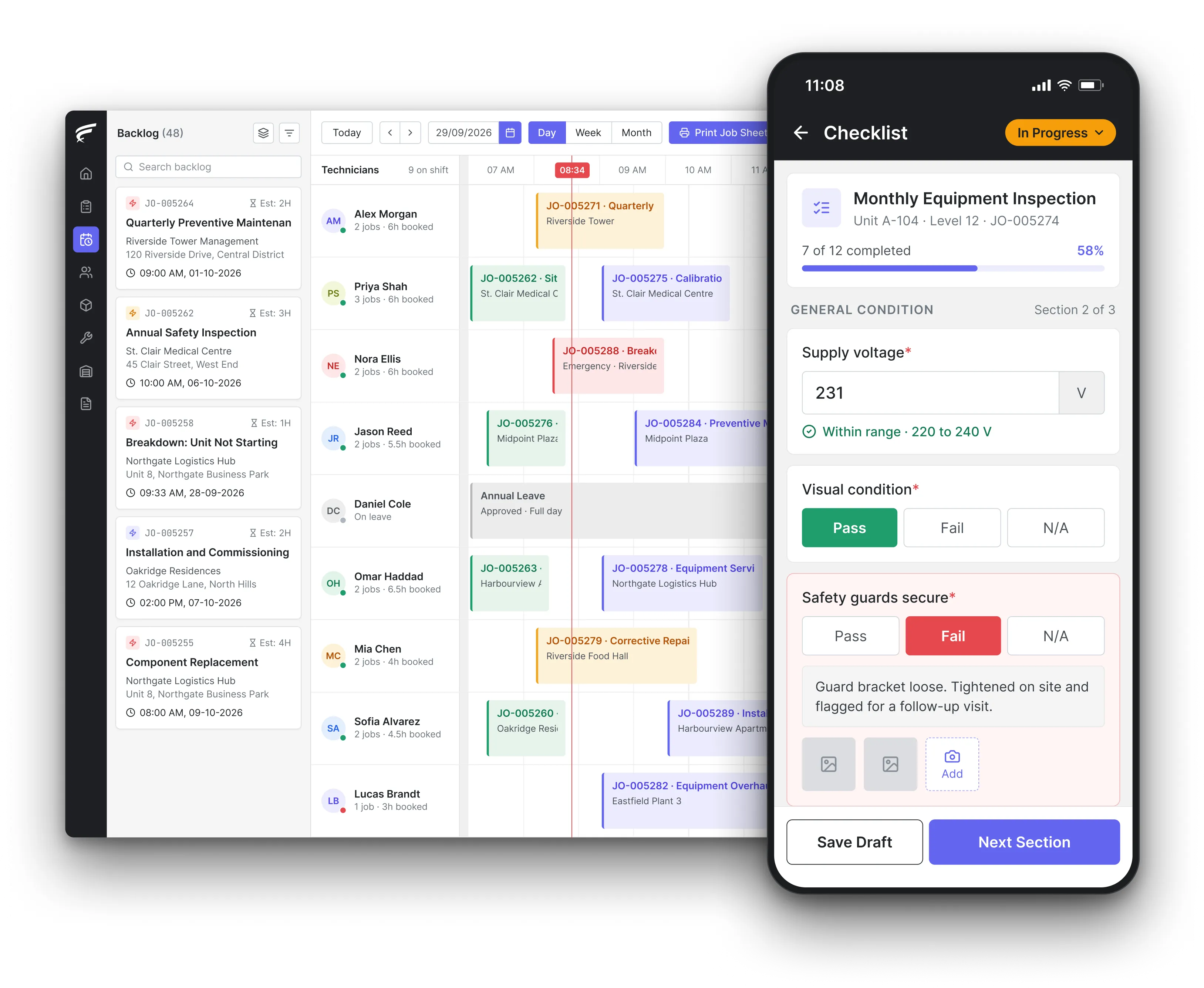
FieldEx scheduling board on desktop with a technician's inspection checklist open on the mobile app, as used by fleet maintenance teams

FieldEx is field service management and maintenance management (CMMS) in one system, used as fleet maintenance software for road vehicles. It keeps every van, truck, bus and trailer on its own record, plans safety inspections and services by date or odometer reading, turns driver defect reports into workshop jobs, and tracks parts, costs and time off the road.

What FieldEx does for fleet managers and vehicle workshops

A fleet stays legal and earning when inspections happen on time, defects get fixed before the next trip and the paperwork proves both. FieldEx runs that cycle for in-house workshops and for the contractors who maintain vehicles for you. Book a demo with a few of your vehicles and their inspection dates.

Every vehicle on its own record

  • Vans, trucks, tractor units, trailers, buses and cars each on their own record, with registration, VIN, make, model and year, in asset management.
  • Trailers, tail lifts, refrigeration units and cranes kept as components under the vehicle, each with its own history.
  • Extra identifier fields renamed to your own terms, such as fleet number or depot code.
  • Odometer or engine-hour readings logged against the vehicle, with the previous reading kept beside each new one.
  • Vehicle statuses named your way, such as available, in the workshop or off the road.

Inspections and services that plan themselves

  • Safety inspection plans that raise workshop jobs automatically on a fixed cycle, in preventive maintenance.
  • Services triggered by odometer reading, by date, or by whichever comes first.
  • Plans applied to a whole vehicle type, so new vans pick up the right schedule when they're added.
  • Each vehicle's next inspection date shown on its record, months before it's due.
  • Overdue inspections rescheduled automatically after the period you set.

Driver checks and defect reports

  • Daily walkaround checks as recurring jobs, with a checklist the driver completes on the phone.
  • A failed checklist answer raises the defect repair job for the workshop straight away.
  • Fuel, tyre tread depth and other figures entered by the driver or technician on custom job forms.
  • Watermarked photos of the defect, with time and place, attached to the report.

Workshop jobs and technicians

  • Repair and inspection jobs assigned by skill, availability, shift, leave and location, in scheduling and dispatch.
  • Drag jobs between technicians on the scheduler when a breakdown comes in.
  • Service-level agreement (SLA) clocks with at-risk and breach alerts for roadside or contract repairs.
  • Technician skills named after qualifications, such as brake testing or tachograph calibration, with expiry dates.

Parts, tyres and stock

  • Parts, filters, oils and tyres held per store and per service van, with transfers and approvals between them, in spare parts inventory.
  • Parts used recorded on the job and on the vehicle, so each one's parts history builds up.
  • Low-stock alerts and movement history for every part.

Renewals and certificates

  • Annual tests, inspection certificates, tachograph calibrations, permits and insurance tracked as recurring inspections on each vehicle, with due dates and reminders.
  • Inspection reports and certificates attached to the vehicle's record.
  • Your company's own operator licences and registrations with renewal reminders.

Contractors and outside workshops

  • Outside workshops and tyre contractors get their own accounts, limited to the jobs that involve them.
  • Roles and a hierarchy control what each contractor can see and do.
  • The contractor's checklist, photos and parts appear on your vehicle's record, as if your own team did the work.

Costs, downtime and reports

  • Maintenance and repair costs per vehicle, cost per hour, book value and depreciation, from the vehicle's analytics.
  • Downtime, MTBF and MTTR per vehicle, and repeat jobs flagged on the same vehicle.
  • Jobs and inspections reported and exported by depot, vehicle type or contractor, in reporting and analytics.

What should a daily vehicle walkaround check cover?

The Driver and Vehicle Standards Agency's (DVSA) Guide to maintaining roadworthiness says a driver or responsible person must carry out a walkaround check before the vehicle goes on the road. At least one check is needed in every 24-hour period the vehicle is in service, and arduous or off-road work may need more.

In the US, the Federal Motor Carrier Safety Administration's rule 49 CFR 396.11 asks each driver to report, at the end of each day's work, on brakes, steering, lights and reflectors, tyres, horn, wipers, mirrors, coupling devices, wheels and rims, and emergency equipment. The driver signs the report.

  1. Set up one checklist per vehicle type, with the items your regulator expects.
  2. FieldEx raises the check as a daily job for each vehicle in service.
  3. The driver works through the checklist on the phone, with photos attached to the job.
  4. Any failed item raises the repair job before the vehicle leaves.

A missed PUSPAKOM date blocks road tax renewal. Set the reminder well before each due date.

What FieldEx does about it

  • A daily job for every vehicle: recurring jobs raise the walkaround check each day, so a missed check shows up as an open job.
  • The right list for the right vehicle: a box van, a tractor unit with trailer and a minibus can each have their own checklist.
  • Nil reports as well as defects: a completed checklist with no failed items is a record that the check was done.
  • Defects that can't wait: a failed answer on brakes or tyres raises the repair job at once.

How often should commercial vehicles have a safety inspection?

DVSA's guide says inspections normally run every 4 to 13 weeks, depending on how the vehicle is used. Operators must also plan inspection dates at least six months in advance, on a planner or scheduling system.

Operating conditions (DVSA examples)Inspection frequency
Lightly loaded, easy conditions10–13 weeks
General haulage, trunking6–10 weeks
Arduous work, constant heavy loads4–6 weeks
Off-road, difficult conditions4 weeks
Vehicle or trailer 12 years or older6 weeks

Source: DVSA, Guide to maintaining roadworthiness.

In the US, 49 CFR 396.17 bars a carrier from using a commercial vehicle unless it has passed a periodic inspection within the last 12 months, with proof carried on the vehicle.

What FieldEx does about it

  • One cycle per operating pattern: each group of vehicles can run its own inspection plan, from four weeks to 13.
  • Six months ahead, at a glance: fixed-cycle plans show each vehicle's next inspection dates on its record, well before they're due.
  • Older vehicles on shorter cycles: move a vehicle to a six-week plan when it reaches 12 years, and its jobs follow.
  • Annual tests alongside: the yearly test or periodic inspection runs as its own recurring inspection, with its own reminders.

Should fleet servicing run on mileage or on time?

DVSA's guide says safety inspections should, where practical, follow a time-based pattern. Mileage-based programmes may suit some operators, but they must be linked to time, with the longest equivalent interval (up to 13 weeks) recorded with the regulator.

Manufacturers usually set service intervals by distance or engine hours, with a time limit as well. The safest plan uses both and acts on whichever comes first.

A van that sits in the depot for a month still needs its inspection. A truck that covers a month's distance in a week needs its service sooner.

What FieldEx does about it

  • Whichever comes first: a service plan can trigger on the odometer reading, on the date, or on whichever is reached first.
  • Readings that drive the plan: each new odometer or engine-hour reading logged on the vehicle moves it closer to its next service.
  • Time-based safety inspections kept separate: the regulator's inspection cycle runs on its own fixed-date plan, so a quiet month doesn't delay it.
  • The history behind every reading: each reading keeps the previous value beside it, with the date and who entered it.

What has to happen when a driver reports a defect?

DVSA's guide says any defect found on the walkaround, on the road or on return to base must go in a written report. It records the vehicle, date, defect, reporter, who it was reported to, the assessment, the repair and the date it was done. If a safety defect is found, the vehicle must not be used on the road until it is repaired.

US rule 396.11 says the same in its own words. Before the vehicle is driven again, the carrier must repair any defect likely to affect safety. It must also certify on the report that the defect was repaired, or that repair was unnecessary.

What FieldEx does about it

  • Every field DVSA lists: the defect job holds the vehicle, date, description, reporter, assessment, work done and completion date.
  • Off the road until fixed: the repair job can change the vehicle's status, so planners see it's out of service.
  • Sign-off on the repair: the technician's completion, photos and signature certify the repair on the job.
  • Defects that keep coming back: when the same vehicle gets the same repair again within your set number of days, FieldEx flags the repeat.

How long do vehicle maintenance records have to be kept?

In Great Britain, DVSA's guide says safety inspection records, repair records and drivers' defect reports must be kept for at least 15 months. That includes vehicles sold or taken off the operator licence. Reports with no defects should be kept for at least three months.

In the US, 49 CFR 396.3 asks carriers to keep inspection, repair and maintenance records for one year, and for six months after a vehicle leaves their control. Annual inspection reports are kept for 14 months, and driver reports with their repair certificates for three months.

RecordGreat Britain (DVSA)United States (FMCSA)
Safety inspection or periodic inspection15 months14 months
Repair and maintenance records15 months1 year, plus 6 months after disposal
Driver defect reports15 months3 months

Sources: DVSA Guide to maintaining roadworthiness; 49 CFR 396.3, 396.11 and 396.21.

RenewalApplies toInterval
PUSPAKOM routine inspectionEach commercial vehicleEvery 6 months; goods vehicles yearly in their first 2 years
Road tax (motor vehicle licence)Each vehiclePer licence period (see note)
Vehicle permitEach goods vehiclePer APAD permit
Operator licenceThe companyPer APAD licence
GDL or PSVEach driverPer JPJ licence

Note: for commercial vehicles, road tax can only be renewed with valid insurance and a valid PUSPAKOM report.

Sources: MITI courier services guide; PUSPAKOM and its goods vehicle inspection guide; Malay Mail.

What FieldEx does about it

  • Records stay with the vehicle: every inspection, defect and repair stays on the vehicle's record, with dates and who did the work.
  • Sold vehicles keep their history: set a vehicle's status to disposed rather than deleting it, so its records are still there when asked for.
  • Reports ready on request: completion PDFs hold the work done, parts, times on site, photos and signature.
  • Exports by vehicle or period: reports export by vehicle, depot or date range for an audit or a roadside check.

What tyre tread depth do trucks and buses need?

US rule 49 CFR 393.75 sets the tread depth for commercial vehicles. Tyres on the front wheels of a bus, truck or truck tractor need at least 4/32 of an inch in a major tread groove, and all other tyres at least 2/32 of an inch.

DVSA's guide adds tyre age. Tyres more than 10 years old must not be used on the front steered axle of a heavy goods vehicle, bus or coach. A tyre should be flagged at its safety inspection when it reaches nine years, and tread depths should be measured with an accurate gauge and recorded.

  1. Give each vehicle type its own daily checklist.
  2. FieldEx raises the check each morning for every vehicle in service.
  3. The driver ticks through it on the phone, in the language they choose.
  4. A failed item raises the workshop job before the lorry leaves the yard.

What FieldEx does about it

  • Tread depths as numbers: custom job forms, set up with you during onboarding, can include number fields for each tyre's tread depth, recorded against the job.
  • Tyres tracked on the vehicle: tyre fitting and replacement jobs sit on the vehicle's record, with the parts used.
  • Low tread raises the job: a failed tyre item on the inspection checklist raises the tyre replacement job.
  • Stock where it's needed: tyres held in each store and service van, with low-stock alerts.

How much does it cost to maintain a truck per mile?

The American Transportation Research Institute's (ATRI) 2026 analysis of operating costs found that running a truck in 2025 cost an average of $2.336 per mile, the highest since the study began. Repair and maintenance rose 8.6%, from 39 cents to 40.4 cents per mile. Tyres rose from 4.7 cents to 5 cents.

Planned servicing, quick defect repairs and good parts control are the levers a fleet controls directly. Measure them per vehicle, or you can't tell which vehicles cost too much.

What FieldEx does about it

  • Cost per vehicle: each vehicle's analytics show average maintenance and repair costs, cost per hour, book value and depreciation.
  • Downtime you can see: downtime, MTBF and MTTR per vehicle show which ones spend too long in the workshop.
  • Parts on every job: parts and labour recorded on each job build each vehicle's true maintenance cost.
  • Planned versus breakdown work: reports filter jobs by type, so planned services and breakdown repairs can be compared by depot or vehicle type.

How should a vehicle that's off the road be recorded?

DVSA's guide says that when a vehicle is declared off the road, the date and reason must go in its maintenance file. You need a reliable way to stop it being used. If it misses a planned safety inspection while it's off the road, it can only return to service after an inspection confirms it is roadworthy.

The gov.uk operator guidance adds that vehicles that aren't roadworthy must be taken out of service, and that reported defects must be repaired promptly.

What FieldEx does about it

  • A status everyone sees: the vehicle's status shows it's off the road on web and mobile, with the reason on the repair job.
  • A return-to-service inspection: the repair checklist can raise the safety inspection that clears the vehicle to drive again.
  • Rescheduled from the new date: schedules counting from the last completed visit move the next inspection on from the return-to-service date.
  • Time off the road measured: downtime per vehicle is reported, so long workshop stays stand out.

Who is responsible when an outside garage maintains your vehicles?

The gov.uk guidance for goods vehicle operators is clear. If you don't do the work yourself, you must give the traffic commissioner a copy of your contract with the maintenance provider. You are still responsible for the condition of your vehicles and trailers, even if someone else maintains them.

In practice, that means the garage's inspection sheets and repair records have to reach you, and you have to check them.

What FieldEx does about it

  • Contractors in their own accounts: the garage's technicians open their jobs, complete your checklist and add photos in their own logins.
  • Their work on your record: inspections and repairs done by the garage appear on the vehicle's history straight away.
  • SLAs on the contract: response and completion targets for the garage run as SLA clocks, with alerts before a breach.
  • Proof for the regulator: completion PDFs from the garage's work carry the times, parts and signature.
Customer story

AMRTUR, a Southeast Asian oilfield services contractor, runs its vehicles, machinery and equipment logistics on FieldEx. Drivers record trip logs with mileage, fuel and vehicle condition on the phone, linked to digital safety inspections at customer sites. Machines are serviced after 300 hours of use or every six months, whichever comes first.

Read the AMRTUR story

Questions fleet managers ask about FieldEx

What is fleet maintenance software used for?

It plans and records the work that keeps vehicles safe and legal: daily checks, safety inspections, services, defect repairs, tyres, parts and renewals, on one record per vehicle. FieldEx adds workshop scheduling and contractor access. Compare approaches in our guide to CMMS software.

Can services be scheduled by mileage as well as by date?

Yes. A plan can trigger on the odometer reading, the date, or whichever comes first. Each new reading logged on the vehicle counts towards the next service.

Can drivers do their daily vehicle checks on the FieldEx app?

Yes. The check is raised as a daily job with a checklist for that vehicle type, and the driver completes it on the phone, with photos attached to the job. A failed item raises the repair job.

Can FieldEx record fuel and tyre tread depths?

Yes, as entries on custom job forms set up with you during onboarding. The driver or technician enters the figures on the job, and they're recorded against it.

Can a tail lift or fridge unit have its own service plan?

Yes. Fit it as a component under the vehicle, and it keeps its own history and maintenance plan, separate from the vehicle's own services.

Can FieldEx remind us about annual tests, permits and insurance?

Yes. Each renewal can be tracked as a recurring inspection on the vehicle, with a due date, reminders and the certificate attached. Your company's own licences have renewal reminders too.

Can outside garages use FieldEx for our vehicles?

Yes. Garages and tyre contractors get their own accounts, limited to the jobs that involve them, and their work appears on your vehicle records.

Can FieldEx manage workshop parts and tyres?

Yes. Each store and service van holds its own stock, with transfers, approvals, movement history and low-stock alerts. Parts used are recorded on the job and the vehicle.

Can technicians work where there's no signal?

Yes. Jobs and tasks can be downloaded and worked offline, with check-in, check-out and travel synced when the phone reconnects.

How quickly can a fleet start using FieldEx?

Setup, data upload and training are part of the subscription, with no setup fee. Vehicles, sites and past jobs can all be uploaded. Run the setup yourself with guidance, or hand it to the FieldEx team.

Once we know your requirements and your data is ready, FieldEx can be implemented in as little as a week with standard features for small businesses. Larger setups and custom work take longer. See FieldEx implementation.

Bring your vehicle list and inspection plan to the demo

Book a demo