Digital job sheets that prove every visit, signed on site

Replace the paper job sheet with one the technician fills in on the phone: the fault, the work done, the parts, the readings, photos and the customer's signature, turned into a service report the customer receives before the van leaves.

Book a demo
Updated 15 Oct 2026
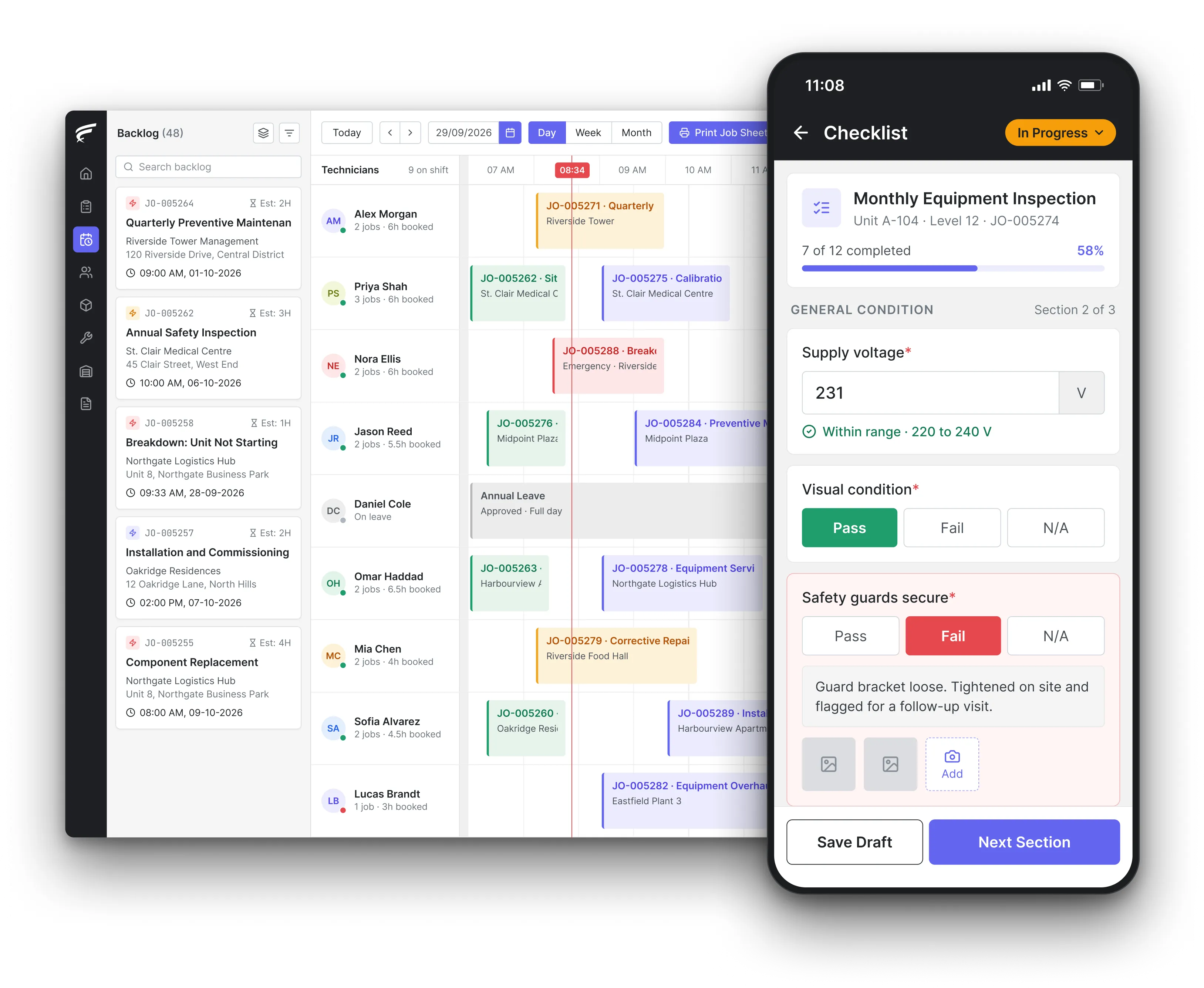
FieldEx scheduling board on desktop with a technician's inspection checklist open on the mobile app, as used by field technicians recording visits

FieldEx is field service management and maintenance management (CMMS) in one system, and it replaces the paper job sheet. Technicians record the fault, work performed, parts, readings, watermarked photos, check-in and check-out times and the customer's signature on the mobile app. FieldEx then produces the service report PDF, emails it with a record of when it was sent, and keeps the job on the asset's history.

What FieldEx does for service teams leaving paper job sheets

A paper job sheet does three jobs badly: it tells the technician what to do, it records what was done, and it is supposed to prove it later. Carbon copies get lost, handwriting can't be read, and the photo that would settle a dispute sits on someone's personal phone. FieldEx keeps all three on the job record itself, so the instructions, the evidence and the report the customer signed are in one place. Book a demo to see a job sheet built from your own paperwork.

The job sheet in the technician's hand

  • Each job opens on the FieldEx mobile app with the customer, site, asset, location on a map and the tasks to do.
  • Scanning the asset's QR code or barcode fills in the asset on the job, so the right serial number goes on the report.
  • Photos and video taken in the app are watermarked automatically and can be annotated, and the customer signs on the screen at completion.
  • Jobs are downloaded to the phone, worked without a signal and uploaded when the connection returns.

A layout for each kind of visit

  • Job forms and fields tailored to each job type, so an installation, a breakdown call and a planned service each ask for what that visit needs.
  • Job templates that prefill the work items, tasks and parts for repeat visits.
  • Forms with number fields for readings such as pressures, amps and water temperatures, entered on site against the job.
  • Tasks in a set order, and designated tasks that must be completed before the job can close, in work order management.

Service reports that build themselves

  • Report templates with your logo, address, sections, columns, field labels, footer text, page numbers, terms and conditions and a customer acknowledgement section.
  • The standard completion PDF shows the job and equipment, the fault and resolution, work carried out, parts with quantities and prices, check-in and check-out times, attachments and the customer's signature.
  • PDFs generated and attached to the job automatically when its job type and status match the rules you set.
  • Reports viewed, downloaded, regenerated or emailed from the job, with an email audit trail of when each was sent.

Times, travel and photos on the record

  • Technicians check in and out of each task, and the times appear on the report.
  • Travel recorded as a task journey, with its distance and duration, viewable on a map.
  • Attachment timestamps shown on the PDF where you choose to include them, alongside activity duration and mileage.
  • A task activity history showing when the task was created, checked in, checked out and changed.

History on the asset and the site

  • Every job raised for an asset stays on that asset's record, with the spare parts used on it.
  • Sites show their assets, jobs, tasks and maintenance plans, so a customer's whole service history is in one view, in asset management.
  • Files such as manuals, previous reports and drawings attached to the asset or site.
  • A change history on each asset showing who edited which field and when.

Who can see and change job records

  • Permission profiles set separate read, create, edit and delete rights for job records and other records.
  • Users can be limited to their own records, and a hierarchy keeps records visible to the right managers.
  • Profiles control which job statuses a user can see or select, and whether they can use the web app, the mobile app or both.
  • Each job keeps an activity history that can be opened from the scheduler.

Reports your customers can open themselves

  • A branded customer portal where customers see their jobs with type, site, status and date.
  • Attachments added to the job, by the customer or your team, visible to the customer.
  • Parts listed on the job, with prices where you enable them, and a PDF summary the customer can download or print, in the customer portal.

Finding a job sheet months later

  • Job data searched, filtered and reported by customer, site, asset, technician or period, in reporting and analytics.
  • Reports exported as CSV, Excel or PDF, or emailed on a schedule.
  • Printable job sheets for one or more technicians generated from the scheduler and downloaded or emailed before the day starts.

What should a field service report include?

Enough for someone who wasn't there to understand what was found, what was done and who did it. Two UK regulations show what a regulator expects. Regulation 36 of the Gas Safety (Installation and Use) Regulations 1998 says a landlord's gas safety record must give the date, the address, a description and the location of each appliance or flue checked, any safety defect identified, any remedial action taken, and the name, signature and registration number of the person who did the check. The Health and Safety Executive (HSE) leaflet INDG339 says a report of a lift's thorough examination must identify the equipment, give the last and next examination dates and the safe working load, list any defect, give the details of any repair required to remedy it and the date by which it should be done, describe the tests carried out, and name the person reporting.

For ordinary service work the same skeleton holds: the asset, the fault, the work, the parts, the readings, what is still outstanding, who attended and who accepted it.

What FieldEx does about it

  • Every field in its place: the standard completion PDF carries the job and equipment details, the fault and resolution, the work carried out, parts with quantities and prices, check-in and check-out times, attachments and the customer's signature.
  • Your own report layout: admins build PDF templates with sections, columns and field labels, so a gas check report and a breakdown report each show what their customer expects.
  • Outstanding work stays visible: a failed answer on an inspection checklist can create a follow-up job and its tasks, so the defect on the report has a job behind it.
  • The person who attended: each task records the assigned technician and their check-in and check-out times, and the report shows them.

Do electronic job sheets and service records meet record-keeping rules?

Usually yes, if the record can be printed and can't be quietly changed. HSE's domestic gas frequently asked questions say an electronic gas safety record is acceptable if it is capable of being reproduced in hard copy when required, for example for the tenant, HSE or a housing department, and is secure from loss and interference. The record must also uniquely identify the operative who did the check, for example by an electronic signature, a scanned signature or a payroll number unique to that person. For lifting equipment, HSE's guidance on thorough examinations under the Lifting Operations and Lifting Equipment Regulations (LOLER) says records do not need to be kept in hard copy, but you should be able to provide a written copy when necessary, and the records should be protected from unauthorised alteration.

So the test for a digital job sheet is practical: can you print it, does it name the technician, and can you show nobody altered it afterwards.

What FieldEx does about it

  • Printable on demand: every completed job can produce its PDF report, viewed, downloaded or emailed from the job's documents.
  • The technician named: the job and its tasks record which user was assigned and checked in, and the customer's signature is captured in the app.
  • Who can edit, decided by you: permission profiles give separate read, create, edit and delete rights, so technicians and office staff only change what their role allows. Completed jobs lock automatically, so only the roles you choose can change them, and every regenerated PDF is kept, so earlier copies are never lost.
  • A trail of changes: each job's activity history and each task's history show what changed and when, and emailed reports keep an audit trail of when they were sent.

Is a customer's signature on a phone legally valid on a service report?

In the US and the UK, a signature isn't invalid just because it is electronic. The US Electronic Signatures in Global and National Commerce Act (ESIGN), 15 U.S.C. 7001, says a signature, contract or other record relating to a transaction may not be denied legal effect, validity or enforceability solely because it is in electronic form. It also doesn't force anyone to accept electronic signatures, so a customer can still ask for paper. In the UK, Article 25 of the retained eIDAS Regulation says an electronic signature shall not be denied legal effect and admissibility as evidence in legal proceedings solely because it is electronic or not a qualified signature. The Law Commission's September 2019 statement on electronic execution of documents, published by the Ministry of Justice, confirms electronic signatures can be used to execute documents, including where a statute requires a signature.

What a court will look at is whether the signature can be tied to the person, the job and the moment it was signed.

What FieldEx does about it

  • Signed at the end of the job: the customer signs on the technician's screen in the completion flow, and the signature is placed on the completion PDF.
  • A named contact for each customer: contact persons sit under the customer record, and the job is linked to the customer, site and contact it was done for.
  • An acknowledgement on the report: templates can include your terms and conditions and a customer acknowledgement section above the signature.
  • Proof it was delivered: the signed report is emailed from the job, with a record of when it was sent.

Can a technician's photos and timestamps prove the work was done?

They can, provided the system that captured them can be shown to be reliable. The US Federal Rules of Evidence, Rule 902(13), added by the 2017 amendments, let a record generated by an electronic process or system that produces an accurate result be self-authenticated by a certificate from a qualified person, and Rule 902(14) does the same for data copied from an electronic device, storage medium or file, if it is authenticated by a process of digital identification. In practice that means a photo sitting in a technician's camera roll, sent over a messaging app, is weaker than a photo taken inside the job and stored with it, with the time it was taken.

What FieldEx does about it

  • Photos taken inside the job: photos and video captured in the app are attached to the job and automatically watermarked, and technicians can annotate them to point at the fault.
  • Times on the report: check-in and check-out times sit on the job, and the PDF can show attachment timestamps, activity duration and mileage.
  • Before and after on one record: attachments stay on the job, and the asset's record lists every earlier job on the same unit, with its own photos.
  • Customers see what you saw: the customer portal shows the attachments on each job to the customer, alongside the report.

Can you record a technician's location when they check in and out of jobs?

You can, but in the UK workers must know about it and it should stay within working time. The Information Commissioner's Office (ICO) guidance on monitoring workers, finalised in October 2023, says you must inform workers, and passengers, of any vehicle monitoring, and that you will rarely be able to justify monitoring during private use of a work vehicle, so tracking should be limited to working hours. For service work, location at check-in and check-out is usually the part that matters: it shows the technician was at the customer's site when the job sheet says.

What FieldEx does about it

  • Location tied to the task: travel is recorded as a task journey that the technician starts, pauses and resumes in the app, with location, distance and duration.
  • Check-in and check-out per task: technicians check in when they arrive and out when they finish, and the times appear on the job and the report.
  • Sites on the map: each site carries its address, map pin, geofence and service zone, so the job's location is the customer's real location.
  • Shifts on record: working hours and shift schedules are set per user or group. Technicians can switch location tracking off at any time by setting their app status to unavailable.

How soon must the customer get a copy of a signed inspection or safety report?

For some work, the deadline is set in law. HSE's leaflet INDG339 says the competent person who examines a lift is legally required to send a written and signed report of the thorough examination as soon as practicable, normally within 28 days. HSE's domestic gas frequently asked questions say a landlord must issue a copy of the gas safety record to each existing tenant within 28 days of the check being completed, and that the record should be issued on completion of the checks, not delayed even if defects are found or until remedial work has been done.

For routine service there is no legal clock, but a same-day report is out of reach when the job sheet has to be driven back to the office and typed up.

What FieldEx does about it

  • The report made when the job closes: PDFs can be generated and attached automatically when a job reaches the job type and status you choose, so the report exists the moment the technician completes.
  • Sent from the job: the office emails the PDF from the job's documents, and the email audit trail records when it went out.
  • Defects don't hold the report up: a failed checklist answer raises a separate corrective job, so the report for the visit can go out while the repair is scheduled.
  • The customer can fetch it: completed job PDFs are downloadable from the customer portal at any time.

How long should job sheets and service records be kept?

Keep them for the longest period that applies to you, which is usually the tax rule. GOV.UK's guidance on running a limited company says company records must be kept for 6 years from the end of the last company financial year they relate to, and longer for equipment expected to last more than 6 years. The US Internal Revenue Service (IRS) says to keep records for 3 years in general, employment tax records for at least 4 years, and 7 years if you claim a loss from a bad debt. Safety records have their own periods: under regulation 36 of the Gas Safety Regulations, a gas safety record is kept until there have been two further checks of the appliance or flue, and INDG339 says lift examination reports are kept for at least 2 years or until the next report, whichever is longer.

A job sheet that supports an invoice is an accounting record, so in the UK six years is the safe floor.

What FieldEx does about it

  • Records that stay with the asset: jobs, parts used, inspections and attachments remain on the asset and site records for as long as you keep them.
  • Certificates kept with the check: certificate and report files are uploaded and retained on the completed certification, where they can be viewed and downloaded later.
  • Exports for your archive: job data and reports can be exported as CSV, Excel or PDF, or emailed on a schedule to the people who keep your files.

What must a technician record after adding refrigerant to a system?

For larger systems in the US, the record has to show the quantity. The US Environmental Protection Agency's (EPA) recordkeeping requirements for stationary refrigeration under 40 CFR Part 82 Subpart F say that for appliances holding 50 lb or more of ozone-depleting refrigerant, servicing records document the date and type of service, as well as the quantity of refrigerant added. Technicians must also keep a copy of their proof of certification at their place of business.

A job sheet that says "regassed unit" without a weight won't meet that.

What FieldEx does about it

  • Refrigerant by the kilogram: refrigerant can be set up as a spare part measured in kg, so the quantity added is logged against the job, deducted from stock and shown on the completion PDF.
  • Recovered gas on the record: refrigerant recovered is written into the job's resolution details.
  • Date and type of service: each job carries its job type and completion times, so the service record shows what kind of visit it was and when.
  • The technician named: each completed job records who was assigned and their check-in and check-out times, so the service record shows who added the gas.

Do the 2024 PDPA amendments mean we must report a leak of client data held in job records?

Yes, if you are the data controller. The Personal Data Protection (Amendment) Act 2024 (Act A1727) adds section 12B(1), under which the data controller shall, as soon as practicable, notify the Commissioner of a personal data breach. Under section 12B(2), where the breach is likely to cause significant harm, the data controller must notify the affected data subjects without unnecessary delay. The amendments also require a data controller to appoint one or more data protection officers. Job sheets carry names, phone numbers, addresses and signatures, so a lost job sheet book or a shared WhatsApp group full of them is a breach risk.

What FieldEx does about it

  • Access by role: access profiles decide who can read, edit or delete each kind of record, and whether they use the web, the app or both.
  • People who leave lose access: user accounts can be suspended, restored or permanently deactivated.
  • Clients see only their own: each client's portal shows only that client's jobs, units and reports.
Customer story

EC Solutions, an engineering and technology services provider at airports in Latin America, had inconsistent sign-offs and no standard way to record why equipment failed, which made audits hard. On FieldEx, technicians and customers sign off digitally, the reason for each replacement is logged, and every swap leaves a full, time-stamped record.

Read the EC Solutions story

Chubb, an integrated security provider, runs its field service from 18 branches across Malaysia on FieldEx. Its story describes paperless forms, checklists and reports, with technicians uploading mandatory photos in the app as proof of job completion, where photos and updates used to go through WhatsApp.

Read the Chubb customer story

Questions about digital job sheets and signed service reports

Which software creates signed service reports with photos on site?

Field service management software that captures the work on the technician's phone and turns it into a report. FieldEx records the fault, work done, parts, readings, watermarked photos, check-in and check-out times and the customer's signature in its mobile app, then produces the completion PDF and emails it from the job. Compare approaches in our guide to field service management software.

Can we keep our current job sheet layout?

Yes. Admins build PDF templates with your logo, address, sections, columns, field labels, footer, terms and conditions and a customer acknowledgement section, and job forms can be tailored to each job type.

Can the report be sent to the customer automatically?

Yes. PDFs can be generated and attached to the job automatically when its job type and status match the rules you set, and emailed from the job with a record of when each email was sent.

Can technicians keep working on their jobs without a signal?

Yes. Jobs and tasks can be downloaded and worked offline, with check-in, check-out and travel synced later.

Can a job be stopped from closing until the checks are done?

Yes. Tasks can run in a set order, with a task required before the next can start, and designated tasks must be completed before the job itself can be closed.

Can customers download their own service reports?

Yes. The branded customer portal lists the customer's jobs and lets them download or print a PDF summary of each one, with the attachments your team added.

Can we record meter readings and test results on the job sheet?

Yes. Forms attached to a job add number fields for readings such as pressures, amps and water temperatures, and asset meter readings build a history on the asset.

Can we print job sheets for technicians before they go out?

Yes. The scheduler generates job-sheet PDFs for one or more technicians, ready to download or email at the start of the day.

How long does it take to move from paper job sheets to FieldEx?

Once we know your requirements and your data is ready, FieldEx can be implemented in as little as a week with standard features for small businesses. Larger setups and custom work take longer. Setup, data upload and training are included in the subscription, with no setup fee. Customers, sites and assets can be uploaded. FieldEx helps with setup, and training is included. See FieldEx implementation.

Turn tomorrow's job sheets into signed reports your customers keep

Book a demo