Raise your first-time fix rate and stop the same faults coming back

A better first-time fix rate starts before the technician leaves the depot: the right skill on the job, the right parts in the van, the asset's full history on the phone and a checklist that gets the diagnosis right.

Book a demo
Updated 15 Oct 2026
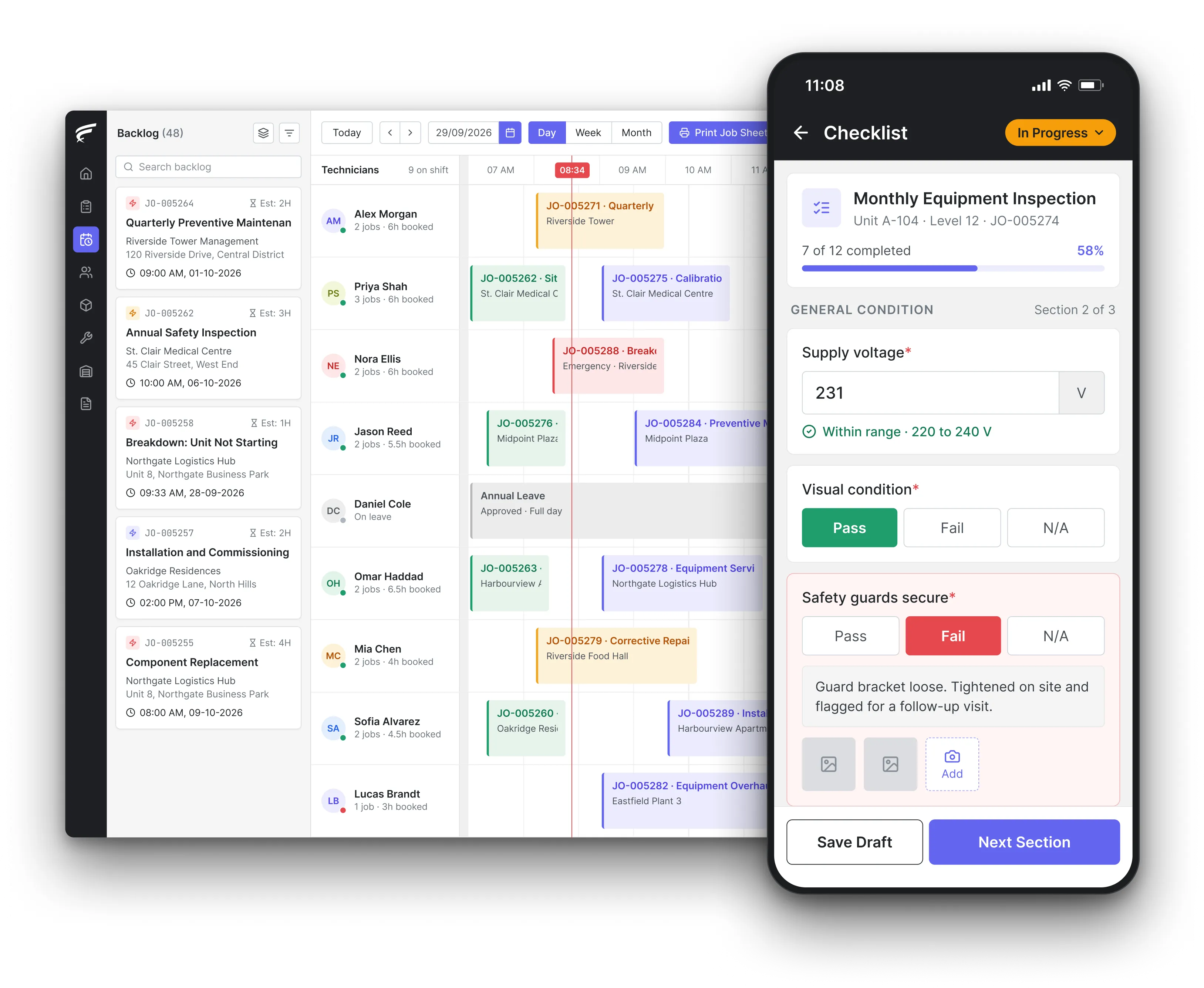
FieldEx scheduling board on desktop with a technician's inspection checklist open on the mobile app, as used by field service technicians

FieldEx is field service management and maintenance management (CMMS) in one system for teams that want more jobs fixed on the first visit. It sends the technician with the right skill, shows their own stock and the asset's repair history on the phone, prefills the parts a job usually needs, guides the repair with checklists, and flags when a new job repeats a recent one on the same asset.

What FieldEx does to get more jobs fixed on the first visit

Most second visits have one of four causes: the wrong person went, the part wasn't in the van, the technician didn't know the asset's history, or the fault was misdiagnosed and came back. FieldEx works on all four from the same job and asset record, and tells you when a fault returns so the cause can be fixed rather than the symptom. Book a demo to see it on your own jobs.

The right technician on the first visit

  • Automatic assignment by skill, availability, shift, leave and service zone, so a job needing a specialist reaches a specialist, in scheduling and dispatch.
  • Live location used to rank eligible technicians, so the nearest qualified person goes, not just the nearest person.
  • Technician groups tried in the order you set, with a fallback that alerts a supervisor when nobody qualifies.
  • A drag-and-drop scheduler to swap the technician before they set off if the job turns out to need a different skill.

The right parts in the van

  • Each technician's own stock tracked separately, visible on the phone, so they know what they are carrying before they leave, in spare parts inventory.
  • Part availability checked by warehouse, zone, store or technician, to find which store or technician is carrying a part.
  • Reorder and low-stock thresholds on each technician's stock, with alerts to the managing group.
  • Parts transferred between stores and technicians on the phone, scanning barcodes to pick them.

The job arrives prepared

  • Job templates that prefill the work items, tasks and parts a repeat type of job usually needs, in work order management.
  • Task templates that add their own parts to the job's parts list.
  • Photos and video attached by the customer when they raise the request through the portal or a site QR code, so the fault is seen before anyone travels.
  • The asset, site, customer and contact linked on the job, with the job's location on a map.

The asset's history on the phone

  • Every past job, inspection, part used and meter reading on the asset's record, opened by scanning its QR label, in asset management.
  • Parent and component levels, so the technician sees which component failed last time and what replaced it.
  • Attached drawings, manuals and warranty details on the asset.
  • A change history showing who edited what and when.

Repairs guided by checklists

  • Inspection checklists in sections, with single-select answers and reference photos, so every technician diagnoses the same way.
  • Checklist questions generated with AI from a description or a PDF or PNG of your existing checklist or procedure.
  • Ordered tasks inside a job, with tasks that must be finished before the next can start or before the job can close.
  • Failed answers that create the corrective job, its tasks and a follow-up inspection.

The FieldEx mobile app at the repair

  • The job, the asset history, the checklist and the technician's own stock on the FieldEx mobile app.
  • Parts used recorded on the job from the technician's stock, and watermarked photos of the fault and the fix.
  • Check-in and check-out times, and the customer's signature on completion.
  • Jobs downloaded to the phone, worked without a signal and uploaded when the connection returns.

Repeat faults caught and counted

  • A notification by email or in-app message when a new job repeats a recent job on the same asset.
  • Reports on asset reliability, maintenance cost and age, to find the assets and components that keep failing, in reporting and analytics.
  • Jobs reported by asset, site, customer, technician or contractor, exported or emailed on a schedule.

How can a field service company improve its first-time fix rate?

Attack the time and steps that sit between a fault and a finished repair. NASA's Reliability Centered Maintenance Guide for Facilities and Collateral Equipment breaks repair time into separate elements, including the time to successfully diagnose the cause of the failure and the time to procure or deliver the parts needed for the repair. Each of those is a reason for a second visit. The Housing Ombudsman's Spotlight report on complaints about repairs makes the same point from the customer's side: prompt inspection when a repair is reported helps diagnose the cause and start the repair, and the UK Home Standard for social housing has the objective of completing repairs right first time.

So the levers are diagnosis before and during the visit, parts on hand, and a technician who can do the whole job.

What FieldEx does about it

  • Diagnosis starts at the request: customers attach photos or video when they report a fault through the portal or a site QR code, so the dispatcher can judge the skill and parts before booking.
  • Parts known before the trip: job templates prefill the parts a job type usually needs, and the technician sees their own stock on the phone.
  • The skill matched to the fault: assignment rules send the job only to technicians holding the required skill.
  • The history in hand: the asset's previous jobs, parts and readings are one QR scan away on site.

Why does the same equipment keep breaking down?

Because the cause is still there. NASA's RCM guide warns that if the underlying cause of a failure isn't removed, the conditions causing it will remain, failures will recur, and they will keep needing unnecessary corrective work and downtime. Repeated failures, the guide says, mean high costs for parts and labour and lost customer goodwill. The Housing Ombudsman's Spotlight report gives an example of what that looks like in practice: multiple visits by general operatives, without a referral to a specialist, led to a 28-month delay before the landlord completed one repair.

What FieldEx does about it

  • Repeat jobs flagged: when a new job repeats a recent job on the same asset, the users you choose are notified by email or in-app message.
  • The specialist sent second time round: the dispatcher can change the job's required skill or reassign it to a specialist group from the scheduler.
  • Component-level history: parent and component records show whether the same component keeps failing or the fault is moving around the system.
  • Costs that tell the story: asset reports show maintenance cost and parts used per asset, so the price of a repeat fault is visible.

How do you carry out root cause analysis on repeat failures?

NASA's guide describes root cause failure analysis (RCFA) as correcting the cause of the problem, not just its effect, so the fix lasts. It defines repetitive failures in three forms: repeat failure of the same item, failures of items within the same system, and failures of the same or similar components in several different systems. The UK Health and Safety Executive (HSE), in its inspector guidance on maintenance error (Human Factors Common Topic 2), asks whether incidents and near misses with maintenance root causes are adequately investigated and whether the results and actions are communicated.

That third form, similar components failing across different systems, is the one nobody sees without data across all assets.

What FieldEx does about it

  • All three patterns in reports: reports group repair jobs by asset, by parent system or by asset type, so repeat failures of one item, one system or one component type across sites each show up.
  • The investigation as a task: a repeat fault can carry an investigation task inside the job, assigned to an engineer, before the permanent fix task.
  • Findings shared: the investigation's notes and attachments stay on the job and the asset, where the next technician reads them.
  • Fix confirmed: a follow-up inspection after the repair checks that the cause was removed.

What is the difference between MTBF and MTTR?

NASA's RCM guide defines mean time between failures (MTBF) as the reciprocal of the failure rate: the average time an asset runs before it fails. Mean time to repair (MTTR) is the arithmetic average of the maintenance cycle times for the individual repair actions of a system, excluding preventive maintenance. MTBF tells you how often you go back; MTTR tells you how long each repair takes. A low first-time fix rate shows up in both: more failures between visits and longer total repair times when a second trip is needed.

The point of the database is the next technician: the fault, the cause and the fix that worked are there before they start.

What FieldEx does about it

  • Failures counted per asset: every breakdown job sits on the asset with its date, so reports count failures per asset and period.
  • Repair time recorded: check-in and check-out times on each job and task give the time spent on every repair.
  • Planned work kept out: planned visits carry their own job type, so they can be left out of repair-time figures as MTTR requires.
  • Reliability reports: asset reliability reports bring failures and repair data together per asset. MTBF, MTTR and downtime are reported for every asset as standard.

Do you need to keep a maintenance log for each machine?

If the machine has one, it must be kept up to date. Regulation 5(2) of the UK Provision and Use of Work Equipment Regulations 1998 (PUWER) says that where any machinery has a maintenance log, the employer must make sure the log is kept up to date, and regulation 5(1) requires work equipment to be maintained in an efficient state, in efficient working order and in good repair. The Housing Ombudsman recommends that landlords and contractors keep records of reports, appointments, any pre- and post-inspections, surveyors' reports, work carried out and completion dates.

For first-time fix, the log is also the technician's best diagnostic tool: what failed before, what was replaced, and what didn't work.

What FieldEx does about it

  • A log that writes itself: every job, inspection, part used and meter reading is saved on the machine's record as the work is done.
  • Before and after on the job: photos and checklist answers from before and after the repair stay on the job.
  • Appointments and completion dates: each job keeps its scheduled date, check-in and check-out times and completion status.
  • Available on site: the technician opens the log on the phone by scanning the machine's QR label.

How do you spot recurring repair problems by site or contractor?

The Housing Ombudsman's Spotlight report on repairs tells landlords to monitor repairs and complaints to spot recurring issues, for example in a particular location or with a specific contractor, and to keep accessible records of appointments, inspection reports, work orders and completion dates for their own repairs service and their contractor's. HSE's maintenance error guidance asks whether maintenance work is adequately co-ordinated and tracked.

A repeat visit is often a pattern rather than bad luck: one building's pumps, one contractor's repairs, one technician's diagnoses.

What FieldEx does about it

  • Repeat work by location: reports group repair jobs by site, service zone or customer, showing where faults keep recurring.
  • Repeat work by contractor or technician: the same reports group by the assigned group or technician, so a contractor whose repairs come back is visible.
  • Your contractor's records in your system: contractors complete their jobs in FieldEx, so their appointments, inspections and completion dates sit alongside your own team's.
  • Reviewed every month: the report can be emailed on a schedule to the operations manager.

Do checklists reduce maintenance errors and repeat visits?

HSE's guidance on maintenance error says statistics and investigations show it remains a continuing serious issue, and expects job aids, including procedures, checklists and diagnostic tools, for critical maintenance tasks. Every skipped step on a repair is a chance for the fault to come back.

The same logic applies inside a maintenance team: a failure investigated once is a failure that need not happen again.

What FieldEx does about it

  • Checklists matched to the asset: each asset type has its own inspection checklist, opened by scanning the asset on site.
  • Reference photos on the question: checklist questions can carry reference photos, so technicians compare what they see with what good looks like.
  • Steps that can't be skipped: ordered procedures require each task to be finished before the next starts, and designated tasks before the job can close.
  • Checklists from your procedure: questions can be generated with AI from a description or a PDF or PNG of your existing checklist or procedure.

Why are repairs not completed on time, and how often is it the parts?

Parts are a named cause. The Regulator of Social Housing's Tenant Satisfaction Measures statistics for 2023/24 report that 77% of non-emergency repairs and 89% of emergency repairs were completed within target at sector level, against median maximum timescales of 24 hours for emergency repairs and 28 days for non-emergency repairs. Among the reasons landlords gave for missed targets was the availability of specific parts. NASA's RCM guide advises specifying standard parts where possible, to keep parts stocking down and avoid mixing incompatible parts, and using just-in-time supply where it works.

So a fast first response that leads to a second visit still costs most of the score.

What FieldEx does about it

  • Stock per technician and store: own stock and store levels are tracked separately, with reorder and low-stock thresholds and alerts.
  • A missing part found fast: part availability by store, zone and technician shows where a part is when it isn't in the van.
  • Transfers on the phone: parts move between stores and technicians on the mobile app, with barcode scanning and approvals where needed.
  • A standard parts catalogue: one central catalogue of spare parts, with types, families and units, keeps everyone ordering and fitting the same part.

What should a maintenance contract include to prevent repeat damage after complex repairs?

A method statement for each complex, costly repair. JKR Putrajaya's PLL (2019) recommends tightening the method statements for complicated, high-cost repair work to avoid repeat damage, and including them in the maintenance contract. It also notes, as something that worked well, complete maintenance reports from the contractor presented at monthly meetings.

What FieldEx does about it

  • The method statement as an ordered procedure: the steps of a complex repair become a task procedure in a set order, with steps that must be done before the next begins.
  • The document with the job: the approved method statement is attached to the equipment or the job, and opened on the phone before work starts.
  • Monthly reports ready for the meeting: repair, PPM and complaint reports are emailed to the client before each monthly meeting.
  • Proof the steps were followed: each task's check-in, check-out, notes and photos show how the repair was carried out.
Customer story

Chubb, an integrated security provider, runs its security systems field operations on FieldEx. Its story describes tasks assigned automatically by skill, availability and location, mandatory photos in the app as proof of completion, and jobs that can't be marked complete until every SOP step is fulfilled, with a 20% boost in first-time fix rates and a 15% boost in technician productivity.

Read the Chubb story

Sime Industrial, a heavy equipment and industrial solutions provider serving 191 locations across Asia Pacific, runs its field service on FieldEx. Its story describes job updates, statuses and time logs in one place, live technician locations and task progress in one view, and reports on job durations, coverage and technician performance.

Read the Sime Industrial story

Questions service managers ask about first-time fix in FieldEx

What is the best software for improving first-time fix rates?

It needs to match skills to jobs, show what each technician is carrying, put the asset's history in the technician's hand and flag faults that come back. FieldEx does all of these in one system, with field service and maintenance management sharing the same job and asset records. Compare approaches in our guide to field service management software.

Can FieldEx tell us when a fault comes back on the same asset?

Yes. When a new job repeats a recent job on the same asset, FieldEx notifies the users you choose by email or in-app message.

Can technicians see what parts they have in the van?

Yes. Each technician's own stock is tracked separately and shown on the mobile app, with transfers between stores and technicians and low-stock alerts.

Can a job arrive with the usual parts already listed?

Yes. Job templates prefill the work items, tasks and parts a type of job usually needs, and task templates add their own parts to the job.

Can customers send photos of the fault before we visit?

Yes. Requests raised through the customer portal or a site QR code can include photos or video, attached to the job the dispatcher sees.

Can technicians see an asset's full repair history on site?

Yes. Scanning the asset's QR label opens its record on the mobile app, with past jobs, parts used, inspections and meter readings, including on its components.

Can FieldEx stop a job being closed before every step is done?

Yes. Ordered procedures require each task to be finished before the next can start, and designated tasks must be completed before the job can close.

Can we report repeat repairs by contractor or site?

Yes. Reports group repair jobs by site, service zone, customer, technician or contractor group, and can be emailed on a schedule.

How long does it take to get FieldEx running for our service team?

Once we know your requirements and your data is ready, FieldEx can be implemented in as little as a week with standard features for small businesses. Larger setups and custom work take longer. Setup, data upload and training are included in the subscription, with no setup fee. Customers, sites, assets and parts can be uploaded. FieldEx helps with setup, and training is included. See FieldEx implementation.

Fix it on the first visit, and keep it fixed

Book a demo