After-sales service software for equipment suppliers and distributors

Every machine you sell becomes a customer record you can service: its serial number, site, warranty, contract and every visit since installation, with the parts, the sales order and the customer's own view in the same place.

Book a demo
Updated 15 Oct 2026
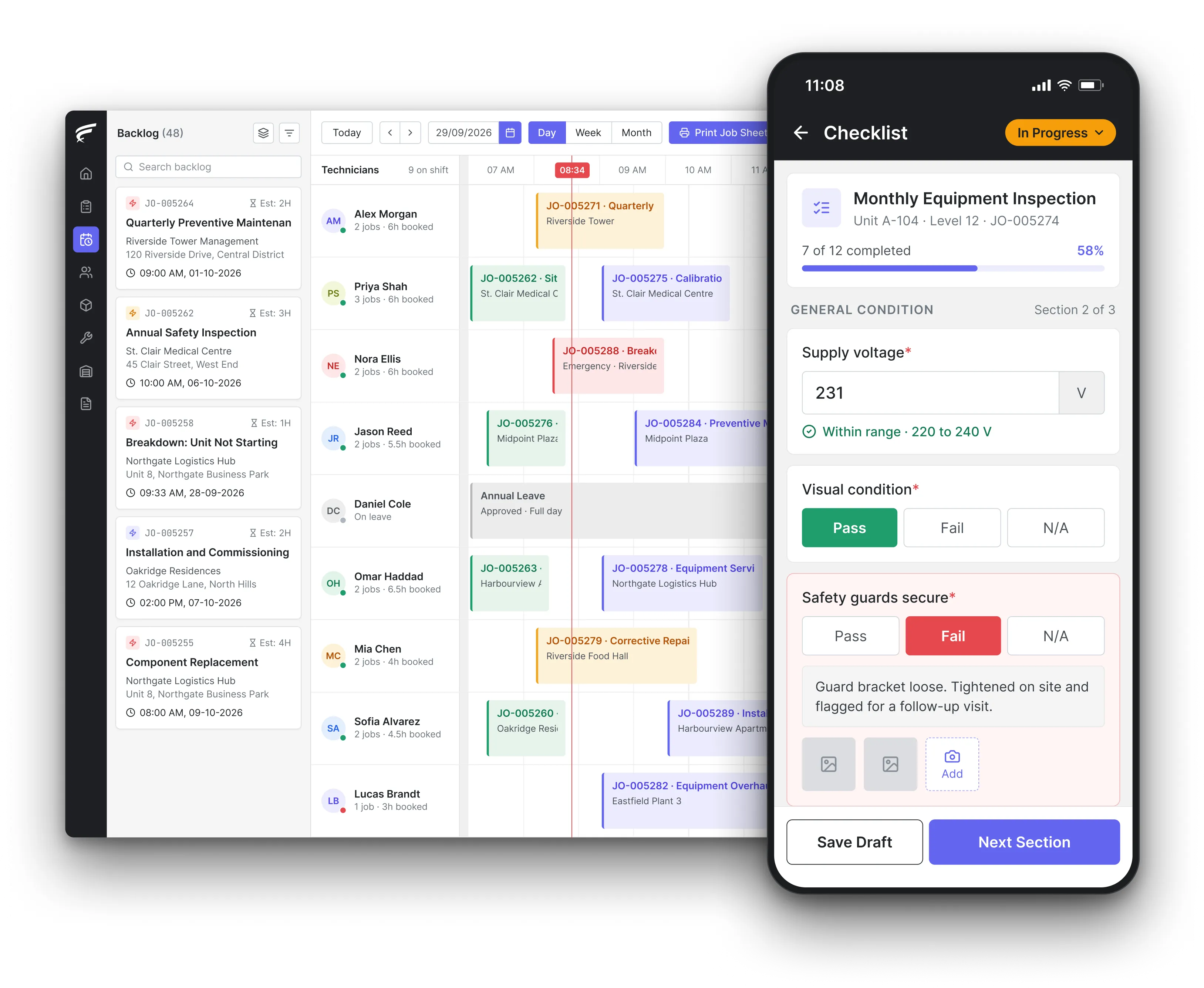
FieldEx scheduling board on desktop with a technician's inspection checklist open on the mobile app, as used by equipment suppliers' service teams

FieldEx is field service management and maintenance management (CMMS) in one system for equipment suppliers and distributors running after-sales service. It keeps each unit sold on its customer and site with its serial number and warranty, links sales orders and service contracts to the jobs that follow, runs planned maintenance and warranty repairs, and gives customers a portal to raise requests and see their equipment.

What FieldEx does for equipment suppliers' service teams

After-sales service starts the day the equipment is delivered. From then on the supplier needs to know where every unit is, who owns it, whether it is still under warranty, what the contract covers and what has been done to it. FieldEx holds all of that on the unit and the customer, so installation, warranty repairs, planned servicing and chargeable work follow one history. Book a demo with a sample of your installed equipment list.

Every unit sold, on the customer's record

  • Each unit as an asset with its identifiers, specifications, photos, warranty details, location and acquisition information, in asset management.
  • Units linked to their customer, site and project, with parent and component levels for machines with major assemblies.
  • Customers with contacts, billing and shipping addresses, map locations and their related sales orders, jobs, assets, contracts and sites in one overview.
  • Units found and filtered by type, category, status, location, zone or user.

Sales orders, contracts and the jobs that follow

  • Sales orders with dates, sales type and channel, an owner, spare-part line items, totals and a unique order number.
  • Sales orders linked to the installation and service jobs they relate to, and to the contract they belong to.
  • Service contracts with start and end dates, the units they cover and the maintenance plans linked to them.
  • Contract status tracked on every contract, with custom notifications.

Warranty repairs and breakdown calls

  • Jobs raised for a unit from the office, the customer portal, a QR code on the machine or an API, with the unit's warranty details on its record, in work order management.
  • A notification when a new job repeats a recent job on the same unit, so repeat failures are seen early.
  • Service-level agreements by customer, job type or unit, timed against business hours, with at-risk and violation alerts.
  • Parts flagged as not for sale and warranty periods recorded on each spare part.

Planned servicing for installed equipment

  • Maintenance plans by calendar, meter reading or whichever comes first, applied to new units automatically when they match the plan's criteria, in preventive maintenance.
  • Different checklists and technicians for different visits in the cycle.
  • Upcoming asset maintenance shown to the customer in the portal's maintenance tab.

Spare parts for the installed base

  • A central parts catalogue with part numbers, descriptions, photos, warranty periods, manufacturer details, prices and units of measure, in spare parts inventory.
  • Stock by warehouse, zone and technician's own stock, with reorder and low-stock alerts.
  • Parts used on each job recorded with the quantity, job, user and date, and shown on the unit's record.

Engineers at the customer's site

  • Each engineer's jobs, the unit's history and the right checklist on the FieldEx mobile app.
  • Scanning the unit's QR code or barcode to open its record and its quick actions.
  • Check-in and check-out, watermarked photos and video, parts from their own stock and the customer's signature.
  • Jobs downloaded to the phone, worked without a signal and uploaded when the connection returns.

A portal for the equipment owner

  • A branded portal where customers see their registered equipment with serial number, status, site and last-serviced date, in the customer portal.
  • Service requests with a description, contact number, photos or video and a requested appointment date.
  • Job status, attachments, parts with prices where enabled, and a downloadable PDF summary of each job.

How should an equipment distributor track the installed base for each customer?

By unit, by customer and by site, with the supply chain on record. In the EU, the General Product Safety Regulation, Regulation (EU) 2023/988 of 10 May 2023, Article 15(3) and 15(5), says economic operators must be able to identify who supplied them with a product and whom they supplied, for 6 years. Under Article 15(2) and 15(4), risk, complaint and corrective-action information is kept for 10 years. For medical devices, the Medical Device Coordination Group's MDCG 2022-7 guidance, published by the European Commission in May 2022, says distributors and importers shall cooperate with manufacturers to achieve an appropriate level of traceability.

A useful installed base record goes further than the law: model, serial number, install date, site, owner, warranty end date, contract and the last service.

What FieldEx does about it

  • One record per unit sold: each unit carries its identifiers, specifications, warranty details, location and acquisition information, linked to its customer and site.
  • The sale behind the unit: sales orders link to the jobs that installed and serviced the unit, and to its contract.
  • The customer's whole fleet: the customer overview shows every asset, site, contract, sales order and job they have with you.
  • Kept as long as you need: the unit's record, its jobs and attachments stay in FieldEx for as long as you keep the asset.

Can a warranty require customers to use only authorised service or genuine parts?

In the US, generally not. The Federal Trade Commission's (FTC) Businessperson's Guide to Federal Warranty Law, on the Magnuson-Moss Warranty Act, says tie-in sales provisions, which state or imply that a consumer must buy or use an item or service from a particular company to keep warranty coverage, generally aren't allowed. A tie-in is only allowed if that item or service is provided free under the warranty, or if the FTC grants a waiver. The guide's tie-in section was updated in March 2018.

So the stronger after-sales offer is the one customers choose: fast response, the right parts and a record of every visit.

What FieldEx does about it

  • Warranty parts set apart: spare parts can be marked as not for sale in the catalogue, and part prices in the customer portal shown only where you enable them.
  • The warranty on the unit: warranty details sit on each unit's record, visible to the office and to the engineer on the phone.
  • Response times you can prove: service-level agreements time each job against business hours and record completion and violations on the job.
  • A record of who serviced it: every job on the unit shows the engineer, the date, the work and the parts used.

What does a full warranty commit the supplier to?

Free service, and a remedy if repair fails. The FTC's guide says the Magnuson-Moss Warranty Act requires every written warranty on a consumer product costing more than $10 to be titled either "full" or "limited". Under a full warranty, you provide warranty service free of charge, and if after a reasonable number of tries you are unable to repair the product, you provide, at the consumer's choice, either a replacement or a full refund.

"A reasonable number of tries" only works in your favour if you can show each attempt: when it was reported, what was found and what was done.

What FieldEx does about it

  • Every attempt on the unit's history: each repair job stays on the unit's record with its fault, resolution, parts and dates.
  • Repeat failures flagged: a notification warns when a new job repeats a recent job on the same unit, so the office sees the pattern before booking another visit.
  • The report the customer signed: each completion PDF shows the fault, the work done, the parts and the customer's signature, emailed with a record of when it was sent.
  • Patterns by model: asset reliability and maintenance reports show which models fail most, exported or emailed on a schedule.

Who pays for warranty repairs, and how quickly must they be done?

The trader pays, and within a reasonable time. In the UK, section 23 of the Consumer Rights Act 2015 says that when a consumer requires repair or replacement, the trader must do it within a reasonable time and without significant inconvenience to the consumer, and must bear any necessary costs, including in particular the cost of labour, materials or postage. In the US, the FTC's guide says a full warranty must provide warranty service free of charge.

"Reasonable time" isn't defined, which is why a written response target per customer or product line helps both sides.

What FieldEx does about it

  • Response targets in stages: service-level agreements can have several stages, such as respond, attend and fix, each with its own at-risk and violation thresholds.
  • Different targets per customer or unit: agreements can apply to all customers or selected ones, within validity dates, and be scoped to a specific unit.
  • Costs captured on the job: parts with quantities and prices, travel, and check-in and check-out times are recorded, so warranty costs can be reported.
  • The customer can move the visit: customers can request a new appointment date through the portal to avoid inconvenience.

What do the new EU right-to-repair rules mean for after-sales service?

More repairs, done for longer, at a fair price. Directive (EU) 2024/1799 on the repair of goods, adopted on 13 June 2024 and applying from 31 July 2026, says manufacturers of the products listed in its Annex II must repair them within a reasonable time and for a reasonable price, and must not impede repair. Consumers who choose repair under the legal guarantee get an extra year of the legal guarantee. Manufacturers that supply spare parts for Annex II goods must do so at reasonable prices.

For a supplier's service team, that means more repair jobs on older units, more warranty extensions to track per unit, and more requests from independent repairers for parts.

What FieldEx does about it

  • Warranty dates per unit: each unit's warranty details are kept on its record, so an extended guarantee after a repair can be recorded on the unit it applies to.
  • Repair jobs with their history: each repair is a job on the unit, with fault, resolution, parts and times, so the next engineer sees what has been done.
  • Parts sold as well as fitted: sales orders carry spare-part line items with prices, linked to the customer, so parts sold to repairers are recorded alongside parts fitted.
  • Repair volumes reported: jobs can be reported by job type, unit type or period to see how repair work is growing.

How do you reach every customer with an affected unit in a product recall?

Start from the installed base, not the sales ledger. The EU General Product Safety Regulation, Article 37(1), says the economic operator responsible for a product safety recall shall offer the consumer an effective, cost-free and timely remedy. Under Article 37(5), for products that are not portable, the economic operator shall arrange for the collection of the product. Article 12(4)(b) says distributors must ensure the corrective measures needed are taken, including withdrawal or recall, as appropriate.

That depends on knowing which customers hold which model and serial number, at which site, today.

What FieldEx does about it

  • Affected units in one list: filter units by type, category, status, location or zone to find every unit of an affected model.
  • Customers and sites behind each unit: each unit links to its customer, contacts and site, so the list of people to contact comes from the same records.
  • Recall jobs raised per unit: jobs created for each affected unit can be scheduled, tracked and reported until every unit is done.
  • Customers told by email: workflows send emails to addresses stored on the record when the conditions you set are met, using templates with your own wording.
  • Recall jobs in one upload: one upload raises a recall job per affected unit; workflows email each customer and every recall is tracked to completion.

How long must spare parts be available after a model is discontinued?

For some products, the law sets it. Commission Regulation (EU) 2019/2023 on the ecodesign of household washing machines, adopted on 1 October 2019 and applying from 1 March 2021, says manufacturers, importers or authorised representatives must make parts such as motors, pumps and printed circuit boards available to professional repairers for at least 10 years after placing the last unit of the model on the market. Directive (EU) 2024/1799 adds that where manufacturers supply spare parts for the products it covers, they must do so at reasonable prices.

For a distributor, the question is how many units of each discontinued model are still in the field, and which parts they will need.

What FieldEx does about it

  • Parts by model and family: the parts catalogue classifies parts by type and family, with manufacturer details and units of measure.
  • Usage history per part: every part used on a job is recorded with its quantity, job, user and date, so demand by model can be reported.
  • Units still in the field: asset reports by type and status show how many units of each model are still active.
  • Stock alerts per location: reorder and understock thresholds per stock location warn the managing group before a part runs out.

What records must medical device distributors keep about the devices they supply?

Records that identify each device. MDCG 2022-7 explains that under Article 27(8) of the EU Medical Device Regulation, economic operators shall store and keep the Unique Device Identifier (UDI) of the class III implantable devices which they have supplied or with which they have been supplied. The same guidance says the UDI shall be used for reporting serious incidents and field safety corrective actions.

Service records on medical equipment therefore need the device identifier on every job, not just the customer's name.

What FieldEx does about it

  • Identifiers on the unit: each device's identifiers, such as serial number and model, are recorded on its asset record and appear on the job. Extra identifier fields can be renamed to your own terms, such as UDI, and the names show on web and mobile.
  • Device to site to customer: each device links to the hospital or clinic site and the customer it was supplied to.
  • Incidents raised as jobs: a reported fault becomes a job on the device, with photos, the engineer's findings and the resolution.
  • Reports for the regulator: job and asset data can be filtered by device type and period and exported as CSV, Excel or PDF.
Customer story

EC Solutions, an engineering and technology services provider working across airport sites in Latin America, runs installations, preventive maintenance and equipment replacements on FieldEx. A technician scans the equipment's QR code to open a replacement job, records one or several parts swapped in a single form, and the equipment records, site and customer details and linked parent and child assets update as soon as it is submitted. Removed units are marked not in use, and the reason for replacement and both signatures are logged.

Read the EC Solutions story

Sime Industrial, a heavy equipment and industrial solutions provider serving 191 locations across Asia Pacific and representing more than 30 brands of heavy machinery, uses FieldEx to centralise job updates, statuses and time logs, with live technician locations and task progress in one view and reports on job durations, coverage and technician performance.

Read the Sime Industrial story

Questions equipment suppliers ask about after-sales service in FieldEx

What software do equipment suppliers use to manage after-sales service and warranties?

Software that holds the installed equipment, the warranties and contracts, and the service jobs on the same records. FieldEx combines field service and maintenance management, so each unit sold carries its warranty, contract, planned maintenance and repair history, with a portal for the customer. Compare approaches in our guide to field service management software.

Can FieldEx link a sales order to the installation job?

Yes. Sales orders can be linked to the related jobs and to a contract, and the customer record shows its sales orders, jobs, assets and contracts together.

Can we see whether a unit is still under warranty before sending an engineer?

Yes. Warranty details sit on each unit's record, viewable in the office and on the engineer's phone, alongside the unit's job history.

Can customers register a fault against a specific machine?

Yes. Customers raise service requests through the branded portal, where they see their registered equipment, or by scanning a QR code on the unit, with photos or video and a requested appointment date.

Can we offer different service contracts to different customers?

Yes. Each contract has its own dates, units and linked maintenance plans, and service-level agreements can apply to selected customers, within validity dates, or be scoped to a single unit.

Can planned servicing start automatically for newly installed units?

Yes. Maintenance plans can add new units that match their criteria automatically, so a newly installed machine joins its servicing cycle without manual setup.

Can FieldEx connect to our ERP or accounting system?

FieldEx can connect to any open system through REST APIs and has connectors for QuickBooks and Xero.

Can we track rental equipment as well as equipment we sold?

Yes. Contracts track each unit's asset code, serial number, location and quantity.

How long does it take to set up FieldEx for after-sales service?

Once we know your requirements and your data is ready, FieldEx can be implemented in as little as a week with standard features for small businesses. Larger setups and custom work take longer. Setup, data upload and training are included in the subscription, with no setup fee. Customers, sites and installed equipment can be uploaded. FieldEx helps with setup, and training is included. See FieldEx implementation.

See every unit you've sold, and its service history, in one place

Book a demo