Pest control software for bait station rounds, callouts and audit-ready records

Keep every bait box and trap on the site record and run each contract's visits on time. Clients get a signed report on site.

Book a demo
Updated 19 Oct 2026
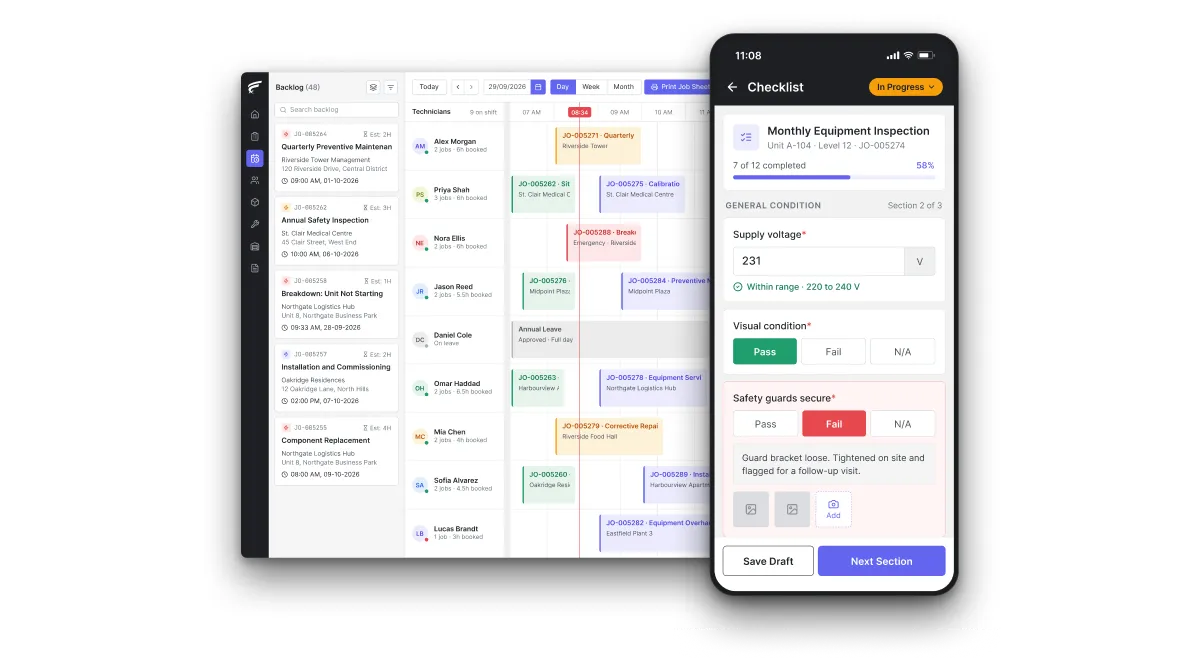
FieldEx scheduling board on desktop with a technician's inspection checklist open on the mobile app, as used by pest control technicians

FieldEx is a field service and asset management (FSM+CMMS) application for commercial pest control companies. Every customer site and every bait station, monitor and trap has its own record and QR label. FieldEx schedules routine inspections and callouts to licensed technicians, who record each station check on the phone. Findings raise follow-up treatments, and the client receives a signed service report.

What FieldEx does for commercial pest control companies

A commercial pest contract is a promise to visit on a fixed rhythm and check every device on the site plan. You act on what you find and prove it to an auditor months later. FieldEx runs that cycle from one record per customer site. The station check, the treatment it led to and the report the client signed all sit together. Book a demo to see it with your own contracts and sites.

Customer sites and site plans

  • A site record for every customer premises, with its address, map pin, contacts and service zone.
  • Each site's stations, jobs and visit plans, on the same record.
  • The current site plan, label sheets and the customer's pest risk assessment, attached to the site record. The technician opens them on the phone before the round.
  • Sites grouped under their customer, so a food group with many factories or restaurants is one account with separate records for each premises.
  • Site reports by customer, service zone and type, including when each site was last visited.

Every station, monitor and trap on record

  • Each rodent bait box, insect light trap, pheromone monitor and termite station as its own asset under the site, in Asset Management.
  • Each device record holds its number, type, location and photos.
  • QR or barcode labels printed for every device in the size and layout you need. The technician scans the station to open its record and checklist.
  • Each completed inspection is saved against the asset with its date, technician, result and remarks.
  • Screens, field names and PDF labels renamed to your trade's words, so assets can show as stations and work orders as service visits.

Routine visits that keep to the contract

  • Recurring plans that create each visit automatically, by days, weeks, months or years. Preset intervals include every two weeks and quarterly.
  • One plan applied across many sites, with each site's last and next visit dates shown on the plan, in Preventive Maintenance.
  • Fixed calendar schedules, or schedules that count from the last completed visit. Missed visits are rescheduled after a set overdue period.
  • Customer contracts with start and end dates, linked to the visit plans they cover.
  • A choice between a fixed calendar date and a date counted from the last completed service.
  • Any missed round rescheduled after the overdue period you set.
  • Each customer's service contract recorded with its start and end dates and the round plans it pays for.

Station checks on the phone

  • A checklist for each device type, with guided questions in sections. Single-select answers include no activity, bait taken, droppings or station missing.
  • Reference photos on checklist questions, so every technician grades activity the same way.
  • Checklist questions generated with AI from a description, or from a PDF or PNG of your existing checklist or procedure.
  • A completed check that updates the station's status and, where the answer calls for it, creates a follow-up job, its tasks and the next inspection.
  • Each check saved against the station with the date, the technician and the answers given.
  • Each answer stored against the station with the applicator's name and the date.

Licensed technicians on the right jobs

  • Automatic assignment by skill, availability, shift and leave, in Scheduling and Dispatch.
  • Service zones and live location to pick the nearest qualified technician.
  • A drag-and-drop scheduler with an unassigned backlog, so urgent callouts can be fitted in around the routine round.
  • Tasks inside one job assigned to different people, such as an assistant and the supervising applicator, each with their own times.
  • A notification to the technician each time a job is assigned or moved.

The FieldEx mobile app on the round

  • Each technician's own visits, the site plan, the station list and the right checklist on the FieldEx Mobile App.
  • Check-in and check-out on each visit, with travel distance and time logged against the job.
  • Watermarked photos and video of activity, proofing defects and damaged stations, and the client's signature at the end of the visit.
  • Jobs and tasks can be downloaded and worked offline, with check-in, check-out and travel synced later.

Your own sprayers, vans and test tools

  • Sprayers, foggers, misting machines and dusters on record as assets, each with its own maintenance plan.
  • Service vans on plans by date or odometer reading, with each technician's own stock of baits and products alongside.
  • Moisture meters and other test tools with calibration due dates and reminders.
  • Inspection records stay on each machine’s asset record. For certifications, attach the certificate or report when marking the record complete.

Service reports, clients and trends

  • A service report PDF on your letterhead for every visit, in Work Order Management. It is emailed with a record of when it was sent.
  • The report shows the technician, check-in and check-out times, the work done and the client's acknowledgement. Photos stay attached to the job.
  • A branded Customer Portal. The client sees every visit and the devices on site with their last-serviced dates, and downloads each report.
  • A QR code for each site, so the client's staff can report a sighting with photos or video without logging in. Each report arrives as a job in the backlog.
  • Reports that count findings by site, station, device type or month, in Reporting and Analytics. Export the findings counts as CSV, Excel or PDF, or email them on a schedule.

How often should rodent bait stations be checked?

Check new baits within 7 days, then at least every two weeks, with permanent outdoor baits no more than 4 weeks apart. The Campaign for Responsible Rodenticide Use (CRRU) UK Code of Best Practice sets those intervals, with closer checks for a large infestation or burrow baiting. Customers can set tighter rules. The British Pest Control Association (BPCA) reports that one food standard requires monthly checks of all external monitors at least. One supermarket requires weekly checks of internal break-back traps.

What FieldEx does about it

  • A clock per device type: set recurring inspections for each device type weekly, every two weeks, monthly or quarterly. The internal traps and the external boxes on one site each keep their own cycle.
  • The seven-day first check: book the check a week after baiting starts as its own visit. A two-weekly plan that counts from the last completed visit takes over from there.
  • Missed rounds flagged: inspections show as due, overdue or completed. The dashboard lists what is overdue and what falls due in the next 7 days.
  • Every box scanned: the technician scans each station's QR label, answers its checklist and moves on. A skipped box shows up as an unchecked record.

How often do termite bait stations need to be inspected?

Inspect baited stations at least quarterly, with no more than 6 months between monitoring and servicing visits. That interval comes from the Recruit IV termite bait label accepted by the US Environmental Protection Agency (EPA) for the Sentricon system. That gives a pest company two jobs on the same property. One is a routine monitoring round on the label's interval. The other is a baiting visit once termites are found.

  • the customer's name and address, and the type of premises
  • the purpose and date of the treatment, and the site treated
  • the pesticide's active ingredient, trade name and concentration
  • the method of application, the area treated and the quantity
  • the label precautions, the applicators' names and the vehicle used

For termite control, Form H also records the hole spacing, the number of holes and the quantity used per hole.

What FieldEx does about it

  • Quarterly by default, closer when needed: each termite station's inspection can run monthly, every 2 months or quarterly. You can change the plan when a station goes active.
  • A hard ceiling on the gap: maintenance plans generate maintenance jobs on the schedule you set. No station drifts past the six-month limit unnoticed.
  • Hits become baiting jobs: an answer of "termites present" on the station's checklist creates the baiting job and books a follow-up inspection.
  • Each station's own history: every monitoring visit, hit and bait change stays on that station's record, with the date and technician.

How can a customer tell whether termite bait stations were actually serviced?

By checking each visit's record against the list of every station. The EPA-accepted Recruit IV label has baited stations inspected at least quarterly. It adds that the bait must be used with a service from a licensed pest management professional. Proof of service therefore has three parts. They are the station list, a record of each station checked on each date, and the licensed person who did the work.

What FieldEx does about it

  • Scan as proof of presence: the technician scans each station's QR label to open its check. FieldEx saves the check with the time and the technician's name.
  • Photos from the station: watermarked photos of the open station and its bait or monitor are attached to the job.
  • Check-in and check-out times: the visit shows when the technician arrived and left, with the distance traveled to get there.
  • The client can look for themselves: the customer portal shows each station with its last-serviced date. The client downloads the report for every visit.

What should a pest control service report include?

It covers what was inspected, what was found, what was done and who did it. Clause 11.2.4 of the SQF Food Safety Code, Edition 10 asks the contractor for a written report of findings, inspections and treatments. The contractor also reports to an authorized person on arrival and after the work is finished.

What FieldEx does about it

  • Reports filled in automatically: PDF templates carry your logo and address. Sections cover the job, the site, the technician, check-in and check-out times and the work done.
  • Treatment details on the job form: each job type has its own form and fields. A treatment visit collects the target pest, the product and the method. Digital forms can hold the pesticide details, with a pick-list of registered products.
  • Recommendations and sign-off: the report can carry terms, recommendations and a customer acknowledgement section, signed on the phone by the authorized person on site.
  • Sent and on record: FieldEx generates the report when the job reaches the status you choose. It emails the report to the client or anyone else you choose, records when it was sent and keeps it in the job's documents.

How long do pest control companies have to keep pesticide application records?

In the US, keep restricted use pesticide records for at least 2 years from the date of use. The EPA's applicator recordkeeping requirements set that floor for commercial applicators. The US Department of Agriculture's Agricultural Marketing Service (USDA AMS) applies the same 2 years. It adds that commercial applicators must give the customer a copy of the required record within 30 days. Food clients often hold records for longer under their own standards, so the contractor's copy needs to stay findable well beyond the visit.

What FieldEx does about it

  • Records stay with the site and station: every visit, check, report and photo stays on the site and device records. They stay for as long as you keep them.
  • The report to the customer on the day: FieldEx emails the service report when the visit is completed, well inside a 30-day window. It records when the report was sent.
  • Filter by any field: pull past visits into a report by customer, site, technician, date or job type. Export it as CSV, Excel or PDF when the regulator asks.

What pest control records do BRCGS food safety auditors check?

They check the site plan and devices, who is responsible, and the products, activity and treatments. The BRCGS Global Standard Food Safety, Issue 9, clause 4.14.4, lists what the pest management records must hold:

  • an up-to-date plan of the full site showing every device and its location
  • the baits and monitoring devices in use
  • the responsibilities of the site and the contractor
  • the products used, any pest activity observed and the treatments carried out

Any missing bait station has to be recorded, reviewed and investigated. The records can be kept electronically.

What FieldEx does about it

  • Station history on demand: open any station, by scanning its label or searching its number, and see every check, finding and treatment on its record.
  • Missing stations recorded and followed up: an answer of "missing" on the checklist sets the station's status. It also creates a job to investigate and replace the station.
  • Products and activity on the visit record: the job form captures the products used and the activity seen, and both stay on the job record.
  • Electronic records the client can reach: the client downloads reports and sees each device's last-serviced date through the customer portal.

How many pest control visits a year does a food factory need?

There's no single number, because a documented risk assessment sets it. BRCGS Issue 9, clause 4.14.2, ties inspection frequency to that assessment. Clause 4.14.10 adds an in-depth assessment from a pest management expert at least once a year. BPCA says routine inspections are usually chosen from 8, 12, 26 or 52 a year, and field biologist visits from 1, 2, 4 or 12. Three supermarkets require their suppliers to have at least eight routine and four biologist visits a year.

What FieldEx does about it

  • Routine and biologist visits on separate plans: run the routine round and the biologist's assessment as two plans on the same site. Each has its own checklist and its own technicians.
  • Any interval the assessment sets: weekly, every two weeks, monthly or a set number of days, on a fixed calendar or counted from the last completed visit.
  • Visits linked to the contract: each customer contract holds its start and end dates and the visit plans it covers.
  • Proof of the count: reports show visits completed against visits planned by site, customer or period.

What is a pest risk assessment and how often should it be reviewed?

Review it at least once a year, and again after a significant infestation or a building change. A pest risk assessment (PRA) looks at a site's buildings, processes and surroundings, then sets the control measures and visit frequency to match. BPCA gives the annual minimum. BRCGS Issue 9 adds a review after any change to the building or production processes that could affect pest management. It also asks for one after any significant pest issue.

  • what happened and any poisoning
  • the follow-up actions and medical help given
  • the action taken on any spillage
  • the applicator involved and the date and time
  • the amount of pesticide involved

What FieldEx does about it

  • The annual review on the calendar: a yearly site plan creates the PRA visit for your field biologist or surveyor, with its own checklist. The signed assessment is attached to the completed job.
  • Reviews triggered by events: a finding of significant activity on a station check can create a job to review the assessment, alongside the treatment.
  • The current assessment on the site record: the latest PRA is attached to the site, so every technician on the round reads the same plan.

Do bait stations and traps have to be shown on a site plan?

Yes, for food sites under the main standards. The SQF Code, Edition 10, clause 11.2.4.1, requires a site map of every pest control and monitoring device. The map shows each device's identification, location, number and type. Outside food audits, the CRRU code still recommends using or drawing a site map for complex or large sites. It also recommends leaving the client a copy of the record, including the map of baiting points. The hard part is keeping the plan current as stations are added, moved or lost.

What FieldEx does about it

  • Numbered devices on the site: each station carries its number, type and location description. The device list in FieldEx matches the numbers on the plan.
  • The plan attached where it is used: the current site plan is attached to the site record and opened on the phone during the round.
  • Changes recorded as they happen: the technician updates a new, moved or removed station on the visit. The record's change history shows who changed what and when.
  • A device register for the client: filter each site's station list by type or status, then export it to send with the updated plan.

What has to happen when pest activity is found at a food site?

Act at once, protect at-risk products and keep the evidence. BRCGS Issue 9, clause 4.14.8, requires immediate action on any infestation or evidence of pest activity. The site identifies at-risk products, minimizes the risk of contamination. Any potentially affected products should go through the non-conforming product procedure. The SQF Code, clause 11.2.4.4, requires disposal of contaminated products and an investigation that resolves the source. The site keeps records of the disposal, investigation and resolution.

What FieldEx does about it

  • Findings raise the work: a checklist answer such as "live activity" creates the treatment job and its tasks as soon as the check is completed.
  • The follow-up is booked: the same answer can create a follow-up inspection, so the return visit is on the schedule before the technician leaves.
  • Response times tracked: service-level agreements time callouts against business hours, with several stages and at-risk and violation alerts to the people you choose.
  • One thread of evidence: the finding and photos, the treatment, the recommendation and the follow-up all sit on the station and site records. The client downloads each visit's report from the portal.

Do food safety standards require pest activity trend analysis?

Yes, both main standards do. BRCGS Issue 9, clause 4.14.11, requires trend analysis of pest inspection results at least once a year, or after an infestation. The SQF Code, Edition 10 requires sites to record pest sightings and trend the frequency of pest activity, so they can target pesticide applications. A trend report is only as good as the station checks behind it. It needs the same answers, from the same devices, on every visit.

  • an up-to-date plan of the full site showing every device and its location
  • the baits and monitors used
  • the products applied, the activity observed and the treatments made

Clause 4.14.11 requires trend analysis at least once a year or after an infestation. The international SQF Code, Edition 10 requires a site map showing each device's identification, location, number and type.

What FieldEx does about it

  • Standard answers, so the data adds up: single-select checklist answers mean every technician records activity the same way on every station.
  • Counts by station, area and month: reports group inspection results by site, device type, station or period. They count findings, with sums and averages.
  • Sent on a schedule: monthly trend reports can be emailed automatically. Quarterly trend figures can be exported on demand.
  • Exports for the audit file: trend data exports as CSV, Excel or PDF for the annual review.

What are a business's legal duties on rats and mice in the UK?

The occupier must tell the local authority about substantial numbers of rats or mice, and may be served a notice to act. Under section 3(1) of the Prevention of Damage by Pests Act 1949, that notice to the local authority is given in writing at once. Under section 4(1), the authority can serve a notice requiring reasonable steps within a set period. The Food Standards Agency's Safer Food, Better Business pack asks caterers to check their premises regularly for signs of pests. On signs of an infestation, they call a pest contractor immediately.

What FieldEx does about it

  • Sightings reported straight to you: the client's staff scan the site's QR code and report a sighting with photos or video, without logging in. The report arrives as a job in your backlog.
  • Visits and recommendations on record: each service report carries a recommendations section, and the client keeps every report.
  • A deadline you can see: when a notice sets a period for the work, the job's tasks carry their dates. The scheduler shows them against the technician's calendar.

When is permanent rodenticide baiting allowed?

Only as an exception, with a written case for each site. The CRRU UK Code of Best Practice allows permanent baiting only under tightly controlled conditions, and never as a routine business model. CRRU's guidance on permanent baiting (revised August 2025) asks for a documented record. It lists the alternatives considered and the reasons they would be or have been ineffective. Outdoors, the code's limit of 4 weeks between visits applies.

What FieldEx does about it

  • The justification kept with the site: the documented review of alternatives is attached to the site record, next to the risk assessment.
  • Permanent points tracked separately: permanently baited stations can carry their own status or device type. They run on their own inspection plan and appear in their own report.
  • A four-week ceiling enforced: the inspection for those stations runs at least every 4 weeks. Reminders come before each due date and an overdue flag after it.
  • Ready for an officer's visit: each machine's service history is on hand when an authorized officer inspects your equipment.

How often should sprayers and other pesticide application equipment be inspected?

In the EU, professional pesticide application equipment is inspected at least every 3 years. Article 8 of Directive 2009/128/EC set the limit at 5 years until 2020 and 3 years after that. New equipment is inspected at least once within 5 years of purchase. Member States may exempt handheld equipment and knapsack sprayers. In that case, operators must be told to change accessories regularly and be trained to use the equipment properly.

What FieldEx does about it

  • Each sprayer on record: sprayers, foggers and dusters are assets with their own serial numbers and inspection history.
  • Each machine can have a recurring maintenance plan for its inspection, with a three-year interval.
  • Accessories changed on a plan: nozzle, hose and filter changes on knapsack sprayers run as recurring maintenance plans.
  • Faults become repair jobs: A failed pre-use check can be recorded on the machine's inspection record.
Customer story

Sterra, a wellness brand based in Singapore, runs its field service operations on FieldEx. Its story describes GPS check-ins and jobs matched to technicians by skill and proximity. Checklists and technician reporting run automatically. Sterra recorded a 55% boost in operational efficiency and a 50% drop in mileage claim costs.

Read the Sterra Story

Magnum, a long-standing Malaysian brand in leisure and entertainment, runs its field operations on FieldEx. It shares a PCO's need for scheduled jobs, reports and deadlines across many sites. Its story describes jobs, inventory logs and reports created automatically. Reports go out on the schedule the team sets, and SLA alerts fire as deadlines approach. Magnum recorded a 25% increase in operational efficiency, with field manpower reduced from 55 to 41.

Read the Magnum Story

Questions pest control operators ask about FieldEx

What is the best pest control software for commercial contracts?

For commercial work, the software has to hold every site and device, run visits on each contract's interval and produce the report the auditor reads. FieldEx does this in one system, as the sections above describe. Compare approaches in our guide to Field Service Management Software.

Can FieldEx track every bait station on a customer's site?

Yes, as the station section shows. A food group with many factories stays one account, with each premises' stations on its own record.

Can technicians record a station check by scanning a QR code?

Yes, as the station checks section shows. A box the technician skips stays as an unchecked record on the round.

Can different devices on one site run on different inspection frequencies?

Yes, as the bait station sections show. Each plan can run on a fixed calendar or count from the last completed visit.

Can a finding on a station automatically book a follow-up visit?

Yes, as the pest activity section shows. Service-level agreements then time the response against your business hours.

Can our clients see their service reports and station history?

Yes, through the branded customer portal described above. Client staff can also report a sighting through the site's QR code without logging in.

Can we send the service report on our own letterhead?

Yes, as the service report section shows. Reports can also go automatically to anyone else you choose, such as the site's food safety lead.

Can FieldEx produce a pest activity trend report for an audit?

Yes, as the trend section shows. Exports come as CSV, Excel or PDF for the annual review.

Can technicians work in basements and cold stores without a signal?

Yes, as the mobile app section shows. That covers basements, cold stores and loading bays where the signal drops.

Can urgent callouts be fitted around the routine round?

Yes. Callouts arrive in the scheduler's backlog, where jobs are matched on skills, zone and availability first, then nearest and least busy. The dispatcher can also drag a job onto any technician's calendar.

How quickly can a pest control company get started on FieldEx?

There's no setup fee. Once we know your requirements and your data is ready, FieldEx can be implemented in as little as a week with standard features for small businesses. Larger setups and custom work take longer. Customer sites and stations can be uploaded. FieldEx helps with setup, and training is included. See Setup and Training.

Put every station check, treatment and service report on one record

Book a Demo