CMMS migration that keeps your assets, PM dates and work history

Moving from another CMMS or maintenance tool is mostly a records job. Bring the asset register, its components, every preventive maintenance (PM) plan with its last-done date, meter readings and past work orders across, and the maintenance calendar carries on where it stopped.

Book a demo
Updated 15 Oct 2026
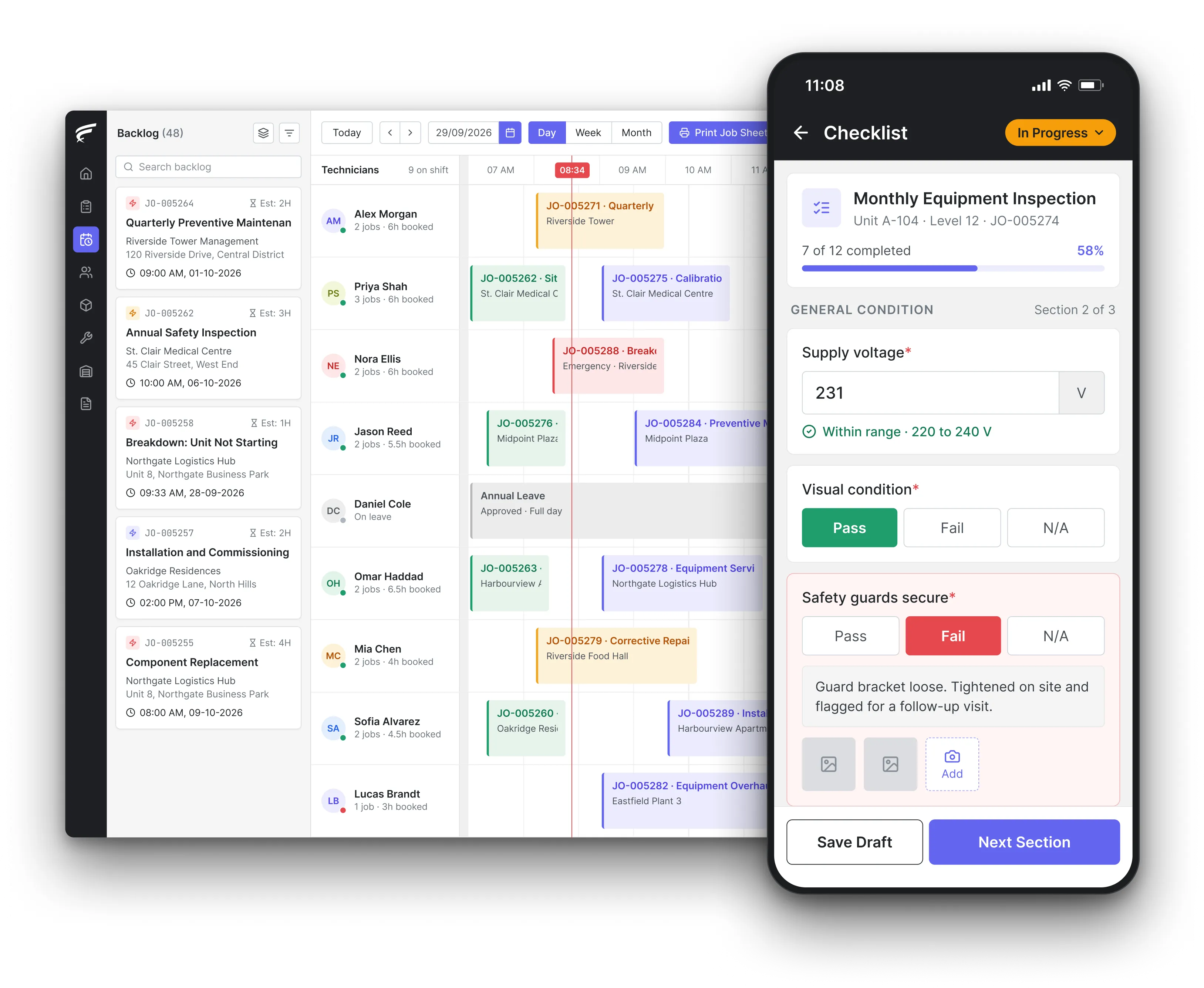
FieldEx scheduling board on desktop with a technician's inspection checklist open on the mobile app, as used by maintenance teams switching CMMS

FieldEx is field service management and maintenance management (CMMS) in one system. A CMMS migration to FieldEx brings your asset register with its parent and component structure, PM plans that continue from their last-done dates, meter readings and past work orders, all uploaded. Both systems can run side by side while your team checks the results.

What FieldEx does for teams switching CMMS

Most maintenance teams switch CMMS because the old one stopped keeping up: plans that need nudging by hand, a mobile app technicians avoid, reports that take a day to build. The worry is what the old system does hold. FieldEx is set up around those records first.

Records brought across from your old CMMS

  • Assets, sites, customers and past work orders can all be uploaded.
  • Past completed work orders uploaded too, so an asset's history in FieldEx starts years before go-live.
  • Larger or repeated loads of customers and maintenance plans created through the FieldEx API.
  • Old service reports, certificates, manuals and drawings attached to the asset, site or customer they belong to.

The asset register, structure and all

  • Equipment records with identifiers, specifications, photos, warranty details and location, on the web and in the mobile app, in asset management.
  • Parent and component levels, so a replaced pump motor or fan keeps its own history under the parent unit.
  • Extra identifier fields renamed to your own terms, such as plant number, tag number or client asset code.
  • Meter readings recorded against each asset, building a dated history of run hours, cycles or counts.

PM plans that carry on mid-cycle

  • Plans that raise work orders on a calendar schedule, on meter usage, or on whichever threshold is reached first, in preventive maintenance.
  • A choice per plan: a fixed calendar date, or a floating schedule that counts from the last completed visit. Fixed calendar dates apply to time-based plans.
  • Different task lists and assignees for different stages of one cycle, such as a monthly check and an annual overhaul.
  • Missed maintenance rescheduled automatically after the overdue period you set.

Inspections and certificates with their due dates

  • Recurring inspections and compliance certificates tracked per asset, with due dates, completion history and results, in compliance documentation.
  • Inspection and certificate records generated automatically from their own schedules.
  • Reminders by email, in-app notification or both before a certificate falls due.
  • A calendar of maintenance and compliance work showing overdue, open and completed items.

Your terms, forms and reports kept

  • Any field or label renamed to the words your team already uses, so the old CMMS vocabulary carries over.
  • Forms attached to a work order with number fields for readings such as pressures, amps and temperatures.
  • Completion PDFs showing equipment details, fault and resolution, parts used, check-in and check-out times and the customer's signature.

On the mobile app from the first shift

  • Each technician's PM work orders, asset history and checklists on Android and iOS phones, in the FieldEx mobile app.
  • An asset's QR code or barcode scanned to open its record, its history or a checklist.
  • Inspections completed on the phone can update the asset's status and its meter reading.
  • Work downloaded to the phone, completed without a signal and uploaded when the connection returns.

Proof the move worked

  • Reports on asset reliability, maintenance, costs and age, with mean time between failures (MTBF), mean time to repair (MTTR) and downtime per machine, in reporting and analytics.
  • Exports as CSV, Excel or PDF, and recurring exports emailed on a schedule.
  • Completed work orders that lock automatically, so only the roles you choose can change past records.

What should you move when you switch CMMS?

The UK National Archives' guidance on transferring digital records sets out the order for any system move. Back up the records first. Agree the minimum fields every record must carry and map each old field to its new one. Confirm the export format is one the receiving system supports.

The same guidance says not to destroy any data until it has loaded into the new system and been quality checked. For a CMMS, that means the old system stays readable until the asset count, plan count and open work in FieldEx match it.

In practice, teams move six groups of records: the asset register and its hierarchy, PM plans with their last-done dates, meter readings, open and overdue work orders, completed work history, and the documents attached to each asset.

What FieldEx does about it

  • Uploads that keep the links: assets, sites, customers and past completed work orders can all be uploaded. Each old work order lands against the asset it belongs to, so the history reads as one record.
  • Documents on the right record: manuals, drawings, old reports and certificates attach to the asset, site or customer they concern. A technician scanning the asset sees them on the phone.
  • Uploads included: assets, plans, readings and past work can all be uploaded, and setup is part of the subscription.

How do you keep PM due dates right after a CMMS migration?

Many maintenance intervals legally run from the last time the work was done. Under the US Occupational Safety and Health Administration (OSHA) rule on portable fire extinguishers (29 CFR 1910.157), each extinguisher needs an annual maintenance check, and the date must be recorded.

Stored-pressure dry chemical units need emptying and full maintenance every 6 years, counted from the last recharge or hydrostatic test.

UK Health and Safety Executive (HSE) guidance on the Lifting Operations and Lifting Equipment Regulations (LOLER, leaflet INDG422) sets in-service thorough examinations at 6-monthly, 12-monthly or examination-scheme intervals. A plan that restarts on go-live day would push every one of those dates out of line.

Bring the last completed date for every plan. Without it, a new CMMS can only guess the next due date.

What FieldEx does about it

  • Floating or fixed, per plan: a floating plan counts from the last completed visit, so a late job moves the next one with it. A fixed plan keeps its calendar anchor, which suits statutory dates. Fixed calendar dates apply to time-based plans.
  • Time, meter or whichever comes first: plans can trigger on calendar intervals, on an asset's meter usage, or on whichever threshold is reached first. Each asset can use its own meter interval.
  • Overdue work at cutover: a work order can be raised by hand before its scheduled date when a visit is already late on the day you switch. Missed maintenance is rescheduled automatically after the overdue period you set.
  • Several stages in one cycle: one plan can run a monthly check, a quarterly service and an annual overhaul, each with its own task list and assignee.

How do you bring the asset hierarchy and component records across?

Regulators often expect records at component level. The OSHA rule for overhead and gantry cranes (29 CFR 1910.179) requires a monthly inspection of hooks with a certification record. That record must include the inspection date, the inspector's signature and the serial number or other identifier of the hook inspected. Running ropes need a monthly inspection recorded the same way.

If the migration flattens the hierarchy, those records lose the item they refer to. Load the parent assets first, then each component with its own identifier, then the work history that names them.

If the component structure is lost in the move, that history no longer points at the item it describes.

What FieldEx does about it

  • Parent and component levels: assets sit in parent and component levels, so a replaced hook block, motor or valve keeps its own history under the crane, chiller or line it belongs to.
  • Your identifiers, your names: extra identifier fields on every asset can be renamed to match your register, such as plant number, tag number or client asset code. The names show on web and mobile.
  • Assets linked to where they live: each asset links to its customer, site, project and responsible users, so a site view lists everything installed there.
  • New labels without a hunt: QR code or barcode labels can be printed in several sizes and layouts, so old labels are replaced site by site.

How long must old inspection and maintenance records stay available after you switch?

UK HSE guidance sets different periods for different records:

RecordKeep it for
LOLER thorough examination before first useUntil the equipment is no longer used
LOLER in-service thorough examinationUntil the next report, or 2 years
Work equipment inspection (PUWER)At least until the next inspection
Legionella monitoring resultsAt least 5 years

Sources: UK HSE leaflet INDG422, HSE inspection of work equipment guidance, HSE Legionnaires' disease record-keeping guidance.

HSE also says inspection records under the Provision and Use of Work Equipment Regulations (PUWER) can be held on a computer if they are held securely and made available to an enforcing authority on request. UK limited companies must keep company and accounting records for 6 years from the end of the financial year they relate to, according to GOV.UK.

What FieldEx does about it

  • History in, not just in an archive: past completed work orders can be uploaded, so an inspector asking for the last 2 years sees them against the asset in FieldEx.
  • Records that can't drift: completed work orders lock automatically, and delete rights are set per role, so past maintenance history stays protected.
  • Reports with the original detail: the completion PDF keeps the work carried out, parts used, check-in and check-out times, attachments and the signature, and every regenerated PDF is kept.

How do you clean an asset register before loading it into a new CMMS?

The UK Government Data Quality Framework names the checks that matter for a register. Uniqueness means no duplicate records. Validity means values sit in the expected range and format. Completeness means the records and fields you need are present. Consistency means two values for the same asset don't contradict each other.

For a maintenance register, that usually means one record per physical asset, one naming pattern for asset types and locations, a status for every asset, and a meter reading where a plan depends on one.

What FieldEx does about it

  • Types, categories and statuses: asset types, categories and the lifecycle statuses each type allows give the cleaned register a structure to land in.
  • Counts that prove it matched: reports count and group assets by site, type or status, so the totals can be checked against the old system after each upload.
  • A trail of later edits: each asset keeps a record of changes to its details, with the user and the time, so corrections after go-live are traceable.

Can you run the old CMMS and the new one side by side?

The National Archives guidance is direct: don't delete source records until their receipt and accessibility in the new system are confirmed. Where an EU customer is switching cloud providers, the EU Data Act (Regulation 2023/2854, Article 25) sets the default transition: once notice is given, the data must be ported within 30 calendar days.

A practical pattern is to move one site or team first, run both systems for a few weeks, compare counts, then move the rest.

What FieldEx does about it

  • One site or team first: FieldEx suggests starting with one team or one site, then adding the rest when they're ready. You can also go live with everyone at once.
  • Calendar checks at cutover: a calendar of maintenance and compliance work shows what is overdue, open and done, so a plan that landed on the wrong date stands out in the first week.
  • No contract pressure: FieldEx bills monthly or annually, with no minimum term and no notice period, so the overlap is planned around your work, not a contract.

Can your old CMMS vendor charge you to export your data?

The EU Data Act (Article 29) removes switching charges, including data egress charges, from 12 January 2027. Until then, a provider may only charge reduced fees that do not exceed the costs directly linked to switching.

The European Commission's Data Act guidance adds that software-as-a-service providers must at least export data in a commonly used, machine-readable format, covering input data, output data and metadata.

Notice periods are capped too: Article 25 says the notice period to start switching can't exceed 2 months. Outside the EU, the contract decides, so ask for a full export in CSV or Excel before you give notice.

Ask your current vendor for a test export of assets, plans and work history before you sign anything new.

What FieldEx does about it

  • Your data stays yours: you can export your FieldEx data at any time, free of charge, including when you leave.
  • Exports in common formats: reports and lists export as CSV, Excel or PDF, and recurring exports can be emailed on a schedule.
  • No lock-in: billing is monthly or annual, with no minimum term and no notice period: you simply don't renew at the end of the term.

What should happen to statutory inspection schedules during the switch?

Under the UK Pressure Systems Safety Regulations 2000, HSE says a written scheme of examination must be in place, and an examination done, before any qualifying pressure equipment is used.

The competent person must produce a written report for each examination. For hired or leased equipment, the user should check the scheme is in place and the examination certificate is current.

A CMMS migration that drops the scheme or the last report leaves the next examination without its evidence. Treat statutory items as their own load: scheme, last report, next due date, competent person.

What FieldEx does about it

  • Certificates with their own cycle: recurring compliance certificates and scheduled inspections are tracked per asset, with due dates, completion history and results.
  • Reminders before the date: certificate reminders go by email, in-app notification or both, and a chosen group can be told when one is completed.
  • The paperwork on the asset: the written scheme and past examination reports attach to the pressure vessel, lift or crane they cover.
  • Licences, not only assets: licences and registrations for people and for your own company carry their own renewal schedule and reminders.
Customer story

An American integrated facility services company with a regional presence in Singapore found its existing mechanical and electrical (M&E) and cleaning systems could not meet internal needs and customer reporting requirements.

It moved more than 100 technicians and contractors onto FieldEx, which now schedules equipment maintenance grouped by type and location alongside its cleaning rosters.

Read the facility services case study

DKSM, a Malaysian mechanical, electrical and plumbing (MEP) and fire safety contractor serving 300+ client sites, needed separate checklists for sprinklers, hose reels, fire alarms and hydrants, and schedules that ran monthly, every 2 months, quarterly and every 6 months.

With FieldEx, each hydrant's record links to its site, and automatic reminders cover every schedule.

Read the DKSM customer story

Questions maintenance teams ask before moving to FieldEx

Can FieldEx take our past work orders from the old CMMS?

Yes. Past completed work orders can be uploaded alongside your assets, sites and customers. Each work order lands against its asset, so technicians see the full history on the phone from the first day.

Will our PM plans start again from zero?

No. Each plan can follow a floating schedule counted from the last completed visit, or a fixed calendar date. Carry the last-done date across and the next work order falls when it should. Overdue visits can be raised by hand on the day you switch.

Can we keep our asset numbers and the terms our team knows?

Yes. Extra identifier fields on every asset can be renamed to your own terms, and any field or label can be renamed too, for example calling a work order a "service ticket". The names show on web and mobile.

Can one plan use both run hours and calendar dates?

Yes. A plan can trigger on calendar intervals, on meter usage, or on whichever is reached first. Meter readings are recorded against each asset and kept as a history, and an inspection on the phone can update the reading.

Can we move one site at a time?

Yes. Start with one team or one site, then add the rest when they're ready, or move everyone at once. Plans can be applied to more sites later, and permission profiles decide who works in FieldEx from day one.

Can we get our data out of FieldEx later?

Yes. Export your data at any time, free of charge, including when you leave. FieldEx bills monthly or annually with no minimum term and no notice period: you simply don't renew when your term ends.

Does FieldEx work with our finance or ERP software?

FieldEx can connect to any open system through REST APIs and has connectors for QuickBooks and Xero.

How long does it take to move to FieldEx from another CMMS?

Once we know your requirements and your data is ready, FieldEx can be implemented in as little as a week with standard features for small businesses. Larger setups and custom work take longer.

Most implementations take 1 to 3 months, depending mainly on how long it takes to prepare your data. Setup, data upload and training are included in the subscription, with no setup fee. See FieldEx implementation.

Bring an export from your current CMMS to the demo

Book a demo