Multi-site operations with one maintenance standard for every site and building

Multi-site operations software that applies the same plans, checklists and response times at every location, lets each site report its own faults, and shows the whole portfolio, or one site, on a single dashboard.

Book a demo
Updated 15 Oct 2026
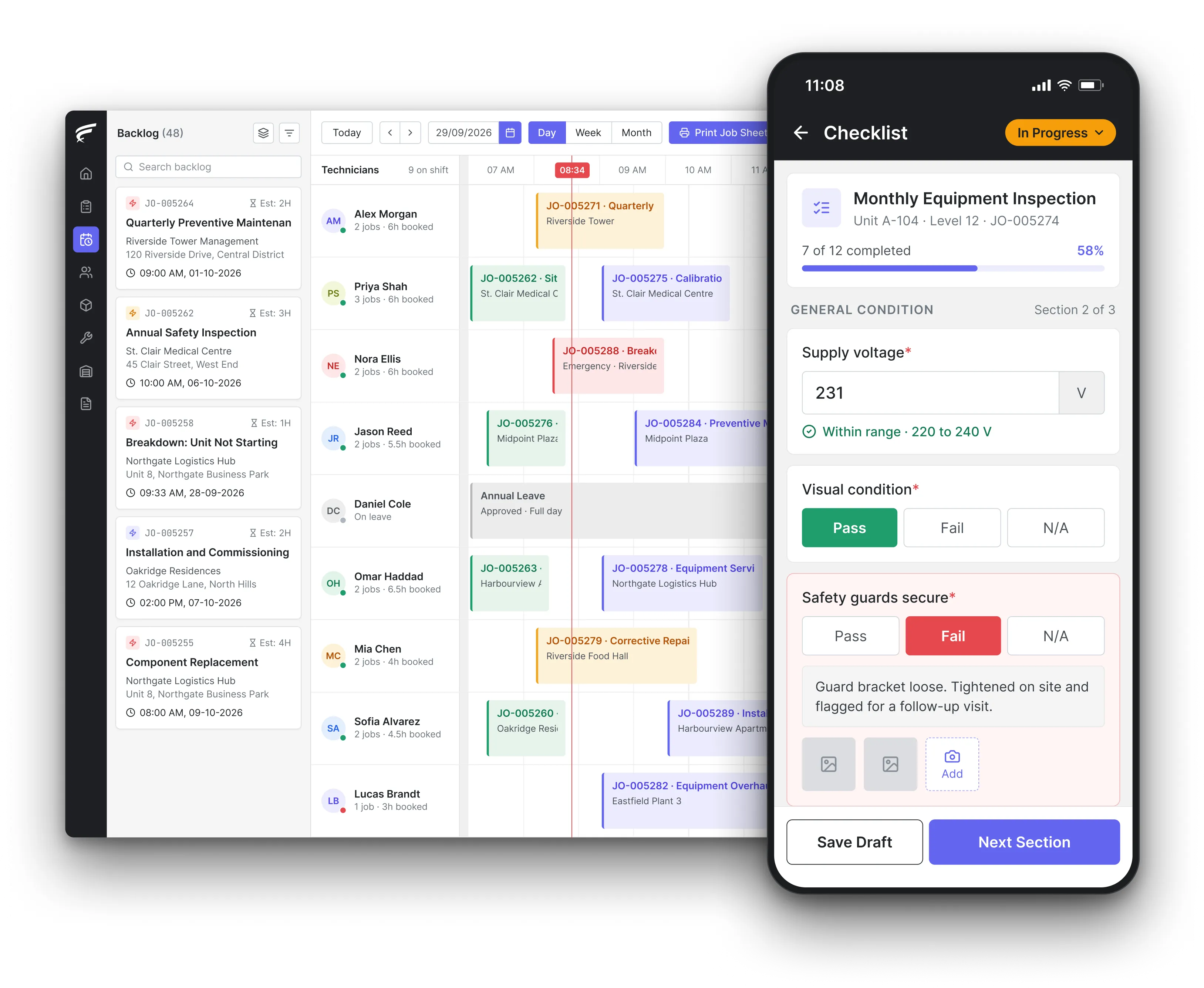
FieldEx scheduling board on desktop with a technician's inspection checklist open on the mobile app, as used by multi-site maintenance teams

FieldEx is field service management and maintenance management (CMMS) in one system for organisations that maintain many sites, branches or buildings. It holds every site with its own assets, contacts and service zone, applies one maintenance plan across all of them, gives each site a QR code for fault reports and each client a portal, and reports compliance and workload by site, region or portfolio.

What FieldEx does across a portfolio of sites

Running maintenance across many locations is a consistency problem: the same standard at every site, the same evidence from every technician, and one place to see which site is falling behind. FieldEx builds that from the site record up, so one plan, one checklist and one response target can cover a hundred sites while each site keeps its own history. Book a demo to see it with your own sites.

Every location as its own site

  • A site record for each branch, store, building or plant, with its address, map pin, primary and extra contacts, classification, geofence and service zone.
  • Sites linked to their customer and project, with the assets, jobs, tasks and maintenance plans that belong to each one.
  • Site photos, drawings and documents kept on the site record.
  • Site lists filtered and sorted by type, service zone, category, geofence or project, with saved views for each team.

One plan across many sites

  • Site maintenance plans applied to many sites at once, each site showing its last and next maintenance dates, in preventive maintenance.
  • Asset maintenance plans that pick up every matching asset automatically, including assets added at new sites later.
  • Plans cloned to start a new region or client from a proven plan, with or without its assets.
  • A site removed from a plan without deleting the site record when a location closes.

Fault reporting at every location

  • An automatic QR code for each site that opens a fault-report form without logging in, with the location, a description, contact details and photos or video.
  • Every report arriving as a job in the backlog with the site already filled in, using a shared default job template.
  • A branded customer portal for each client, on its own subdomain, to raise requests and follow every site's jobs, in the customer portal.
  • Service-level agreements per customer or asset, with at-risk and violation alerts.

The right technician for each location

  • Automatic assignment by skill, availability, shift, leave and service zone, using live location to rank the nearest eligible technician, in scheduling and dispatch.
  • Technician groups tried in the order you set, such as the regional team first and a backup group next, with a fallback when nobody qualifies.
  • Task journeys that record location, distance and duration between sites, viewable on a map.
  • Manager views of their team's tasks on a calendar, table or map.

Who sees which sites

  • An organisational hierarchy, so a regional manager sees their own sites' records while head office sees everything.
  • Permission profiles that limit users to their own records or open all records, and control web and mobile access.
  • Contractors set up as their own user group, assigned only the jobs and sites they work on.
  • Default list views by profile, so each role opens the sites and jobs that matter to them.

Parts and equipment across locations

  • Stock held by location, zone and store, with each technician's own stock tracked separately, in spare parts inventory.
  • Transfers of parts and equipment between sites and people, with approvals routed to the groups responsible for each zone.
  • Reorder and low-stock alerts per location, and a movement history of every transfer and part used.
  • Jobs and tasks can be downloaded and worked offline, with check-in, check-out and travel synced later.

The FieldEx mobile app at any site

  • Each technician's jobs across all their sites, with the site's location on a map and the asset's history, on the FieldEx mobile app.
  • QR or barcode scanning to open an asset and its checklist at whichever site the technician is standing in.
  • Check-in and check-out, watermarked photos, parts used and the customer's signature on every job.
  • Jobs downloaded to the phone, worked without a signal and uploaded when the connection returns.

One dashboard for the portfolio

  • Overdue work, work due in the next 7 days and work completed in the last 7 days, filtered by service zone, group, asset type and time range.
  • Site reports by status, customer, service zone, type and category, including the last visit to each site, in reporting and analytics.
  • Reports exported as CSV, Excel or PDF, or emailed on a schedule to each region or client.

How do you keep preventive maintenance consistent across multiple sites?

Set one standard, apply it everywhere, and check every site against it. The UK Government Facilities Management Standard 001 (under GovS 004 Property) says it is particularly important to avoid variations in service delivery standards across an estate, and requires organisations to have a thorough estate compliance plan that includes all of their properties. Government fire safety guidance for offices and shops makes the same point from the other end: regular checks, periodic servicing and maintenance must be carried out whatever the size of the premises, and any defects put right as quickly as possible. The small branch gets the same standard as the flagship.

What FieldEx does about it

  • One plan, every site: a site maintenance plan covers many sites at once, and asset plans add every matching asset across the portfolio, including new ones.
  • The same checklist everywhere: each plan uses one job template and checklist, so every site's visit asks the same questions and collects the same evidence.
  • Laggards shown by site: each plan lists every site's last and next maintenance dates, and the dashboard filters overdue work by service zone or group.
  • Defects fixed quickly: a failed checklist answer creates the corrective job straight away, at whichever site it was found.

Who is responsible for fire safety maintenance at each site in a multi-site business?

The responsible person for each premises. Article 17 of the UK Regulatory Reform (Fire Safety) Order 2005 requires the premises and its fire equipment and devices to be subject to a suitable system of maintenance and kept in efficient working order and good repair. UK government fire safety guidance says an organisation with several premises should decide who the responsible person is for each one, usually the manager, the person with overall control.

In a portfolio, that means a named owner per site and a way for head office to see that every one of them is keeping up.

What FieldEx does about it

  • A named contact on every site: each site holds its primary contact and additional contacts, so the responsible person is on the record.
  • Their own sites, their own view: the hierarchy lets each site or regional manager see their own sites' jobs and plans, while head office sees all of them.
  • Alerts to the right owner: reminders and service-level alerts go to the users or groups you choose for each site's work.
  • Maintenance on schedule at each site: fire equipment runs on recurring inspections per asset type, with due, overdue and completed status at each site.

Who is responsible for maintenance when several businesses share one building?

Each of them, for their part, and they must co-ordinate. Article 22 of the Regulatory Reform (Fire Safety) Order 2005 says that where two or more responsible persons share premises, temporarily or permanently, each must co-operate with the others and co-ordinate their fire safety measures. Since 1 October 2023, each must also tell the others which part of the premises they consider themselves responsible for, and keep a record of that information. Article 17 adds that occupiers of other parts of the building must co-operate with the responsible person's maintenance arrangements.

What FieldEx does about it

  • The building and its occupiers on one site: the shared building is one site, with each occupier's contacts on the record and their areas noted in the site's classification and reference fields.
  • Shared assets, one history: common fire alarms, sprinklers and emergency lighting sit on the building's site record, so every party sees the same maintenance history.
  • Records of who covers what: the written split of responsibilities is attached to the site record, next to the risk assessment.
  • Each client sees its own work: through the customer portal, each occupier sees the jobs and equipment linked to its own account.

How do you run the same weekly, monthly and annual fire checks at every branch?

The GOV.UK guidance on fire safety risk assessment for offices and shops sets a common rhythm that any portfolio can roll out. Each week, test the fire detection and warning systems and manually operated warning devices, following the manufacturer's or installer's instructions. Each month, test all emergency lighting systems and safety torches for charge and illumination. Each year, the emergency lighting, all firefighting equipment, fire alarms and other installed systems are tested and maintained by a competent person.

The weekly test is usually done by site staff, the annual one by a contractor; both need to land on the same record.

What FieldEx does about it

  • Three frequencies, one roll-out: weekly, monthly and annual inspections are set once per asset type, so every site with that equipment gets all three automatically.
  • Site staff do the weekly test: branch staff get mobile access to complete the weekly checklist, with a permission profile that limits what they can see and change.
  • Contractors do the annual service: the annual job goes to the contractor's group, and the certificate is attached to the completed record.
  • Every branch in one view: the dashboard and inspection list filter overdue checks by service zone, asset type or group.

What maintenance records should each site keep, and for how long?

UK government fire safety guidance says records should be kept in a specified place on the premises, such as the management office, covering audits, tests and any remedial action, and recommends a log book of all maintenance and testing, with larger premises keeping a dedicated record. For water systems, the Health and Safety Executive (HSE) says legionella records, including the responsible persons, significant findings, the written scheme and dated monitoring results, are kept while they are current and for at least 2 years after, and records of monitoring inspections for at least 5 years.

Across a portfolio, the question is less where each site keeps its log book than whether head office can produce any site's records on the day they are asked for.

What FieldEx does about it

  • A log book per site, built automatically: every inspection, job, certificate and reading is saved on the site and its assets as the work is done.
  • Available on the premises: the site manager opens the site's records on the web or the phone, and the client downloads job reports through the portal.
  • Kept for as long as you need: records stay on the site and asset for as long as you keep them, well past 2 or 5 years.
  • Pulled by site when asked: inspection and job reports filter by site, asset type and period, and export as CSV, Excel or PDF.

How should staff at many locations report faults?

Through one front door that works the same at every site. The same Facilities Management Standard 001 under GovS 004 says building users should have a single point of access to facilities management (FM) services, which might be a helpdesk for larger portfolios or a building manager for smaller ones, and that the methods of access must give all users a consistent experience. Government fire safety guidance also lists reporting faults, incidents and near misses among the duties of fire marshals at each site.

A phone number and a WhatsApp group might work for three sites; at thirty, nobody can tell which site a message came from.

What FieldEx does about it

  • A QR code on every site: each site gets its own QR code automatically, so staff scan it and report a fault without logging in, with photos or video.
  • The site is already known: each QR report creates a job with the site filled in and a default job template applied.
  • One backlog for the helpdesk: reports from every site, the portal and the office land in the same scheduler backlog, ready to assign.
  • The same experience for every client: each client's branded portal shows their own sites' jobs and lets them raise requests the same way.

How do you manage contractors working across many locations?

The Health and Safety Executive's guide to using contractors (INDG368, rev1) says the client and contractor must work together and co-ordinate their activities so the work can be done safely, and that the client should keep a check on how the work is going against what was agreed, doing more the greater the risk. HSE's lone working guidance adds that when a worker will be at someone else's workplace, the employer must ask that workplace's employer about any risks and control measures.

At many sites, that check has to happen remotely, through the record of what each contractor did, where and when.

What FieldEx does about it

  • Contractors as their own group: each contractor's team is a user group, so jobs can be assigned to the group and its members see only the work given to them.
  • Progress against what was agreed: jobs show their status, check-in and check-out times, photos and checklist answers, and service-level agreements alert you before a target is missed.
  • Site hazards in the job: the site's notes and attachments, such as access rules and risk assessments, are on the job the contractor opens on the phone.
  • Contractor work in reports: jobs and service-level data report by contractor group, site and period.

How do you keep track of technicians working alone at remote sites?

HSE's lone working guidance says that under the Management of Health and Safety at Work Regulations, employers must manage the risk to lone workers, and must train, supervise and monitor them, keep in touch with them and respond to any incident. For a technician driving between sites, keeping in touch means knowing where they were last seen and whether the job they are on has finished.

So a central filing room at head office doesn't satisfy the rule; each building needs its own lifts' records to hand.

What FieldEx does about it

  • Check-in and check-out on every task: technicians check in and out of each task, so a supervisor sees who is on which site and since when.
  • Journeys on a map: task journeys record location, distance and duration, with pause and resume, and managers see their team's tasks on a map view.
  • Live location for dispatch: technicians' live location is used to match them to jobs, with a predicted location outside the live-location window.
  • Offline and still logged: jobs and tasks can be downloaded and worked offline, with check-in, check-out and travel synced later.

How detailed should an asset register be across a property portfolio?

Detailed in proportion to the building's importance. The GovS 004 FM Standard 001 requires a complete FM asset register, with its granularity depending on building criticality, and asset condition reviewed regularly. It also asks for a forward maintenance register covering short-term (1-2 years), medium-term (3-5 years) and long-term (5 years plus) maintenance needs, for at least 5 years ahead.

So a critical site may register every pump and panel down to its components, while a small branch registers its main plant only.

What FieldEx does about it

  • Depth chosen per site: assets can be registered with parent and component levels where a site needs them, and as single assets where it doesn't.
  • A consistent structure: asset types, categories and subcategories are shared across every site, so the register reads the same everywhere.
  • Condition and status kept current: each asset's status and meter readings are updated by inspections, and the change history shows who changed what.
  • Lifecycle data for the forward register: asset reports on age, cost and reliability, filtered by site, support the 1-2, 3-5 and 5-plus year plans.
Customer story

A large American facility services company with a regional presence in Singapore runs its field teams across many buildings on one FieldEx system. Before FieldEx, service requests were emailed to field teams by hand and managers had no live view; now more than 100 technicians and contractors work from one schedule, maintenance is grouped by equipment type and location, and every job ends with a digital checklist and a PDF report.

Read the facility services case study

Chubb, an integrated security provider, runs security operations from 18 branches across Malaysia on FieldEx. Its story describes a central dashboard of active, pending and completed jobs, tasks assigned automatically by skill, availability and location, SLA reminders to avoid penalties, and jobs that can't be closed until every SOP step is done, with a 50% increase in daily completed tasks.

Read the Chubb story

Questions multi-site operators ask about FieldEx

What is the best maintenance software for multiple sites?

It needs a record for every site, plans that apply across all of them, a way for each site to report faults and a single view of who is behind. FieldEx does all of these in one system, with field service and maintenance management sharing the same site and asset records. Compare approaches in our guide to CMMS software.

Can one maintenance plan cover all our sites?

Yes. A site plan can apply to many sites, and asset plans pick up every matching asset automatically, including assets at sites added later.

Can regional managers see only their own sites?

Yes. The organisational hierarchy scopes what each user sees, so regional managers see their own teams' records and head office sees everything.

Does each site get its own fault-reporting QR code?

Yes. FieldEx creates a QR code for every site automatically, and reports made through it arrive as jobs with the site already filled in.

Can each client have its own portal?

Yes. The customer portal is branded with your logo, colours and font, can run on a branded subdomain, and shows each client only its own jobs, equipment and reports.

Can we compare maintenance performance between sites?

Yes. Reports group jobs, inspections and service-level data by site, service zone, customer or period, and site reports show the last visit to every site.

Can parts be moved between sites?

Yes. Parts and equipment transfer between stores, sites and technicians, with approvals by zone and a movement history of every transfer.

How long does it take to set up FieldEx across many sites?

Once we know your requirements and your data is ready, FieldEx can be implemented in as little as a week with standard features for small businesses. Larger setups and custom work take longer. Setup, data upload and training are included in the subscription, with no setup fee. Sites and assets can be uploaded. FieldEx helps with setup, and training is included. See FieldEx implementation.

Run every site to the same standard, from one system

Book a demo