Multi-trade job management for electrical, mechanical, plumbing and fire teams

Multi-trade job management that sends a qualified technician to every job, keeps each trade's checklists and certificates straight, and builds one history for every building and asset you look after.

Book a demo
Updated 15 Oct 2026
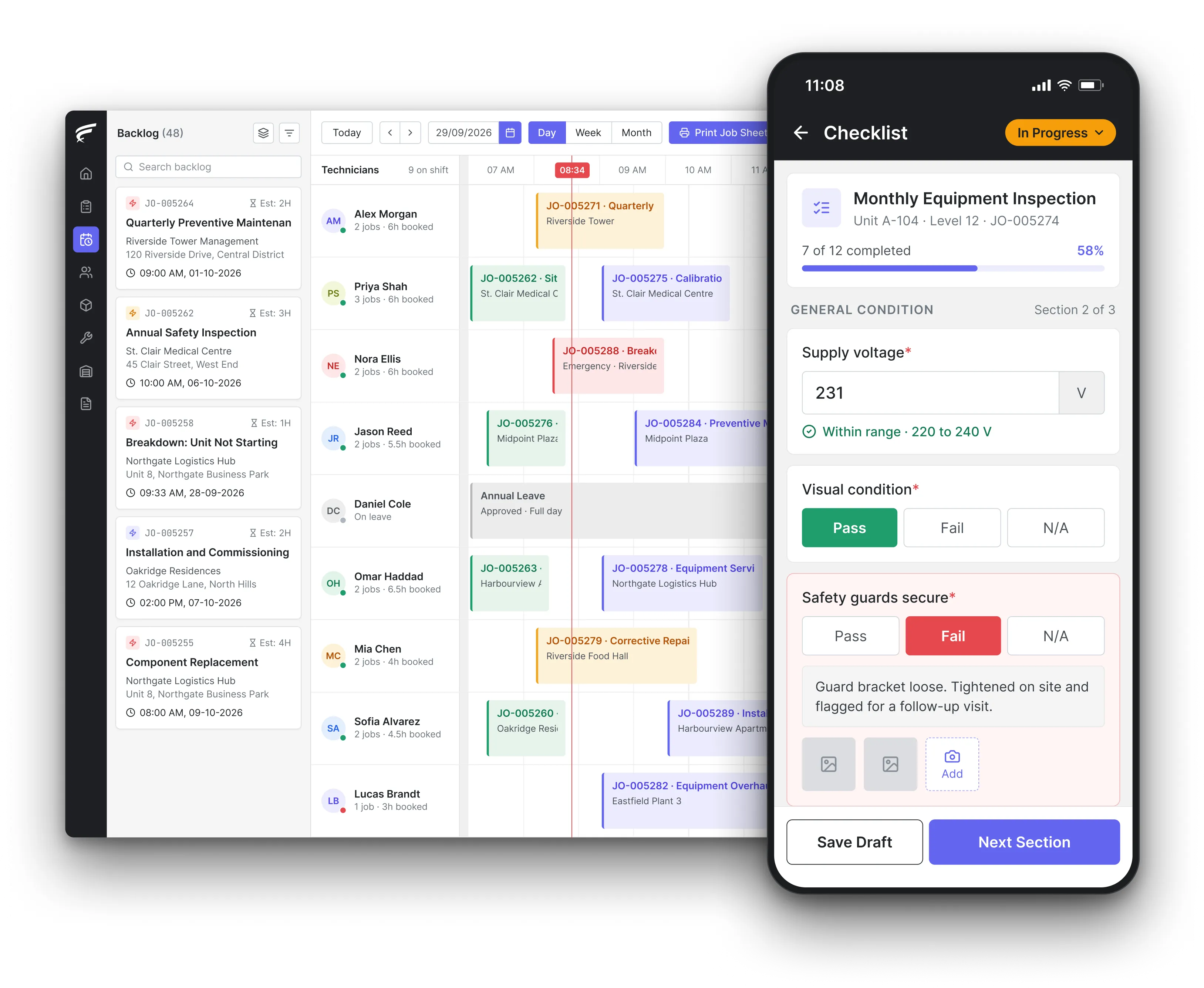
FieldEx scheduling board on desktop with a technician's inspection checklist open on the mobile app, as used by multi-trade maintenance teams

FieldEx is field service management and maintenance management (CMMS) in one system for multi-trade operations. It assigns each job to a technician with the right skills, gives every trade its own job types, checklists and inspection schedules, runs planned maintenance across all trades on one calendar, and keeps every visit on the record of the site and asset it belongs to.

What FieldEx does for multi-trade operations

A multi-trade operation lives or dies on two things: the right person on each job, and a record of every trade's work that a client or auditor can follow. FieldEx handles both from the same system, so the electrician's test results, the plumber's repair and the fire technician's inspection all land on the same building and asset records. Book a demo to see it with your own trades and sites.

Jobs that reach the right trade

  • Automatic assignment by skill, availability, shift, leave and service zone, using the technician's live location to pick the nearest match.
  • Technician groups tried in the order you set, such as your own electricians first and then a backup group, with a fallback that alerts a supervisor or leaves the job unassigned when nobody qualifies.
  • A drag-and-drop scheduler with an unassigned backlog, reassignment and rescheduling, and a notification to the technician each time, in scheduling and dispatch.
  • The technician's working hours, shifts and approved leave taken into account before a job is assigned.

A separate job type for each trade

  • Job forms and fields tailored to each job type, so an electrical fault, a plumbing leak and a fire alarm service each collect what that trade needs.
  • Job templates that prefill the work items, tasks and parts for repeat jobs.
  • Tasks and procedures inside a job, in the order you set, with tasks that must be finished before the job can close, in work order management.
  • Forms attached to a job with number fields for readings such as pressures, amps and water temperatures.

Planned maintenance across every trade

  • Maintenance plans for assets and for whole sites that create the visits automatically, with different checklists and technicians for different points in the cycle.
  • Triggers on the calendar, on meter readings such as running hours, or on whichever comes first.
  • Fixed calendar schedules or schedules that recalculate from the date the last visit was completed, with missed visits rescheduled after a set overdue period. Fixed calendar dates apply to time-based plans.
  • Last and next maintenance dates on every plan, site and asset, in preventive maintenance.

Inspections and certificates for each trade

  • Recurring certifications and inspections per asset type on standard or custom frequencies, with the certifying authority recorded.
  • Due, overdue and completed status, with reminders by email, in-app notification or both.
  • The completion date, the technician, the result and remarks on each record, with the certificate or test report attached, through compliance documentation.
  • A dashboard view of overdue certifications and inspections and those due in the next 7 days.

One record per site and asset

  • Sites with their address, map location, contacts, service zone and the assets, jobs and maintenance plans that belong to them.
  • Assets with parent and component levels, specifications, photos, warranty details, meter readings and attached files, in asset management.
  • Every trade's work orders, parts used and inspections kept on the asset record, with a change history showing who edited what and when.
  • A change history on each asset showing who edited what and when.

What technicians see on the phone

  • Each technician sees their own jobs, the asset's history and the right checklist on the FieldEx mobile app.
  • QR or barcode scanning to open an asset and start its inspection.
  • Check-in and check-out, travel logged against the job, watermarked photos and video, parts from the technician's own stock and the customer's signature.
  • Jobs downloaded to the phone, worked without a signal and uploaded when the connection returns.

Clients, reports and response times

  • Service-level agreements timed against business hours, with several stages and at-risk and violation alerts, applied by customer, job type or asset.
  • A branded customer portal where clients see their equipment, upcoming asset maintenance and job status, and download completed job reports.
  • Completion PDFs with the equipment, fault and resolution, parts with quantities and prices, check-in and check-out times, attachments and the customer's signature.
  • Reports by trade, site, customer or technician, exported or emailed on a schedule, in reporting and analytics.

How do you schedule technicians by skill when a job could be plumbing, HVAC or electrical?

Start from the task, not the technician. SFG20, the building maintenance specification standard that grew out of the Building Engineering Services Association (BESA), lists the recommended skill set for each maintenance task, so the trade a job needs is part of the specification itself. For some trades the match is also a legal one. Under the UK Electricity at Work Regulations 1989, regulation 16, nobody may do electrical work that needs technical knowledge or experience to prevent danger unless they have it or are properly supervised. The Gas Safety (Installation and Use) Regulations 1998, regulation 3, say gas work may only be done by someone competent to do it.

In practice that means each job type needs a required skill, each technician needs a list of the skills they hold, and whoever books the job needs to see both at once.

What FieldEx does about it

  • Skills drive the assignment: assignment rules match each job to technicians with the required skill, then check availability, shift, approved leave and service zone. Skills, zone and availability come first; then the nearest and least busy technician gets it. Skills can be named after any licence or registration, such as "gas registered" or "F gas qualified", and carry an expiry date.
  • The nearest qualified person: live location is used to rank eligible technicians, with a predicted location outside the live-location window, so a gas job goes to the closest gas-qualified engineer, not the closest engineer.
  • A safe fallback: if no technician in the first group qualifies, FieldEx tries the next group in your order, then alerts a supervisor, leaves the job unassigned or assigns it to a named person, as you choose.
  • Job types that carry the trade: each trade's job type has its own form and fields, so the electrician and the plumber each see the questions and readings that belong to their work.

Which maintenance jobs legally need a certified or registered technician?

Gas, refrigerant and electrical work carry the clearest rules, and they differ by country.

  • Gas (UK): under the Gas Safety (Installation and Use) Regulations 1998, regulation 3, an employer may not let staff work on gas fittings unless the employer is a member of a class of persons approved by the Health and Safety Executive (HSE).
  • Refrigerant (US): technicians who maintain, service, repair or dispose of equipment containing refrigerant must hold Environmental Protection Agency (EPA) Section 608 certification, earned by passing an EPA-approved test.
  • Refrigerant (UK): each person working on fluorinated gas (F gas) equipment needs their own F gas qualification, and working without one is illegal. Companies servicing F gas equipment operated by others, including air conditioning, refrigeration and fire protection systems, also need company certification from an approved body.
  • Electrical (UK): competence is required by law under the Electricity at Work Regulations, as above.

For a multi-trade contractor, the risk is the job that looks routine, such as a split unit that needs regassing, landing with someone who isn't qualified for that part of it.

What FieldEx does about it

  • Qualified jobs go to qualified people: each regulated job type can require its matching skill, so refrigerant work only reaches technicians who carry it and gas work only reaches gas-qualified engineers.
  • Certificates tracked with expiry dates: recurring certifications show as due, overdue or completed, with reminders, the certifying authority recorded and the certificate attached. Technicians' own certificates are tracked the same way.
  • Refrigerant recorded by the kilogram: set refrigerant up as a spare part measured in kg, so the quantity added is logged against the job, deducted from stock and shown on the completion PDF.
  • Who did the work, on the record: every completed job and inspection records the technician by name, with check-in and check-out times and the customer's signature.

How do you build one planned maintenance schedule across electrical, mechanical, plumbing and fire assets?

Use one specification and tailor it. SFG20 describes itself as the industry standard for building maintenance specification, and lets you adjust task timing, frequency, criticality and required skill set for each site or asset. BS 8210:2020, the British Standards Institution (BSI) code of practice for facilities maintenance management, treats regular, planned maintenance as a value-adding activity rather than an overhead. The practical problem is that each trade arrives with its own interval, its own checklist and its own people, and they all need to sit on one calendar for the same building without colliding.

For the contractor, the deadline is fixed and the evidence has to be complete before the inspection, not after it.

What FieldEx does about it

  • Plans per asset and per site: asset maintenance plans cover equipment such as boilers, pumps and distribution boards, and site plans cover building-wide work, each creating its visits automatically.
  • Each trade's cycle in the same plan: a plan can use different checklists and different technicians for different points in its cycle, so a quarterly electrical check and an annual service on the same asset each get the right list and the right person.
  • Intervals that follow your specification: schedules run daily, weekly, monthly, yearly or on preset intervals such as fortnightly, quarterly or every 3 years, on a fixed calendar or recalculated from the last completed visit.
  • New assets join automatically: plans can pick up new assets that match their criteria, so a newly installed pump on a covered site joins the right cycle without anyone adding it.

How do you run different inspection frequencies for each trade on the same site?

Every trade's standard sets its own clock. Under BS 5839-1, as summarised by Bedford Borough Council, a fire alarm system is tested weekly and serviced six-monthly by a trained competent person, with both recorded in a log book. The National Fire Protection Association's NFPA 70B (2023 edition), Table 9.2.2, sets infrared thermography of electrical equipment every 12 months for equipment in normal condition and every 6 months for equipment in poor condition, wherever manufacturer guidance is missing and a failure would be an unacceptable risk. A University of Colorado summary of NFPA 72 (2007 edition) notes that fire alarm devices that can only be tested during scheduled shutdowns must not exceed 18 months between tests.

So one building can carry weekly, six-monthly, annual and 18-month obligations at once, owned by several trades.

What FieldEx does about it

  • A frequency per inspection: set each recurring inspection daily, weekly, fortnightly, monthly, quarterly, every 6 months or annually, and certifications on standard or custom repeat frequencies.
  • Linked to the right checklist: each inspection links to its checklist template, so the weekly fire alarm test and the annual thermography survey open different questions.
  • Overdue work is visible: the dashboard shows overdue certifications and inspections, those due in the next 7 days and those completed in the last 7 days, filterable by asset type, group and service zone.
  • Findings turn into work: a failed answer can create a corrective work order and its tasks, and schedule a follow-up inspection.

How long do maintenance records need to be kept for each trade?

Retention rules vary by trade, and the longest one sets the bar for your records.

  • Refrigerant (UK): F gas records must be kept for 5 years, including the gas charged at installation and the gas added during maintenance.
  • Refrigerant (US): owners of appliances holding 50 lb or more of ozone-depleting refrigerant keep servicing records with the date, type of service and refrigerant added, and technicians give them an invoice showing the refrigerant added.
  • Water systems (UK): HSE says records of Legionella monitoring inspections should be kept for at least 5 years, and employers with 5 or more employees must record the significant findings of their risk assessment.
  • Electrical: Eaton's summary of NFPA 70B (2023) lists a documentation and records-retention policy covering maintenance, equipment and personnel as part of an electrical maintenance program.

A contractor serving the same building across trades holds all of these at once, and the client expects them to be found by asset, not by trade folder.

What FieldEx does about it

  • History that stays with the asset: every work order, inspection, part used and meter reading sits on the asset's record for as long as you keep the asset.
  • Proof attached to the record: certificates, test reports and lab results are attached to the completed inspection or certification, where they can be viewed and downloaded later.
  • Completion PDFs on every job: each finished job produces a PDF with the equipment, fault and resolution, parts with quantities and prices, check-in and check-out times, attachments and the customer's signature, emailed with a record of when it was sent.
  • Reports when an auditor asks: inspection, job and asset data can be reported by site, asset type or period, then exported as CSV, Excel or PDF.

How do you coordinate lockout and permits to work when several trades work on the same equipment?

The rules put one person in charge. The US Occupational Safety and Health Administration's lockout/tagout standard, 29 CFR 1910.147(f)(3), says that when a crew or craft group services equipment, group lockout must give each worker protection equal to a personal lock, and where more than one crew or craft is involved, one authorised employee is given overall control to coordinate them. HSE describes a permit to work as stating what work is done, when, and which parts are safe, with a responsible person checking safety at each stage and the workers signing the permit.

For a multi-trade job, that means the order of work matters: isolation first, then each trade's task, then reinstatement, with a named person accountable for each step.

What FieldEx does about it

  • Tasks in a set order: a job can hold an ordered procedure of tasks, such as isolate, repair and reinstate, with each task required to be finished before the next can start.
  • Each task to its own trade: tasks inside one job can be assigned to different technicians or groups, with their own date and start and end times, and the assignee can accept or decline.
  • A job can't close early: designated tasks, such as the reinstatement check, must be completed before the job itself can be closed.
  • Check-in, check-out and history: technicians check in and out of each task, and the task's history shows who did what and when.

How do you keep one maintenance record per building when several trades work on it?

Regulators increasingly expect the building's information to be kept as one thread. The UK government's guidance on the golden thread for higher-risk buildings says the record must be kept digitally and securely, be the building's single source of truth, and be available when someone needs it. Once the building is occupied, the Accountable Person keeps it up to date.

Trade rules point the same way. UK F gas guidance asks equipment operators to record the name, address and certificate number of every company that installs, services or decommissions their F gas equipment.

When each trade keeps its own spreadsheet, nobody holds that thread.

What FieldEx does about it

  • Site first, then asset: each site holds its assets, jobs, tasks, projects and maintenance plans, so the electrical, plumbing and fire work for one building is seen together.
  • Components with their own history: parent and component levels let a pump set, a distribution board or a fire panel keep its parts' histories separately.
  • QR labels on every asset: print QR or barcode labels in several sizes and layouts, so any trade can scan the asset and see its full history before starting work.
  • One place for clients to look: through the customer portal, the client sees registered equipment with its last-serviced date, upcoming asset maintenance and every trade's job reports.

How do you send the nearest qualified technician when an earlier job runs long?

FieldEx shows the dispatcher which qualified technician is nearest when a job overruns. The waiting job can be moved to another technician with the same skill, and response-time alerts go out before the target is missed, so the client hears about the change in time.

What FieldEx does about it

  • Reassign in a drag: the dispatcher drags the waiting job to another qualified technician's calendar, or returns it to the backlog, and the new technician is notified straight away.
  • Live and predicted location: assignment uses live location to find the nearest eligible technician, and a predicted location outside the live-location window.
  • Response times watched for you: service-level agreements time each job against business hours and send at-risk alerts before a violation, to the people or groups you choose.
  • The client can move the visit: customers can request a new appointment date through the portal, and the change shows on the schedule.

What happens when a job overruns and the next client is waiting?

It happens every week on a mixed-trade roster: an aircond callout turns out to be an electrical fault, and the technician's next PPM visit slips. The job needs another technician with the same skill, and the client needs a new time before the response window closes.

What FieldEx does about it

  • Move the job in seconds: drag it to another qualified technician's calendar or back to the backlog, and the new technician is notified.
  • Alerts before the breach: service-level agreements send at-risk alerts before the response or fix time is missed.
  • The client can reschedule: customers request a new appointment date through the portal, and the change appears on the schedule.
Customer story

AlanDick runs telecom infrastructure field operations on FieldEx. Its story describes scheduling and dispatch based on technician skill, availability and proximity, with a live operations dashboard for job progress.

Read the AlanDick customer story

DKSM, a mechanical, electrical and plumbing (MEP) and fire safety contractor in Malaysia, uses FieldEx to automate compliance scheduling and inventory tracking across 300+ client sites, with maintenance reminders and work orders for each account's schedule and parts logged on team leads' phones.

Read the DKSM story

Questions multi-trade contractors ask about FieldEx

What is the best job management software for a multi-trade contractor?

One that knows which trade each job needs and who holds that skill, gives each trade its own job forms and checklists, and keeps all the work on the same site and asset records. FieldEx does all three, along with planned maintenance, certifications and service-level agreements in the same system. Compare approaches in our guide to field service management software.

Can FieldEx assign jobs to technicians by skill automatically?

Yes. Assignment rules match each job to technicians with the required skill, then check availability, shift, leave and service zone, then put the nearest and least busy first. Groups can be tried in a set order, with a fallback when nobody qualifies.

Can each trade have its own checklists and job forms?

Yes. Job forms and fields can be tailored to each job type, job templates prefill the work items and parts, and inspection checklists are linked to the asset type they belong to, with sections and reference photos.

Can one job involve two trades?

Yes. A job can hold several tasks in a set order, each assigned to a different technician or group with its own times, and designated tasks must be finished before the job can close.

Can we track response times separately for different job types?

Yes. Service-level agreements apply to jobs that match the conditions you set, such as a job type, a customer or an asset, each with its own stages, business hours and at-risk and violation alerts.

Can our clients see every trade's work in one place?

Yes. The branded customer portal shows the client's equipment with its last-serviced date, upcoming asset maintenance, job status and downloadable job reports, whichever trade did the work.

Can technicians complete jobs without a signal?

Yes. Technicians download their jobs to the mobile app, work without a signal in risers, plant rooms and basements, and upload the completed work when the connection returns.

How long does it take to set up FieldEx for a multi-trade team?

Once we know your requirements and your data is ready, FieldEx can be implemented in as little as a week with standard features for small businesses. Larger setups and custom work take longer. Setup, data upload and training are included in the subscription, with no setup fee. Sites and assets can be uploaded. FieldEx helps with setup, and training is included. See FieldEx implementation.

See every trade's jobs, checks and records in one system

Book a demo