
Asset Lifecycle Management
Organize equipment into multi-level hierarchies, log full service records, and keep the complete maintenance history for each machine.
Learn moreThe best CMMS (computerized maintenance management system) software, an asset management system, schedules preventive maintenance automatically, keeps a full history for every asset, controls spare parts and cuts unplanned downtime. For teams whose technicians also travel to customer or remote sites, FieldEx runs CMMS and Field Service Management (FSM) in one platform.
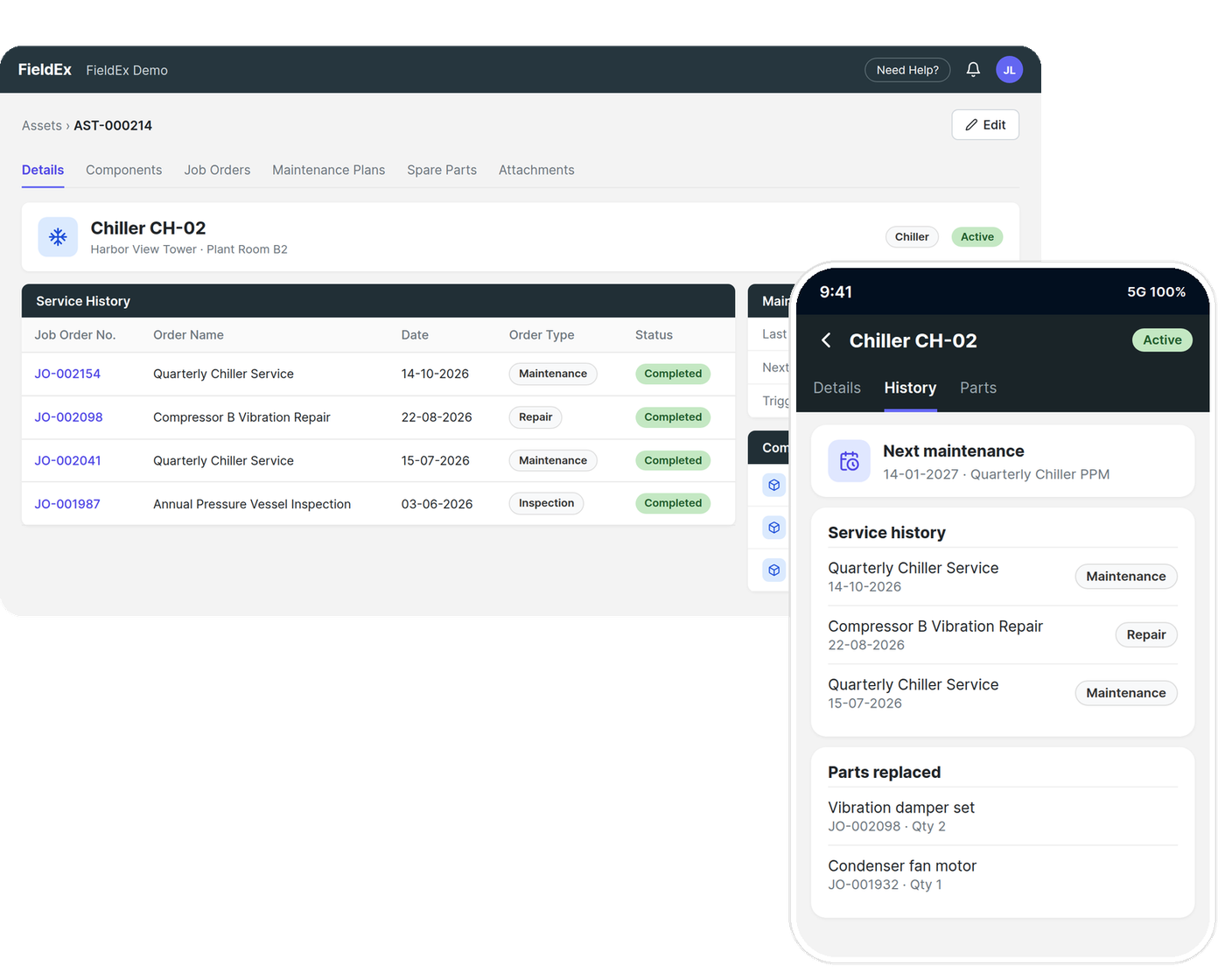
A Computerized Maintenance Management System is central software that simplifies maintenance work, extends asset life, and keeps equipment running. The key features usually include:
Organize equipment into multi-level hierarchies, log full service records, and keep the complete maintenance history for each machine.
Learn moreCreate, assign, and close maintenance jobs while logging tasks, technician notes, and the spare parts used.
Learn moreFollow stock levels across warehouses, technician bins, and active jobs, so every part used is tied to a work order.
Learn moreManage recurring certifications, safety inspections, and audit records against the equipment they belong to.
Learn moreAutomate maintenance on a time or meter-based schedule so services happen before equipment fails.
Learn moreBuyers often ask whether they need a CMMS or Field Service Management (FSM) software. The honest answer for most operations is both, so it helps to know the difference.
A CMMS is built around the equipment. It exists to keep machines running, track their history, schedule their upkeep, and prove they were maintained. Its center of gravity is the asset.
If you only manage maintenance on your own fixed equipment, a CMMS alone may be enough. The moment you send people to different sites, you are doing field service too. FieldEx runs the CMMS and the FSM side in one platform, against the same assets, sites, and customers, so a scheduled service and a reactive repair on the same machine share one history.
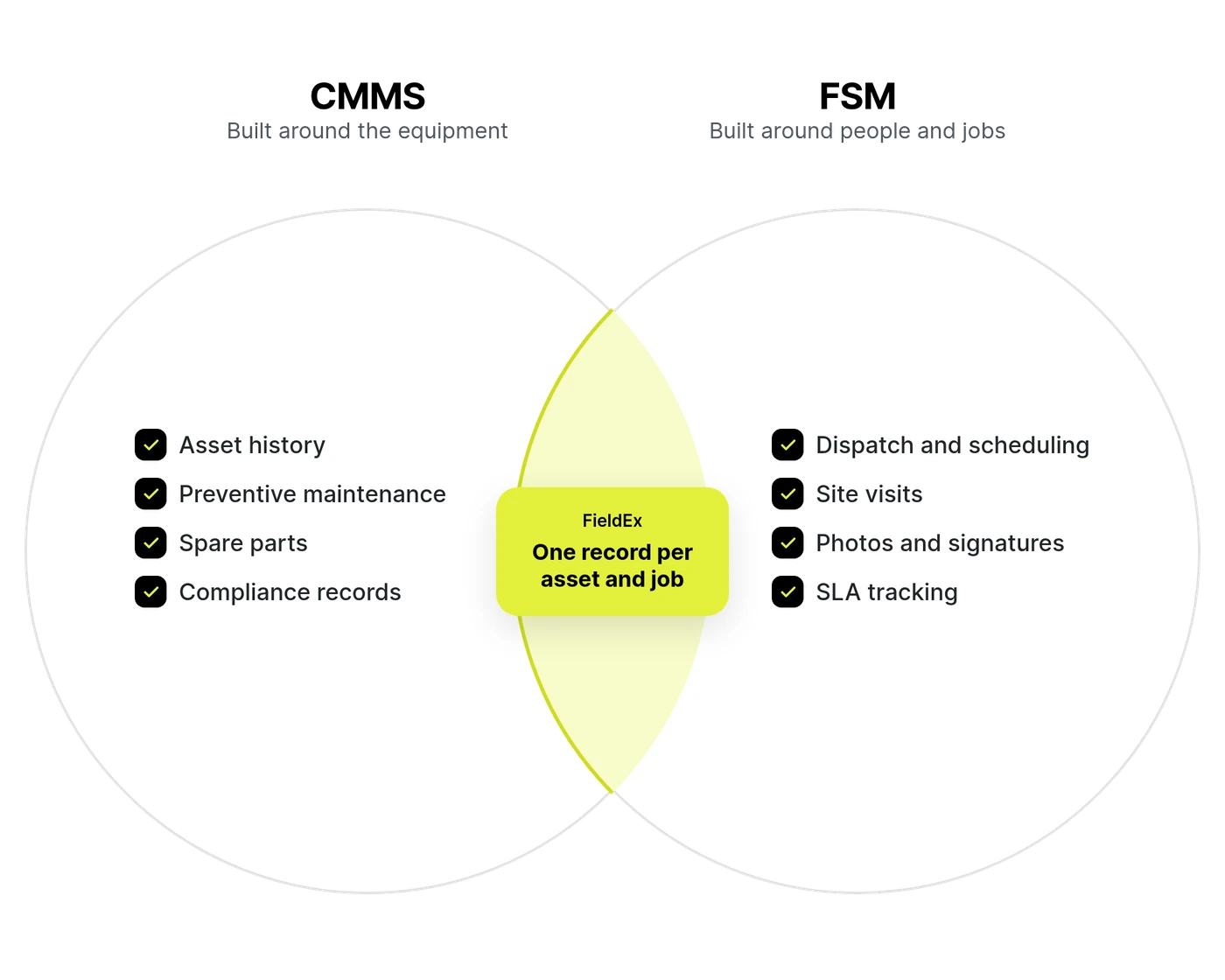
Many legacy CMMS platforms fail because field technicians find them too heavy to use on site. What makes FieldEx such a strong CMMS is how it closes the gap between management visibility and daily field work by pairing a flexible CMMS engine with full FSM features. It handles any maintenance work type against any physical asset type in one place.
Track complex machinery down to the exact sub-component. FieldEx supports multi-level parent-child asset structures, so a technician can log a repair or part replacement against a sub-assembly while the parent asset keeps its overall service timeline. Because the engine is asset-agnostic, the same system tracks a generator, a vehicle, a chiller, or a coffee machine, without a separate template per type.
Set up preventive maintenance on a time or meter-based schedule where either the calendar or the usage meter can trigger the next job. The hybrid mode lets you run on both together, choosing whether elapsed time, runtime hours, kilometers, or cycles decide when the next service is due. This suits everything from monthly filter changes to usage-based servicing on generators, pumps, and vehicles.
FieldEx also includes self-healing schedule logic. If a routine service becomes overdue past a threshold you set, the system reschedules the next visit based on when the work is actually completed, so the schedule does not build an artificial backlog of missed dates. Preventive maintenance can run against a single asset or a whole fleet.
AMRTUR, a Southeast Asian oilfield services contractor, used to service equipment on a fixed calendar, with no regard for how hard it was actually being run. With FieldEx, a maintenance job is now created automatically once a machine hits 300 hours of use or six months, whichever comes first, so servicing follows real wear instead of a date on a calendar.
Read the full storyKeep compliance separate from routine maintenance. FieldEx has a dedicated layer for recurring certifications and scheduled inspections, configured against each asset. Set the frequency once and the system generates the dated records for you. Add reminders before due dates, tie each inspection to a mandatory digital checklist the inspector must complete, and upload the official certificate or report straight onto the asset record. When the certificate is due again, the next record is already waiting.
Maintain granular stock control for audit and accounting. FieldEx tracks spare parts through a clear structure: Location (warehouse or depot) → Zone → Bin, including the personal bins that represent technician van stock. Parts then transfer onto the Job Order they are used on. Transfers move stock from bin to bin, to a technician's bin, or directly onto a job, so you always know where a part is and which work consumed it. This gives you a clean trail from stockroom to machine.
TapEffect, a social enterprise running piped water systems across remote communities in Cambodia, used to manage stock at each site independently, with no way for head office to see what was where. With FieldEx, their central team can now see stock levels across every site and transfer surplus parts to wherever they're needed, instead of over-ordering.
Read the full storyFind your high-failure equipment before it damages productivity. FieldEx calculates Mean Time Between Failures (MTBF) and Mean Time to Repair (MTTR) directly on each asset from real work order logs, alongside failure rate, downtime, total repair time, and utilization. For broader enterprise reporting, asset and job data can be pulled into Microsoft Power BI using a template FieldEx sets up with you.
Set up maintenance work in your own terms. Create custom work order types with their own status paths and field visibility, and control who can move a job into a given status, such as reserving an "Approved" sign-off for a supervisor. Field names, list values, and module labels can be renamed to match how your team already refers to its equipment and work, so people are not learning a new vocabulary to use the system.
Digital inspection checklists do more than record a pass or fail. Map individual answers so that a failed check automatically creates a corrective repair job on completion, using the template and task steps you set. One completed inspection can raise several corrective jobs if several answers are mapped, with no manual re-entry.
Technicians run maintenance from the Android and iOS apps. They open an asset and its history, complete inspection checklists, log parts used, capture photos, and collect sign-offs on site. Job-related asset information and record edits work offline and sync back once the technician is online again, so a service in a basement plant room or a remote site still gets recorded.
None of that depth lands on the technician all at once. Each person opens the app to their own job list and sees only the fields set for that type of work, with labels in the words your team already uses. Procedures can require task steps in a set order, so a newer technician follows the same routine as your most experienced one.
A CMMS that only lives at a desk records what happened to a machine. FieldEx also records the field work around it, and that context changes what your asset data can tell you.
A desk CMMS counts the replacement part and an estimate of labor hours. FieldEx holds parts cost, repair cost, and maintenance cost against each asset, and also captures the travel and mileage each job required through journey logging. Put those together and an identical machine can turn out to cost more to maintain at a distant site because of the distance to reach it, not because it breaks more often.
Every asset belongs to a site, and every job records where the work happened and who did it. So you can compare failures across sites, zones, and installation teams. That tells a reliability engineer whether a recurring failure is the component itself, or something about one site or one crew that a single-location log would never surface.
Faults reported through the customer portal or a site QR code, and the sign-offs customers give on completed work, land on the same asset history your maintenance team works from. You see how a machine behaves under real use in the field, not only what internal logs show.
Most CMMS platforms were built for one fixed location: a single plant or facility, with its own equipment and its own maintenance team. FieldEx does that job in full. Run maintenance at one site and you get the complete system: asset hierarchies, preventive maintenance, spare parts control, and compliance records, with nothing switched off because your operation is smaller.
Where FieldEx does more is the moment you add a second location. The system is built around a site structure, so every asset, job and inspection belongs to a site. Adding locations does not mean a new system or a new spreadsheet for each one.
Across many sites, that structure gives you:
Whether those sites are buildings you own or customer locations you service, the model stays the same: one system, one record per asset, every location accounted for.
How your equipment is spread, and who owns it, matters more than your industry. FieldEx fits three setups.
Factories, hospitals, hotels and commercial buildings with an in-house maintenance team. A standalone CMMS can cover this. FieldEx runs the full CMMS at a single site and stays the same system if you add a second site later.
Plantations and estates, telecoms sites, and networks of branches or terminals. Every asset belongs to a site, so each location keeps its own history while head office sees every asset in one list.
Fire and security companies, building services contractors, and equipment dealers with a service center. Each customer's equipment keeps its own history. The field side records travel, sign-offs and faults reported by customers. One of our Malaysian customers matches technicians' petrol claims to logged journeys, which cut questionable claims by about 80%.
Use this as a checklist when comparing platforms:
Can it model parent-child equipment, so repairs on a sub-component still roll up to the parent's history?
Does it support time and meter-based schedules, and can it reschedule overdue services instead of stacking a backlog?
Can you manage recurring certificates and inspections separately from maintenance jobs, with reminders and document uploads on the asset record?
Can you track stock from warehouse to bin to job, with a clear trail of what each job consumed?
Can you set up recurring maintenance routines across flexible intervals, from daily and weekly checks to monthly and annual services, so routines run automatically according to operational needs?
Does it track the full history of a machine from initial purchase through leasing assignments, repair histories, contract details, and warranty status? Can it store manufacturer manuals directly on the asset record so technicians have instant access on site?
Can you scan a QR tag on a machine to open its record, and let non-users report faults through a public form?
Are MTBF, MTTR, downtime, and utilization tracked on the asset, and can the data feed Power BI?
Can technicians run maintenance on a phone, including partial offline work that syncs back?
Can you produce job sheets and service certificates in your own layout, with signatures and photo evidence?
The strongest CMMS is the one your technicians will actually use and the one that fits how your equipment is serviced. Work through these before you commit:
If your equipment runs on usage rather than the calendar, you need meter-aware scheduling, not just fixed dates. If your machines have sub-components that fail independently, you need parent-child hierarchies. Match the asset model first.
If certifications and inspections carry legal or audit weight in your work, a system that treats them as a proper layer, with reminders and stored documents, saves you from tracking renewals in a spreadsheet.
A CMMS that only works well at a desk fails where maintenance happens. Test the mobile app the way a technician will use it, including with no signal, before you decide. Check that each technician sees only what their job needs, in a language they are comfortable with.
The value of a CMMS is the record it builds over time. If parts, jobs, and asset history live in separate places, you lose the reliability data that justifies the system. One connected record per asset is the point.
If you send people to customer sites, a CMMS alone leaves the dispatch and customer side unmanaged. A platform that covers both keeps maintenance and field work on the same records.
FieldEx connects to accounting, calendar, CRM and reporting tools, and has an API for other systems.
Customer, product and spare part records sync between FieldEx and your accounting system. With QuickBooks, you generate the invoice from the completed job. With Xero, the invoice is created when a job reaches a status you choose.
Each user can connect their own calendar.
FieldEx provides a Power BI template and prepares your data with you. Your admin connects it once from FieldEx Setup. You can then report on assets and jobs across every site.
A documented API lets your IT team or partner connect FieldEx to an ERP, local accounting software or other tools. Custom integrations built by FieldEx are quoted separately.
FieldEx is cloud software, with no on-premise version. Your team uses it in a web browser and in the FieldEx app for iOS and Android. There is no server to buy, and FieldEx handles hosting and updates.
An on-premise CMMS runs on your own servers. It suits organizations whose IT policy requires internal hosting. In exchange, your IT team takes on the servers, updates, backups and security patches.
Cloud fits teams spread across several sites or working away from a desk, and companies without a large IT department. If the signal drops on site, technicians can still complete checklists, capture photos and collect sign-offs. The app syncs once they are back online.
Getting live in FieldEx does not carry a separate bill. Onboarding, workspace setup, configuration, and technician training are included for free. There is no implementation fee to pay before you see the system working.
The FieldEx team helps set up your workspace with you and helps bring your existing records in, so you start with your assets, sites, and customers already loaded, instead of a blank system.
Because setup is guided and the data is brought in for you, most teams are running real work in days to weeks, depending on the size of your operation, rather than the long rollout a heavy legacy CMMS usually needs.
Can’t find the answer you’re looking for? Please chat with our friendly team.
The best CMMS depends on how your maintenance work is set up. If you maintain your own equipment at one site, such as a factory or a building, a standalone CMMS can cover the job. If your equipment is spread across many sites, or your team services equipment for customers, choose a CMMS that also runs field service. FieldEx is built for both but thrives on that second group. It runs preventive maintenance, asset history, spare parts and compliance alongside dispatch and field work, with a technician app in six languages. Large enterprises already running SAP or Oracle should check the maintenance module inside their ERP first.
Cloud CMMS is priced per user per month, or per asset, depending on the vendor. Compare the total cost, not only the subscription. Setup, data import, training, add-on modules and support can each add to the bill. FieldEx publishes its per-user prices on its pricing page. Setup, data import and training are included, with no implementation fee, and you can start with a 14-day free trial.
Any organization that maintains physical equipment. That includes manufacturing plants, hospitals, commercial buildings, plantations and estates, telecoms sites, utilities, and contractors who service equipment for their customers. The setup matters more than the industry: one site or many, and whether the equipment is yours or your customers'.
The FieldEx app for iOS and Android switches between English, Bahasa Melayu, Mandarin, Spanish, German and Romanian (with more coming soon), so each technician can work in their preferred language.
Some CMMS products connect directly and others need custom work, so ask each vendor which is which. FieldEx connects to QuickBooks and Xero. Customer, product and spare part records sync, and invoices are created from completed jobs. Other accounting systems can connect through the FieldEx API as a custom project.
Cloud. Your team uses FieldEx in a web browser and in the iOS and Android apps, with nothing to install on your own servers. FieldEx handles hosting and updates.
A CMMS automates maintenance scheduling, tracks asset service history, controls spare parts, and reports on downtime and maintenance cost. It moves operations from reactive emergency repairs to planned, preventive care.
A standalone CMMS records what happens to your equipment. FieldEx runs maintenance and field service on the same records, so your asset history also carries the field context: the travel and mileage each job took, which site and team handled it, and faults or sign-offs reported by customers. A failed inspection in the field raises its corrective work order automatically and stays chained to the asset as one record.
FieldEx runs planned preventive maintenance and reactive repairs against the same asset records. Emergency jobs can be logged instantly from a reported fault, while scheduled PM jobs generate automatically ahead of their due date without displacing ongoing schedules.
Time and meter-based. A time-based schedule runs on the calendar. A meter-based schedule runs on usage, hours, kilometers, or cycles. Combine them and choose whether the next job fires on whichever hits first, or only when both are met. Site-level PM is time-based.
If a routine service becomes overdue past a threshold you set, FieldEx reschedules the next visit based on when the work is actually completed. This stops a missed service from creating an artificial backlog of overdue dates that never clears.
The FieldEx apps for iOS and Android let technicians view job-related asset information, complete checklists, log parts, capture photos, and collect sign-offs while offline. Everything syncs back once they're online again. By design, inventory transfers need a live connection. Stock is shared across the whole team, so a transfer only counts once it matches what's actually on the shelf. This also keeps every movement logged the moment it happens, which makes audits easier to trust.
Parts are tracked through Location (warehouse or depot), then Zone, then Bin, including personal bins that hold technician van stock. Parts transfer onto the job that uses them, so you can trace any part from the stockroom to the machine and see which work consumed it.
Certifications and inspections are handled as a dedicated layer against each asset, set up at the asset type level. You set the frequency, and FieldEx generates the dated records. Certifications support reminders and document uploads. Inspections tie each record to a mandatory checklist the inspector completes.
No. BIM (building information modeling) is for designing and modeling the building itself. FieldEx manages the equipment inside and around buildings, and outdoors, such as chillers, pumps, generators and chargers, along with its maintenance history, spare parts and compliance records.
