Work order management software that closes every job with proof

Build each job from a template and keep required steps in order. Send the customer a signed completion report the moment the work is done.

Book a demo
Updated 16 Oct 2026
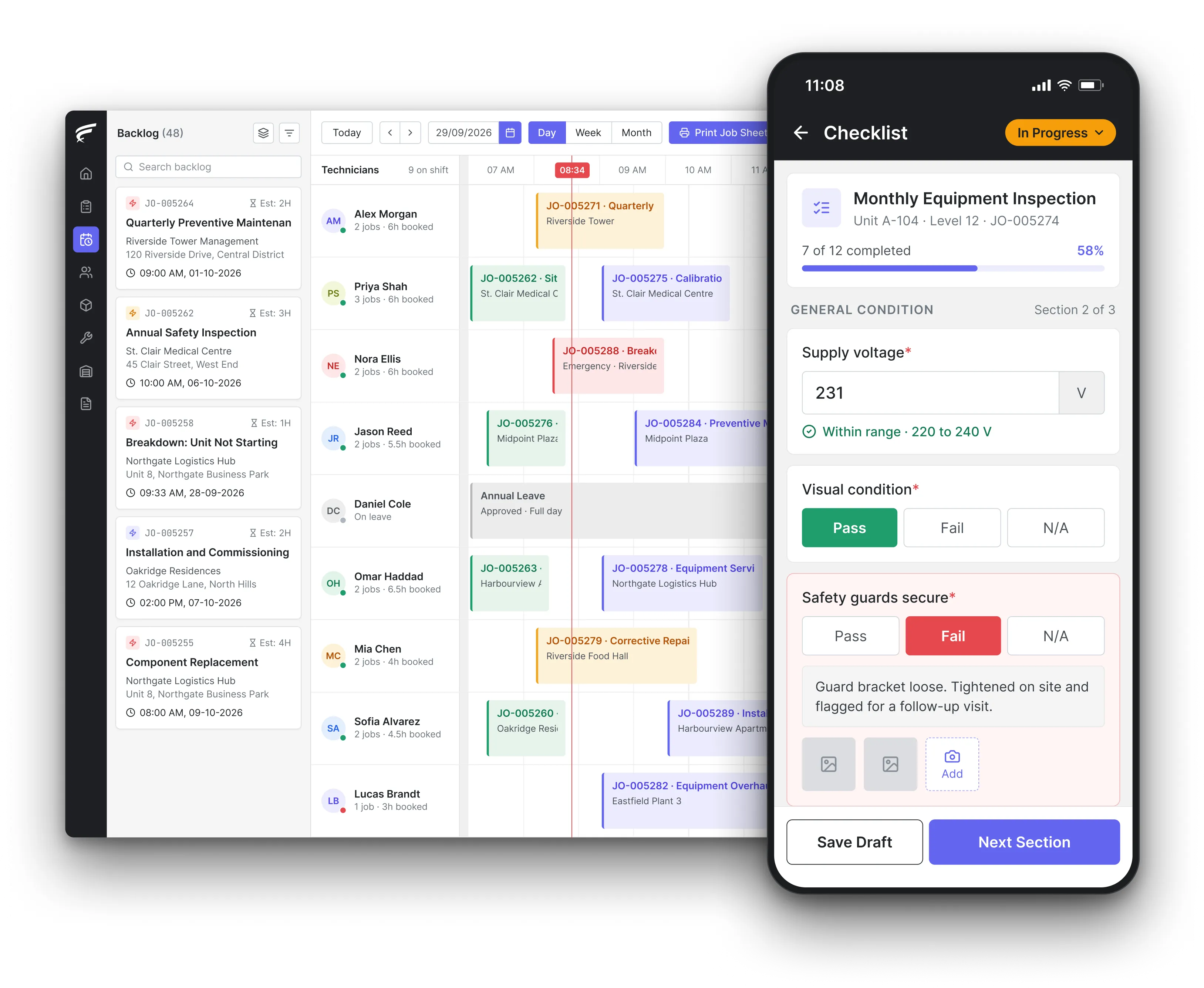
FieldEx work order with tasks, parts and the customer's signature

FieldEx is a field service and asset management (FSM+CMMS) application. Its work order management builds each job from a template and keeps required tasks in order. Technicians record photos, parts and times on site. Each job closes with the customer's signature and a completion PDF.

  • Every job type set up the way that work actually runs.

  • Required tasks finished before a job can close.

  • A signed completion PDF, with the full history kept on the job.

What FieldEx does as work order management software

FieldEx runs each work order from the first request to the signed report, and every job stays linked to its asset, site and customer.

That link is what turns a pile of finished jobs into a service history you can use.

Jobs set up your way

  • A separate job type for installations, repairs, inspections, surveys and planned maintenance.
  • Each job type shows only the sections and statuses that work needs.
  • Your own statuses, with control over which roles can set each one.
  • Rename any field or label, for example calling a work order a "service ticket".

Templates

  • Job templates that bring in tasks, procedures, parts and the start time.
  • Task templates that carry their own parts list.
  • Create from a template on the web or on the phone.

Procedures and tasks

  • Tasks grouped into procedures, set to follow an order.
  • Required tasks that must be finished before the job can close.
  • Each task with its own technician, time, notes and travel log.

On site

  • The day's work orders on the phone, with directions to each site.
  • Scan an asset's QR code to fill in the asset on a job.
  • Check in and out of each task, with time on task recorded.
  • Jobs and tasks can be worked offline, with check-in, check-out and travel synced later.

Proof and sign-off

  • Photos and videos attached to the job, marked up and stamped with location and time.
  • The customer signs on the phone.
  • A completion PDF generated and emailed to the customer.

Follow-up and repeat work

  • Checklist findings that raise follow-up work on the spot.
  • A warning when a new job repeats recent work on the same asset.
  • Condition grades that update the asset's status.

Parts and faults

  • Parts used on the job, from a list or from the technician's own stock.
  • Faults and resolutions recorded on every job, from your own lists.

Records and control

  • A full change history on every job.
  • Completed jobs lock, so only the roles you choose can change them.
  • The PDF can wait until a supervisor marks the job reviewed.

Connected work

  • Requests from the customer portal and QR codes arrive as jobs.
  • Anyone can scan an asset's QR code to report a fault, no account needed, and it becomes a job.
  • Service-level agreement (SLA) status on jobs that carry one.

Set up every job type the way that work actually runs

An installation, a repair and an inspection need different information, so each job type in FieldEx shows only what that work needs.

A generic form makes technicians scroll past fields that don't apply. It also leaves the office guessing which ones matter. In FieldEx, you create a job type for each kind of work. Examples are installation, corrective repair, survey and inspection, or planned maintenance and anything else your business runs.

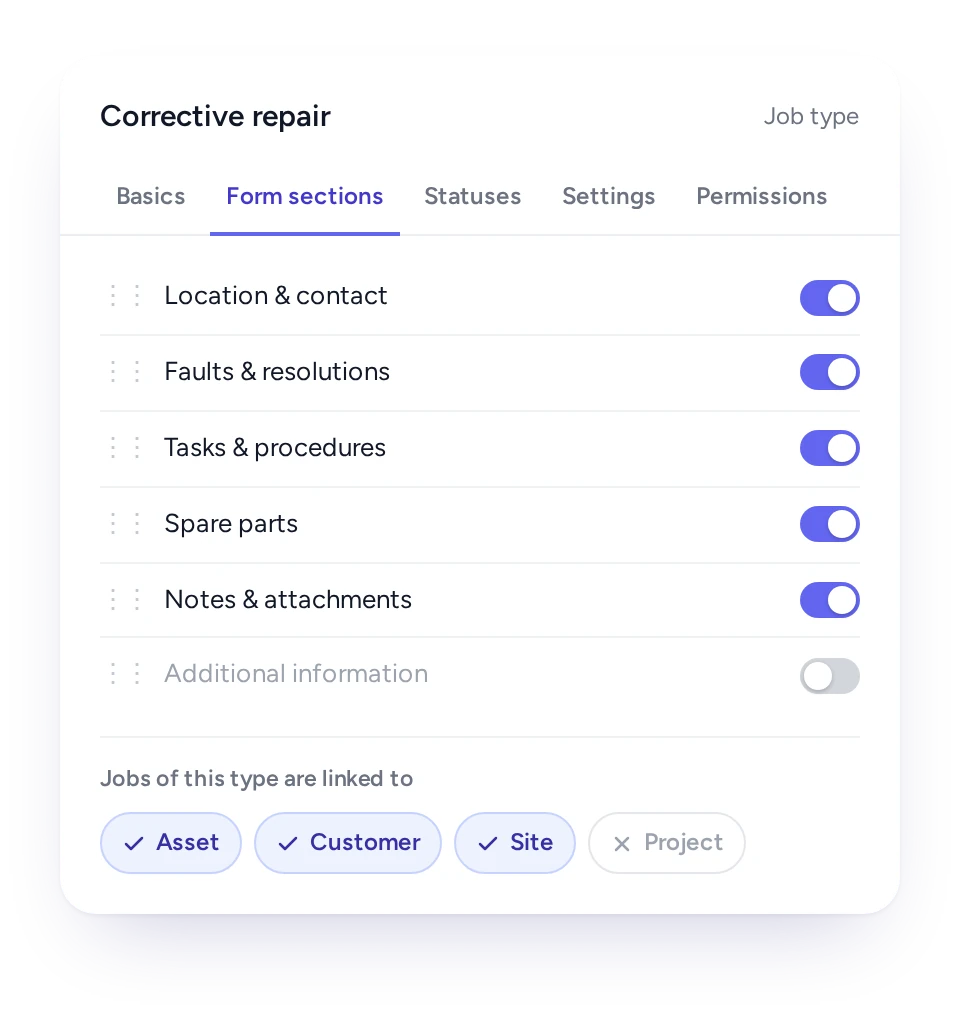
For each type, you choose which sections appear. Examples are location and contact, faults and resolutions, tasks and procedures, and spare parts and notes. You also choose whether the job is tied to an asset, a customer, a site or a project. The form then asks only for what applies.

Each job type has its own list of statuses, in your words. You decide which roles can set each status, so a technician can mark work done while only a supervisor can close it. Labels can be renamed across the system, so if your team calls a work order a "service ticket", FieldEx does too.

Job type set-up in FieldEx showing the sections each job needs

Build the whole job from a template in seconds

A template brings the tasks, procedures, parts and timing into a new work order, so the same job is set up identically.

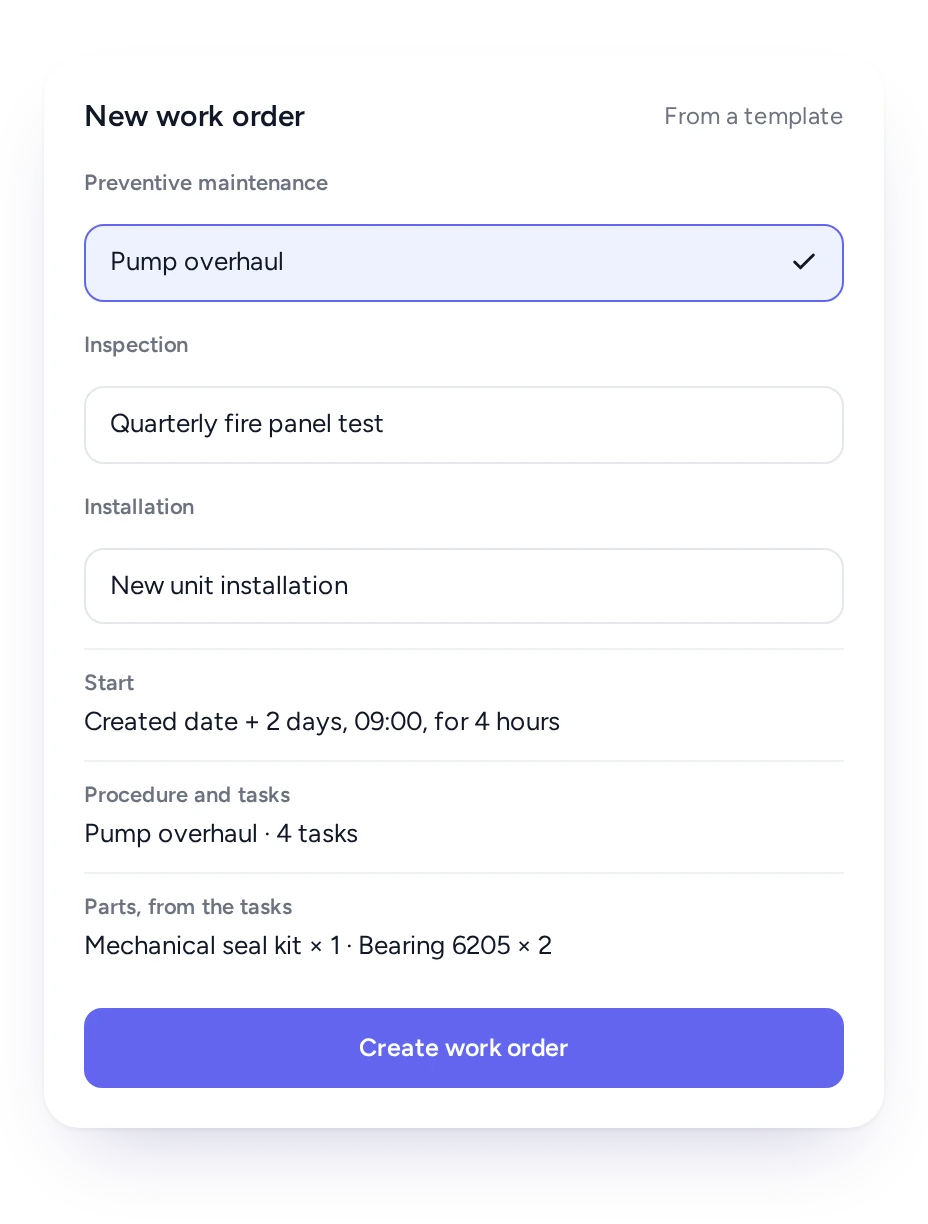
Most missed steps start when someone builds a job from memory. In FieldEx you build a template once for each recurring piece of work: a pump overhaul, a quarterly fire panel test, a new unit installation. The template carries the procedures, the tasks and a start time set relative to the day the job is created.

Parts come with the tasks. Each task template holds its own parts list, so adding the task adds the parts the technician will need. The office sees the parts for the job before anyone leaves the depot.

Templates work on the phone as well as the web. A technician who finds extra work on site can raise a new work order from the right template there and then. Nobody has to call the office to have it typed up.

Creating a FieldEx work order from a template, with its start time, procedure, tasks and parts

Steps that can't be skipped before the job closes

Procedures keep tasks in the order you set, and required tasks must be finished before the work order can close.

Mark a task as required and the work order can't be closed until it is done. The rule is applied on the job itself, not checked in an audit weeks later.

Each task records who did it, when they checked in and out, and any notes or attachments they added. When someone asks whether isolation was confirmed before work started, the answer is on the work order, with a name and a time.

A written procedure only helps if people follow it on the day. In FieldEx, tasks are grouped into procedures and can be set to follow an order, each finished before the next starts.

Photos, times and the customer's signature on every work order

Technicians attach marked-up, time-stamped photos to the job, the customer signs on the phone, and FieldEx produces the completion PDF.

Many customers need their copy of the record quickly, and a late or lost report becomes their problem. On the FieldEx app, technicians take photos or video and attach them to the job.

Photos can be marked up before saving and are stamped with the location and time they were taken. Check-in and check-out on each task record how long the work took.

At the end, the customer signs on the phone. The completion PDF then holds the job and equipment details, the fault and resolution, and parts used with quantities and prices. It also holds technician check-in and check-out times, the work carried out, attachments and the signature. It can be emailed straight from the job.

Turn findings on site into follow-up work orders

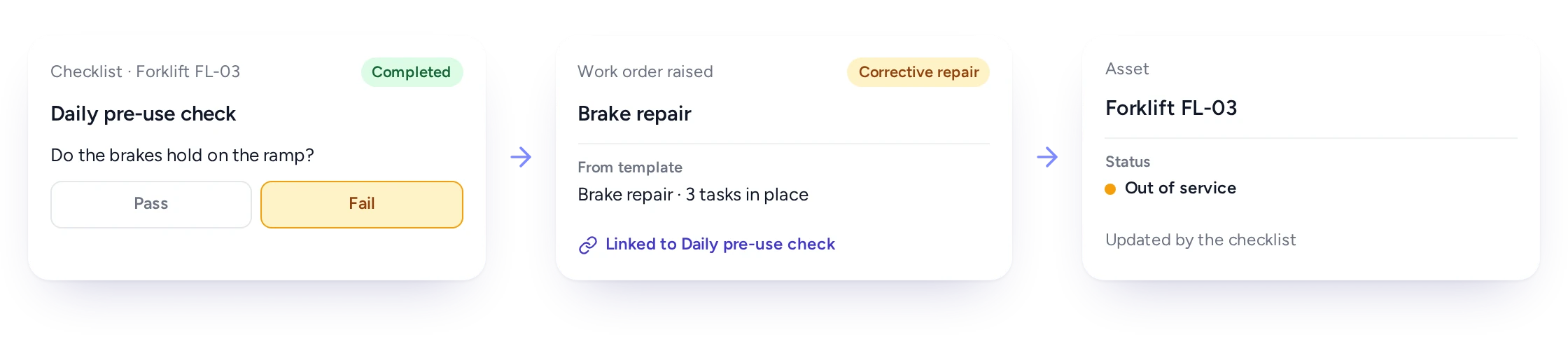
When a checklist answer shows a problem, FieldEx can raise the follow-up work order on the spot, so a defect found is a defect booked.

A failed checklist answer raising a linked follow-up work order and updating the asset’s statusA failed checklist answer raising a linked follow-up work order and updating the asset’s status

Finding a fault is only half the job. The gap between finding and fixing is where risk sits. In FieldEx, each answer on an inspection checklist can be set to raise a work order from the right template.

The work order arrives with its tasks already in place. A condition grade can also update the asset's status, so the asset record shows the problem before anyone opens a report.

The follow-up job is linked to the inspection that found the problem. The history then reads in order: what was found and when, who found it, and the work that fixed it.

Book a demo

Know when a new job repeats last week's work on the same asset

FieldEx can warn you when a new work order repeats recent work of the same type on the same asset, so callbacks get noticed.

A unit that needs the same repair twice in a week usually means the first fix didn't hold. In a busy office that pattern is easy to miss, because each call looks like a new job.

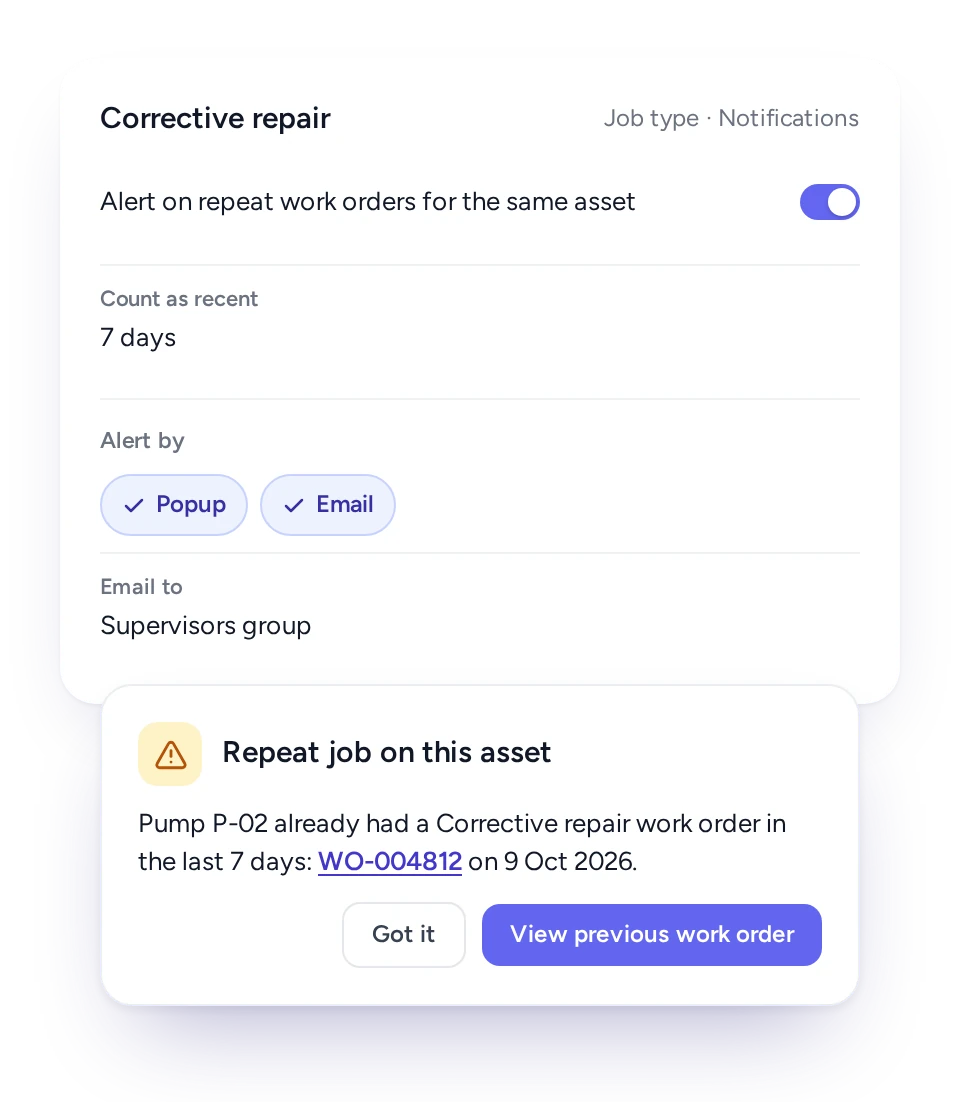
Switch the warning on for the job types where repeats matter and set how many days count as recent. When a new work order repeats recent work on the same asset, FieldEx shows the earlier job straight away. It can also email a chosen group.

The warning doesn't block the job. It puts the earlier visit in front of the dispatcher. The dispatcher can send a senior technician, bring the right part, or ask the first technician what they found.

FieldEx warning that a new job repeats recent work on the same asset

Record the parts and the fault on every job

Parts are taken from a list or the technician's own stock, and every job records its fault and resolution from your own lists.

When parts are noted on paper, stock and job records drift apart. In FieldEx the technician adds parts to the work order from the parts list, by scanning a barcode, or from the stock they carry. Parts taken from a storage location are deducted from it, so stock stays accurate.

Each job also records what was wrong and what was done, picked from your own fault and resolution lists. Faults can be linked to the resolutions that fit them, so the technician chooses from a short, relevant list rather than typing free text.

Over time those records answer useful questions: which faults recur on which equipment, which fixes hold, and which parts are used most. See Spare Parts and Inventory for how stock is managed.

Adding spare parts by list or barcode, and picking a fault with its linked resolutions

A work order history nobody can quietly change

Every change to a work order is logged with old and new values, who made it and when, and completed jobs can be locked.

Each job type can be set to lock completed jobs, so only the roles you choose can edit them. Delete rights are set per role.

The completion PDF can wait until a supervisor marks the job reviewed, and every regenerated PDF is kept. If a customer queries a report months later, you can show exactly what was sent and when.

Work order records only help managers plan staff and workloads if the records can be trusted. FieldEx keeps a full change history on every job: the field, the old value, the new value, who changed it and when.

What each person gets from FieldEx work orders

Planners build jobs faster, technicians know exactly what to do, and managers get records they can stand behind.

  • Service coordinator

    Jobs built from templates, with tasks, parts and timing already in place.

  • Technician

    The job, the procedure and the parts on the phone, plus photos and sign-off in one place.

  • Supervisor

    Required steps applied on every job, and a review step before the report goes out.

  • Maintenance manager

    Fault, resolution and parts history on every asset, with repeat jobs flagged.

  • Finance team

    Parts and work recorded on the job, ready for invoicing.

  • Customer

    A signed completion PDF in their inbox when the work is done.

Work orders that build each asset's maintenance history

FieldEx is field service management and a CMMS in one system, so every work order adds to its asset's history.

Field service tools often treat a work order as a visit to a customer. Maintenance tools treat it as work on a machine. FieldEx treats it as both. Each job is linked to the customer, the site and the asset, so the same record serves the service manager and the maintenance planner.

Planned maintenance plans create work orders when they fall due, and inspection findings create follow-up jobs. Everything technicians record on site, from parts to faults to meter readings, flows back to the asset for the next plan.

Work orders connect to these features:

To compare tools, read what makes a good CMMS.

How a facilities firm runs maintenance and cleaning work orders in FieldEx

A facilities and property management firm (real estate, Singapore) had more than 100 technicians and contractors. Their paper reports and checklists left gaps in the audit trail.

With FieldEx, its technicians use the mobile app to check in on jobs and complete required inspection forms. They track supplies and generate a finished PDF report the moment a job is done.

Read the Facilities Firm Story

Agri Sumber Prestari: from log books to jobs on the phone

Agri Sumber Prestari (ASP) is an agricultural manpower and training company under SD Guthrie Agri Bio. It relied on manual log books, spreadsheets and paper-based SOPs and checklists. FieldEx now generates its work orders, inspection checklists and SOPs, with 92 agricultural estates up and running.

Read the Agri Sumber Prestari Story

Questions service and maintenance managers ask about FieldEx work orders

What is the best software for managing work orders?

For teams that look after equipment, the best software closes each job with proof and links it to the asset.

FieldEx builds each work order from a template and keeps required tasks in order. It closes the job with photos, the customer's signature and a completion PDF. FieldEx is also a CMMS, so every job is linked to its asset. The work builds a maintenance history you can use for planning.

Can technicians create and complete work orders from the FieldEx app?

Yes. Technicians can create a work order on the phone, from a template if they like. They scan an asset's QR code to fill in the asset. They can then check in, work through the tasks, add parts and photos, and collect the customer's signature.

Can a work order stop technicians from skipping steps?

Yes. Tasks can be set to follow an order, each finished before the next starts, and any task can be marked as required. The work order can't be closed until every required task is done.

What does the FieldEx completion report include?

The standard completion PDF shows job and equipment details, addresses, and fault and resolution details. It lists spare parts used with quantities and prices, and technician check-in and check-out times. It also shows the work carried out, attachments and the customer's signature. Admins can also build custom PDF layouts.

Can we have different forms for installations, repairs and inspections?

Yes. Each job type has its own sections and its own statuses. You choose whether it is tied to an asset, a customer, a site or a project. Templates under each type bring in the right tasks and parts.

Can an inspection automatically create a follow-up work order?

Yes. Each checklist answer can be set to raise a work order from a template, with its tasks in place, when the checklist is completed. Condition grades can also update the asset's status.

Will FieldEx warn us about repeat jobs on the same equipment?

Yes. For the job types you choose, FieldEx warns when a new work order repeats a recent job of the same type on the same asset. You set the number of days that counts as recent. FieldEx shows a link to the earlier job and can email a chosen group.

Can completed work orders be locked so they can't be changed?

Yes. For any job type, completed work orders can lock so only the roles you choose can still change them. Every change is logged with the old and new value, who made it and when, and delete rights are set per role.

Can technicians attach photos and videos to a work order?

Yes, as covered under Photos, times and the customer's signature. The photos also stay on the asset's history, so the next technician sees what the last one found.

Can work orders be worked without a signal?

Yes. Jobs and tasks can be downloaded and worked offline, with check-in, check-out and travel synced later.

Can we record the parts used on each job?

Yes. Parts come off the stock they were taken from and appear on the completion PDF. Each asset also builds a list of every part used on it, so recurring replacements stand out.

Does FieldEx connect to accounting software?

FieldEx can connect to any open system through REST APIs and has connectors for QuickBooks and Xero.

Can we call work orders by our own name?

Yes. Any field or label can be renamed to the words your team uses, for example calling a work order a "service ticket".

FieldEx runs that part. Jobs follow the SOP, and photos, parts and the customer's signature are recorded on the spot. Each machine keeps its full service history. For accounting, see the question above on accounting systems.

Can we move our work orders off Excel?

Yes. A spreadsheet can list jobs, but it can't send them to a technician's phone or stop a step being skipped. It also can't collect the customer's signature on site.

In FieldEx, your customers, sites and assets can be uploaded, so nothing is retyped. From then on, each job runs on the phone and closes with a signed completion report.

Once we know your requirements and your data is ready, FieldEx can be implemented in as little as a week with standard features for small businesses. Larger setups and custom work take longer.

How long does it take to start using FieldEx work orders?

There's no setup fee. Customers, sites, assets and past jobs can be uploaded. FieldEx helps with setup, and training is included. See Setup and Training.

You can also set FieldEx up yourself with guides, videos and the in-app AI assistant, which answers questions as you go.

Once we know your requirements and your data is ready, FieldEx can be implemented in as little as a week with standard features for small businesses. Larger setups and custom work take longer.
See a work order built, worked and signed off in FieldEx

Book a Demo