Retire the maintenance spreadsheet and the job chat group

The maintenance spreadsheet, the WhatsApp group and the phone calls in between become one system: every job in a list, every technician on a calendar, every update recorded where the next person can find it.

Book a demo
Updated 15 Oct 2026
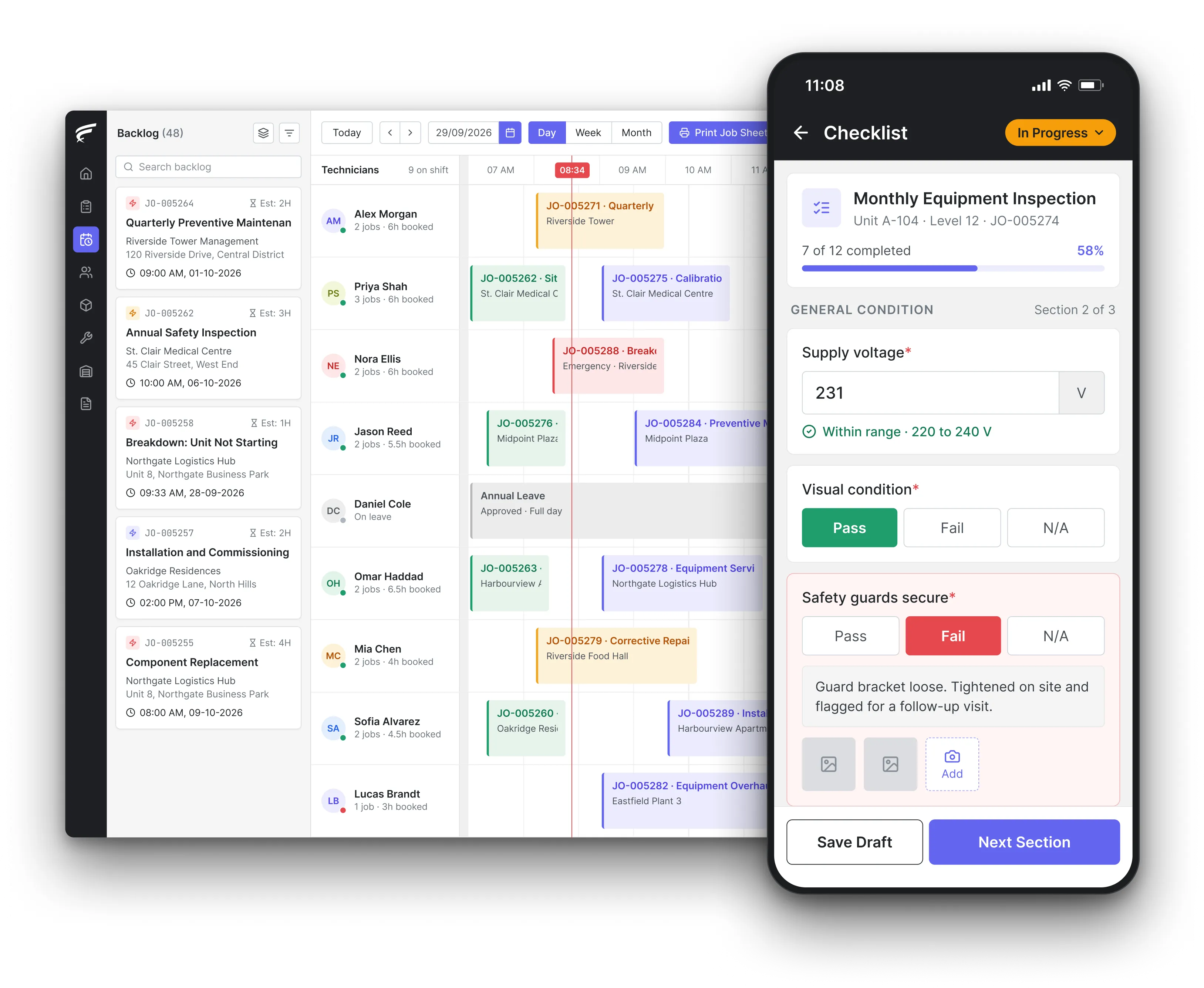
FieldEx scheduling board on desktop with a technician's inspection checklist open on the mobile app, as used by teams moving off chat groups and spreadsheets

FieldEx is field service management and maintenance management (CMMS) in one system, and it takes over the work a maintenance spreadsheet and a WhatsApp group were doing. Jobs land in a backlog, are assigned on a drag-and-drop schedule, update their own status as technicians check in and out, and keep every photo, note and part on the job and asset record.

What FieldEx does for teams running jobs on chat and spreadsheets

A spreadsheet and a chat group are where most service businesses start, and they work until the team grows past what one coordinator can hold in their head. Then the questions start: which copy of the tracker is current, did anyone take the 3pm call, where is the photo of the leaking valve. FieldEx gives the office one list of jobs, one schedule and one history, and gives technicians their own work on the phone. Book a demo and bring your current tracker.

One list of jobs instead of a message thread

  • Every job created once, from the office, a customer request, a QR code or a maintenance plan, with its customer, site, asset and contact linked, in work order management.
  • Statuses you configure, with a job marked In Progress automatically when the technician starts the journey to site.
  • A notification when a new job repeats a recent job on the same asset, so a repeat fault doesn't get logged twice.
  • Filters and saved list views by status, customer, site or technician, instead of scrolling a chat.

Dispatch without the group message

  • Unassigned jobs in a backlog next to each technician's calendar, assigned by dragging them onto a time slot, in scheduling and dispatch.
  • Automatic assignment by skill, availability, shift, leave and service zone, using live location to find the nearest match.
  • The technician notified each time a job is assigned or reassigned, and able to accept or decline a pending task.
  • Reassignment, rescheduling and returning a job to the backlog in a drag.

Updates the office doesn't have to chase

  • Check-in and check-out on each task, so the office sees arrival and completion without a phone call.
  • Workflows that send email or in-app notifications when a job meets the conditions you set, to users, groups or email addresses stored on the job.
  • Email templates with your own subject, wording, record details and a button that opens the job.
  • An activity history on every job and task showing who did what and when.

The maintenance schedule that used to live in Excel

  • Maintenance plans for assets and sites that create the jobs automatically, by date, by meter reading such as running hours, or whichever comes first, in preventive maintenance.
  • Fixed calendar schedules or schedules that recalculate from the last completed visit, with missed visits rescheduled after a set overdue period. Fixed calendar dates apply to time-based plans.
  • New assets that match a plan's criteria added to it automatically.
  • Last and next maintenance dates on every plan, site and asset, without a formula to maintain.

Technicians' work on their own phone

  • Each technician's jobs, tasks, the asset's history and the right checklist on the FieldEx mobile app.
  • Watermarked photos and video, notes, parts from their own stock and the customer's signature, saved to the job instead of a chat.
  • Asset QR or barcode scanning to open the right record.
  • Jobs downloaded to the phone, worked without a signal and uploaded when the connection returns.

Requests that don't arrive by text

  • A branded customer portal where customers submit requests with a description, contact number and photos or video, and request an appointment date, in the customer portal.
  • A QR code for each site that opens a fault-report form without logging in.
  • Every request created as an unassigned job in the backlog, ready to schedule.

A live picture for managers

  • A dashboard of overdue work, work due in the next 7 days and work completed in the last 7 days, with a calendar of maintenance and compliance jobs.
  • Reports on jobs, technicians, customers and sites built from live data, exported as CSV, Excel or PDF or emailed on a schedule, in reporting and analytics.
  • Permission profiles that decide who can read, create, edit or delete each kind of record.

Why do so many service teams end up running jobs on WhatsApp?

Because everyone already has it. Ofcom's Online Nation 2024 report, published in November 2024, found WhatsApp reached 87% of UK online adults in May 2024, and 64% accessed it every day. When a new technician joins, there is nothing to install and nothing to learn, so a group chat becomes the dispatch board, the photo archive and the job log at once.

The trouble is that a chat is ordered by time, not by job. Ask "what did we do at that site last March" and the answer is buried between a lunch order and a holiday photo.

What FieldEx does about it

  • Ordered by job, not by time: every message-worthy fact, from the assignment to the photos, notes, parts and signature, sits on the job, linked to its customer, site and asset.
  • Just as quick on the phone: technicians see only their own jobs and tasks on the mobile app, with the site on a map and the asset's history one tap away.
  • Notifications without the noise: the technician is notified when a job is assigned or moved, and workflows send in-app or email alerts only when a job meets the conditions you set.
  • History you can search: the office finds any past job by customer, site, asset, technician or date.

When should a maintenance company move from Excel and WhatsApp to proper software?

When the tracker stops being trustworthy, or when the maintenance it records starts to matter for safety. Spreadsheet errors are more common than most owners think: in his paper for the European Spreadsheet Risks Interest Group (EuSpRIG) in 2000, Raymond Panko of the University of Hawaii reported that field audits using better methods found errors in at least 86% of the spreadsheets audited. The Health and Safety Executive (HSE), in its guidance on maintenance of work equipment, says establishing a planned maintenance programme may be a useful step towards reducing risk, and that where any machinery has a maintenance log, the log must be kept up to date.

The practical signs are familiar: two people editing different copies, jobs agreed in chat that never reach the tracker, and a planned visit that only happens if someone remembers it.

What FieldEx does about it

  • One copy for everyone: the office, managers and technicians all work on the same job and asset records, on the web and on the phone.
  • Planned work that books itself: maintenance plans create the jobs ahead of their due date and assign them to a person or group, so the planned programme doesn't depend on memory.
  • A log that keeps itself up to date: every completed job, part used and meter reading lands on the asset's record when the technician finishes.
  • Missed visits caught: missed maintenance is rescheduled after the overdue period you set, and the dashboard shows what is overdue.

How often do maintenance spreadsheets contain errors?

Often enough to plan for. Panko's EuSpRIG paper summarised the field audits of the time: across 367 spreadsheets audited, errors were found in 24%, while the more recent audits with better methods found errors in at least 86%. His conclusion was that there is ample evidence that spreadsheet errors are common and nontrivial. A maintenance tracker is a typical case: next-due dates calculated by formula, copied down hundreds of rows, edited by several people.

One wrong formula can quietly push a statutory check months past its due date, and nothing in the sheet will warn you.

What FieldEx does about it

  • Dates calculated by the plan: intervals run by day, week, month or year, including fortnightly, quarterly and every 3 years, on a fixed calendar or from the last completed visit.
  • Meter-based triggers without formulas: a plan can trigger on running hours or other meter readings, using each asset's own interval or a custom one.
  • Overdue shown, not hidden: the dashboard lists overdue maintenance, certifications and inspections, and the due-in-7-days view shows what is coming.
  • Inspections with reminders: certifications and inspections carry their own due dates with reminders by email, in-app notification or both.

How many people can work in a shared Excel maintenance tracker at once?

More than you'd guess, but that isn't the real limit. Microsoft's Excel specifications and limits page says that with the legacy shared-workbook setting, up to 256 users can open the file at the same time, and a worksheet holds 1,048,576 rows by 16,384 columns. The real limit is the work itself: a technician on a roof can't easily update a cell, two people sorting the same sheet undo each other, and there is no alert when a row is overdue.

What FieldEx does about it

  • Built for many users at once: office staff work on the web app while technicians work on the mobile app, each on their own jobs and tasks.
  • Each person sees their part: users can be limited to their own records, and managers see their team's work through the hierarchy.
  • Changes recorded: jobs and tasks keep an activity history, and assets keep a change history showing who edited which field and when.
  • Bulk actions where you allow them: permission profiles decide who can select and update many records at once in a list view.

Is it safe to share customer details and job photos in a WhatsApp group?

It carries real risk. In August 2023 the Information Commissioner's Office (ICO) reprimanded NHS Lanarkshire after 26 staff had access to a WhatsApp group in which patient data, including names, phone numbers, addresses and images, was entered on more than 500 occasions between April 2020 and April 2022, and a person who wasn't a member of staff was added to the group in error. A service company's group holds the same kinds of data: customer names, addresses, phone numbers and photos taken inside their premises.

The weakness of the sheet is that it only shows the plan. Someone still has to turn each mark into a job, tell the technician, and come back to tick it off.

What FieldEx does about it

  • Customer data in customer records: names, contacts, addresses and map locations sit on the customer and site records, not in a chat that anyone can forward.
  • Access set by role: permission profiles give separate read, create, edit and delete rights, and control whether a user can use the web app, the mobile app or both.
  • Leavers lose access: user accounts can be suspended, restored or permanently deactivated when someone leaves.
  • Customers see only their own: each customer's portal shows only their own jobs, equipment and reports.

What happens to job instructions in a WhatsApp group when someone edits or deletes a message?

They can disappear for good. WhatsApp's Help Center says a sender has 2 days after sending a message to delete it for everyone, and can edit a message for up to 15 minutes after sending it. It also says that when you delete a message there's no way to get it back unless it was included in a backup. So the instruction a technician followed on Tuesday may not exist by Thursday, when the customer disputes what was agreed.

For a service company, that means the invoice data has to come from a system, not be retyped from a job sheet into a spreadsheet.

What FieldEx does about it

  • Instructions on the job: the job description, tasks, procedures and notes sit on the job record, where the technician reads them before starting.
  • Changes leave a trail: the job's activity history, viewable from the scheduler, and each task's history show creation, check-in, check-out and status changes.
  • Notes kept with the task: technicians and office staff add notes and attachments to tasks, so a change of plan is recorded where the work is.
  • The customer's own record: the completion PDF, with the work carried out and the customer's signature, is emailed with a record of when it was sent.

Do work messages on WhatsApp count as business records you have to keep?

In some regulated industries, regulators have already said yes. In January 2025 the US Securities and Exchange Commission (SEC) announced that twelve firms would pay combined civil penalties of $63.1 million for recordkeeping failures, because staff communications sent through off-channel messaging were records required to be maintained under the securities laws. Service companies are rarely under rules that strict, but the principle carries over: if the only record of a job instruction, an approval or a customer complaint is on someone's personal phone, the business doesn't really hold it.

What FieldEx does about it

  • Business records held by the business: jobs, tasks, attachments, signatures and reports are stored on the company's records, not on individual phones.
  • Requests captured at the source: customers raise requests through the portal or a site QR code, and each one becomes a job with its details and photos.
  • Approvals with a record: stock transfers, consignments and requisitions go through approval stages with each approver's response, date and remarks recorded.
  • Reports on request: job, task and customer data can be reported and exported for any period.

How do you build a maintenance schedule in Excel, and do you have to keep a maintenance log?

A spreadsheet schedule usually lists each asset, the task, the frequency, the last date done and a formula for the next date. HSE's equipment and machinery frequently asked questions on the Provision and Use of Work Equipment Regulations (PUWER), updated in May 2026, say inspection and maintenance frequencies should be set by risk assessment, taking the manufacturer's recommendations into account, and depend on equipment type, use and exposure conditions. On the log, the same page says there is no requirement to keep a maintenance log, but it recommends keeping records of maintenance for high-risk equipment, and HSE's maintenance guidance adds that where any machinery has a log, it must be kept up to date. PUWER itself requires all work equipment to be maintained in an efficient state, in efficient order and in good repair.

The spreadsheet can hold the plan, but it can't raise the job, remind the technician or record the result on its own.

What FieldEx does about it

  • The plan per asset or site: set each asset's interval from its risk assessment or manufacturer guidance, with different checklists and technicians for different points in the cycle.
  • High-risk equipment on its own cycle: inspections and certifications run per asset type on standard or custom frequencies, with the result and remarks recorded.
  • The log written by the work: each completed job, inspection, part used and meter reading builds the asset's maintenance history automatically.
  • Readings as numbers: forms on the job add number fields for readings such as pressures and temperatures, entered on site.

How do you move an Excel tracker into software without losing data?

Clean before you move. Decide which columns are customers, which are sites, which are assets and which are jobs, remove duplicates, and agree one name for each site before anything is uploaded. Bring across what the team needs to work from day one, such as the customer list, sites, assets with serial numbers and the next due dates, and keep the old sheet read-only as an archive rather than trying to upload every past row.

What FieldEx does about it

  • Your records brought across: customers, contacts, sites, assets and past completed jobs can all be uploaded.
  • Your words on screen: admins rename records, field labels and section headings so FieldEx uses the terms your team already knows.
  • Plans that pick up the assets: maintenance plans can add assets automatically based on criteria such as asset type, so uploaded equipment joins the right cycle.
  • Attachments where they belong: manuals, past reports and photos can be attached to the asset, site or customer they relate to.

How can I turn my maintenance spreadsheet into an app?

Treat the spreadsheet as your starting data, not your design. Split it into what it really holds: a client list, a list of sites, a list of units with serial numbers, and a PPM plan for each. Tidy duplicates and spelling of site names first, then bring in only what the team needs to start, and keep the old sheet as a read-only archive.

What FieldEx does about it

  • Your sheet brought in: clients, contacts, sites, units and past completed jobs can all be uploaded.
  • Your own terms on screen: admins rename records, field labels and headings, so the app uses the words your coordinators and technicians already say.
  • Plans that pick up uploaded units: PPM plans can add units by criteria such as type, so uploaded equipment lands on the right schedule.
Customer story

Chubb, an integrated security provider, runs its security services operation from 18 branches on FieldEx. Before the move, its story says, photos and updates were sent through WhatsApp, making traceability and reporting difficult, and technicians couldn't update task status on the go. With FieldEx, a central dashboard shows active, pending and completed jobs, technicians upload mandatory photos in the app, and forms, checklists and reports are paperless.

Read the Chubb customer story

Sime Industrial, a heavy equipment and industrial solutions provider serving 191 locations across Asia Pacific, describes how its planners had relied on Excel, WhatsApp and other disconnected tools, with texts or calls for updates. With FieldEx, job updates, statuses and time logs are centralised, and live technician locations and task progress are shown in one view.

Read the Sime Industrial story

Questions teams ask before leaving spreadsheets and chat groups

What should replace a maintenance spreadsheet?

Software that holds the assets, raises planned jobs on its own, dispatches them and records the result. FieldEx does all of that in one system, with field service and maintenance management sharing the same records. Compare approaches in our guide to CMMS software.

Can technicians still get job details on their phone the way they do on WhatsApp?

Yes. Each technician sees their own jobs on the FieldEx mobile app with the site on a map, tasks, the asset's history and the checklist, and is notified when a job is assigned or moved.

Can customers still send us requests with photos?

Yes. Customers submit requests through the branded portal or a site QR code, with a description, contact number and photos or video, and each request arrives as an unassigned job.

Can we keep our maintenance intervals from the spreadsheet?

Yes. Maintenance plans run by day, week, month or year, including fortnightly, quarterly and every 3 years, or by meter reading, so your current intervals carry across.

Can managers see what everyone is working on without asking?

Yes. The scheduler shows each technician's calendar and the backlog, and the dashboard shows overdue, due and completed work, filtered by asset type, group or service zone.

Can we still export data to Excel?

Yes. Reports can be exported as CSV, Excel or PDF, or emailed on a schedule, and list views can be filtered and sorted before you export.

Can technicians work where there's no mobile signal?

Yes. Jobs are downloaded to the phone, worked without a signal, and uploaded when the connection returns.

How long does it take to move off spreadsheets onto FieldEx?

Once we know your requirements and your data is ready, FieldEx can be implemented in as little as a week with standard features for small businesses. Larger setups and custom work take longer. Setup, data upload and training are included in the subscription, with no setup fee. Customers, sites and assets can be uploaded. FieldEx helps with setup, and training is included. See FieldEx implementation.

Put every job, schedule and update in one place your team can trust

Book a demo