
Item records
- Tools, meters and vehicles set up as their own asset types.
- Serial number, make, model, photo and warranty.
- Your own statuses, such as available, issued or sent for calibration.
See which technician or store holds each item, record every handover with approval, and keep calibration and inspection dates from slipping.
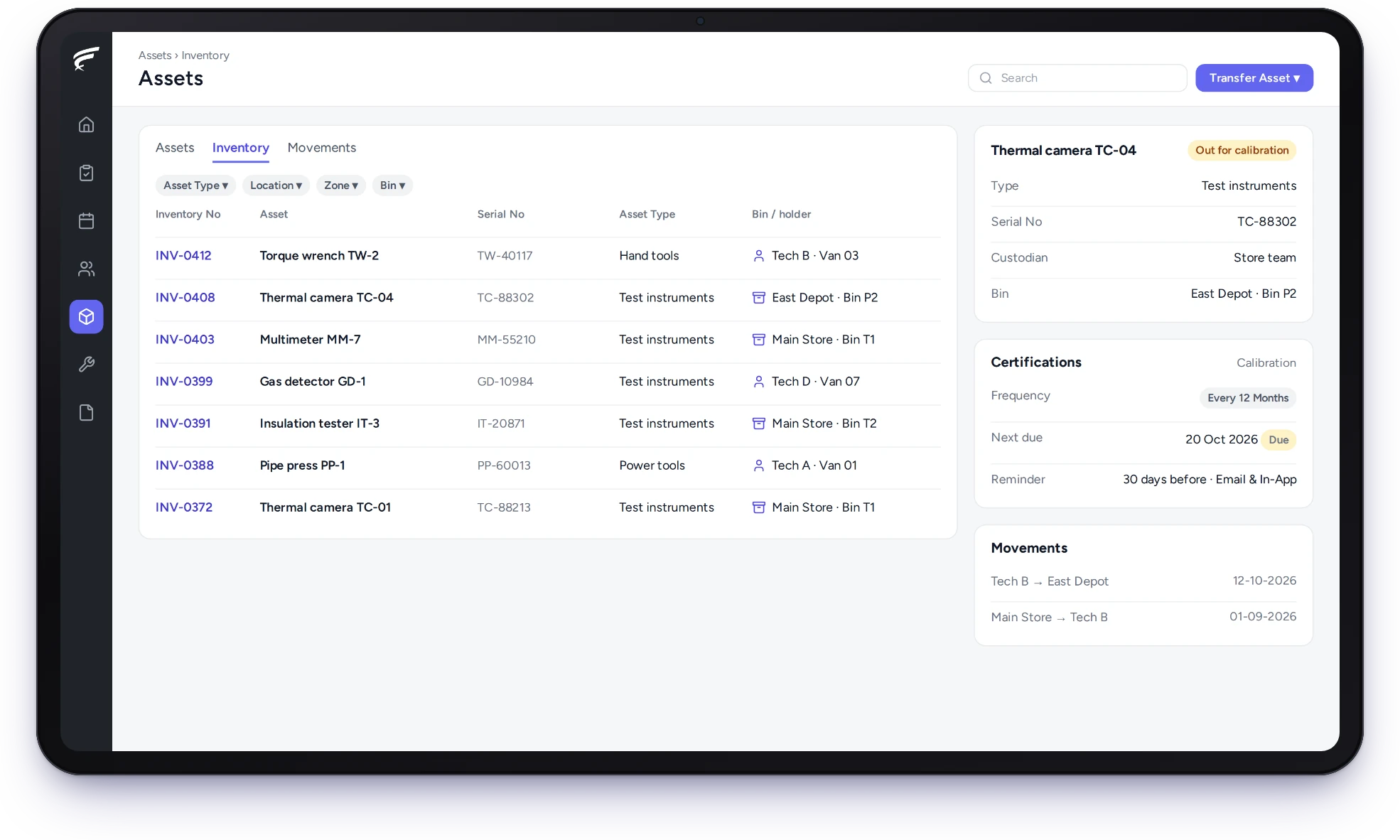
FieldEx is a field service and asset management (FSM+CMMS) application. Its tool tracking software gives each tool, meter and standby unit a record showing who holds it and where. It logs every handover with approval. It reminds you before calibration or inspection falls due, so items in vans stay accounted for and fit to use.
The holder and location of every tool and meter.
Handovers logged and approved.
Calibration and inspection reminders.
Each tool, meter and standby unit gets its own record, holder and history in FieldEx. You know who has it and whether it can be used.
Calibration and maintenance run from the same record.
Each item in FieldEx has a responsible person and a current location, so accountability continues after it leaves the store.
In FieldEx, each tool, meter or standby unit is an asset of its own type. Its record shows the serial number, make, model and photo. A named person can be responsible for each one. Its location is a store, a zone or a technician's van stock.
Your own statuses, such as available, issued or sent for calibration, show what can be issued today. The tools and meters each technician carries are listed against their name.
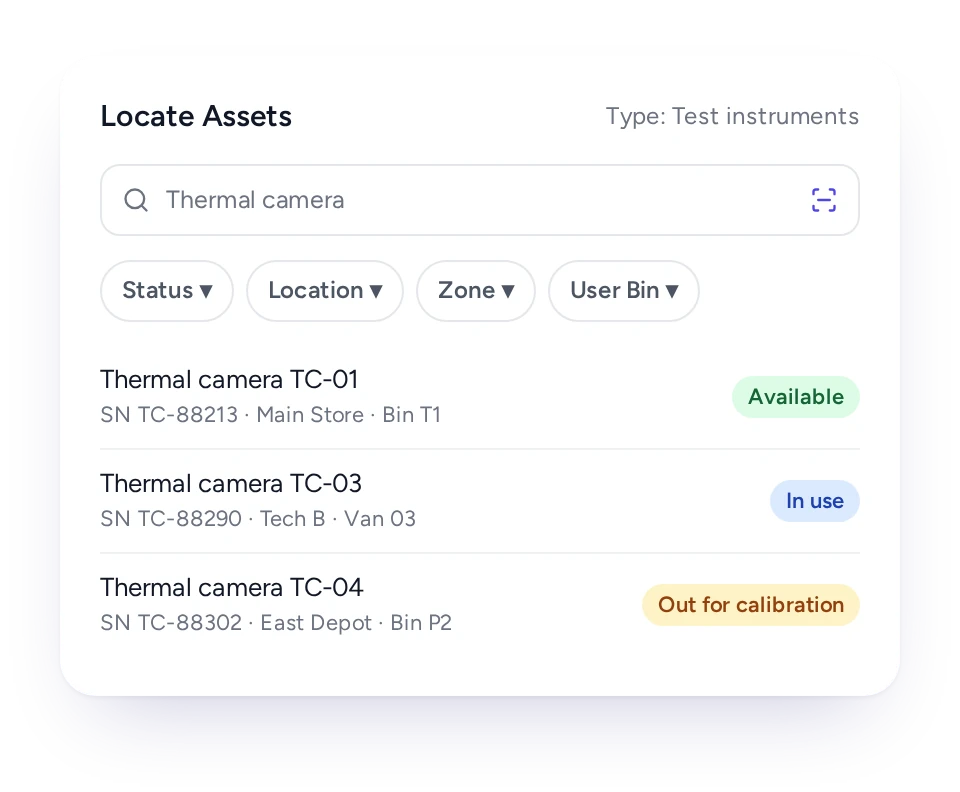
Search by type, status, location, store or technician to see where each item is and who has it.
Teams lose hours each week hunting for the insulation tester, the refrigerant gauge set or the standby pump. Often it's in another technician's van.
In FieldEx, a search finds items by type, category or status. Location, zone, store and the technician holding them work as filters too. The results show each item's holder and status. The coordinator can ask for it back or send the technician who already has it.
Van stock is tracked the same way as the main store.
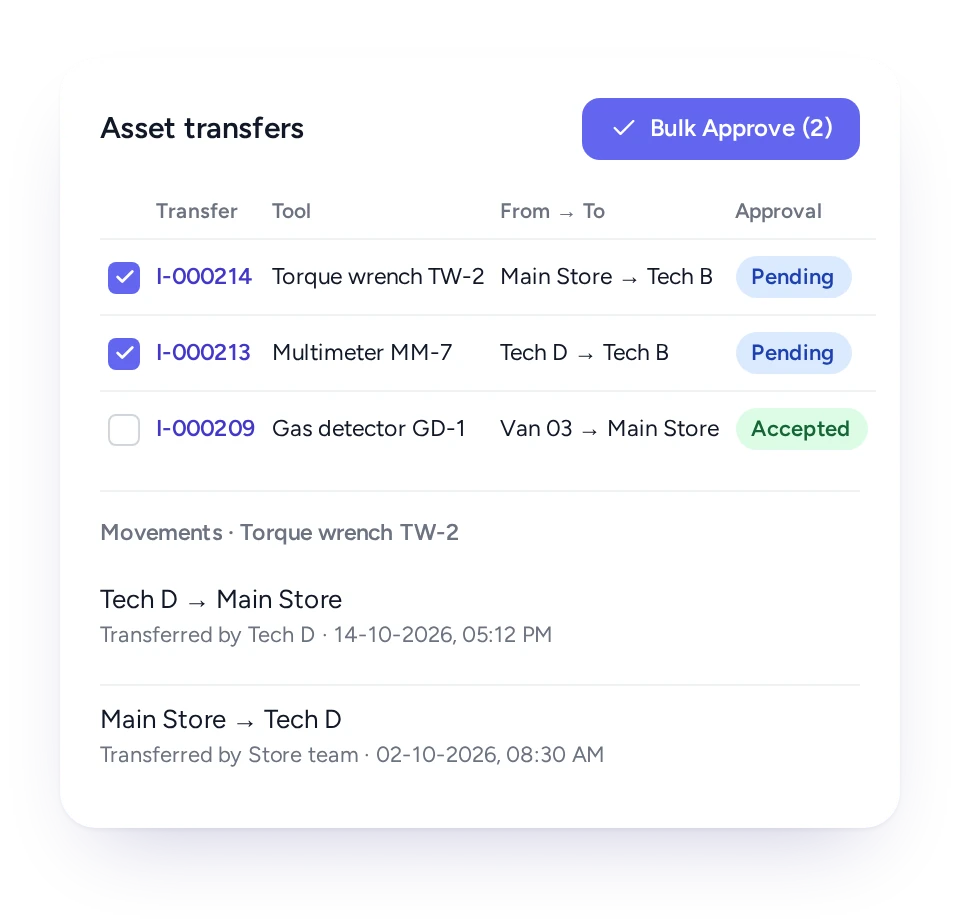
Every move to a store, technician or site is a transfer approved by the responsible team, so the record shows the holder.
A meter passed between technicians in the car park leaves no trace. When it goes missing, nobody knows who had it last.
In FieldEx, a transfer states the item, where it comes from and where it goes: a store, a storage location or a technician. The responsible team approves it, and approvers can clear several transfers at once. Approved moves are logged with the date and the people involved.
Technicians raise transfers in the app by scanning the item's label.
Each instrument's certificate has its own cycle and reminders, so recalibration is booked before the due date.
The new certificate is uploaded to the instrument's record, ready to show when a client or inspector asks for it.
In FieldEx, a calibration or verification certificate on an instrument has its own cycle, the issuing laboratory or authority and a start date. Reminders go out ahead of the due date, by email or in the app.
Give each item an inspection cycle and a checklist, and FieldEx creates the inspection record when it falls due.
Lifting gear and other plant often carry their own certificates as well as regular checks. In FieldEx, items can carry inspections on the schedule they need, each linked to the checklist technicians complete. Each record shows as overdue, due or completed.
An overdue inspection flags the item as not compliant, so it can be held back from the next job.
Overdue inspections also mark the tool as not compliant on its record, so it can be pulled before the next job.
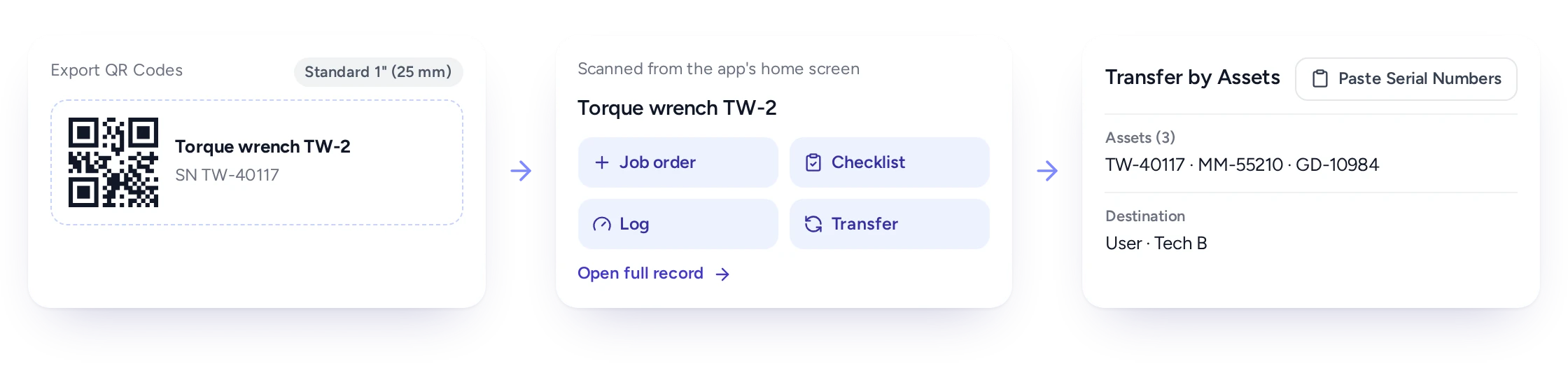
Print QR or barcode labels for every item, and technicians scan them to open the record or start a handover.
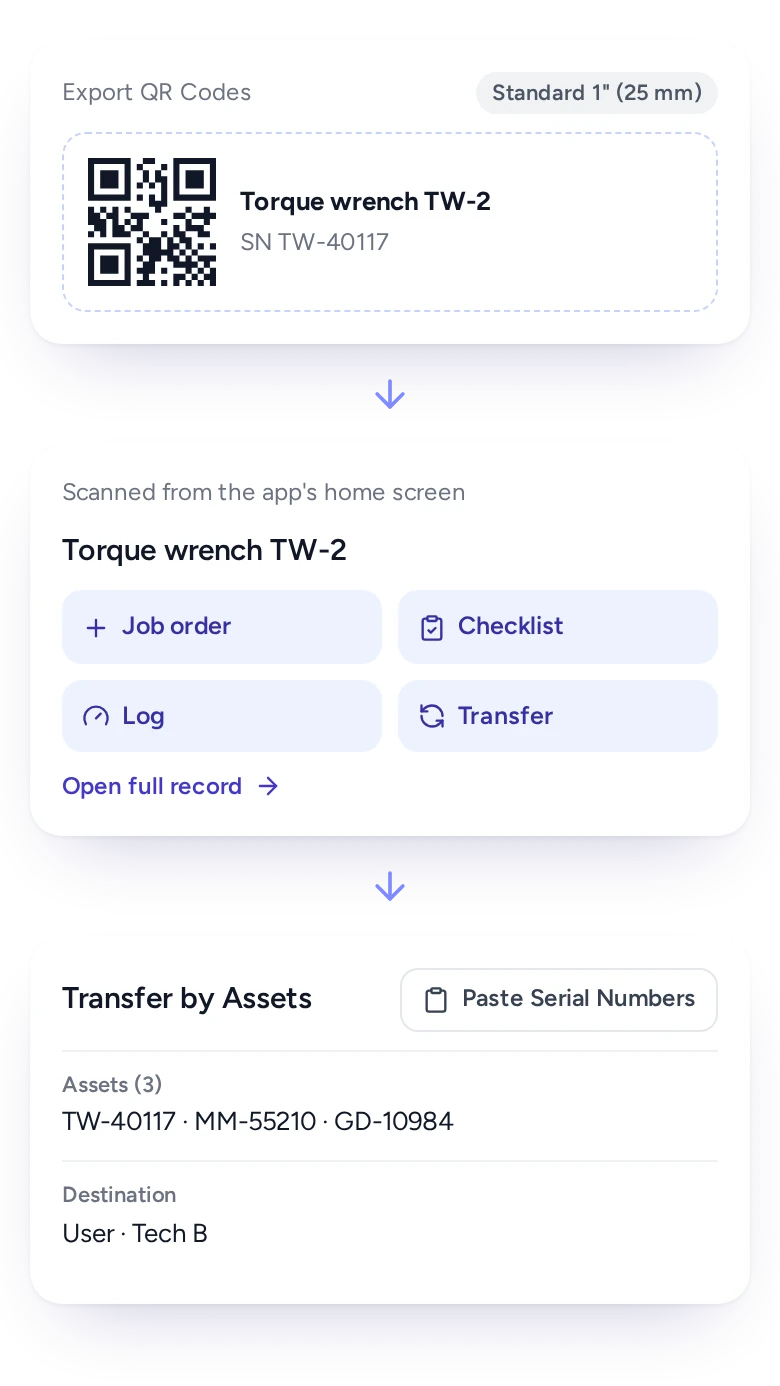
Typing serial numbers into a phone on site is slow and error-prone, especially for small meters and gauges.
In FieldEx, labels print for any set of items in different sizes and layouts. Technicians scan an item's label from the app's home screen to open its record or start a transfer. They scan storage locations the same way.
When many items move together, their serial numbers can be pasted into the transfer in one go.
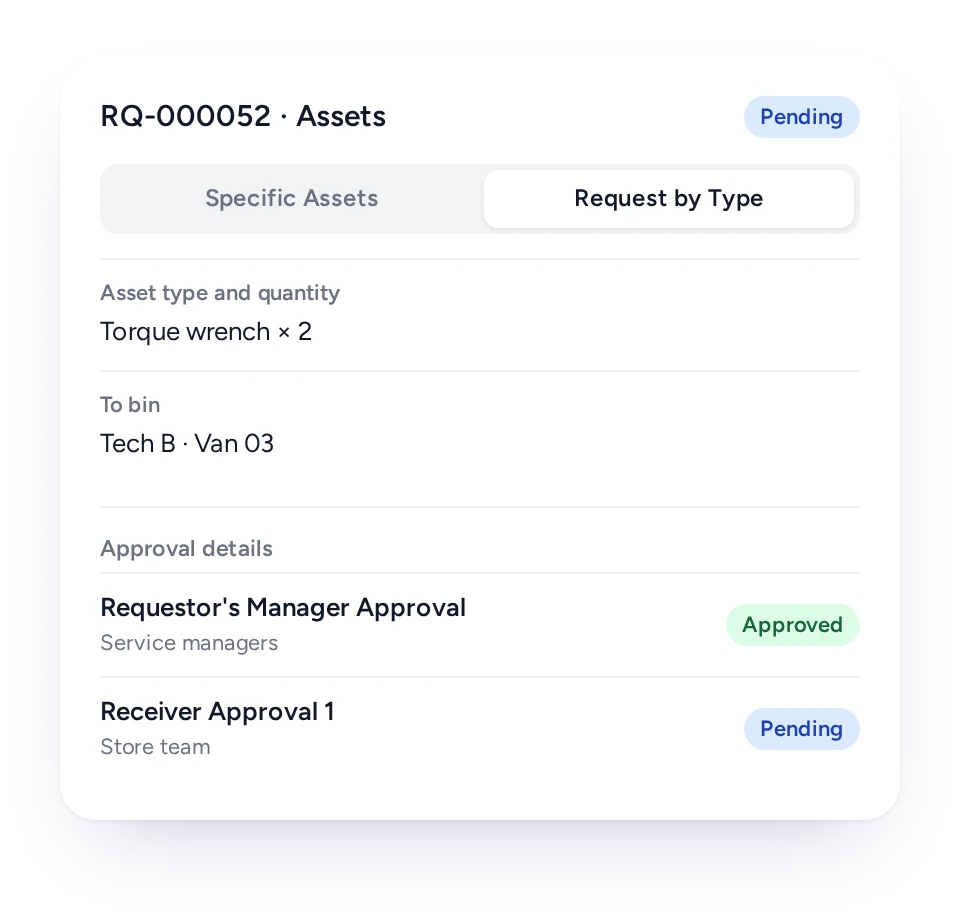
Request named items or any item of a type, and approvers sign off before it leaves the store.
Larger teams want a proper request before tools move: the technician asks, the supervisor approves, the store issues.
In FieldEx, a requisition names specific items or asks for any available item of a type. It then passes through one or more approval levels, and the requester is notified at each step. Consignment notes record items sent to another store and print as PDFs.
For named items, the transfer starts straight from the approved requisition.
Each item keeps its movements, jobs, readings, certificates and inspections on one record for as long as you own it.
In FieldEx, an item's record lists every move with the person, date, from and to. It also shows the jobs the item was used on or repaired under. Its readings, certificates and inspections sit on the same record. Edits to the record are logged as well.
Maintenance plans can service items by date or running hours, and each item shows its utilization and downtime.
Vans, gensets and hire plant have their own asset types, readings, inspections and PPM. Heavy equipment sits on the same register as hand tools.
Technicians record readings such as mileage or running hours on the record. PPM plans service it by date, by usage or both, and inspections and certificates carry their own reminders.
Moves between sites or people are transfers, recorded and approved like any hand tool.
Field teams move more than meters. Service vans, gensets, scissor lifts and test rigs travel between sites, and goods vans have their own inspection dates. In FieldEx, each can be its own asset type with its own statuses.
Storekeepers know who has every item, technicians hand over by scanning, and managers know each instrument is in calibration.
Storekeeper
Holder, location and status of every item.
Technician
Items in their van, and handovers by scan.
Supervisor
Requisitions and transfers to approve.
Safety and health officer
Calibration and inspections with reminders.
Coordinator
The nearest technician who already has the item.
Operations manager
Item utilization and downtime.
Because FieldEx is field service management and a CMMS in one, tools are tracked, maintained and used on jobs in a single system.
A standalone tool register knows where a drill is. It can't tell you which job the drill went to or when it was last serviced. In FieldEx, the item's record ties its movements, jobs, PPM and calibration together.
Technicians already work in the FieldEx app, so recording a handover needs no extra login.
Related pages:
To compare tools, read our guide to choosing CMMS Software.
EC Solutions (aviation, Uruguay) had no real-time way to see which store removed equipment went back to, or when its status changed to not in use.
With FieldEx, removed equipment is automatically marked as not in use. It is assigned to the correct return store, which the technician selects in the field. Every swap is recorded with technician and customer sign-offs.
Chubb, an integrated security provider in Malaysia, lacked clear oversight of equipment movement and usage as its operations expanded.
With FieldEx's built-in asset tracking, Chubb now monitors asset movements, compliance and use in real time. It also runs SOP enforcement and time tracking for its field teams.
Pick one that shows who holds each item right now, with dates for calibration. FieldEx records each tool, meter and standby unit with its holder and location. It logs handovers with approval and reminds you before calibration or inspection is due. As a CMMS too, it maintains items and links them to the jobs they're used on.
Yes. Each item shows whether it's in a store, a zone or a technician's van stock. A search finds items by type, status, location, store or technician.
Yes. Technicians scan the item's label in the app to raise a transfer, and the responsible team approves it.
Yes. Each instrument's certificate can carry reminders ahead of the due date, by email, in the app or both.
Yes. Items carry inspections on their own schedules, each linked to a checklist.
Yes. QR or barcode labels print in different sizes and layouts.
Yes. Requisitions name specific items or any item of a type and pass through one or more approval levels.
Yes. Every move is logged with person, date, from and to. The item's jobs, readings, certificates and inspections sit beside it.
Yes. PPM plans can service items on a date or running-hours cycle, like any other asset.
Yes. Each asset type has its own statuses, such as available, issued or sent for calibration.
Yes. Technicians can choose English, Bahasa Malaysia or Chinese in the app, each setting their own.
Yes. Existing asset lists can be uploaded, and serial numbers can be pasted in bulk into a transfer.
Label every tool and meter with a QR code or barcode, and give it a named holder. In FieldEx, each handover is a transfer recorded on the phone, so the record always shows who has it and where. Calibration and inspection dates carry reminders.
Yes. A genset, a rental pump or a company truck can each be its own asset type. Each records readings such as running hours or mileage.
They can also carry their own inspections, certificates and maintenance plans, due by date or by usage. One record then shows who holds each item and when its next check is due.
There's no setup fee. Training is at your office or online, in Bahasa Malaysia or English. Your team can also learn as it goes with guides, videos and the in-app AI assistant.
Customers, sites, assets and past jobs can be uploaded. FieldEx helps with setup, and training is included. See Setup and Training.
Once we know your requirements and your data is ready, FieldEx can be implemented in as little as a week with standard features for small businesses. Larger setups and custom work take longer.
