Changing field service software in Malaysia without losing a single service visit

When a service company changes its job management system, clients still expect the technician on the agreed day and the invoice on time. Move clients, sites, contract visits and job history into FieldEx first, then switch your team over branch by branch.

Book a demo
Updated 15 Oct 2026
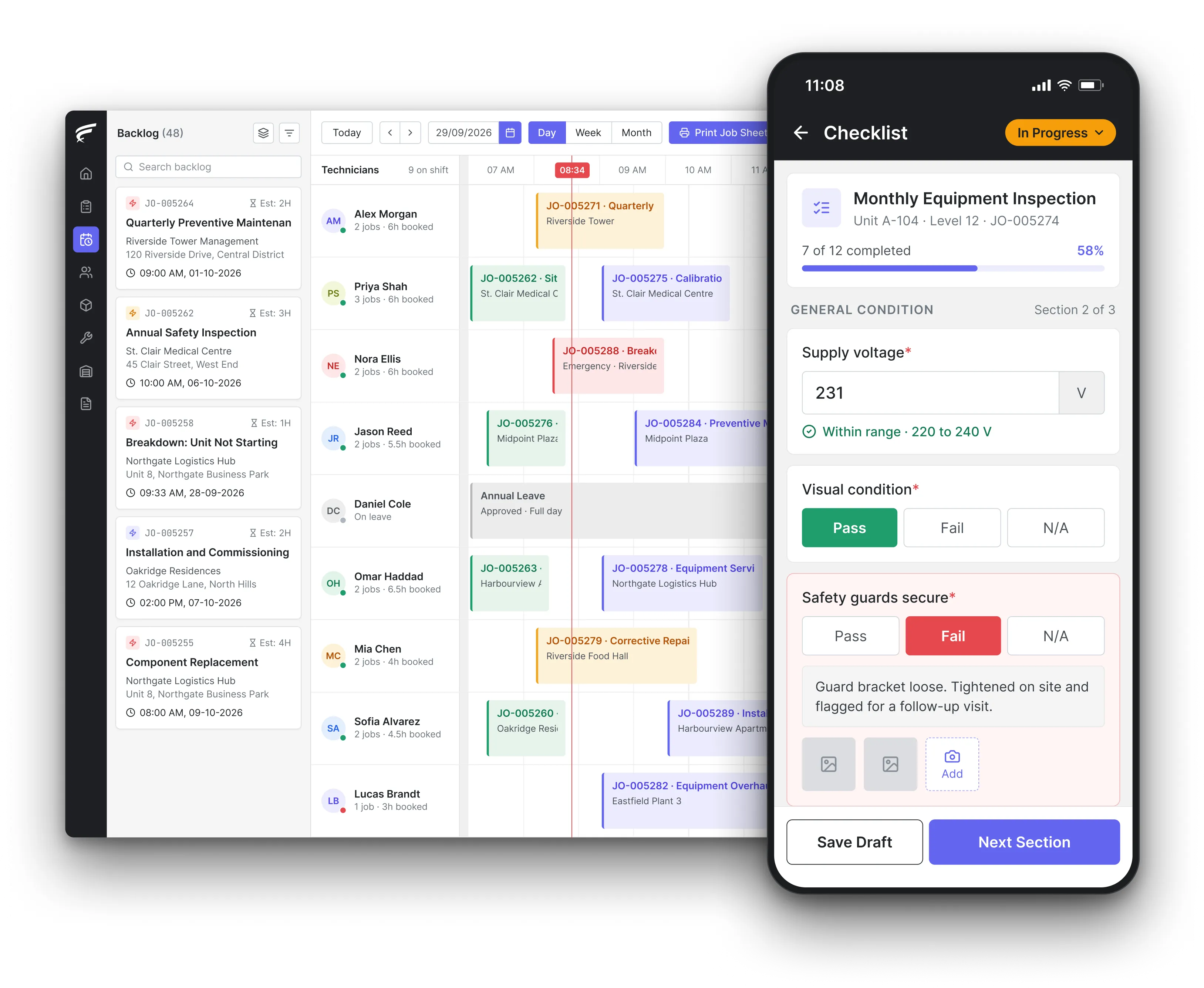
FieldEx scheduling board on desktop with a technician's inspection checklist open on the mobile app, as used by field service teams switching software

FieldEx is field service management and maintenance management (CMMS) in one system. Malaysian service companies changing field service software can upload clients, contacts, sites, contract visits and past jobs. Planners assign jobs from one calendar, technicians use the app in English, Bahasa Malaysia or Chinese, and client data can be hosted in Malaysia.

What FieldEx does for Malaysian service companies changing systems

Companies change field service software when planners still run the week on WhatsApp beside the system, when technicians won't use the app, or when the vendor stops answering. FieldEx sets up the client side first, then the schedule, then trains the team.

Clients and their sites

  • Client accounts uploaded, with billing and delivery addresses pinned on the map.
  • Several contact persons per client, with the person for invoices marked.
  • Sites and branches with their own address, map location, service zone and site contacts.
  • Clients sorted by your own groups, such as contract clients, walk-in jobs or government accounts.

Contract visits and SLAs

  • Recurring visits raised automatically, monthly, every 2 months, quarterly or yearly, with or without equipment attached.
  • Each plan on fixed dates, such as every first Monday, or counted from the last visit done.
  • Client contracts with start and end dates and the visits they include.
  • Service level agreements (SLAs) for chosen clients, with alerts to the supervisor or job owner before a deadline slips.

Planning the week

  • Each technician's day or week on one calendar, with unassigned jobs waiting beside it, in scheduling and dispatch.
  • Jobs dragged onto a technician and a time slot, with the technician told on the phone straight away.
  • One click to move a job to another technician or date.
  • Daily job sheets for a team printed or emailed as PDFs.

Matching the right technician

  • Skills named after licences such as Suruhanjaya Tenaga (ST) chargeman or wireman grades, or Department of Occupational Safety and Health (DOSH) competent person, with an expiry date.
  • Jobs assigned automatically on skill, availability, shift, leave and service zone.
  • Shift patterns, including night shifts, set for each person or team.
  • Licences and registrations, such as ST, Bomba eFEIS and SAMM, tracked for staff and for the company with renewal reminders.

The app in your team's language

  • Jobs, client details, site location and equipment history on Android and iOS, in English, Bahasa Malaysia or Chinese, in the FieldEx mobile app.
  • Check-in and check-out on site, with travel time and distance logged.
  • Photos with an automatic watermark, and the client's signature on completion.
  • Jobs done without a signal in basements and plant rooms, then uploaded later.

Clients see the work

  • A client portal with your branding, showing jobs, upcoming asset maintenance and completed service reports, in service requests and customer portal.
  • Service requests sent by clients with photos, a phone number and a preferred date.
  • A QR code at each site so building staff report a fault without logging in.

Reports and billing records

  • Service report PDFs with your logo, parts used with quantities and prices, check-in and check-out times and the signature.
  • Sales orders linked to the client and their contract.
  • Data hosted in Malaysia where your clients require data residency.

Which records should move when a Malaysian service company changes its job management system?

The Inland Revenue Board of Malaysia (LHDN) Public Ruling No. 4/2000 (Revised) on keeping sufficient records says records must be kept for at least 7 years from the end of the year the income relates to.

Records first made electronically may stay electronic. Where a business uses computers, it should also keep its system documentation, such as the accounting manual and chart of accounts.

The safe order is clients, then sites and contacts, then equipment, then contract plans, then open jobs, then history.

What FieldEx does about it

  • Clients and history together: clients, contacts, sites and past jobs can all be uploaded, each job linked to its client and site.
  • Open jobs ready to plan: open work goes into the backlog, so planners assign it on the first morning.
  • Uploads included: clients, sites, contract visits and earlier jobs can be uploaded; setup comes with the subscription.

Do personal data rules change when we move client data to a new system?

Under the Personal Data Protection Act 2010 (PDPA), section 9(2), when a data processor such as a software provider handles personal data for you, you as the data user must ensure it gives sufficient technical and organisational security guarantees.

Law-firm commentary on the 2024 amendments notes that, since 1 April 2025, data processors are also directly bound by the PDPA Security Principle.

For a service company, the personal data in the old system is client names, phone numbers, addresses, signatures and site photos.

What FieldEx does about it

  • Contacts under each client: contact persons upload under the right client and site, so nothing sits in a loose list.
  • Access by role: permission profiles decide who can view, add, edit or delete client records, and who can use the web or mobile app.
  • Your own data, any time: client data can be exported at any time, free of charge, including when you leave.
  • Contracts tied to the work: each contract carries its dates and the plans it covers, so a renewal shows the visits behind it.

Can client data move to a system hosted outside Malaysia?

Section 129 of the PDPA governs transfers abroad. Before the 2025 amendments, a place had to be specified, with a law substantially similar to the PDPA or an adequate level of protection. Law-firm commentary notes that, from 1 April 2025, data users may transfer personal data to countries whose data protection laws are substantially similar.

Some clients, such as government agencies and government-linked companies (GLCs), ask for data to stay in Malaysia regardless.

FieldEx can host your data locally in Malaysia where data residency is required.

What FieldEx does about it

  • Local hosting on request: data can be hosted in Malaysia for clients who need it.
  • Clear exports: your data can be exported in Excel, CSV or PDF whenever an auditor or client asks.
  • Repeat visits flagged: when a new job repeats a recent job on the same asset, the office is alerted, which catches a visit booked twice.

What should we do with client data left in the old system?

Section 10 of the PDPA, the Retention Principle, says personal data must not be kept longer than necessary for its purpose. Data no longer required must be destroyed or permanently deleted.

That has to sit alongside the seven-year LHDN period for business records. Keep the records the law requires, move them into the new system, and ask the old provider to delete the rest in writing.

What FieldEx does about it

  • Kept where it's needed: completed jobs and their reports live in FieldEx against the client and site, so the old system isn't kept just as an archive.
  • History protected: completed jobs lock automatically, and delete rights are set per role.
  • Every report kept: each regenerated service report PDF is kept, so you can show what the client received.
  • Their own schedule on the phone: each technician sees their shift and can apply for leave from the same screen.

Will the new system need to work with LHDN MyInvois for e-Invoices?

According to LHDN's e-Invoice FAQ (updated 4 September 2026), e-Invoice applies from 1 January 2026 to businesses with annual turnover up to RM5 million, and businesses below RM3 million are exempt. The Companies Commission of Malaysia (SSM) training note on MyInvois explains that e-Invoices go to LHDN through the MyInvois Portal or through an API.

For a service company, the job record is where the invoice detail starts. The parts, labour and visit details need to reach your accounting system cleanly.

FieldEx can connect to any open system through REST APIs and has connectors for QuickBooks and Xero.

What FieldEx does about it

  • Parts and prices on every job: the service report lists spare parts used, with quantities and prices, so the invoice matches the work.
  • Sales orders per contract: sales orders link to the client and their contract.
  • Access decided by role: permission profiles set who can read, create, edit or delete customer records, and who can use the web app, the mobile app or both.

How do you keep monthly and quarterly contract visits on time during the switch?

RecordHow long
UK company and accounting records6 years from the financial year end
UK VAT business records6 years
US tax records, general rule3 years
US employment tax recordsAt least 4 years

Sources: GOV.UK company and accounting records; HMRC VAT Notice 700/21; IRS, How long should I keep records?

The risk in a switch is a visit that slips between two systems. A quarterly fire alarm service or a monthly lift visit is set by contract, and the client notices a missed date before you do.

Pick a cutover day. Stop booking in the old system the day before. Load open jobs and recurring plans. Confirm every technician's next 3 days.

What FieldEx does about it

  • Plans that know their dates: each recurring plan runs on fixed dates or counts from the last visit done, so the next job lands on time.
  • Missed visits moved: a missed visit is rescheduled automatically after the overdue period you choose.
  • Double bookings caught: when a new job repeats a recent job on the same equipment, the office is alerted.

How do we get technicians to use the new app?

FieldEx trains your supervisors and senior technicians first, so the team learns from people they already work with; for big teams, FieldEx runs the sessions itself. Training happens at your office or online, in Bahasa Malaysia or English.

Old job apps often hold customer addresses, photos and signatures offline. Sign each device out of the old tool, then choose the level for its next use.

What FieldEx does about it

  • Their language on screen: technicians can use the app in English, Bahasa Malaysia or Chinese.
  • Their own phones: the app runs on Android and iOS, and every licence includes it.
  • Simple on site: scan the QR code, follow the checklist, take photos and get the client to sign.
  • Location in their hands: technicians can switch location tracking off at any time by setting their app status to unavailable.

Can clients log their own requests while we change systems?

During a switch, the busiest channel is usually the planner's WhatsApp. Moving requests into the system early takes pressure off the cutover week.

Run one week of jobs through to invoices in a test before the cutover, and compare totals with your accounting system.

FieldEx can connect to any open system through REST APIs and has connectors for QuickBooks and Xero.

What FieldEx does about it

  • A portal for each client: each client checks open jobs and planned maintenance, logs requests and moves visit dates.
  • QR codes on site: building staff scan a site QR code and report a fault without logging in.
  • Requests become jobs: each request arrives as an unassigned job, with the client's photos and preferred date.
Customer story

Royal Facilities Management delivers hard and soft services across commercial and residential properties in Oman. The other software it considered didn't offer built-in preventive maintenance scheduling or a way for clients to check in on their properties.

With FieldEx, site staff report faults by scanning a QR code, and property owners track technician progress and completed reports in their own portal.

Read the Royal Facilities Management story

Chubb, an integrated security provider with 18 branches across Malaysia, used to receive technician photos and updates through WhatsApp, and weekly reports took several systems and manual work. With FieldEx, planners see active, pending and completed jobs on one dashboard.

Read the Chubb customer story

What Malaysian service companies ask before moving to FieldEx

Can we bring our clients and past jobs into FieldEx?

Yes. Clients, contacts, sites and completed jobs can all be uploaded. Each job sits under its client and site, so planners and technicians see the history from the start.

Will contract visits keep their dates?

Yes. Each recurring plan keeps fixed dates or counts from the last visit done. Bring the last visit date across and the next job is created on time.

Can FieldEx match jobs to licensed technicians?

Yes. Skills can be named after licences such as ST chargeman or wireman grades, or DOSH competent person, with an expiry date. FieldEx matches jobs on skill, availability, shift, leave and service zone.

Does the app work in Bahasa Malaysia?

Yes. The FieldEx app works in English, Bahasa Malaysia and Chinese, on Android and iOS phones.

Can our data stay in Malaysia?

Yes. FieldEx can host your data locally in Malaysia where data residency is required.

Will FieldEx work with our accounting package?

FieldEx can connect to any open system through REST APIs and has connectors for QuickBooks and Xero.

Do we have to sign a long contract?

No. Billing is monthly or annual. There is no minimum term or notice period, so you can stop by not renewing. The annual option costs less than monthly.

How long does it take to switch to FieldEx from another field service system?

Once we know your requirements and your data is ready, FieldEx can be implemented in as little as a week with standard features for small businesses. Larger setups and custom work take longer.

Most switches take 1 to 3 months, mostly depending on how quickly your data is ready. There is no setup fee, and training is at your office or online. See FieldEx implementation.

How long does it take to move to FieldEx from another field service tool?

Once we know your requirements and your data is ready, FieldEx can be implemented in as little as a week with standard features for small businesses. Larger setups and custom work take longer.

Most moves take 1 to 3 months, depending mainly on how long your data takes to prepare. Setup, data upload and training are included, with no setup fee. See FieldEx implementation.

Bring your client list and contract schedule to a demo

Book a demo