
Mobile Field Execution
Android and iOS apps that let technicians check into jobs, log parts used, take site photos, and capture customer sign-offs, even when working offline.
Learn moreThe best field service management software for Malaysian businesses replaces WhatsApp groups, whiteboards and paper job sheets with one system for scheduling, dispatch, mobile work orders and parts tracking.

FieldEx also runs CMMS for the equipment you maintain, with a local team in Malaysia, free onboarding, and a technician app in Bahasa Malaysia, Mandarin and English. Plans start at RM50 per user per month, billed annually.
This guide explains what FSM software does, what separates a strong platform from a basic one, and how FieldEx handles the full job cycle from request to signed-off PDF. It also covers how to choose, so you can match a platform to the way your business runs instead of forcing your work into a fixed template.
Field Service Management software is the central tool service companies use to coordinate work that happens at customer sites. It connects office staff, field technicians, and customers into one clear workflow, so nothing gets missed between the request coming in and the job being closed. The main features usually include:
Android and iOS apps that let technicians check into jobs, log parts used, take site photos, and capture customer sign-offs, even when working offline.
Learn moreAutomate recurring service visits and build a full, searchable history for every piece of equipment.
Learn moreFollow stock as it moves from warehouses to technician bins and onto specific jobs, so parts used are always tied to the work order.
Learn moreGive customers a branded web portal to raise requests, check job status, and view the service history on their equipment.
Learn moreSend work to the right technician based on skills, working hours, leave, location, and current workload, or spread jobs evenly across a team.
Learn moreCreate, assign, and track jobs from start to finish, with custom forms per job type and instant PDF completion reports.
Learn moreThis is the question most buyers get stuck on, so it is worth settling early.
FSM software is built around people and jobs in the field. It manages who goes where, what they do on site, and how the job is recorded and closed. Its center of gravity is the technician and the customer.
CMMS (Computerized Maintenance Management System) software is built around machines and their upkeep. It manages asset histories, preventive maintenance schedules, spare parts, and reliability data. Its center of gravity is the equipment.
Most real operations need both. You dispatch people to jobs (FSM), and many of those jobs are maintenance on tracked equipment (CMMS). Buying two systems means the field team and the maintenance team work from different records. FieldEx runs both in one platform, against the same customers, sites, and assets, so a repair raised in the field and a scheduled service on the same machine share one history.
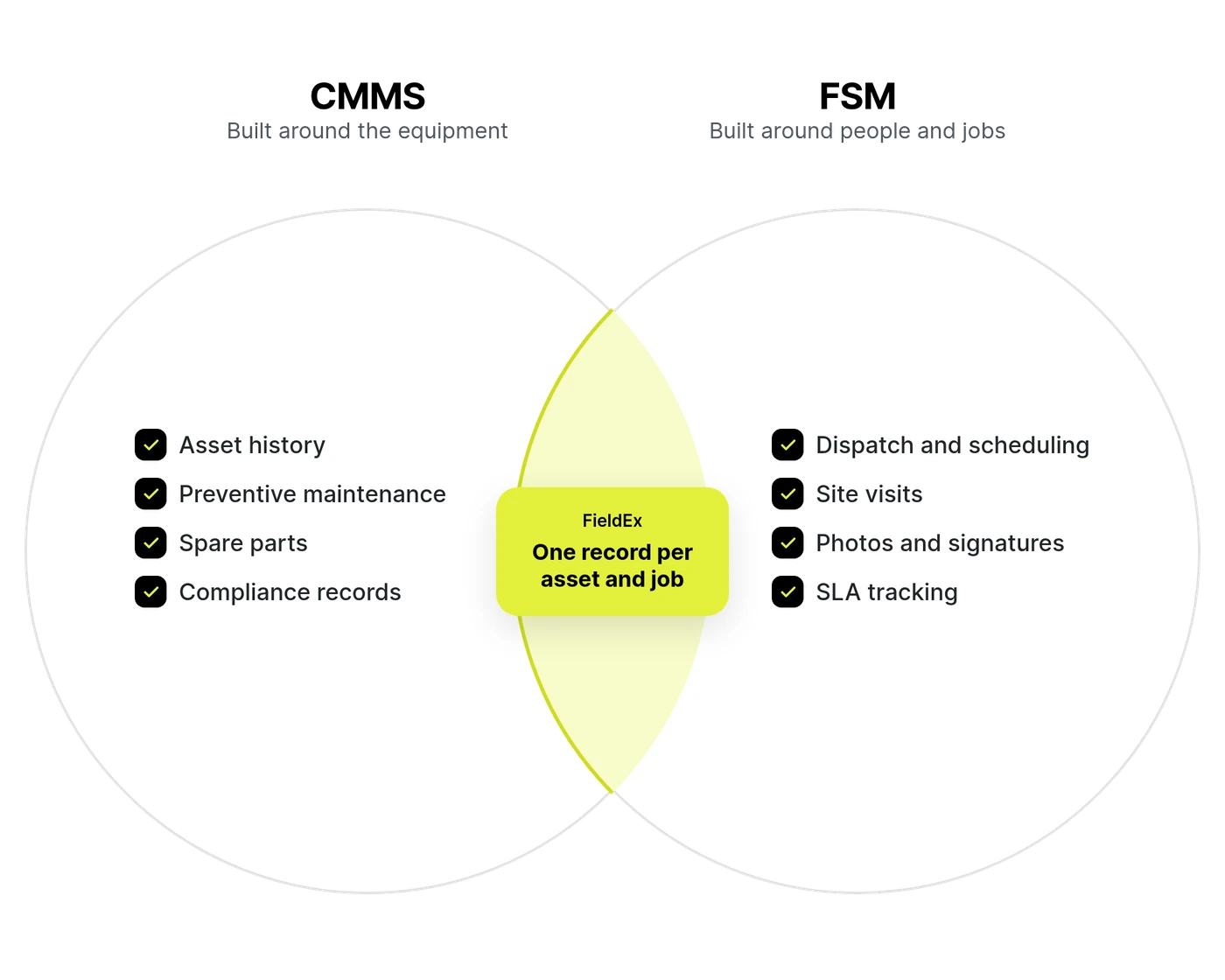
Most field service systems force you to fit your work into fixed, off-the-shelf templates built for one trade. What makes FieldEx such a strong FSM is that it is built differently. It pairs a flexible FSM engine with full CMMS features, so you can run any job type against any asset type. You control how work gets set up, done, documented, and audited.
Managing field service teams in Malaysia also comes with unique operational demands, from coordinating multi-lingual workforces to handling distributed sites across key commercial zones. FieldEx is structured to support local growth without technical friction.
Set up the platform in your own words and your own steps, without paying consultants for custom development. You decide which fields technicians see for each job type, and you control who can move a job into a given status. For example, you can restrict an "Approved" status so only a supervisor can sign it off.
FieldEx goes further than most platforms on this. Field names, list values, and module labels can be renamed to match how your business already talks about its work. The system adapts to your language instead of making your team learn a new one.
FieldEx assigns jobs three ways, and you can mix them:
You do not need every method. A small team can run on manual and round-robin. A larger operation can let rules route the routine jobs and keep manual control for the exceptions.
Sime Industrial, a heavy equipment provider operating across more than 190 locations in Asia Pacific, used to juggle Excel and WhatsApp just to track technician activity, job progress and mileage claims. Planners had no live view of where technicians were or how long jobs actually took, and claims were checked manually against handwritten notes. With FieldEx, all job data, statuses and time logs sit in one dashboard, so planners can see who's doing what and where without waiting for an end-of-day update, and mileage claims are backed by real-time logs instead of manual checks.
Read the full storyChecklists in FieldEx do more than collect digital ticks. When a technician completes a checklist, individual answers can create follow-up work automatically. Map a failed check on an inspection to a corrective repair job, and completing the checklist creates that job for you, using the template you chose and the right task steps. One checklist can raise several jobs if several answers are mapped. No manual re-entry is needed.
Technicians run their day from native Android or iOS apps with built-in language options in Bahasa Malaysia, Mandarin, and English. They see assigned jobs, open the linked asset and its history, fill in checklists, log parts used, take photos, and capture the customer's signature on site.
That depth sits behind a simple screen. Each technician opens the app straight to their own work, such as today's pending jobs, and sees only the fields set for that job type. Labels use your team's own words. Task steps can be set to run in order, so the app walks a technician through the job instead of leaving them to work it out.
FieldEx keeps working when the signal drops. Technicians can view job-related asset information and create or edit records offline. Everything syncs back once they're online again. Inventory transfers check against the live stock count before they go through, not a snapshot that might already be out of date. That's what keeps every number accurate and every movement traceable, so your stock reports and audits hold up under scrutiny.
Measure response and resolution times accurately against the hours you actually work. FieldEx builds Service Level Agreement (SLA) rules from reusable timer stages with At Risk and Violation thresholds, tied to business-hours calendars. Timers pause outside working hours, so a job raised on Friday evening is not marked late for sitting overnight. Packages apply the right SLA to the right jobs based on match conditions you set.
Learn more about SLA ManagementMagnum, a Malaysian leisure and entertainment brand operating since 1968, was drowning in paper forms and manual reports. FieldEx now centralises its SLA management and alerts the team as deadlines approach, and the Reports module creates and sends scheduled reports automatically. The team says the SLA feature helps them finish tasks more efficiently and stay on track with their KPIs.
Read the full storyCapture the exact operational data required by your specific customer contracts and regulatory standards. Beyond standard checklists, FieldEx lets you build tailored digital forms to record unique machine parameters, operational readings, safety steps, and mandatory verification protocols on site. Require multiple digital signatures, such as from both the technician and the on-site client supervisor, before a job can close, giving you a tamper-proof digital record that satisfies audit and client compliance requirements.
Skip rigid, standard-issue job sheets. FieldEx produces completion certificates, service reports, and compliance sign-offs with your own logo, colors, and layout. You control which details, photos, signatures, and line items appear on the final customer PDF.
Give customers a branded web portal where they can raise new requests, check live job status, and view the maintenance history on their registered equipment. Requests submitted through the portal land in FieldEx as live jobs, ready to schedule.
For quick fault reporting without a login, each site can carry a QR code. A customer scans it, fills a short public form, and a job is created automatically from the template you set. Route that template to a group and round-robin spreads the incoming reports across the team.
Every job logged against a piece of equipment builds its service record. FieldEx calculates Mean Time Between Failures (MTBF) and Mean Time to Repair (MTTR) directly on the asset from real job logs, so you can see which equipment costs you the most downtime. When leadership needs broader reporting, asset and job data can be pulled into Microsoft Power BI using a template FieldEx sets up with you.
You do not have to figure out deployment alone or wait days for an offshore reply. FieldEx has a direct local team in Malaysia to guide your team through setup, workflow configuration, and staff training, providing ongoing local support. Onboarding and system configuration come at no extra cost.
A field service tool gets the right person to the right job. A CMMS underneath it tells you what that job is actually about, and what it is costing you over time. Run both on one platform and your field work builds a maintenance record instead of leaving one behind.
An FSM job says "repair at Client X, Floor 3." FieldEx ties that job to the asset itself: its serial number, warranty status, parent and child components, meter readings, and every past repair and part replaced. The technician opens the asset and sees what they are working on and what has already been done to it.
The parts a job type usually needs can be pre-loaded from its template, and technicians can check what is in stock across warehouses and van bins before they leave. Parts used on the job are drawn from the bin and logged against both the job and the asset, so the stock count updates itself and every part is traceable to the work that consumed it.
Because every job feeds the asset record, FieldEx builds engineering data a job log cannot: MTBF, MTTR, failure rate, downtime, and repair cost per asset. Assets carry their manufacturer and model, so you can compare how one brand or model holds up against another, and see which machines now cost more to repair than they are worth. That is the data that tells a customer when to stop repairing and replace.
When a technician fails a check on a digital inspection, FieldEx raises the corrective work order on its own and keeps the failure, the fix, and the resolution chained to the asset. The trigger is the inspection in front of the technician, not a sensor you have to buy and wire in.
A calendar reminder says "service every three months." FieldEx can also trigger maintenance on actual usage: a work order is raised when a generator passes a set number of runtime hours, or a machine crosses a cycle count. Run both together and choose whether the job fires on whichever comes first, or only when both are due.
Use this as a checklist when comparing platforms:
Can you rename fields and control who sees and edits what, per job type, without custom development?
Does it support manual, round-robin, and rule-based routing, so you can match the method to the size of your team?
Can technicians run jobs, log parts, take photos, and collect signatures on the app, and does it hold up when the signal drops?
Can you measure response and resolution time against real business hours, with timers that pause after hours?
Can customers raise requests, check status, and view equipment history in a branded portal?
Can non-users report an issue by scanning a site QR code and having a job created automatically?
Does it sync with QuickBooks Online and Xero to keep customers, parts, and invoices aligned with your books?
Can you produce completion certificates and service reports in your own layout?
Does it organize work as Customer > Site > Asset, so you can manage equipment and history across many locations?
Are MTBF, MTTR, downtime, and utilization tracked, and can the data feed Power BI for custom reporting?
The best platform is the one that fits your work pattern, not the one with the longest feature list. Work through these before you commit:
If most jobs are scheduled maintenance, weight the preventive maintenance and asset features. If most are reactive break-fix calls, weight fast job creation, dispatch, and mobile execution. FieldEx handles both against the same records, so a mixed operation is not forced to choose.
A platform you cannot change without paying for custom work will trap you in someone else's assumptions. Look for renamable fields, configurable job types, and status permissions you can set on your own.
A five-person team does not need rule-based routing. A fifty-person team drowns without it. Choose a platform that grows from manual to rule-based rather than one that only does one.
Ask what happens with no signal, how signatures and photos are captured, and how parts get logged. The office view rarely fails. The field view is where weak platforms show cracks. Check how much a technician has to learn before they can close their first job. A good app shows each person only what their work needs.
If jobs, assets, customers, and inventory live in separate silos, you lose the history that makes the data useful. One connected record per job, asset, and customer is the point of the system.
Getting live in FieldEx does not carry a separate bill. Onboarding, workspace setup, configuration, and technician training are included for free. There is no implementation fee to pay before you see the system working.
The FieldEx team sets up your workspace with you and brings your existing records in, so you start with your assets, sites, and customers already loaded, instead of a blank system.
Training can be in person. The team can come to your office to run the demo, set up the system, and train your technicians, in English or Bahasa Malaysia. We have helped Malaysian teams move off paper, set up the system to fit how they already work, and improve things from there.
Because setup is guided and the data is brought in for you, most teams are running real work in days to weeks, depending on the size of your operation, rather than the long rollout a heavy legacy field service system usually needs.
Can’t find the answer you’re looking for? Please chat with our friendly team.
Yes. FieldEx has a direct local team in Malaysia providing hands-on assistance, workflow guidance, and dedicated onboarding support to ensure your deployment succeeds at zero onboarding and configuration cost.
The FieldEx mobile app also supports Bahasa Malaysia, Mandarin and English. Technicians can easily choose their preferred language to view assigned work orders, fill out digital forms, and log job details.
Yes. WhatsApp threads and manual spreadsheets make it easy to lose job details and leave you with no audit trail. FieldEx gives every job a single record, routes it to the right technician using your rules or spreads it across a team, tracks time on site, and produces a verifiable PDF report when the work is done.
Three ways, and you can combine them. You can assign a job to a person manually. You can assign it to a group and let round-robin spread work evenly. Or you can set assignment rules that match a job to the right technician by skill, working hours, leave, location, and current workload, then notify them. Rule-based assignment runs on the Job Order module.
FieldEx organizes operational data as Customer > Site > Asset. This makes it simple to manage equipment, track open jobs, and review service history across hundreds of locations.
Yes. Each site can display a QR code. A customer scans it, submits a short public form, and FieldEx creates a job automatically from a preset template. It is a quick way to capture faults from people who do not use the system.
Yes. FieldEx connects to QuickBooks Online and Xero to keep customer records, parts, and invoices aligned with your books. You control the sync direction for each data type.
Most technicians only ever see a small part of it. Each person opens the app to their own job list and sees only the fields set for that job type, labelled in the words your team already uses. The app runs in English, Bahasa Malaysia and Mandarin, and technician training is included in onboarding at no extra cost.
