Scheduling and dispatch software for service and maintenance teams

Stop planning by WhatsApp and whiteboard. Book PPM and breakdown jobs on one board, with the right technician on each.

Book a demo
Updated 16 Oct 2026
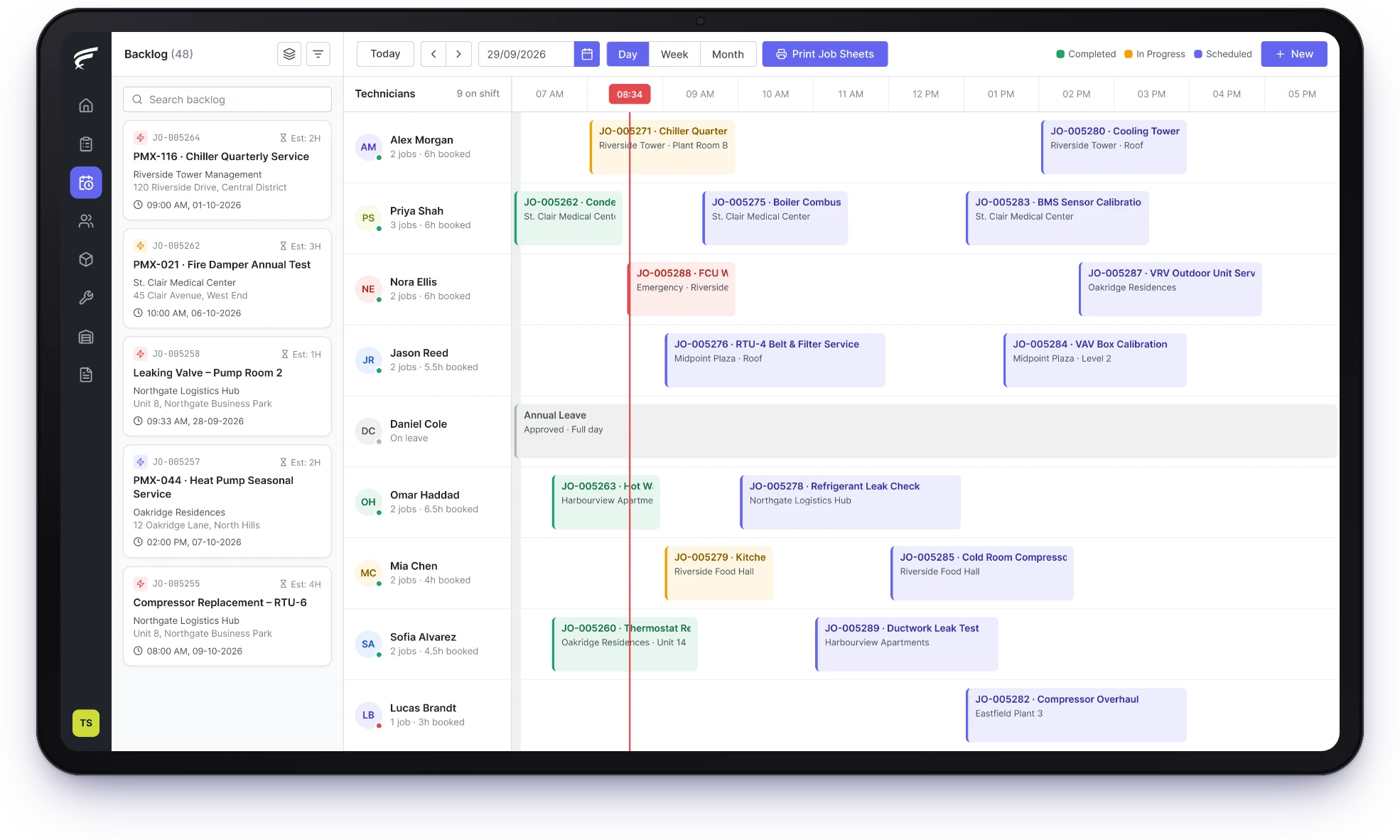
FieldEx scheduling board with waiting jobs beside each technician's day

FieldEx is a field service and asset management (FSM+CMMS) application. As scheduling and dispatch software, it puts jobs waiting to be booked beside every technician's calendar. FieldEx matches jobs to the right skills and licenses and skips staff on approved leave. It creates planned preventive maintenance (PPM) jobs when they fall due.

  • One board for PPM, breakdowns and every technician's day.

  • Licensed work goes only to technicians holding that competency.

  • Urgent breakdowns re-planned quickly, with the technician told at once.

What FieldEx's scheduling and dispatch software does for coordinators

FieldEx plans field jobs and maintenance jobs on the same board.

Your coordinator works from one list instead of a spreadsheet, a whiteboard and a chat group. Every booking is a work order tied to its customer, site and unit.

The board

  • Day and week calendars, one row for each technician.
  • Jobs waiting to be booked, listed beside the calendar.
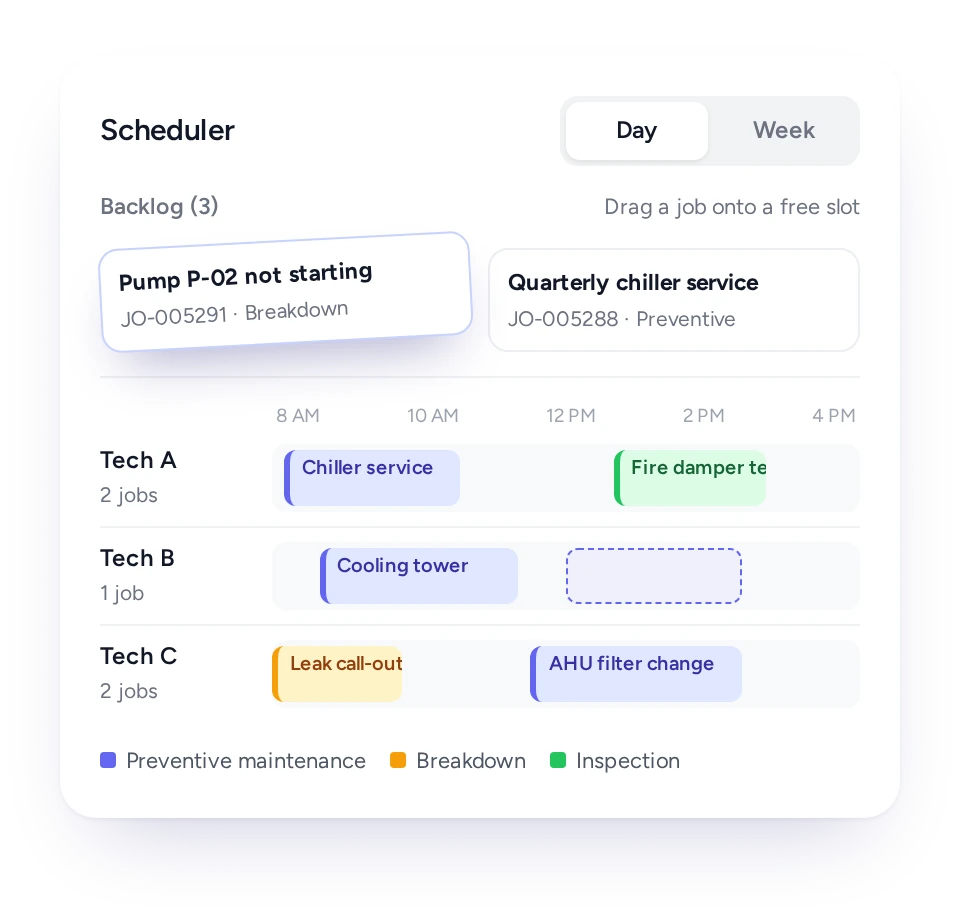
  • Drag a waiting job onto a technician's slot to book it.
  • Start a new job in an empty slot, with a template if needed.
  • Colors by job type, so PPM and breakdowns stand out.
  • Filter by service zone, customer, job type, status or asset type.

Who does the job

  • Give a job to one technician, or to a team.
  • Team jobs shared out evenly among the members.
  • Skills named after licenses, such as chargeman and wireman grades.
  • New jobs assigned automatically, with a supervisor alerted when nobody suitable is free.
  • Teams set up by trade, state or region, or certification.

Leave and shifts

  • Staff on approved leave left out when jobs are given out.
  • Leave applied for in the app, then approved by the manager.
  • Shift patterns for people or teams, visible to each technician in the app.

PPM and repeat work

  • PPM jobs created from each unit's or site's plan when due.
  • PPM jobs sent directly to the person in charge of that unit.
  • Recurring jobs created on a fixed cycle.
  • Jobs from inspection findings and QR breakdown reports, in the same waiting list.

When plans change

  • Re-assign or re-schedule a job, and all of its tasks if you choose.
  • Stretch a job on the calendar to change how long it is expected to take.
  • Put a job back into the waiting list.
  • Technicians notified whenever a job is given or moved to them.

Bigger jobs

  • One job split into several tasks, each with its own technician and time.
  • Tasks moved individually or together.

Response times

  • Service-level agreement (SLA) timers on every job, from waiting to completed.
  • Working-hours calendars, so the clock pauses after hours.
  • Early warning when a job is at risk, and an alert if the target is breached.

In the technician's hand

  • Today's jobs, and any other date's, on the phone.
  • Accept or decline new jobs on the spot.
  • Map to the site, journey log and check-in per task.
  • Progress the office can follow without phoning.

Job sheets and customers

  • A daily job sheet for each technician, with the spare parts needed for the day.
  • Job sheets for several technicians printed or emailed in one go.
  • Clients see their upcoming visits in the customer portal and can reschedule.

From whiteboards and WhatsApp to one scheduling board

Waiting jobs and calendars sit side by side, so your coordinator books work in one place and nobody retypes jobs from chat messages.

Many Malaysian service teams still plan the week on a whiteboard or a spreadsheet, then send each job to technicians in a WhatsApp group. The coordinator becomes the only person who knows the real plan, and a sick day or one urgent breakdown unravels it.

In FieldEx, jobs that need a slot wait in a list next to the calendar. Each technician has a row in the day or week view. Drag the job onto a free slot to book it, and the technician sees it on the phone.

Jobs reach the list from the office, from technicians in the field and from PPM plans. Others come from inspection findings, QR breakdown reports and the customer portal. Colors by job type show how much of the week is PPM and how much is breakdowns.

Portal requests alert coordinators automatically, and an email or in-app alert can be set up for QR reports the moment they arrive.

Dragging a waiting job onto a technician’s free slot in FieldEx

Match licensed work to licensed technicians

Name skills after the licenses and competencies your technicians hold, and FieldEx uses them so each job goes to someone qualified to do it.

In FieldEx you create a skill for each license or qualification and give technicians the skills they hold. Examples are chargeman and wireman grades, a competent person certificate, or wind turbine and medical device training.

Skills can carry an expiry date. FieldEx then uses those skills to match the right technician to each job.

Teams can follow your organization too: by trade, by state or region, or by certification. A job needing a chargeman in the northern region goes to that team, not the whole company.

Plan around shifts and approved leave

FieldEx leaves out staff who are on approved leave, so you don't promise a client a visit from a technician who is off.

Shift patterns can be set up for people or teams, and technicians see their own shifts in the app. Coordinators book work around each person's rostered hours, not around guesswork.

Leave is applied for in the app and signed off by the manager. Once approved, FieldEx won't give that technician jobs for those days, and the work passes to the next suitable person.

PPM visits that land on the board by themselves

PPM jobs are created from each unit's plan when they are due, so contract maintenance doesn't depend on someone remembering to book it.

Many maintenance contracts in Malaysia are judged on PPM done on time: monthly for some equipment, quarterly or yearly for others. FieldEx creates PPM jobs from the maintenance plan on each unit or site.

A job can go straight to the person in charge of that unit, or wait on the board for your coordinator. Recurring jobs on a fixed cycle work the same way.

PPM and breakdown jobs share the same board. You can see when a run of breakdowns is pushing PPM visits back, and rebook them before the contract report shows a gap.

Handle the breakdown call without losing the day

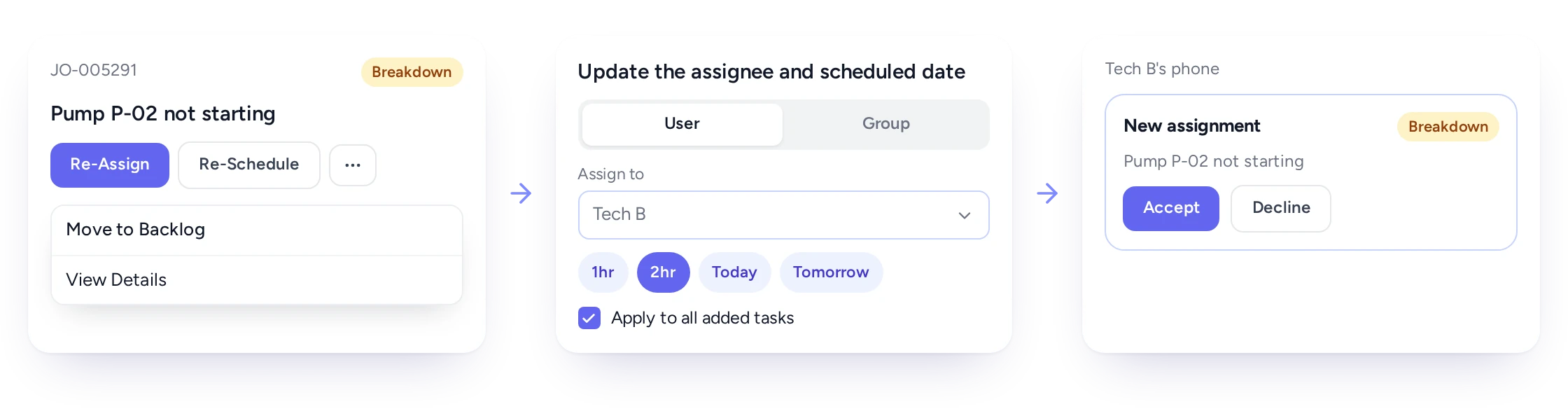
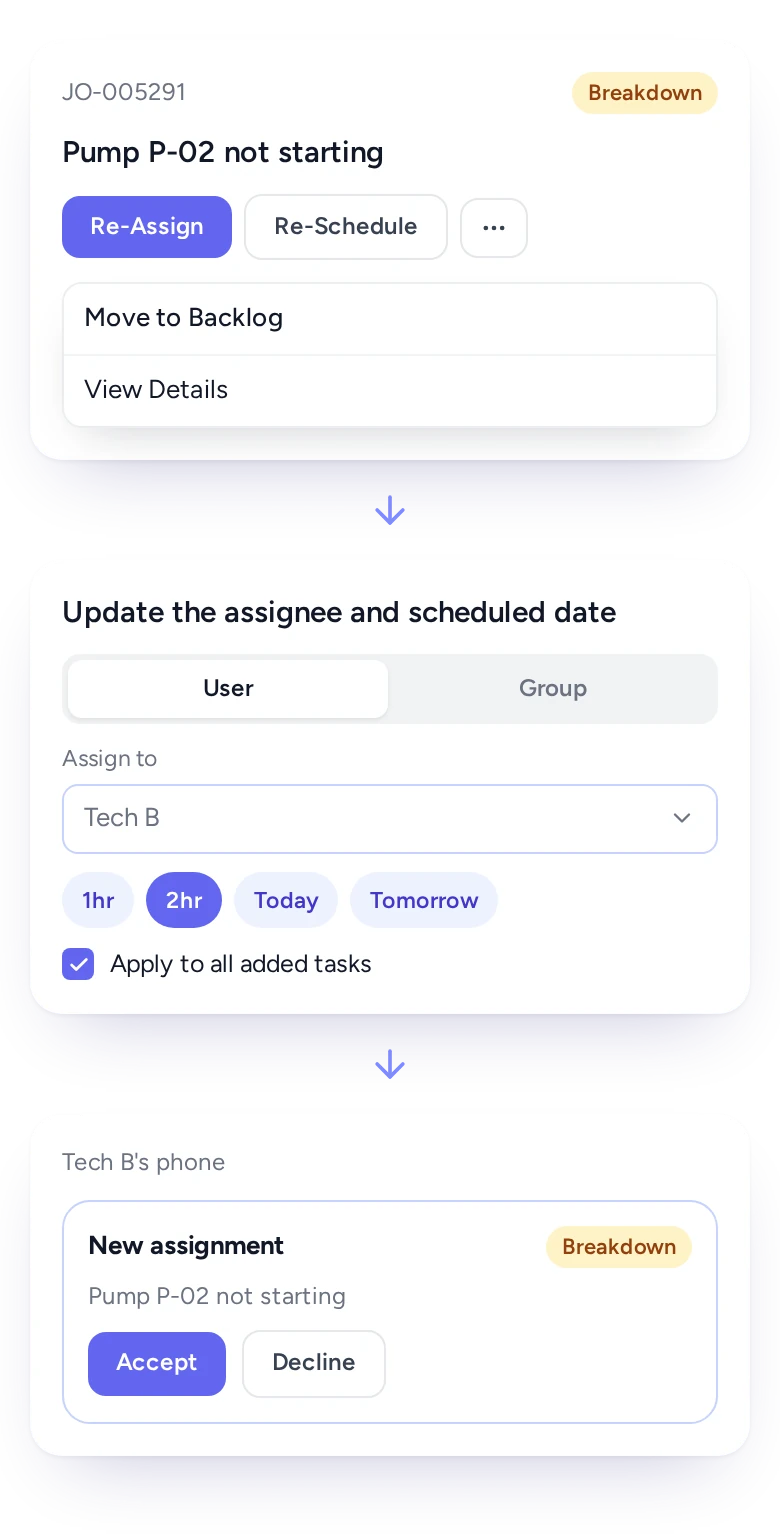
Move jobs, hand them to another technician or send them back to the waiting list, and the technicians affected are notified at once.

Dispatcher moving an urgent job to another technician in FieldExDispatcher moving an urgent job to another technician in FieldEx

A breakdown at 11am used to mean a round of phone calls to find out who was nearest and free. In FieldEx, your coordinator opens the board and gives the breakdown to the best-placed technician. The coordinator then moves that technician's other jobs to someone else or back to the waiting list.

Changes can cover every task on a job at once, or just one task. Each technician is told when a job is given or moved to them. They can accept or decline from the app, so the office knows fast whether the breakdown is covered.

On the phone, technicians can accept or decline a new assignment, so the office knows quickly whether the urgent job is covered.

Book a demo

Meet the response times in your service contracts

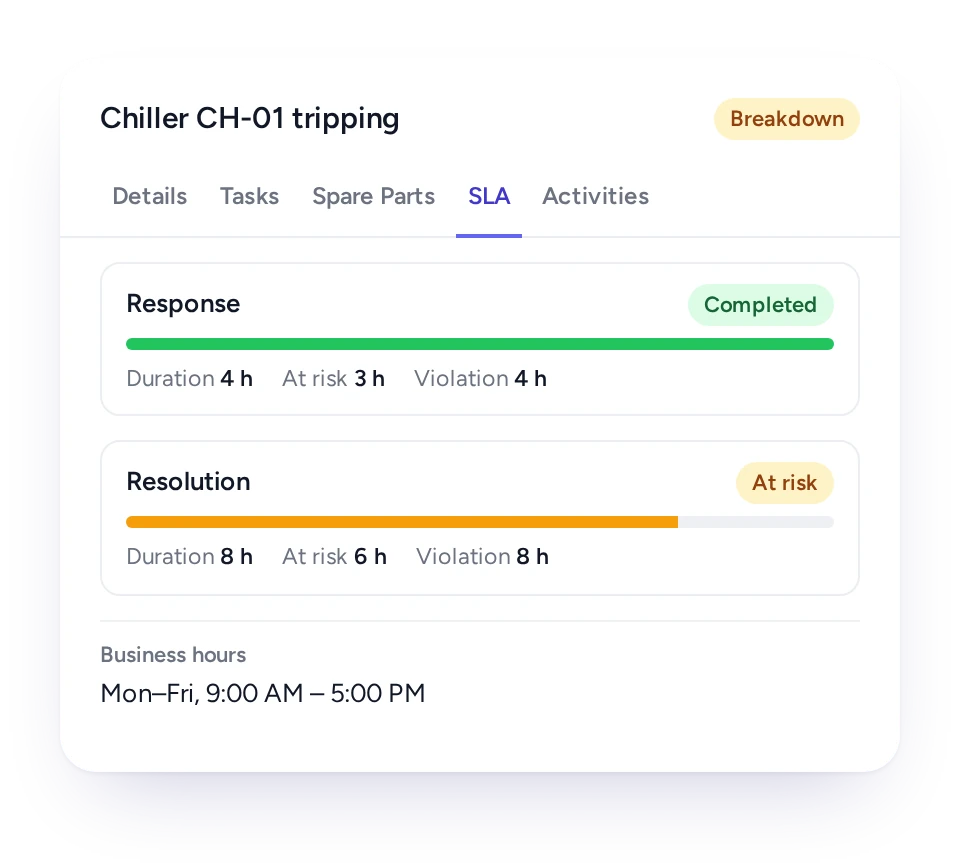
SLA timers on each job count only working hours and warn before a target is breached, so urgent contract work is booked first.

Service contracts with facility owners and government clients often set a response time and a rectification time. In FieldEx, an SLA is made of stages, each a timer with its own start, pause and stop. One stage can measure how long a job waited, and another how long the repair took.

Working-hours calendars decide when the clock runs, so a four-hour target doesn't count through the night. Each job shows its SLA status, and FieldEx alerts chosen people or teams when a job is at risk or breached. Every client can have its own service levels.

Different customers can have different service levels, so a dispatcher can see which waiting job carries the tightest promise.

The draft has none. Suggested: SLA status on a FieldEx job

A job sheet for every technician, with the parts list

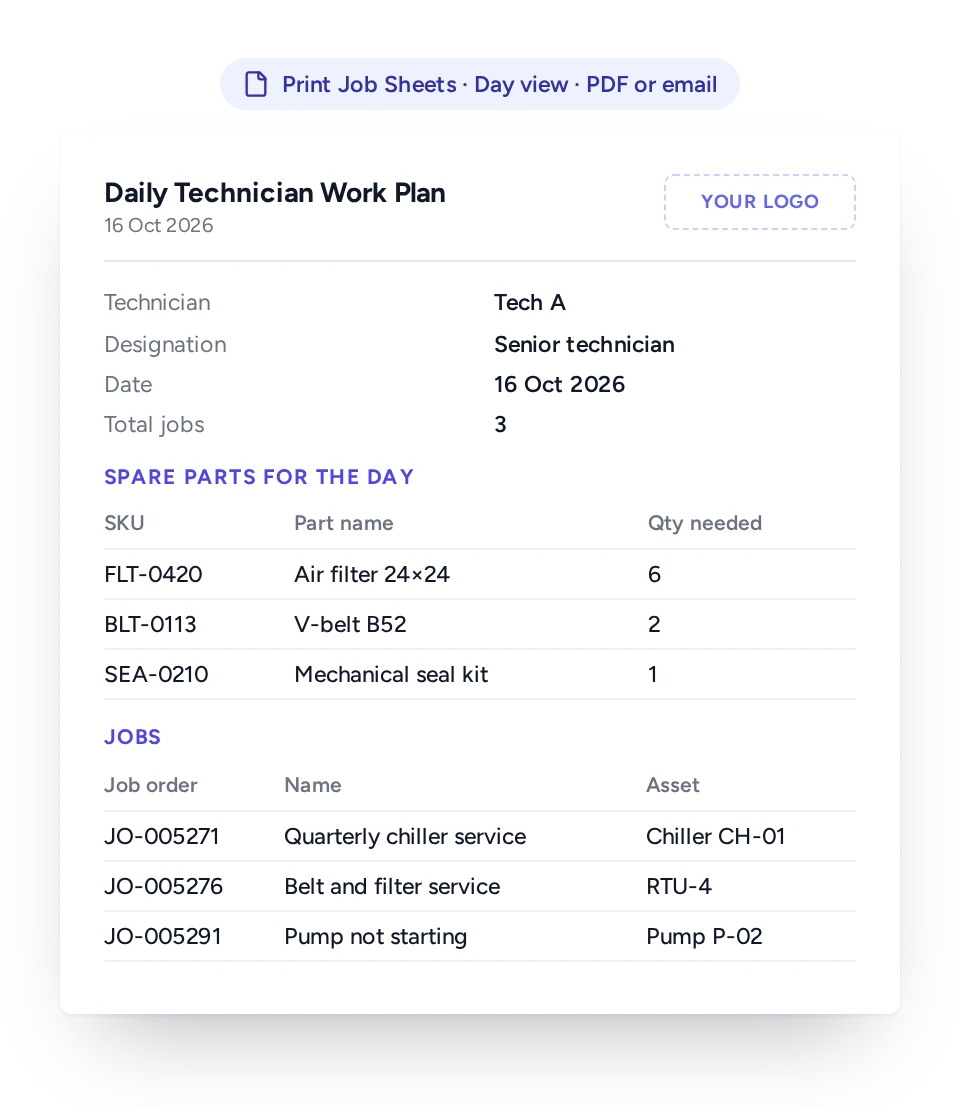
Each technician's daily job sheet lists the day's jobs and all the spare parts needed, so the van is loaded once.

Going back to the store for a missing part can cost a technician half a morning, especially between sites in different towns. From the board, print each technician's daily job sheet, with the day's jobs and every spare part needed across them.

Job sheets for several technicians can be produced together as one PDF, then downloaded or emailed to supervisors or the storekeeper. The same jobs appear on each technician's phone with the customer, site, unit and tasks.

Daily job sheet listing a technician’s jobs and parts for the day

Know your technicians have arrived, and keep in touch

Journey logs and task check-ins show the office who has reached site and started work, without a phone call.

Any technician can turn location tracking off by setting their app status to unavailable.

For technicians working alone at remote sites, supervision starts with knowing who has arrived. Technicians record the drive to each site and check in and out of every task in the app. The office follows progress on the job. For automatic assignment, where each technician is right now can help decide who goes.

How each person in the team uses the schedule

Coordinators plan on one board, technicians see a clear day on their phone, and managers see PPM and SLA promises at a glance.

  • Coordinator or dispatcher

    Every waiting job and calendar on one board, booking by drag, and quick changes for breakdowns.

  • Technician

    The day's jobs in the app, notice of every change, and the option to accept or decline.

  • Supervisor

    An alert when nobody suitable is free, and jobs shared out evenly across the team.

  • Maintenance manager

    PPM jobs created on time and shown next to breakdowns.

  • Service or contract manager

    SLA status on each job, with early warnings.

  • Storekeeper

    Each technician's parts list for the day, before the vans leave.

  • Client

    Upcoming visits shown in the customer portal, and a way to change the date.

PPM and breakdowns planned in one system

FieldEx is field service management and a CMMS in one system, so every booking knows its unit and that unit's history.

Scheduling apps made for small trades see appointments. In FieldEx each booking is a work order linked to a unit, a site and its maintenance plan. A PPM visit, an inspection and a breakdown call all sit on one board and all build the unit's service history.

The plan feeds the schedule as PPM falls due. The readings and results technicians record on site keep each unit's history current for the next plan.

Related features: the Mobile App, Work Order Management and Preventive Maintenance. See also Asset Management, Service Requests and Customer Portal, and a guide to Field Service Management software.

How AlanDick gets up to 26 people to the right sites with FieldEx

AlanDick (telecommunications infrastructure, Brunei): with up to 26 team members deployed daily to onshore and offshore sites, scheduling and dispatching had become a major challenge. FieldEx assigned tasks automatically by skill, availability and proximity, and technicians reached the right sites on time. AlanDick manages more than 70 jobs a month in FieldEx.

Read the AlanDick Story

How Chubb moved from rigid task scheduling to automatic assignment

Chubb is an integrated security provider with 18 branches across Malaysia. Before FieldEx, rigid task scheduling made urgent or same-day tasks hard to handle. Planners waited until the end of the day for technician updates.

With FieldEx, tasks are assigned automatically to the right technician. Planners see active, pending and completed jobs on a central dashboard, and they get automated SLA compliance reminders.

Read the Chubb Story

Questions Malaysian coordinators ask about scheduling in FieldEx

What software do dispatchers use at a maintenance company?

Many still use a whiteboard and a WhatsApp group. A better choice is software that plans PPM and breakdowns together and knows who is qualified.

FieldEx shows waiting jobs and every technician's calendar on one board. It matches jobs to skills named after your technicians' licenses, and skips staff on approved leave. It also creates PPM jobs from each unit's plan, so your coordinator isn't rebuilding the week by hand.

Can FieldEx replace our whiteboard and WhatsApp group for job assignment?

Yes. Jobs are booked on the scheduling board and reach each technician's phone, with the customer, site and unit attached. Technicians are notified of every new or moved job and can accept or decline it. Assignments no longer depend on someone reading a chat message.

Can FieldEx give jobs only to technicians with the right competency?

Yes. Set up a skill for each competency, such as chargeman or wireman grades or a competent person certificate. Add it to the technicians who hold it. Each skill can have an expiry date, and FieldEx assigns jobs only to technicians with the skill required.

Will FieldEx assign a job to a technician who is on leave?

No. Technicians apply for leave in the app, the manager approves it, and approved leave is taken into account whenever FieldEx gives out jobs. The job passes to the next suitable technician.

Can jobs be assigned automatically?

Yes. New jobs can be given to a suitable technician automatically, based on skills and availability, and the technician is notified. If nobody suitable is free, a supervisor can be alerted. Your coordinator can still book or move any job by hand on the board.

Can PPM jobs be created and booked automatically?

Yes. PPM plans on each unit or site create jobs when they are due. Each job can go straight to the person in charge of that unit, or wait on the board for booking. Recurring jobs on a fixed cycle are created in the same way.

How do we squeeze in an urgent breakdown?

Put it on the best-placed technician and move their other jobs on the board. If the client's contract has an SLA, the breakdown's timer is already running, so the coordinator can see how much time is left.

Can our clients change their own appointment?

Yes. In the customer portal, clients view their jobs and coming maintenance visits and raise new requests. They can move a visit to another date, and your schedule updates.

Can we print a job sheet for each technician every morning?

Yes. FieldEx produces a daily job sheet per technician listing the day's jobs and the spare parts needed. Job sheets for several technicians come out as one PDF, ready to download or email to the storekeeper.

Can FieldEx track response and rectification times for our contracts?

Yes. SLA timers run on each job against working-hours calendars, and each job shows its SLA status. FieldEx alerts chosen people when a job is at risk or breached. Each client can have its own service levels.

Can a big job be split between several technicians?

Yes. A job can hold several tasks, each with its own technician and time slot. Each task can be booked or moved on its own or together with the rest.

Can our team use FieldEx in Bahasa Malaysia?

Yes. The FieldEx web and mobile apps are available in English, Bahasa Malaysia and Chinese, and each user picks their own.

Do technicians need a separate license for the mobile app?

No. The mobile app comes with every FieldEx license, and technicians and office users pay the same license price.

How soon can our team start scheduling with FieldEx?

There's no setup fee. Training is at your office or online, in Bahasa Malaysia or English, and your team can learn as it goes with guides, videos and the in-app AI assistant.

Customers, sites, units and past jobs can be uploaded. FieldEx helps with setup, and training is included. See Setup and Training.

Once we know your requirements and your data is ready, FieldEx can be implemented in as little as a week with standard features for small businesses. Larger setups and custom work take longer.

How quickly can we start scheduling in FieldEx?

There's no setup fee. Customers, sites, assets and past jobs can be uploaded. FieldEx helps with setup, and training is included. See Setup and Training.

You can also set FieldEx up yourself with guides, videos and the in-app AI assistant, which answers questions as you go.

Once we know your requirements and your data is ready, FieldEx can be implemented in as little as a week with standard features for small businesses. Larger setups and custom work take longer.
See your technicians' week planned on one board

Book a Demo