Work order software that replaces paper job sheets and WhatsApp updates

Every job built the same way, every SOP step done in order, and a signed service report sent before the technician leaves site.

Book a demo
Updated 16 Oct 2026
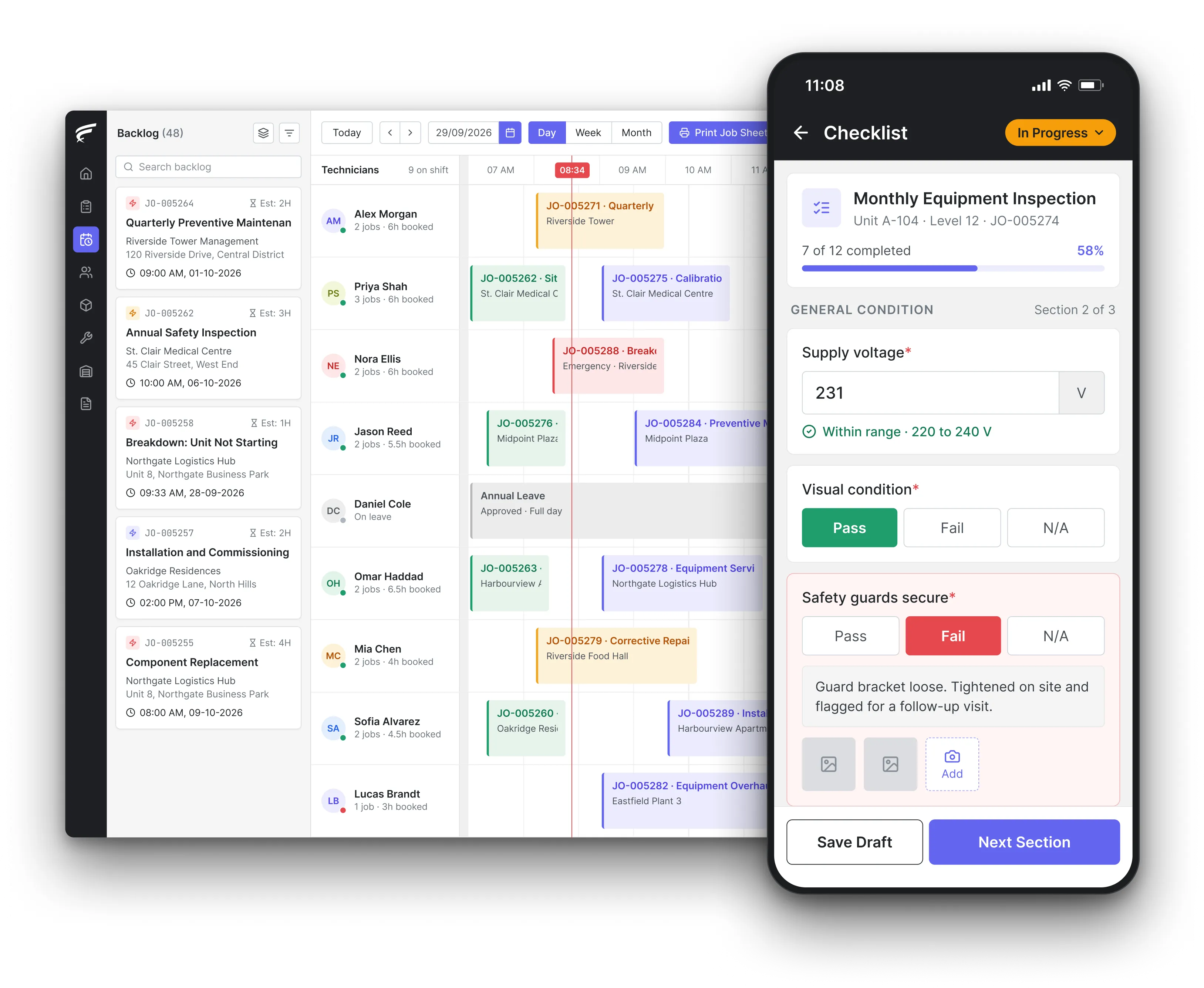
FieldEx work order with tasks, parts and the customer's signature

FieldEx is a field service and asset management (FSM+CMMS) application. Its work order software builds each job from a template and keeps SOP steps in order. Technicians capture photos, parts and check-in times on their phone. Each job closes with the customer's signature and a service report.

  • One record per job, instead of paper and chat messages.

  • SOP steps finished before the job can be closed.

  • A signed service report, emailed from the job.

Inside FieldEx's work order software for coordinators and technicians

FieldEx takes a job from the first call to the signed report, and keeps it tied to the customer, the site and the equipment.

Nothing has to be copied from a chat group into a spreadsheet later.

Job types

  • Different job types for installation, breakdown repair, PPM, inspection and survey.
  • Only the sections each type of work needs.
  • Statuses in your own words, with control over who can set each one.
  • Labels renamed to your team's terms, for example "service ticket".

Job templates

  • Templates that bring in the tasks, procedures, parts and timing.
  • Parts lists carried by each task template.
  • New jobs from a template on the web or the phone.

SOP steps

  • Tasks grouped into procedures and set to follow an order.
  • Required tasks finished before the job can be closed.
  • Notes, attachments and a travel log on each task.

On the job, on the phone

  • The day's jobs on the phone, with a map to each site.
  • An equipment QR code scanned to fill in the asset.
  • Check-in and check-out on every task.
  • Jobs and tasks worked offline, with check-in, check-out and travel synced later.

Evidence

  • Site photos and videos saved to the job, with mark-up and a place-and-time stamp.
  • The customer's signature on the phone.
  • A service report PDF emailed from the job.

Defects and repeat breakdowns

  • Defects found in a checklist that raise the follow-up job.
  • A warning when the same equipment gets the same job again within days.
  • Condition grades that update the asset's status.

Spare parts and fault codes

  • Spare parts from a list, by barcode scan, or from the technician's own stock.
  • Fault and resolution picked from your own lists.

Job history

  • Every change logged with who made it and when.
  • Completed jobs locked to the roles you choose.
  • A supervisor review before the report goes out.

Linked to your other work

  • Client requests from the customer portal or a QR code arrive as new jobs.
  • Occupants can scan a machine's QR code to report a fault, with no account, and FieldEx creates the job.
  • SLA status shown on jobs under a service contract.

A different form for installation, breakdown and PPM jobs

Each job type in FieldEx carries only the sections and statuses that kind of work needs, so technicians aren't filling in fields that don't apply.

A single paper job sheet for every kind of work leaves half the boxes empty and the important ones unclear. In FieldEx, you set up job types for the work you actually do. Examples are installation, breakdown repair and PPM, or inspection, survey and any other work.

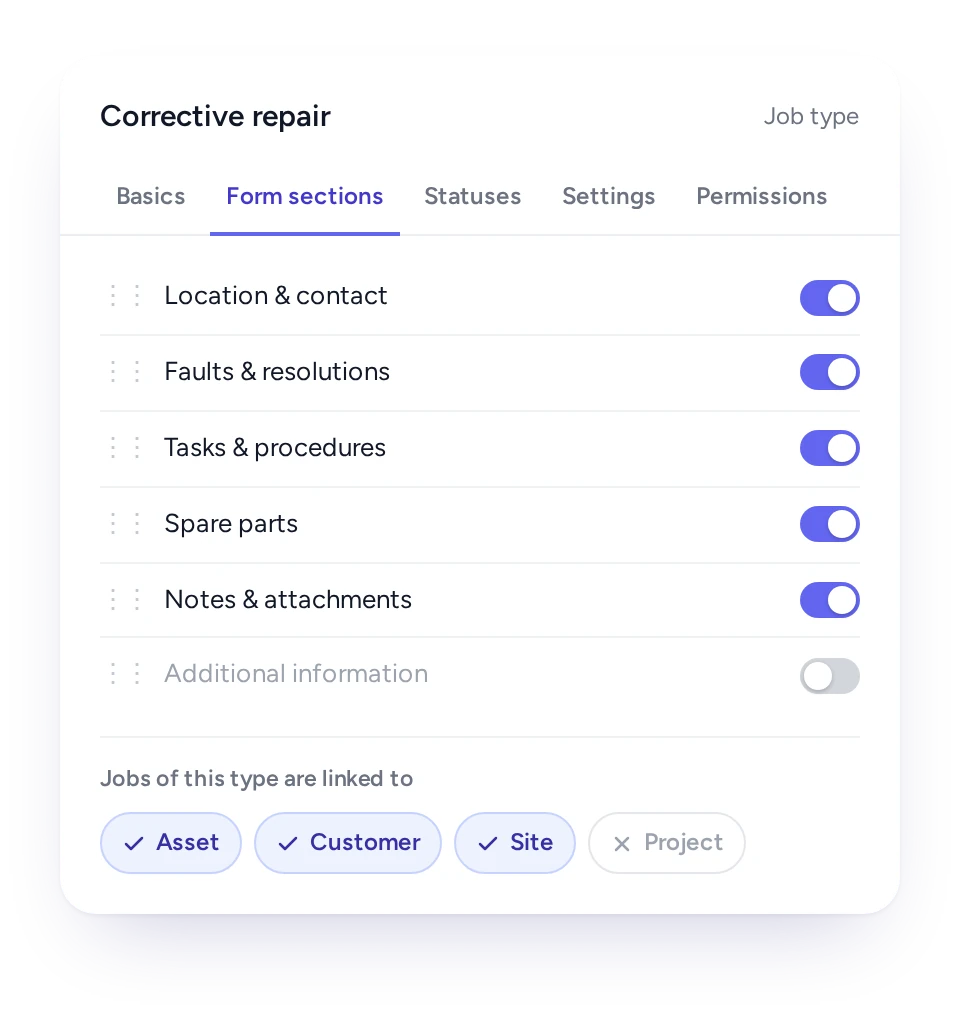
Each type shows only what it needs, such as location and contact, fault and resolution, and tasks. Spare parts and notes can appear too. You choose whether the job must be tied to equipment, a customer, a site or a project.

Statuses are set per job type and named the way your team talks. You decide which roles can set each status: a technician can mark a job done, while only the supervisor can close it. Field names can be renamed too, so the system speaks your language.

Job type set-up in FieldEx showing the sections each job needs

Job templates so every job starts complete

A job template fills in the tasks, procedure, parts and timing, so nobody builds the same job from memory.

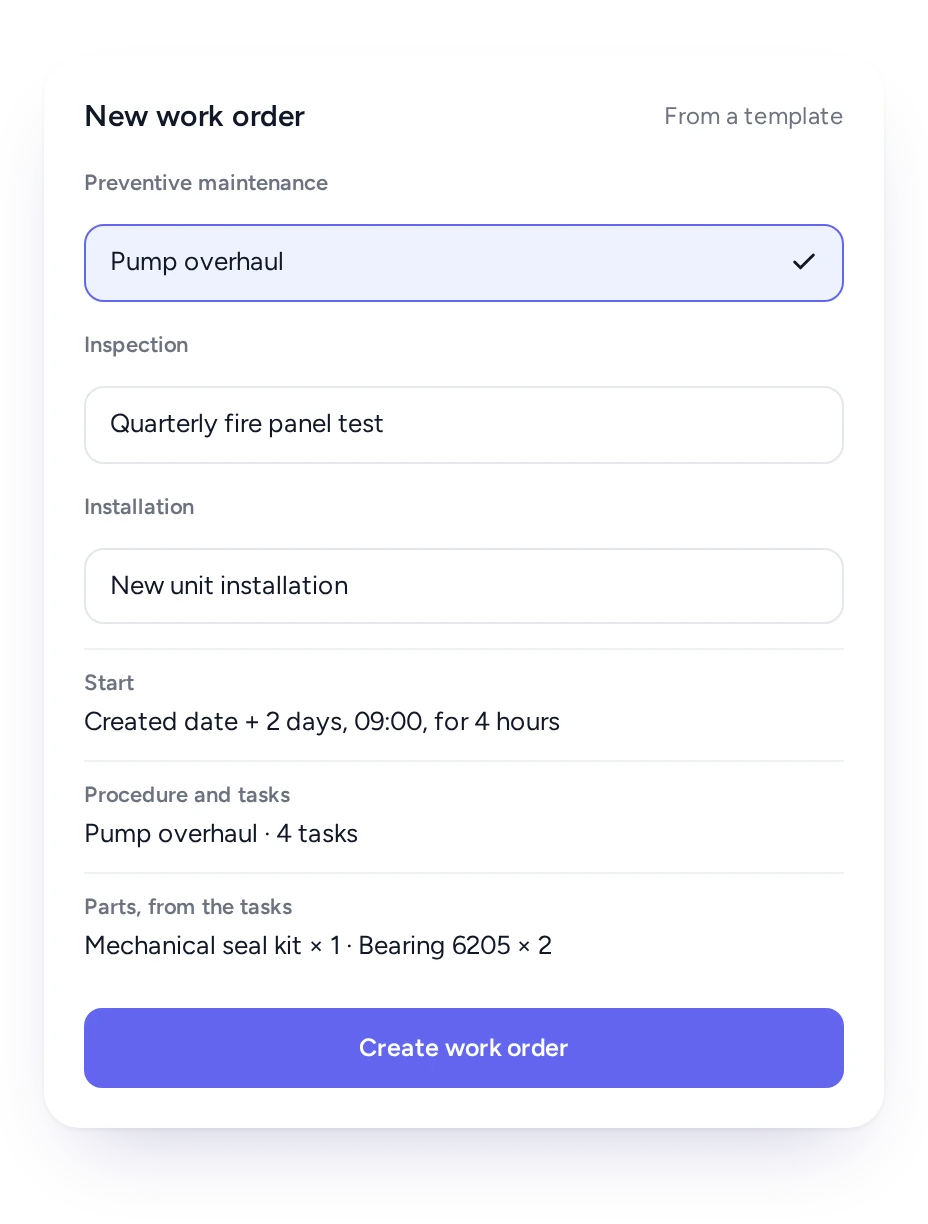
When jobs are typed up from WhatsApp messages, details go missing. In FieldEx, you set up a template once for each repeat piece of work. Examples are a chiller service, a monthly genset run test and a new unit installation. The template carries the procedure, its tasks and a start time counted from the day the job is created.

Each task template has its own parts list. Add the task and the parts come with it, so the storekeeper can prepare them before the technician collects the job.

Technicians can use templates on the phone too. When they find more work on site, they raise the new job from the right template there and then, without calling the office.

Creating a FieldEx work order from a template, with its start time, procedure, tasks and parts

Make sure every SOP step is done before a job is closed

Tasks can follow a set order and any task can be required, so no job closes with SOP steps undone.

Each task shows who did it, when they checked in and out, and what they noted. If a client or auditor asks whether a step was done, the answer is on the job.

Each task records who did it, when they checked in and out, and any notes or attachments they added. When someone asks whether isolation was confirmed before work started, the answer is on the work order, with a name and a time.

Safe work has to be planned, not left to memory, and an SOP on a shelf doesn't do that on its own. In FieldEx, the SOP becomes a procedure on the job. Its tasks can follow a set order, each done before the next begins. Make a task required, and nobody can close the job while it is outstanding.

Photos, signatures and a service report instead of chat messages

Photos go onto the job with a place and time stamp, the client signs on the phone, and the service report is ready.

Photos sent to a WhatsApp group are hard to find a month later, and many clients want their report within days. Technicians shoot photos or video in the FieldEx app and save them straight to the job.

They can draw on a photo to point out a fault, and each one carries the place and time it was taken. Task check-ins show how long the work took.

After the client signs on the phone, the service report PDF lists the equipment, the fault and its fix, and the parts. It also lists the technicians' arrival and departure times, the tasks done, the attachments and the signature. The report is ready to email from the job.

Book the repair the moment a defect is found

A checklist answer showing a defect can raise the repair job straight away, so the problem doesn't wait for someone to remember it.

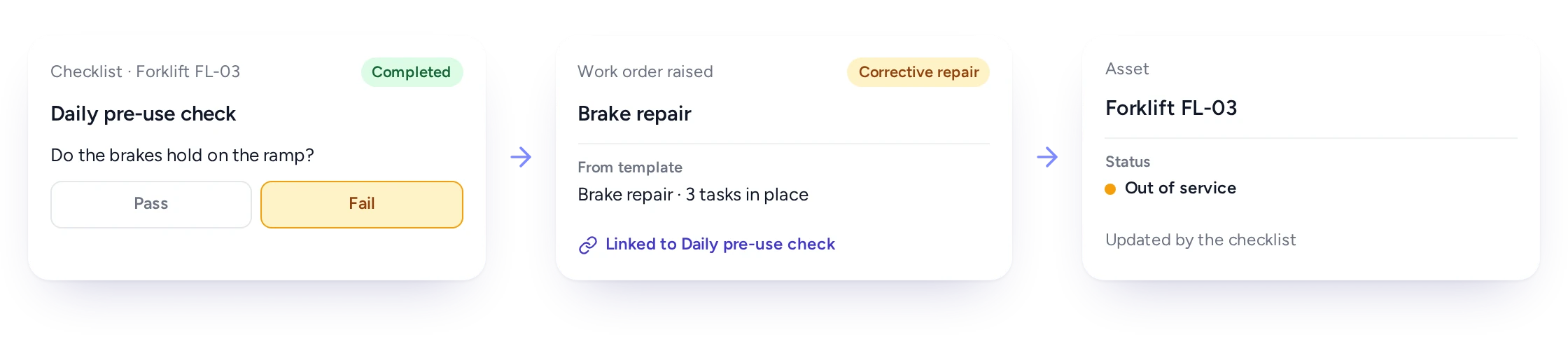
A failed checklist answer raising a linked follow-up work order and updating the asset’s statusA failed checklist answer raising a linked follow-up work order and updating the asset’s status

Any checklist answer in FieldEx can raise a repair job from the template you pick, with its tasks ready. A condition grade can update the equipment's status, so the office sees the problem without waiting for the report.

The repair job stays linked to the inspection that found the defect, so the record shows what was found and how it was put right.

The follow-up job is linked to the inspection that found the problem. The history then reads in order: what was found and when, who found it, and the work that fixed it.

Book a demo

Spot repeat breakdowns on the same machine

FieldEx warns the coordinator when a new job repeats recent work on the same equipment, so repeat breakdowns get noticed.

A machine that breaks down twice in a week often means the first repair didn't fix the cause. When every call is logged as a fresh job, nobody connects the two.

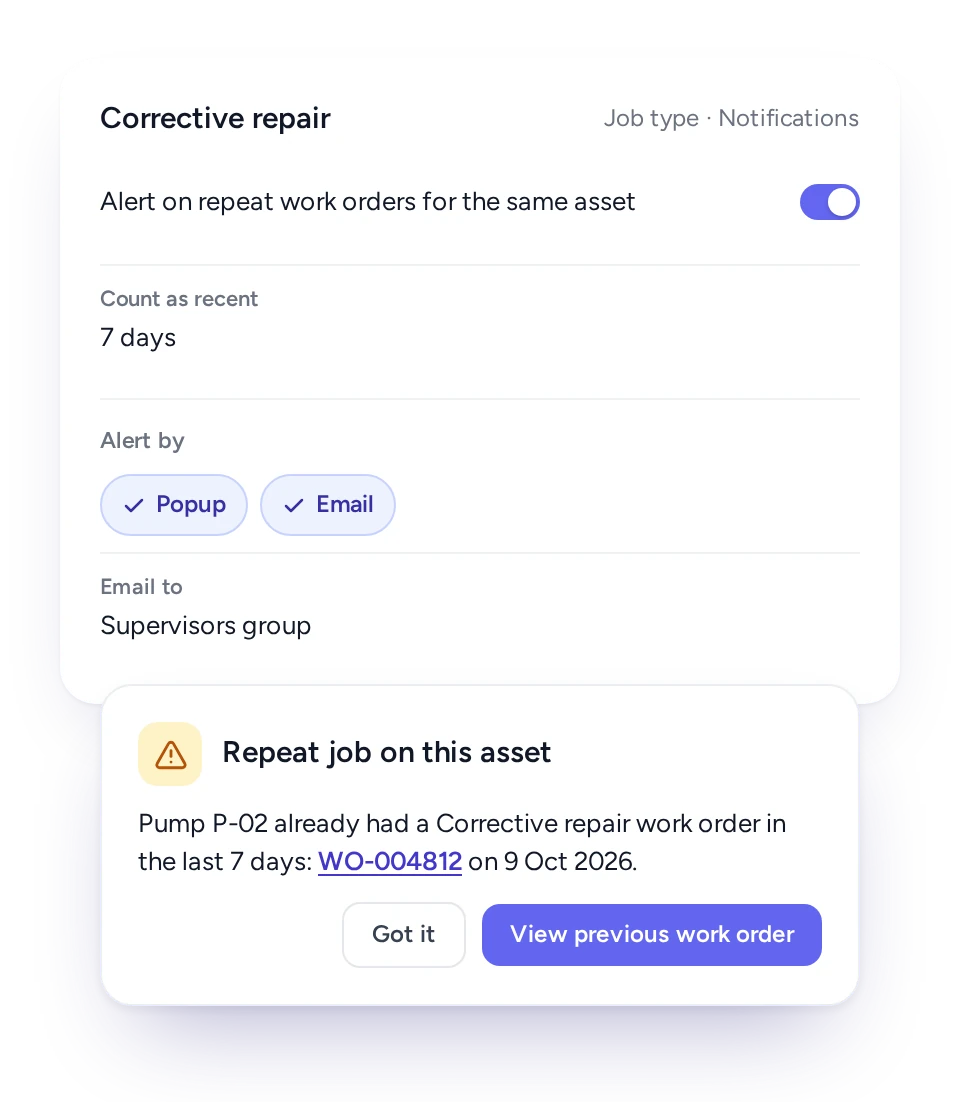
Turn the warning on for the job types where it matters and choose how many days count as recent. When a new job repeats recent work on the same equipment, FieldEx shows the earlier job immediately, and a chosen group can get an email.

The job still goes ahead. The coordinator can send a senior technician, ask what was found last time, or have the right part ready.

FieldEx warning that a new job repeats recent work on the same asset

Spare parts and fault codes recorded on the job, not in a notebook

Technicians add parts from the list, by barcode or from their own stock, and record the fault and resolution from your own lists.

When team leads write down parts in a notebook, the store record and the job record soon disagree. In FieldEx, technicians pick parts from the list, scan a part's barcode, or use the stock in their own van or bag. Anything taken from a storage location comes off its count.

Every job also records the fault and the resolution from your own lists. You can link each fault to the resolutions that apply, so the technician picks from a short list instead of typing.

Those records show which faults keep coming back on which equipment and which parts get used most. See Inventory and Spare Parts for stock control.

Adding spare parts by list or barcode, and picking a fault with its linked resolutions

A job history that stands up to an audit

FieldEx records each edit to a job, with the person and the time, and finished jobs can be locked.

The service report can wait until a supervisor marks the job reviewed. FieldEx keeps each regenerated report, so you can always show what the customer received.

The completion PDF can wait until a supervisor marks the job reviewed, and every regenerated PDF is kept. If a customer queries a report months later, you can show exactly what was sent and when.

Maintenance records only stand up to an audit if they are complete and unchanged. The job's activity log shows each edit: what was changed, from what, to what, by whom and at what time. Each job type can be set to lock finished jobs, so only nominated roles can edit them. Deleting is also limited by role.

How each person in the team uses FieldEx jobs

Coordinators set jobs up faster, technicians follow the SOP on the phone, and managers get records they can show a client or auditor.

  • Coordinator or planner

    Jobs from templates, with the procedure, parts and timing filled in.

  • Technician

    The job, the SOP steps and the parts on the phone, with photos and signature in one place.

  • Supervisor

    No job closed with SOP steps missing, and a check before the client gets the report.

  • Storekeeper

    Parts used on each job, taken from the right store.

  • Service manager

    Repeat breakdowns flagged, and fault history on every machine.

  • Client

    A signed service report by email when the job is done.

Every job adds to the equipment's maintenance history

FieldEx is field service management and a CMMS in one system, so each job counts as service for the customer and maintenance on the equipment.

A service company sees a job as a customer visit. A maintenance team sees it as work on a machine. In FieldEx each job is linked to the customer, the site and the equipment, so one record works for both.

PPM plans create jobs as they fall due, and checklist defects raise repair jobs. What technicians record on site, from parts to faults to meter readings, goes back to the equipment for the next PPM.

Jobs connect to these features:

To choose a system for your equipment, read about choosing a CMMS.

How a facilities firm runs maintenance and cleaning work orders in FieldEx

A facilities and property management firm (real estate, Singapore) had more than 100 technicians and contractors. Their paper reports and checklists left gaps in the audit trail.

With FieldEx, its technicians use the mobile app to check in on jobs and complete required inspection forms. They track supplies and generate a finished PDF report the moment a job is done.

Read the Facilities Firm Story

Agri Sumber Prestari: from log books to jobs on the phone

Agri Sumber Prestari (ASP) is an agricultural manpower and training company under SD Guthrie Agri Bio. It relied on manual log books, spreadsheets and paper-based SOPs and checklists. FieldEx now generates its work orders, inspection checklists and SOPs, with 92 agricultural estates up and running.

Read the Agri Sumber Prestari Story

What Malaysian service teams ask about FieldEx work orders

What is the best work order software for a service and maintenance company?

The best work order software builds each job the same way and keeps SOP steps in order. It records evidence on site and links every job to the equipment it was done on. FieldEx does all four. It is also a CMMS, so those jobs build each machine's maintenance history.

FieldEx builds each work order from a template and keeps required tasks in order. It closes the job with photos, the customer's signature and a completion PDF. FieldEx is also a CMMS, so every job is linked to its asset. The work builds a maintenance history you can use for planning.

Can FieldEx replace our paper job sheets and WhatsApp group?

Yes. Each job lives in FieldEx with its tasks, parts and photos, plus check-in times and the customer's signature. FieldEx produces the service report from the job. Coordinators see progress without chasing messages.

Can technicians open and close jobs on their phones?

Yes. From the phone a technician can start a new job (from a template if needed), scan the equipment's QR code and check in. They then follow the tasks, record parts and photos, and finish with the client's signature.

Can FieldEx make sure technicians follow the SOP?

Yes. Required SOP steps keep the job open until they are done. Each step also records who did it and when, which answers a client's audit question in seconds.

What is in the FieldEx service report?

The standard report covers the job and the equipment, the addresses, and what was wrong and how it was fixed. It lists each spare part with its quantity and price, and when each technician checked in and out. It also shows the tasks done, any attachments and the client's signature. Custom layouts can be built too.

Can a checklist defect create a repair job automatically?

Yes. Each checklist answer can be set to raise a job from a template when the checklist is completed. A condition grade can update the equipment's status.

Can FieldEx tell us when the same machine breaks down again?

Yes. For the job types you pick, FieldEx warns when a new job repeats recent work of the same type on the same equipment. You set the number of days that counts as recent. FieldEx shows the earlier job and can email a chosen group.

Can completed jobs be protected from changes?

Yes. Completed jobs can lock so only chosen roles can edit them. Every change is logged with who made it and when, and delete rights are set per role.

Do the jobs keep working in basements and plant rooms with no coverage?

Yes. Technicians download their jobs and tasks and carry on offline. Check-in, check-out and travel sync once they are connected again.

Can our team use the FieldEx app in Bahasa Malaysia?

Yes. The FieldEx app runs in English, Bahasa Malaysia and Chinese, so each technician can use the language they prefer.

Can we track spare parts used on each job?

Yes. Parts go on the job from the list, by barcode or from the technician's own stock. They come off the count of wherever they were taken from. The service report lists them.

Can FieldEx work with our accounting system?

FieldEx can connect to any open system through REST APIs and has connectors for QuickBooks and Xero.

Do we still need FieldEx if we already have an ERP?

Yes, for the work outside the office. An ERP keeps orders, purchasing and invoices. It doesn't send a job to a technician's phone or record what was done on site.

FieldEx runs that part. Jobs follow the SOP, and photos, parts and the customer's signature are recorded on the spot. Each machine keeps its full service history. For accounting, see the question above on accounting systems.

How fast can our team start using FieldEx for jobs?

There's no setup fee. Training is at your office or online, in Bahasa Malaysia or English. Your team can learn as it goes with guides, videos and the in-app AI assistant.

Customers, sites, equipment and past jobs can be uploaded. FieldEx helps with setup, and training is included. See Setup and Training.

Once we know your requirements and your data is ready, FieldEx can be implemented in as little as a week with standard features for small businesses. Larger setups and custom work take longer.

How long does it take to start using FieldEx work orders?

There's no setup fee. Customers, sites, assets and past jobs can be uploaded. FieldEx helps with setup, and training is included. See Setup and Training.

You can also set FieldEx up yourself with guides, videos and the in-app AI assistant, which answers questions as you go.

Once we know your requirements and your data is ready, FieldEx can be implemented in as little as a week with standard features for small businesses. Larger setups and custom work take longer.
Swap the paper job sheet for FieldEx

Book a Demo