
Calendar PPM
- Cycles from daily and weekly to six-monthly, yearly and longer.
- A plan that ends on a date, after a period, or runs on.
- Jobs built from the template you pick.
- Each plan creates jobs from the template you choose.
Monthly, quarterly or by running hours, FieldEx creates each PPM job early, sends it to the right team and keeps overdue work in view.
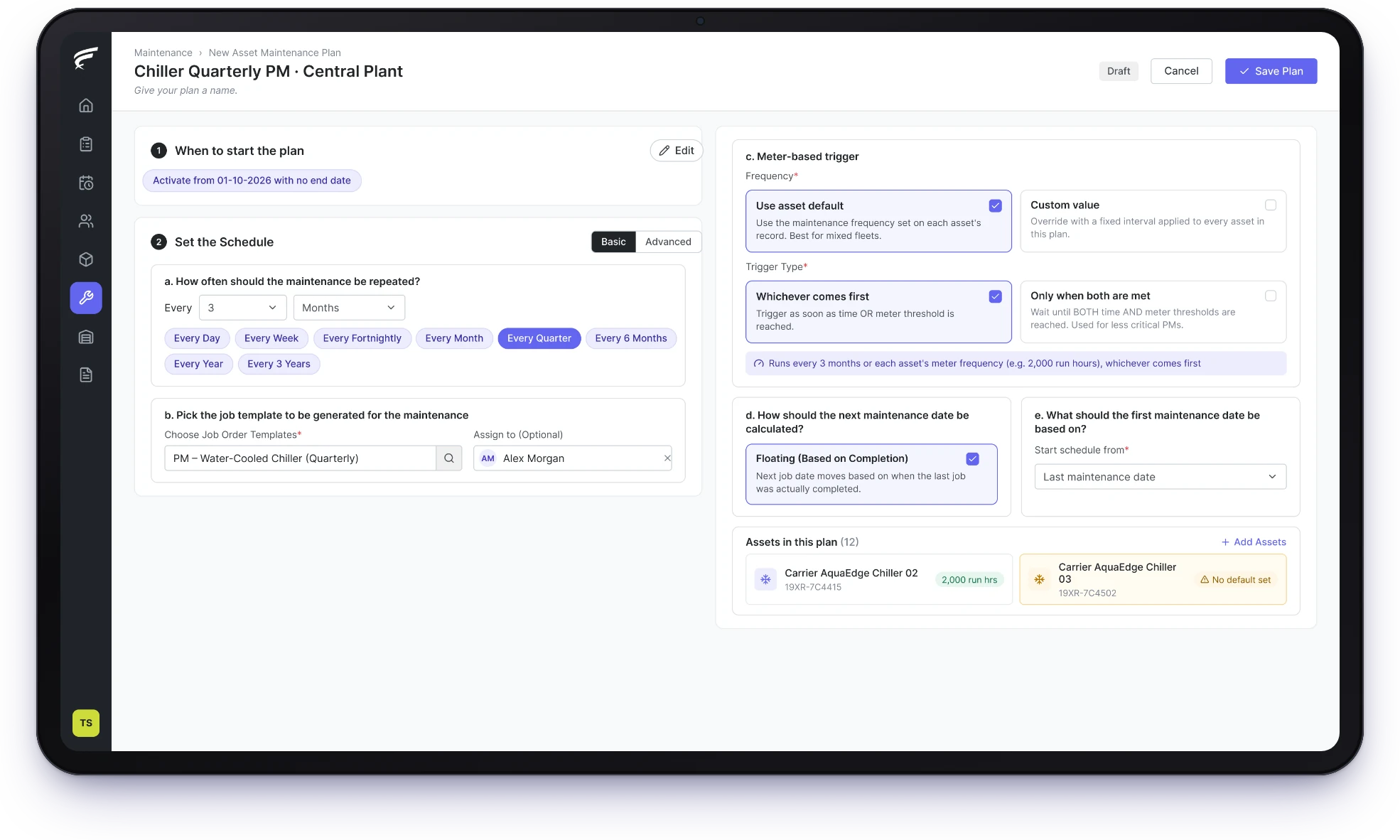
FieldEx is a field service and asset management (FSM+CMMS) application. It turns each planned preventive maintenance (PPM) schedule into jobs, by calendar, by running hours or both. FieldEx creates each job ahead of its due date and sends it to the right team. One dashboard shows every job until it is done.
PPM jobs created automatically, by date or by running hours.
Each job ready early, with the right tasks and team.
Overdue and upcoming PPM visible in one place.
Every PPM plan in FieldEx produces real jobs on schedule, for each asset it covers, so nobody tracks due dates in Excel.
Each job brings the asset's details and the template for that service.
Set the cycle, the template and the team once, and FieldEx raises every PPM job on time for every asset on the plan.
For most teams, a PPM schedule starts as a spreadsheet of assets and due months, which works until a month is skipped.
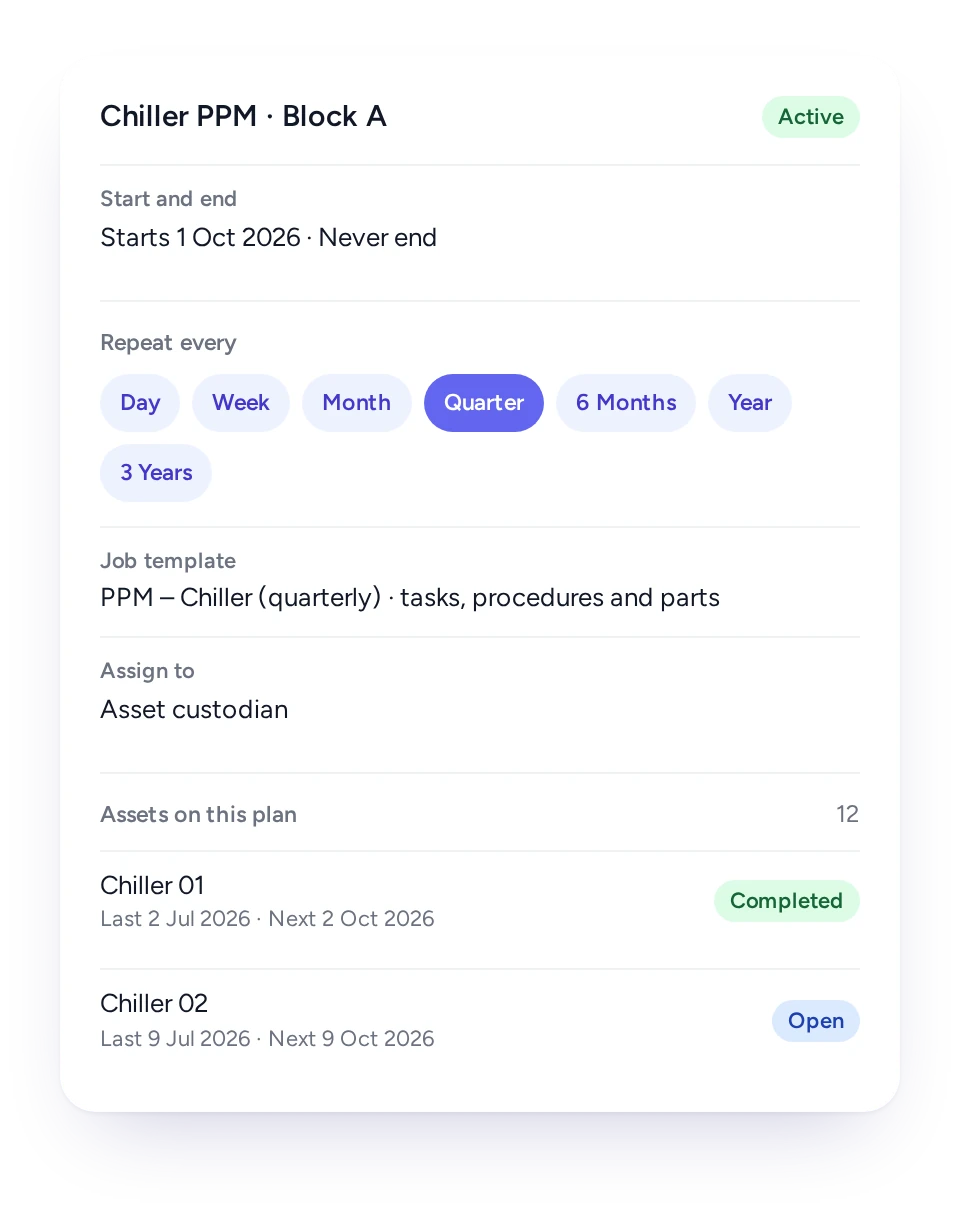
In FieldEx, a plan holds the cycle, the assets and the job template. On a time-based plan, the cycle is whatever each asset needs. Each job the plan creates arrives with its tasks, procedures and parts, so the technician gets the same service sheet every time.
Plans can run indefinitely, end after a set period, or stop on a date, which suits fixed-term maintenance contracts.
Where visits must fall on set days each month, a plan that keeps to the calendar is the safer choice.
Electrical installations, switchgear and protective relays often need visits on set days, plus longer test cycles on top. In FieldEx, a plan on fixed calendar dates keeps those visits on set days, such as the first and third Monday of each month. The dates hold even if one visit runs late. Fixed calendar dates apply to time-based plans.
Every plan creates jobs from a template, so each service arrives with its tasks, procedures and parts already in place. Technicians don't need to know the plan exists: they simply see a job on their phone when it is due.
Plant under a certificate of fitness needs servicing that keeps it in good order between inspections, which is where regular PPM jobs help.
Each visit stays on the unit's record, so the owner and the competent person can both show when servicing was done.
FieldEx turns a lift or escalator service agreement into a plan. Each unit on the plan gets its own monthly or quarterly job, assigned to the competent firm's team. Every job uses the same template.
Equipment that runs harder needs servicing sooner, so a FieldEx plan can follow running hours or kilometers as well as dates.
A standby genset may barely run for months, then work long hours during an outage. Servicing it only by date either wastes visits or misses the ones it really needs.
Technicians record meter readings on the asset during their work. A time-and-meter plan in FieldEx uses those readings. When an asset reaches its hour, kilometer or cycle limit, FieldEx raises the next service job, even if the calendar date is weeks away. For less critical equipment, a plan can wait until both limits are met.
The interval can be one figure for the whole plan, or each asset can keep its own.
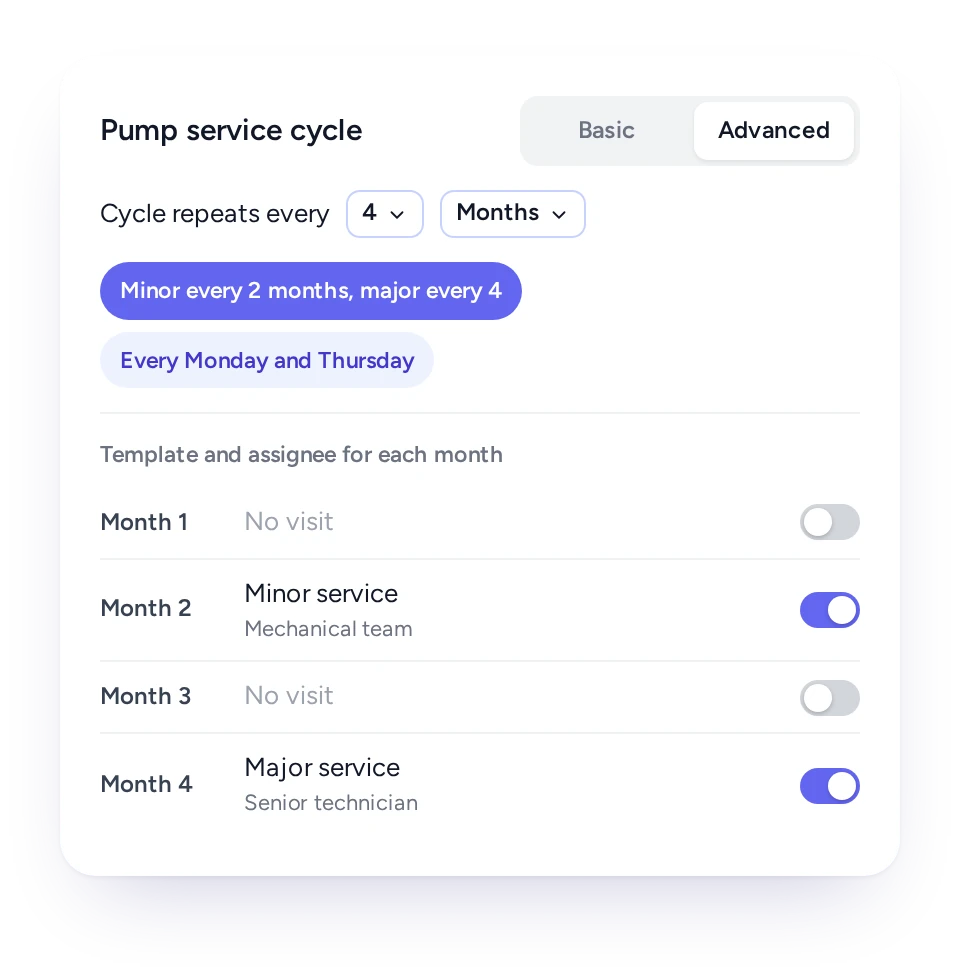
Give each month in a cycle its own template, and one plan handles both the quick check and the full overhaul.
Many PPM contracts alternate between short inspections and full services. Run as two plans, they tend to clash in the same week or drift apart.
In FieldEx, each month in a plan's cycle can have its own template and team. A minor service can fall every two months and a major one every four, each bringing its own tasks and parts. Patterns such as every Monday and Thursday are set up the same way.
The asset's history then shows the whole sequence of minor and major visits in order.
One plan can cover many assets across many sites, each with its own last and next service date.
Fire safety work shows how quickly cycles multiply: one building's fire systems can run on monthly, quarterly and six-monthly cycles at once.
In FieldEx, you build one plan per cycle and attach every asset it applies to, one by one or in a batch. Rules can add new assets of a chosen type automatically, and remove them when their status changes.
Each asset on the plan shows its last and next visit and the job raised for it. One asset's date can move without affecting the rest.
Each plan raises its jobs days ahead and sends them to the responsible person, a named technician or a team.
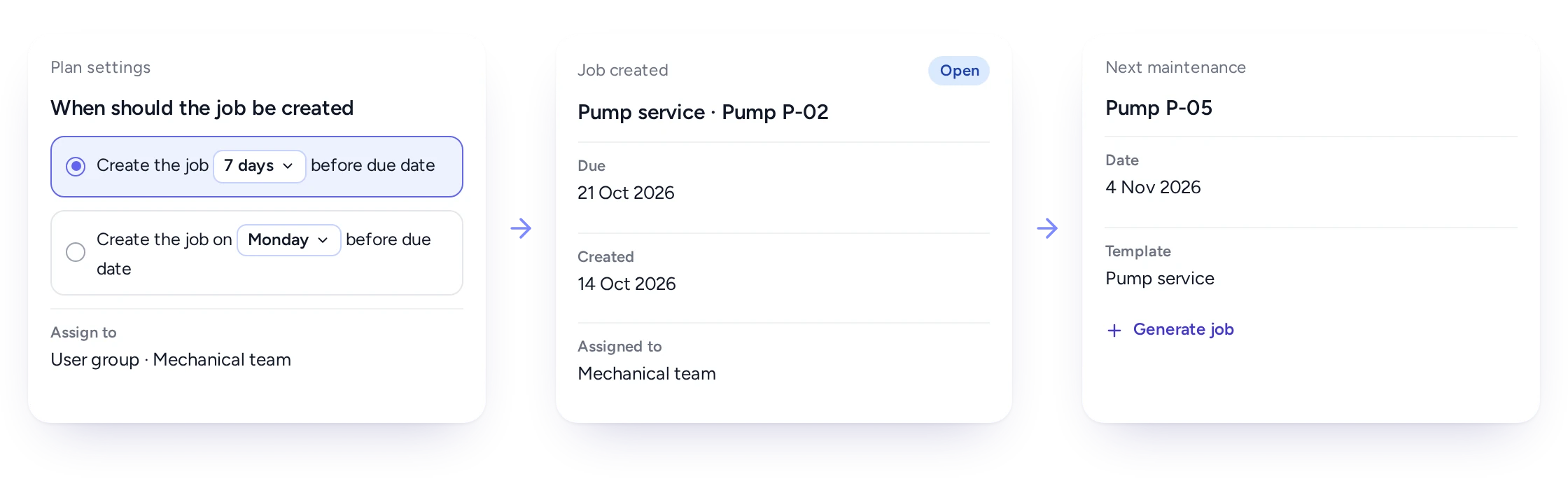
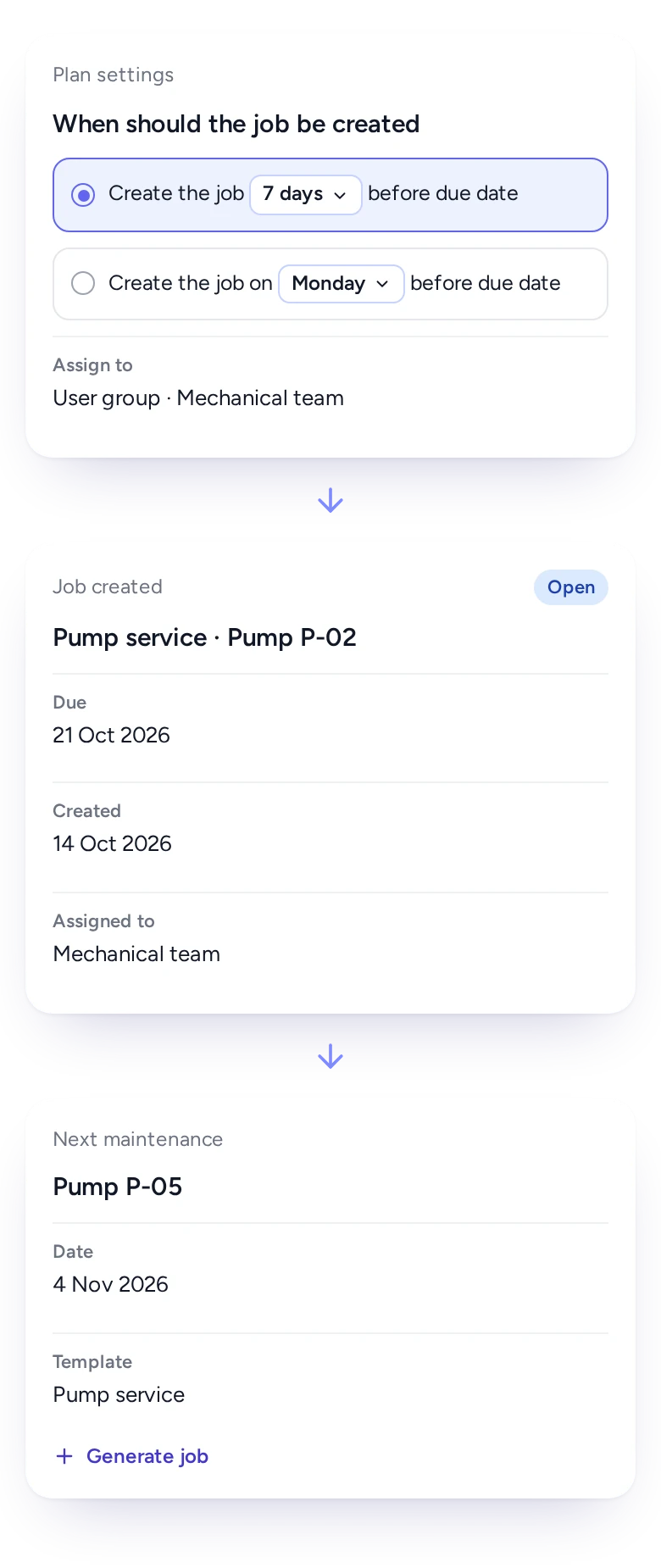
A PPM job that appears on its due date leaves no time to arrange access, permits or parts. In FieldEx, each plan says how far ahead to raise the job. It can be a number of days before the due date, or a weekday before it.
The plan also says who gets it. Jobs can go to the person responsible for the asset, to a named technician, or to a team that shares the work fairly. The assignee is notified when the job is raised.
When a client asks for a visit earlier, a planner can raise the next job by hand for that asset.
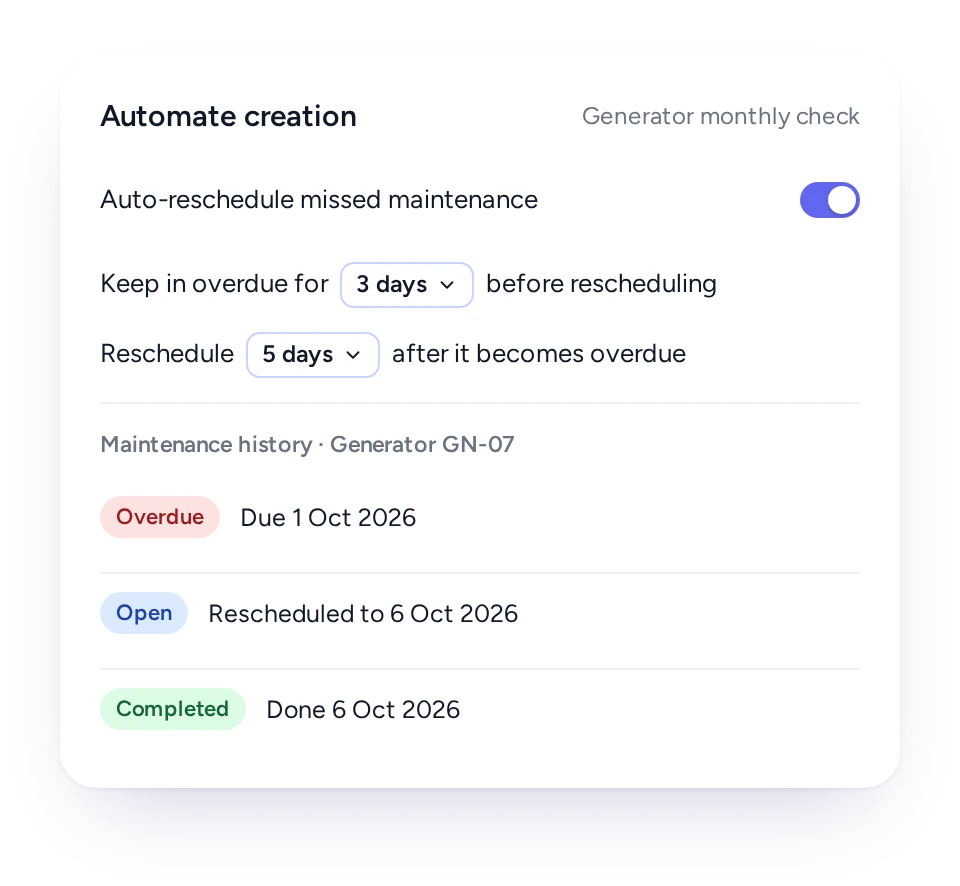
FieldEx can rebook overdue PPM after the number of days you choose, so a missed visit is caught up rather than forgotten.
On a paper schedule, a missed visit is easily lost once the next month's work takes over.
In FieldEx, automatic rescheduling can be switched on for any plan. You decide how long a job stays overdue before it moves and how far ahead it is rebooked. The record keeps the job, so the history shows it was late and when it was done.
Until then, the job stays in the overdue count on the dashboard.
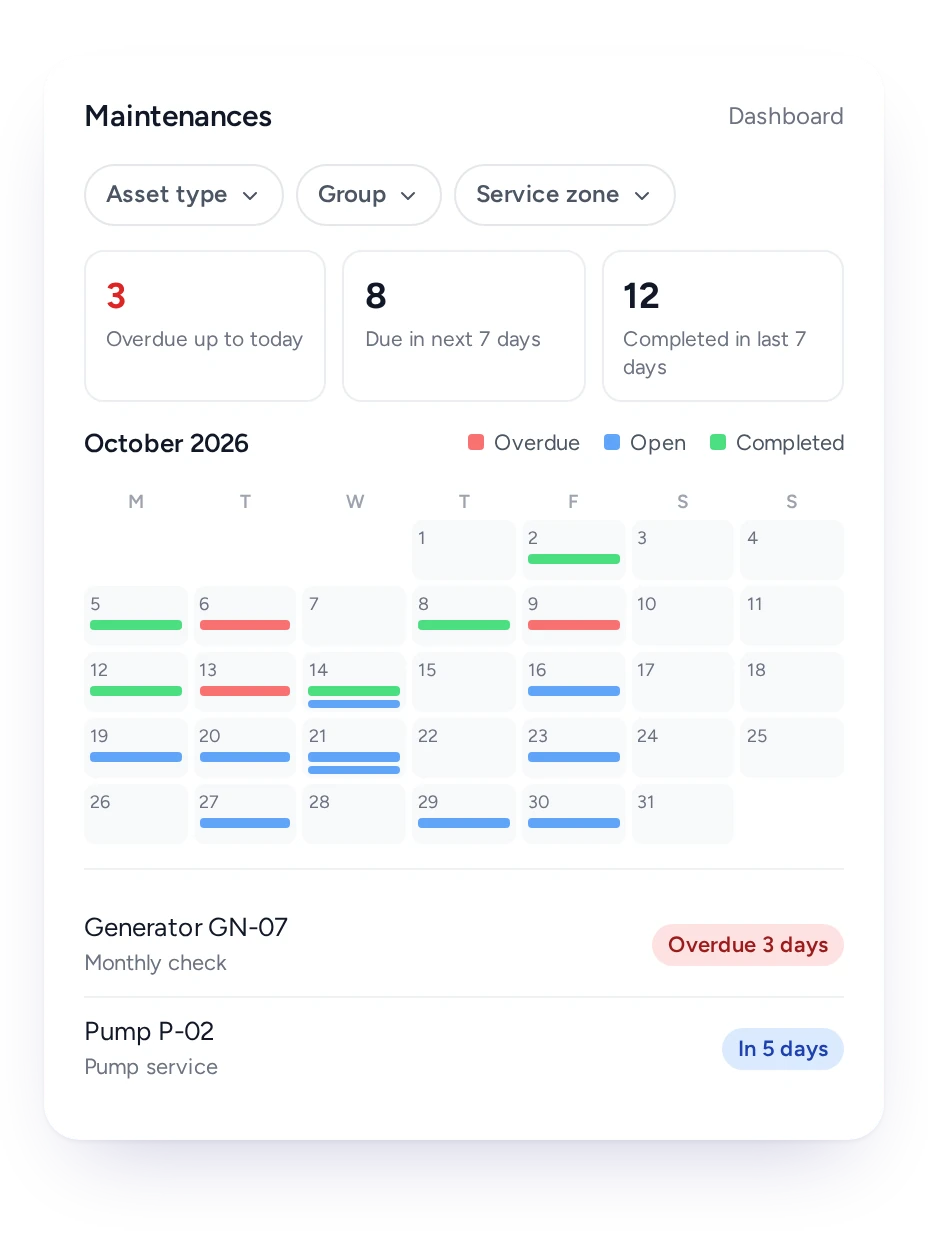
The dashboard shows overdue jobs, jobs due within seven days and jobs done in the past seven, beside a month calendar of every PPM job.
Supervisors and planners start the day on the maintenance dashboard. It brings every plan's jobs together, whichever plan or asset raised them.
Three counts sit at the top. Under them, a month calendar marks each job as overdue, open or completed. A list shows how many days each job is overdue, or how long until it falls due.
Filters by asset type, team and service zone narrow it to one area or crew, and a click opens the job.
Planners set each schedule once, technicians receive jobs when they are due, and managers can see whether PPM is on track.
PPM planner
Schedules by date, by running hours or both, with jobs raised early.
Technician
The day's PPM jobs on the phone, with the right tasks and parts.
Supervisor
Work shared fairly across the team, and overdue PPM in one view.
Maintenance manager
A dated record of every PPM visit on every asset.
Contract manager
PPM for every contract site raised without anyone retyping it.
Client
Upcoming PPM on their equipment, visible in the customer portal.
FieldEx is field service management and a CMMS in one, so PPM jobs and breakdowns share one schedule and one asset history.
Many PPM tools stop at the schedule, so dispatch happens somewhere else. In FieldEx, PPM jobs sit on the scheduling board next to breakdown calls. The dispatcher sees both, and PPM doesn't get pushed aside.
What a technician records on a visit, from parts to meter readings, goes back to the asset. Running-hour plans use those readings to set the next service.
Related pages:
To compare tools, read our guide to choosing CMMS Software.
AMRTUR (oilfield services, Southeast Asia) found that servicing by the calendar alone didn't account for how much equipment was actually being used. FieldEx now tracks equipment usage directly from field reports. It creates a maintenance job automatically once a machine hits 300 hours of use or 6 months, whichever comes first.
DKSM is an MEP and fire safety contractor in Malaysia. It had to keep maintenance on track across 300+ client sites, on cycles that ran monthly, every two months, quarterly and every six months.
With FieldEx, automatic reminders cover all of those schedules, so nothing gets missed at any client site. Team leads log used and returned parts on their phones.
For PPM contracts, choose one that raises the jobs itself and works on the technician's phone.
FieldEx turns each PPM schedule into jobs by date, by running hours or both. It raises each job ahead of the due date with the right template and sends it to the right team. FieldEx is also field service software, so PPM and breakdown jobs share one schedule and one asset history.
Yes. A plan can repeat daily, weekly, every two weeks or monthly. It can also repeat quarterly, every six months, yearly or on longer cycles. Run as many plans as your contracts need.
Yes. A time-and-meter plan uses the readings technicians record on each asset, and raises the job when either the date or the hour limit comes first. It can also wait until both are reached.
Yes. A fixed plan keeps the due date on the calendar, such as the first Monday of the month, even if a visit runs late. Otherwise, the next date can be counted from the last completed visit. Fixed calendar dates apply to time-based plans.
Yes. Each month in a plan's cycle can have its own template and team, so minor and major services run from one plan.
You set it per plan: a number of days before the due date, or a weekday before it. A planner can also raise the next job early for a single asset.
With automatic rescheduling switched on, an overdue job is rebooked after the number of days you choose. It also stays in the overdue count on the dashboard until it is done.
Yes. The maintenance dashboard shows overdue jobs, jobs due within seven days and jobs completed in the past seven, beside a month calendar. Filter by asset type, team or service zone.
Yes. A plan can hold assets across many sites, each with its own last and next visit. New assets of a chosen type can join automatically.
Yes. The customer portal shows clients the upcoming maintenance on their assets, with their jobs and requests.
Yes. Technicians can use the FieldEx app in English, Bahasa Malaysia or Chinese, and each person picks their own language.
Yes. Each job a plan raises is a work order linked to its asset. The asset's history lists every PPM visit with its tasks, parts, photos and service report.
Yes. A spreadsheet can list units and due months, but it can't raise jobs or tell anyone a visit was missed. In FieldEx, your existing units and schedules can be uploaded. The plans then raise each PPM job and rebook missed ones.
Yes. Breakdown (corrective) jobs and PPM jobs share the same board and the same unit history. A checklist answer during PPM can raise the repair job on the spot. FieldEx also flags a breakdown that repeats recent work on the same unit.
There's no setup fee. Training is at your office or online, in Bahasa Malaysia or English, and your team can learn as it goes with guides, videos and the in-app AI assistant.
Customers, sites, assets and past jobs can be uploaded. FieldEx helps with setup, and training is included. See Setup and Training.
Once we know your requirements and your data is ready, FieldEx can be implemented in as little as a week with standard features for small businesses. Larger setups and custom work take longer.
