From the spreadsheet and WhatsApp group to one system your supervisors trust

Stop chasing technicians on WhatsApp and updating the maintenance spreadsheet at night. Jobs, PPM, photos, parts and client sign-offs go into one system the office and the field both use.

Book a demo
Updated 15 Oct 2026
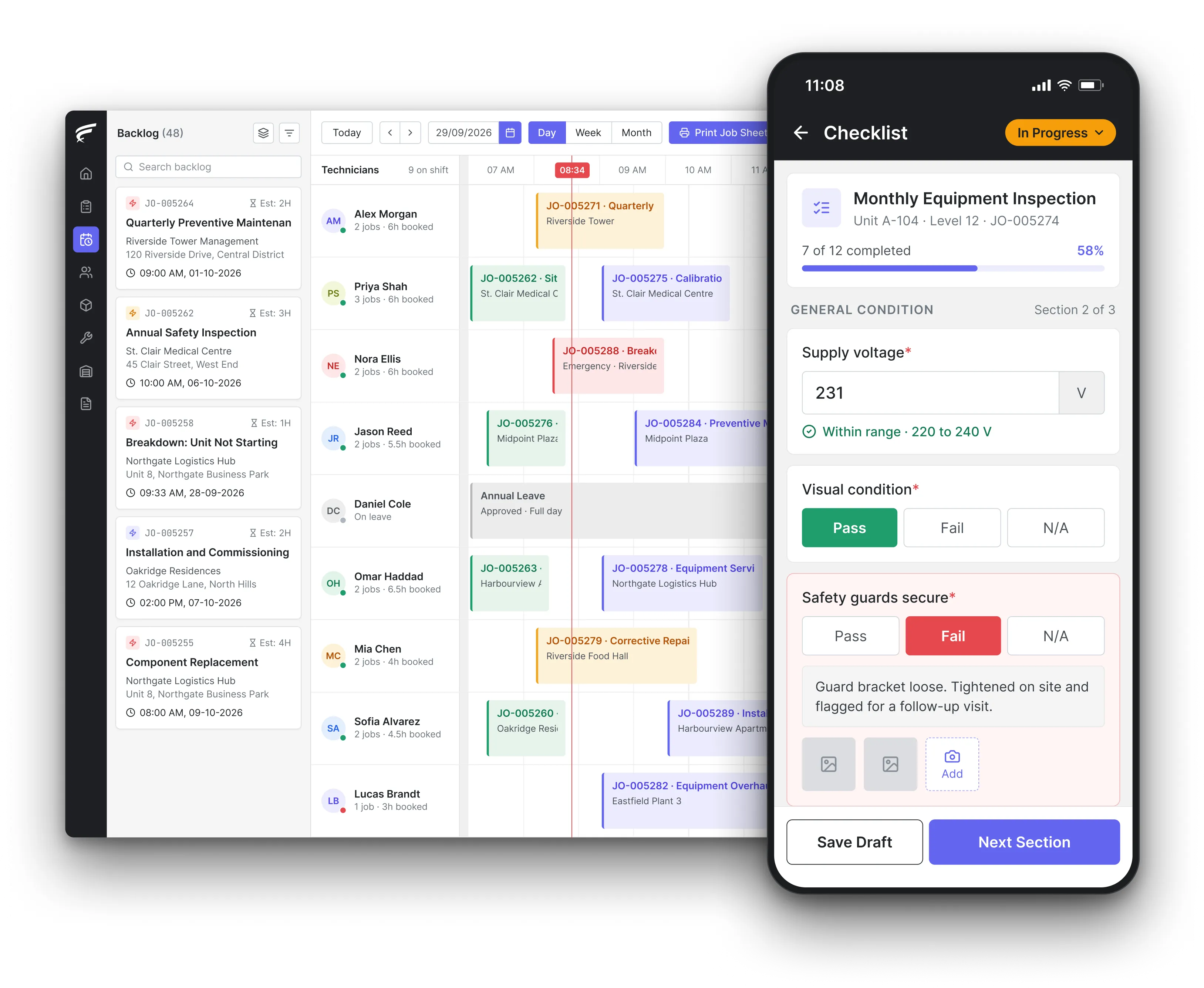
FieldEx scheduling board on desktop with a technician's inspection checklist open on the mobile app, as used by teams moving off chat groups and spreadsheets

FieldEx brings field service management and a computerised maintenance management system (CMMS) together to replace the maintenance spreadsheet and the WhatsApp job group that many Malaysian service teams run on. Supervisors assign jobs from one calendar, PPM plans raise the visits on time, technicians update their jobs in the app, and every photo and sign-off stays with the client and unit.

What FieldEx does for supervisors and coordinators in Malaysia

In a typical Malaysian service company the coordinator keeps the PPM list in Excel, posts the day's jobs in a WhatsApp group by 8am, and spends the afternoon calling technicians to ask whether they have reached site. FieldEx takes each of those steps off the coordinator's phone: the plan raises the jobs, the scheduler sends them out, and the app reports arrival, progress and completion. Book a demo and bring your current PPM sheet.

The day's jobs on one screen

  • Every job, whether from the office, a client request, a site QR code or a PPM plan, linked to its client, site, unit and contact person, in work order management.
  • A backlog of unassigned jobs beside each technician's day or week calendar, dragged into place, in scheduling and dispatch.
  • Jobs matched automatically to technicians by skill, availability, shift, leave and service zone, ranked by live location.
  • A warning when a new complaint repeats a recent job on the same unit.

Progress you don't have to phone for

  • A job switches to In Progress by itself once the technician starts the journey to site.
  • Task check-in on arrival and check-out on completion, seen by the office straight away.
  • Alerts by email or in the app when a job meets your conditions, sent to users, groups or the email address stored on the job.
  • Technicians told whenever a job is given to them or moved, with the option to accept or decline a pending task.

PPM without the Excel formulas

  • Asset and site PPM plans that raise the jobs ahead of the due date, monthly, quarterly, half-yearly or yearly, or by meter reading, in preventive maintenance.
  • A choice of fixed calendar dates or dates counted from the last completed service.
  • Missed PPM moved forward automatically after the overdue period you set.
  • One plan across many client sites, with new units joining when they match its criteria.

The technician's app, in three languages

  • The FieldEx mobile app in English, Bahasa Malaysia and Chinese, with each technician's own jobs and the unit's past work.
  • Photos and video with an automatic watermark, notes, parts from van stock and the client's signature, all saved to the job.
  • QR or barcode scanning on each unit to open its record.
  • Jobs and tasks can be downloaded and worked offline, with check-in, check-out and travel synced later.

Client requests outside the chat

  • A branded portal where clients log complaints with photos or video, a contact number and a preferred date, in the customer portal.
  • Every site gets its own QR code, which opens a complaint form with no login needed.
  • Each request dropped into the backlog as an unassigned job.
  • Jobs downloaded to the phone, worked without a signal and uploaded when the connection returns.

Numbers for the boss, without a pivot table

  • A dashboard of overdue jobs, jobs due in the next 7 days and jobs completed in the last 7 days.
  • Monthly job, technician and client reports drawn from current records, downloaded as CSV, Excel or PDF or emailed on a timetable, in reporting and analytics.
  • Access profiles that decide who can read, add, change or delete each kind of record.

A live picture for managers

  • A dashboard of overdue work, work due in the next 7 days and work completed in the last 7 days, with a calendar of maintenance and compliance jobs.
  • Reports on jobs, technicians, customers and sites built from live data, exported as CSV, Excel or PDF or emailed on a schedule, in reporting and analytics.
  • Permission profiles that decide who can read, create, edit or delete each kind of record.

Our jobs all run on WhatsApp and Excel: when is the right time to switch?

When the coordinator, not the system, has become the only place the job status lives. WhatsApp is the natural starting point in Malaysia: the Malaysian Communications and Multimedia Commission (MCMC) Internet Users Survey 2022 found WhatsApp dominated over 90% of internet users for communication, with account ownership at 97.7%, and 98.3% of internet users communicating by text. Everyone on the team already has it, so it costs nothing to start.

The signs that it's time to move are practical ones: PPM visits missed because a row wasn't updated, the same complaint answered twice by two technicians, photos you can't find when the client asks, and a coordinator who can't take leave because nobody else knows where the jobs stand.

What FieldEx does about it

  • The status lives in the job: every job shows whether it is open, assigned, in progress or completed, without asking anyone.
  • PPM that doesn't depend on one person: plans raise each visit on schedule and send it to the right person or team.
  • Cover when someone is on leave: approved leave and shifts are checked before jobs are assigned, and the scheduler shows who is free.
  • One search for every past job: find any job by client, site, unit or date, with its photos and sign-off.

Can a WhatsApp group work as a work management app for technicians?

For a few people, briefly. WhatsApp's Help Center says a group can have up to 1024 members, so size isn't the problem. The problem is control: a sender can delete a message for everyone for up to 2 days after sending it, and edit it for up to 15 minutes, so the instruction a technician followed may no longer be there when a client disputes it. A group also has no statuses, no due dates, no assignment and no report at month-end.

The practical signs are familiar: two people editing different copies, jobs agreed in chat that never reach the tracker, and a planned visit that only happens if someone remembers it.

What FieldEx does about it

  • Assignment, not announcements: each job goes to one named technician or team, who is notified and can accept or decline the task.
  • Statuses and due dates: jobs and tasks carry their own status and scheduled times, so overdue work is visible on the dashboard.
  • A trail nobody can quietly remove: the job's activity history and each task's history show what was done and when. Delete rights are set per role, so job history stays protected.
  • Month-end reports from the jobs: reports on jobs, tasks and technicians come from the same records, ready to export.

Is sharing client names, addresses and phone numbers in WhatsApp groups allowed under the PDPA?

It puts you on the wrong side of the Personal Data Protection Act 2010 (Act 709) very easily. Section 8 says that, subject to section 39, no personal data shall be disclosed without the data subject's consent for any purpose other than the one it was collected for, or to any party outside the class you told the data subject about. Section 9(1) requires a data user to take practical steps to protect personal data from any loss, misuse, modification, unauthorised or accidental access or disclosure, alteration or destruction, considering where it is stored and how it is transferred. A group that includes ex-staff, subcontractors or a wrongly added number fails both tests.

One wrong formula can quietly push a statutory check months past its due date, and nothing in the sheet will warn you.

What FieldEx does about it

  • Client details kept on the client record: names, contacts, billing and service addresses and map pins stay on the client and site, viewed by the people whose role allows it.
  • Roles decide access: access profiles set read, add, change and delete rights per record type, and can limit staff to their own records.
  • Subcontractors kept to their jobs: a technician limited to their own records sees only the jobs given to them. Subcontractors get their own accounts, with roles and a hierarchy that control what they can see and do.
  • Ex-staff removed in one step: user accounts can be suspended or permanently deactivated.

What must we do if client data leaks from a WhatsApp group?

Report it. The Personal Data Protection (Amendment) Act 2024 (Act A1727) adds section 12B. Under section 12B(1), where a personal data breach occurs, the data controller shall, as soon as practicable, notify the Commissioner. Under section 12B(2), if the breach is likely to cause significant harm, the data controller must also notify the affected data subjects without unnecessary delay. A forwarded group chat full of client addresses and phone numbers is exactly the kind of breach that is hard to contain, because you can't recall what has already been copied.

What FieldEx does about it

  • Fewer copies to lose: client data is held once, on the client and site records, rather than across dozens of phones.
  • Access you can switch off: profiles control whether a user can use the web, the app or both, and accounts can be suspended immediately.
  • Clients see only their own data: each client's portal shows only their own jobs, units and reports.
  • Bulk actions where you allow them: permission profiles decide who can select and update many records at once in a list view.

How do I set up an aircond PPM schedule in Excel, and how often should units be serviced?

Most teams build a 52-week sheet: one row per unit, with client, site, location, model and serial number, then columns for each week or month and a mark for the planned and completed visits. The interval should come from the manufacturer and the conditions the unit works in. As international guidance, the UK Health and Safety Executive's frequently asked questions on work equipment say how often to inspect and maintain is a matter for risk assessment, with the manufacturer's recommendations considered, and varies with the type of equipment, how it is used and the conditions it is exposed to. A unit in a dusty factory or a busy kitchen will need more frequent servicing than one in a clean office.

The weakness of the sheet is that it only shows the plan. Someone still has to turn each mark into a job, tell the technician, and come back to tick it off.

What FieldEx does about it

  • Your 52-week plan, run for you: set each unit's or site's PPM interval, and FieldEx raises the jobs ahead of time with the right job template and technician.
  • Different checklists through the year: a plan can use one checklist for the monthly filter cleaning and another for the yearly chemical wash, each with its own technician.
  • Busy units on shorter cycles: units under heavier use or harsher conditions can sit on their own plan with a shorter interval, or a meter-based trigger.
  • Done means recorded: the completed job, with readings, photos and the client's signature, updates the unit's last and next service dates.

Can we keep invoicing service jobs from Excel now that LHDN e-Invoice applies?

Only if your turnover keeps you exempt. The Inland Revenue Board of Malaysia (LHDN) e-Invoice frequently asked questions, updated on 4 September 2026, set out the phases: taxpayers with annual turnover or revenue above RM100 million from 1 August 2024, RM25 million to RM100 million from 1 January 2025, RM5 million to RM25 million from 1 July 2025, and up to RM5 million from 1 January 2026. Taxpayers with annual turnover or revenue below RM3 million are exempted from issuing e-Invoices, subject to group criteria, and an MSME that reaches RM3 million must start from 1 January in the second year after the year of assessment in which it did so.

For a service company, that means the invoice data has to come from a system, not be retyped from a job sheet into a spreadsheet.

What FieldEx does about it

  • The billable facts on the job: parts with quantities and prices, time on site and work done are all recorded on the job and its completion PDF.
  • Invoices from the job: FieldEx can connect to any open system through REST APIs and has connectors for QuickBooks and Xero.
  • No retyping from paper: the office bills from the completed job record the technician created on site. Invoice data syncs to QuickBooks or Xero, so it reaches your accounts without retyping.
  • The customer's own record: the completion PDF, with the work carried out and the customer's signature, is emailed with a record of when it was sent.

Can we keep sending technicians jobs on WhatsApp after working hours?

It gets harder to justify under the 45-hour week. Section 60A(1) of the Employment Act 1955, as amended by the Employment (Amendment) Act 2022, limits normal working hours to 45 a week, and the Department of Labour Peninsular Malaysia (JTKSM) says the amendment took effect on 1 January 2023. Overtime is limited to 104 hours a month in aggregate.

What FieldEx does about it

  • Tomorrow's jobs ready when the shift starts: jobs are assigned and scheduled in advance, so technicians see them in the app when they begin work.
  • Shifts on record: shift schedules with working hours and days off are assigned to each technician or team, and technicians see their own shift in the app.
  • Hours recorded per job: check-in and check-out on each task, plus journey time, give an accurate record for OT claims.
  • Working-hour limits: each user's working hours and maximum working-hour limits are kept on their profile.

Are WhatsApp messages accepted as evidence in Malaysia if a client disputes a job?

They can be, but they are a weak record. Section 6(1) of the Electronic Commerce Act 2006 (Act 658) says information shall not be denied legal effect, validity or enforceability on the ground that it is wholly or partly in electronic form. Section 90A(1) of the Evidence Act 1950 (Act 56) makes a document produced by a computer admissible as evidence of any fact stated in it if it was produced in the course of the computer's ordinary use. A chat screenshot from a technician's personal phone, with messages that may have been edited or deleted, is far harder to rely on than a job record your business produces for every visit.

The spreadsheet can hold the plan, but it can't raise the job, remind the technician or record the result on its own.

What FieldEx does about it

  • A record for every visit, every time: each job captures check-in and check-out times, photos, readings, parts and the client's signature as part of the normal workflow.
  • The report the client signed: the completion PDF shows the work done and the client's sign-off, emailed with a log of when it was sent.
  • Photos kept with the job: pictures taken in the app carry an automatic watermark and stay on the job, not in a personal gallery.
  • Readings as numbers: forms on the job add number fields for readings such as pressures and temperatures, entered on site.

How error-prone is an Excel equipment maintenance tracker?

More than most teams assume. International research is not encouraging. Raymond Panko, writing in 2000 for the European Spreadsheet Risks Interest Group (EuSpRIG) from the University of Hawaii, found that field audits had detected errors in 24% of 367 spreadsheets audited, and that the more recent audits using better methods found errors in at least 86%. A maintenance tracker with copied-down due-date formulas, merged cells and several people editing it is a typical example.

What FieldEx does about it

  • Due dates worked out by the plan: PPM intervals by day, week, month or year, fortnightly, quarterly or every 3 years, set once per plan.
  • Overdue work flagged: the dashboard lists overdue PPM, inspections and certificates, and those due in the next 7 days.
  • No copy-paste between sheets: units, sites and clients are entered once and linked to every job.
  • Attachments where they belong: manuals, past reports and photos can be attached to the asset, site or customer they relate to.

How can I turn my maintenance spreadsheet into an app?

Treat the spreadsheet as your starting data, not your design. Split it into what it really holds: a client list, a list of sites, a list of units with serial numbers, and a PPM plan for each. Tidy duplicates and spelling of site names first, then bring in only what the team needs to start, and keep the old sheet as a read-only archive.

What FieldEx does about it

  • Your sheet brought in: clients, contacts, sites, units and past completed jobs can all be uploaded.
  • Your own terms on screen: admins rename records, field labels and headings, so the app uses the words your coordinators and technicians already say.
  • Plans that pick up uploaded units: PPM plans can add units by criteria such as type, so uploaded equipment lands on the right schedule.
Customer story

Chubb, an integrated security provider, runs its security services operation from 18 branches on FieldEx. Before the move, its story says, photos and updates were sent through WhatsApp, making traceability and reporting difficult, and technicians couldn't update task status on the go. With FieldEx, a central dashboard shows active, pending and completed jobs, technicians upload mandatory photos in the app, and forms, checklists and reports are paperless.

Read the Chubb customer story

Sime Industrial, a heavy equipment and industrial solutions provider serving 191 locations across Asia Pacific, describes how its planners had relied on Excel, WhatsApp and other disconnected tools, with texts or calls for updates. With FieldEx, job updates, statuses and time logs are centralised, and live technician locations and task progress are shown in one view.

Read the Sime Industrial story

What Malaysian coordinators ask before dropping Excel and WhatsApp

What is a good alternative to WhatsApp for managing technicians in Malaysia?

A field service app that gives each technician their own job list and gives the office one schedule. FieldEx does both, with an app in English, Bahasa Malaysia and Chinese, PPM plans that raise jobs on time and a history of every job by client and unit. See our guide to field service management software.

Will technicians who live on WhatsApp manage the app?

Yes. Each technician sees only their own jobs for the day, opens a unit by scanning its sticker, and completes the job with photos and a signature. The app comes in English, Bahasa Malaysia and Chinese.

Can clients still send complaints with photos?

Yes. Clients use the branded portal or scan the site QR code to log a complaint with photos or video, and it reaches the backlog as an unassigned job.

Can we keep our current PPM intervals?

Yes. PPM plans run monthly, quarterly, half-yearly, yearly or on other day, week and month intervals, or on meter readings, so your existing schedule carries over.

Can the boss still get reports in Excel?

Yes. Any report can be exported as CSV, Excel or PDF, or emailed automatically on a timetable.

Can supervisors see where each job stands without calling?

Yes. The scheduler shows each technician's calendar and the waiting backlog, and each job's status and check-in and check-out times update as the technician works.

Does the app work without mobile data?

Yes. Jobs and tasks can be downloaded and worked offline, with check-in, check-out and travel synced later.

How long does it take to move from Excel and WhatsApp to FieldEx?

Once we know your requirements and your data is ready, FieldEx can be implemented in as little as a week with standard features for small businesses. Larger setups and custom work take longer. There is no setup fee: setup, data upload and training come with the subscription, and FieldEx onboards customers in person in Malaysia as well as online. See FieldEx implementation in Malaysia.

Give your coordinators one place for every job and PPM visit

Book a demo