Job sheet app for Malaysian technicians, from PPM visit to signed report

No more carbon-copy job sheet books. Your technicians fill in the job sheet on their phone, the client signs on screen, and the office has the service report PDF before the next job starts.

Book a demo
Updated 15 Oct 2026
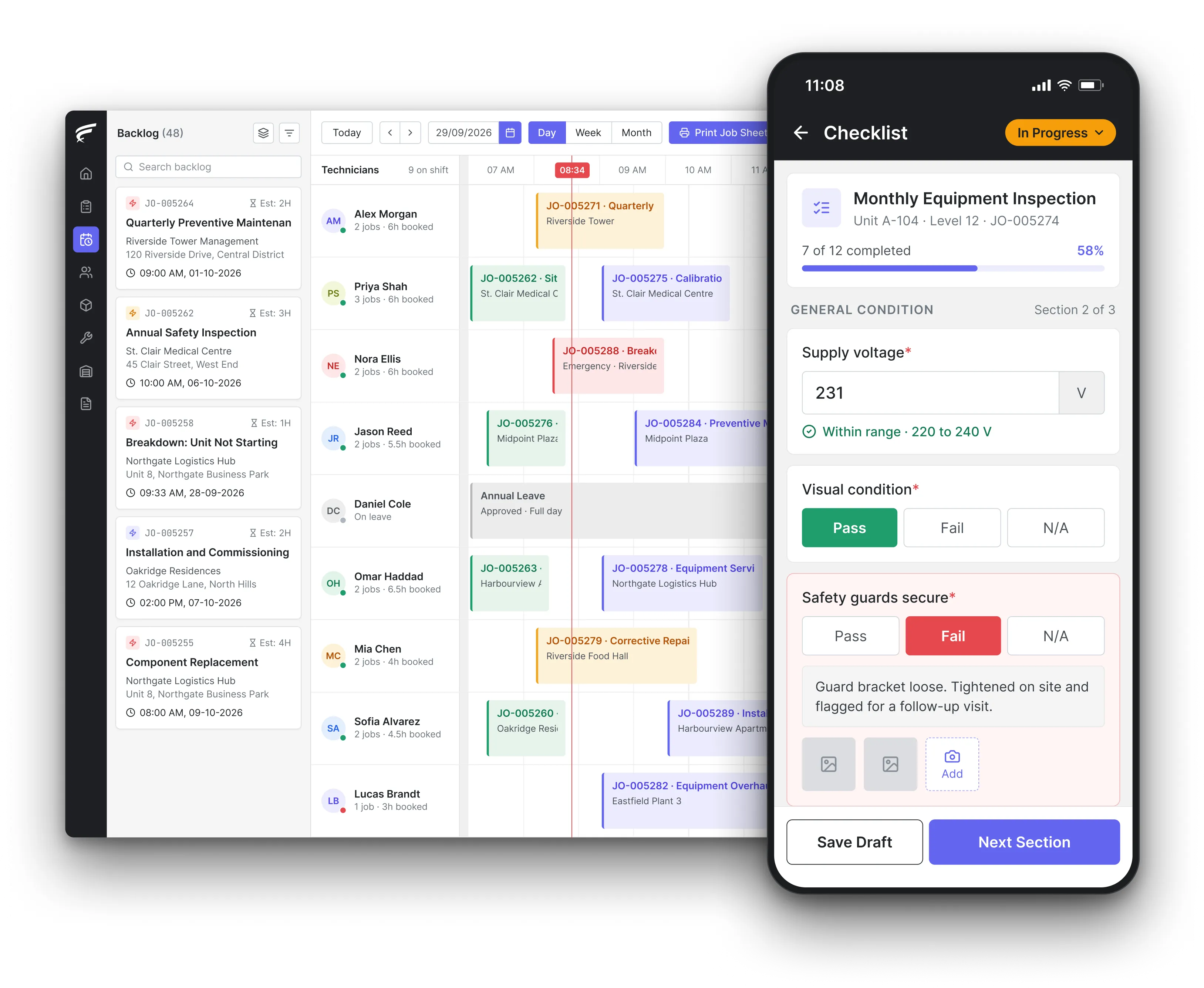
FieldEx scheduling board on desktop with a technician's inspection checklist open on the mobile app, as used by field technicians recording visits

FieldEx combines field service management and a computerised maintenance management system (CMMS) and gives Malaysian service companies a digital job sheet in place of the paper book. On the app, technicians record the complaint, findings, work done, parts from van stock, readings, photos and the client's signature. FieldEx turns that into a service report PDF and files it under the unit's history.

What FieldEx does for Malaysian service and maintenance teams

Many Malaysian service teams still run on a carbonless job sheet book, one copy for the client and one for the office. The office copy comes back days later, sometimes unreadable, and the photos are in a WhatsApp group nobody can search. FieldEx moves the job sheet onto the phone and keeps the signed record, the photos and the service report on the job, the client and the unit. Book a demo with a sample of your current job sheet.

On the technician's phone, in three languages

  • The FieldEx mobile app in English, Bahasa Malaysia and Chinese, showing today's jobs with the client, site, unit and map location.
  • Scan the sticker on the unit and the job picks up the right asset and serial number.
  • Photos and video taken through the app carry an automatic watermark and can be marked up, and the client signs on the screen before the technician leaves.
  • Jobs and tasks can be downloaded and worked offline, with check-in, check-out and travel synced later.

Job sheets that match each kind of job

  • Different job types, such as aircond PPM, chemical wash, breakdown and installation, each with their own form and fields.
  • Templates that fill in the usual tasks, work items and parts for routine jobs.
  • Number fields for readings such as amps, pressures and temperatures, typed in on site.
  • Steps that must be finished before the job can be closed, in work order management.

Service report PDFs in your company format

  • Your letterhead, logo, address, sections, field names, footer, page numbers, terms and an acknowledgement block for the client.
  • The default report lists the unit, complaint and fix, work done, parts with quantity and price, arrival and departure times, photos and the client's signature.
  • Reports created and attached by FieldEx once a job reaches the type and status you pick.
  • Reports opened, re-created or emailed to the client from the job, with a log of every email sent.

Arrival times, journeys and photos kept with the job

  • Check-in on arrival and check-out on leaving, task by task, with both times printed on the report.
  • The drive to site logged as a task journey, with distance and duration shown on a map.
  • Photo timestamps, time on site and mileage on the PDF if you switch them on.
  • A history for each task showing when it was created, started, finished and changed.

Every unit's service history in one place

  • All jobs and spare parts for a unit kept on its asset record, including what was replaced and when, in asset management.
  • Each client site showing its units, jobs, tasks and PPM plans.
  • Manuals, drawings and older reports attached to the unit or the site.
  • A log of every edit to a unit's details, with the user and time.

Access set by role

  • Read, create, edit and delete rights set separately per record type for each access profile.
  • Technicians kept to their own jobs, supervisors and managers seeing their team's work through the reporting line.
  • Limits on which job statuses each role can choose, and on whether they use the web, the app or both.
  • Each job keeps an activity history that can be opened from the scheduler.

Clients who check their own reports

  • A customer portal in your brand where each client sees their own jobs, units and last-serviced dates.
  • Photos and files on each job open to the client, and a PDF summary to download or print, in the customer portal.
  • Monthly job and service summaries by client, site or technician, exported as CSV, Excel or PDF or emailed on a timetable, in reporting and analytics.

Finding a job sheet months later

  • Job data searched, filtered and reported by customer, site, asset, technician or period, in reporting and analytics.
  • Reports exported as CSV, Excel or PDF, or emailed on a schedule.
  • Printable job sheets for one or more technicians generated from the scheduler and downloaded or emailed before the day starts.

How do I set up a job sheet my technicians can fill in during an aircond PPM visit?

Start from what the client will check when the bill arrives. An aircond PPM job sheet usually needs the client and site, each indoor and outdoor unit serviced with its location or serial number, the tasks done (filter wash, coil cleaning, drain flush, gas pressure check), the readings taken, parts or refrigerant used, any defect found with a recommendation, arrival and departure times, and the client's name and signature. Paper or Word templates force the technician to copy unit details by hand at every visit, which is where most errors start.

The better approach is a form that already knows the unit, so the technician only fills in what changed today.

What FieldEx does about it

  • A PPM job type with its own form: set up aircond PPM as its own job type, with fields for each task and number fields for readings such as amps and suction pressure.
  • Units picked up by scanning: technicians scan the QR sticker on each unit, so the serial number and location come from the asset record, not handwriting.
  • The PPM raises the job: PPM plans create the job sheets ahead of each visit with the right template, for each unit or for the whole site.
  • Gas counted in kg: refrigerant topped up is entered as a spare part in kilograms, taken off stock and printed on the report.

What details make a service report a client can rely on?

A report the client, an auditor or a court can rely on states what was found, what was done, what is still outstanding and who did it. Malaysian law doesn't prescribe a general format, so international rules are a useful benchmark. The UK Health and Safety Executive's INDG339 leaflet on lift examinations asks the report to identify any defect which is or may become a danger to people, the repair needed and the date by which it should be done, the tests carried out and the person reporting. The UK Gas Safety (Installation and Use) Regulations 1998, regulation 36, require each record to list the date, the address, each appliance and its location, any defect, any remedial action taken and the signature of the person who did the check.

So the test for a digital job sheet is practical: can you print it, does it name the technician, and can you show nobody altered it afterwards.

What FieldEx does about it

  • A complete report by default: FieldEx's standard completion PDF holds the job and unit details, client address, complaint and fix, work done, parts with quantities and prices, arrival and departure times, photos and the client's sign-off.
  • Defects followed up: a failed checklist answer opens a corrective job with its own tasks, and can book a re-inspection.
  • Who did it: the technician on each task, and their check-in and check-out, appear on the report.
  • A trail of changes: each job's activity history and each task's history show what changed and when, and emailed reports keep an audit trail of when they were sent.

Is a client's e-signature on a service report valid in Malaysia?

Yes, as long as the signature meets the test in the Electronic Commerce Act 2006 (Act 658). Section 6(1) says information shall not be denied legal effect, validity or enforceability because it is wholly or partly in electronic form. Where a law requires a signature, section 9(1) says an electronic signature satisfies it if it is attached to the message, adequately identifies the person and adequately indicates their approval of the information, and is reliable for the purpose. Section 9(2) treats it as reliable where the means of signing is under the signer's sole control and any alteration made to the document after signing is detectable.

For a job sheet, that means the signature should be captured by the client personally, on the report it approves, in a system that shows later changes.

What FieldEx does about it

  • Signed by the client on site: the client signs in the app at the end of the job, and the signature appears on that job's PDF.
  • Tied to the right client: the job links to the client, site and contact person, so the report shows whose approval it carries.
  • Changes on the record: the job's activity history and each task's history show what was changed and when, and every emailed report is logged. Once a job is completed it locks by itself, and only roles you pick can edit it afterwards; if the PDF is generated again, the earlier copy is kept too.
  • Proof it was delivered: the signed report is emailed from the job, with a record of when it was sent.

Can a Malaysian company keep job sheets and service reports digitally instead of on paper?

Yes. Section 8 of the Electronic Commerce Act 2006 says a legal requirement for information to be in writing is met if the information is contained in an electronic message that is accessible and intelligible so as to be usable for later reference. Section 13 covers retention: a requirement to keep a document is met if the electronic message is kept in the format in which it was generated, sent or received, or in a format that does not materially change the information, and stays accessible. For tax, the Inland Revenue Board of Malaysia (LHDN) Public Ruling No. 4/2000 (Revised) on keeping sufficient records says that where the original documents are in electronic form, they can be retained in that form.

What FieldEx does about it

  • Reports kept as generated: the completion PDF is stored in the job's documents, where it can be viewed, downloaded or emailed again.
  • Readable years later: jobs, photos and files stay attached to the client, site and unit records, searchable by the office.
  • Exports when LHDN or an auditor asks: job and service data exports as CSV, Excel or PDF, filtered by client, site or period.
  • Customers see what you saw: the customer portal shows the attachments on each job to the customer, alongside the report.

Will a digital job sheet stand up in a Malaysian court if a client disputes the work?

It can. Under section 90A(1) of the Evidence Act 1950 (Act 56), a document produced by a computer, or a statement in it, is admissible as evidence of any fact stated in it if the computer produced it in the course of its ordinary use. Section 90A(2) lets you prove that ordinary use by tendering a certificate signed by the person responsible for managing the operation of that computer. Section 62 adds that a document produced by a computer is primary evidence. A job record made in the normal course of every service visit, rather than one typed up after a complaint arrives, is the kind of document these sections describe.

What FieldEx does about it

  • Records made as the work happens: check-in, check-out, photos, readings and the client's signature are captured during the visit, as part of every job.
  • The full trail on the job: the job's activity history, task history and email log show the sequence of events from creation to closing.
  • Photos with a watermark: pictures taken in the app are watermarked automatically and kept with the job, not in a personal phone gallery.
  • Pull out any job: the office finds past jobs by client, site, unit or date and downloads the report.

How long must Malaysian companies keep job sheets, service reports and invoices?

Plan for 7 years. Section 245(3) of the Companies Act 2016 says a company shall retain its accounting and other records for 7 years after the completion of the transactions or operations they relate to, and section 245(2) says the entries must be made within 60 days of completing the transaction. LHDN's Public Ruling No. 4/2000 (Revised) says records, including invoices, vouchers and receipts, must be retained for at least 7 years from the end of the year to which the income relates. A signed job sheet that backs up an invoice falls inside both.

The sixty-day rule matters too: a job sheet book that takes weeks to come back to the office makes billing and record entry late.

What FieldEx does about it

  • Entries made the same day: the job, its parts and the report exist in FieldEx as soon as the technician completes, ready for billing.
  • Invoices from the job: FieldEx can connect to any open system through REST APIs and has connectors for QuickBooks and Xero.
  • Records that stay: jobs, attachments and reports stay on the client, site and unit records, and can be exported for your own archive.
  • The customer can fetch it: completed job PDFs are downloadable from the customer portal at any time.

Can we record a technician's GPS location at check-in under the PDPA?

You can, if you handle it as personal data. The Personal Data Protection Act 2010 (Act 709), section 6(1), says personal data may only be processed with the data subject's consent, unless an exception in section 6(2) applies, such as processing needed for the performance of a contract. Section 6(3) says the data must be for a lawful purpose, necessary for that purpose, and adequate but not excessive.

The practical answer is to tell staff what is recorded and why, and to record location at the moments that matter for the job rather than around the clock.

What FieldEx does about it

  • Location tied to each job: journeys are recorded per task, started, paused and resumed by the technician in the app, with distance and duration.
  • Check-in and check-out times: each task records arrival and departure, which is what the client's job sheet and your OT claims depend on.
  • Shifts and working hours set per person: shift schedules and working hours are kept for every user or team. Technicians can switch location tracking off at any time by setting their app status to unavailable.

When is the Bomba fire certificate due, and why do fire-system service reports matter for it?

Every year. Jabatan Bomba dan Penyelamat Malaysia (JBPM) says a Fire Certificate (Perakuan Bomba) is valid for one year from the date of issue and must be renewed annually. Renewal is made on Form III not less than 30 days before the certificate expires, and late applications may incur a RM100 penalty. So the owner needs the year's service reports for hose reels, sprinklers, alarm panels and extinguishers ready well before that 30-day window, not hunted down after it.

A job sheet that says "regassed unit" without a weight won't meet that.

What FieldEx does about it

  • The certificate date tracked: set the fire certificate up as a recurring certification on the building, with reminders before Form III is due.
  • Signed reports for each fire system: every hose reel, sprinkler and panel service ends with a signed job sheet and a service report the owner can download.
  • Findings turned into jobs: a failed item on the inspection checklist raises a corrective job, so defects are fixed before the renewal.
  • Reports kept with the certificate: completed inspections hold the result, the technician, remarks and the attached report.

Do the 2024 PDPA amendments mean we must report a leak of client data held in job records?

Yes, if you are the data controller. The Personal Data Protection (Amendment) Act 2024 (Act A1727) adds section 12B(1), under which the data controller shall, as soon as practicable, notify the Commissioner of a personal data breach. Under section 12B(2), where the breach is likely to cause significant harm, the data controller must notify the affected data subjects without unnecessary delay. The amendments also require a data controller to appoint one or more data protection officers. Job sheets carry names, phone numbers, addresses and signatures, so a lost job sheet book or a shared WhatsApp group full of them is a breach risk.

What FieldEx does about it

  • Access by role: access profiles decide who can read, edit or delete each kind of record, and whether they use the web, the app or both.
  • People who leave lose access: user accounts can be suspended, restored or permanently deactivated.
  • Clients see only their own: each client's portal shows only that client's jobs, units and reports.
Customer story

EC Solutions, an engineering and technology services provider at airports in Latin America, had inconsistent sign-offs and no standard way to record why equipment failed, which made audits hard. On FieldEx, technicians and customers sign off digitally, the reason for each replacement is logged, and every swap leaves a full, time-stamped record.

Read the EC Solutions story

Chubb, an integrated security provider, runs its field service from 18 branches across Malaysia on FieldEx. Its story describes paperless forms, checklists and reports, with technicians uploading mandatory photos in the app as proof of job completion, where photos and updates used to go through WhatsApp.

Read the Chubb customer story

What Malaysian service companies ask about FieldEx job sheets

What job sheet app do service companies in Malaysia use?

Many still use paper books, Word or Excel templates and WhatsApp photos. FieldEx replaces all three with one app in English, Bahasa Malaysia and Chinese: the technician fills in the job sheet, takes photos, records parts from van stock and gets the client's signature, and the office receives the service report PDF. See our guide to field service management software.

Can we use our own company letterhead on the service report?

Yes. Report templates take your logo, address, sections, field names, footer text, terms and an acknowledgement block, and you can have different layouts for different job types.

Can the client get the report by email straight after the job?

Yes. FieldEx can create the PDF automatically when the job reaches the status you choose, and the office emails it from the job with a log of when it went out.

Can technicians carry on with their jobs and tasks where there is no signal?

Yes. Jobs and tasks can be downloaded and worked offline, with check-in, check-out and travel synced later.

Can we record refrigerant top-ups in kg on the job sheet?

Yes. Refrigerant set up as a spare part in kilograms is recorded on the job, deducted from van stock and printed on the service report.

Can clients see their past service reports themselves?

Yes. Through the branded portal, each client sees their units with last-serviced dates and downloads the PDF summary of each job.

Can supervisors check a job sheet before it goes to the client?

Yes. Reports can be generated automatically only at the status you set, so a job can wait at a review status before its PDF is created and sent. Every regenerated PDF is kept, so earlier copies are never lost.

How fast can we switch from paper job sheets to FieldEx?

Once we know your requirements and your data is ready, FieldEx can be implemented in as little as a week with standard features for small businesses. Larger setups and custom work take longer. There is no setup fee: setup, data upload and training come with the subscription, and FieldEx onboards customers in person in Malaysia as well as online. See FieldEx implementation in Malaysia.

How long does it take to move from paper job sheets to FieldEx?

Once we know your requirements and your data is ready, FieldEx can be implemented in as little as a week with standard features for small businesses. Larger setups and custom work take longer. Setup, data upload and training are included in the subscription, with no setup fee. Customers, sites and assets can be uploaded. FieldEx helps with setup, and training is included. See FieldEx implementation.

Swap the job sheet book for signed reports on every phone

Book a demo