Technician app for service and maintenance teams

Replace paper job sheets and WhatsApp photos with one app that records the job, the unit and the customer's signature.

Book a demo
Updated 16 Oct 2026
Technician scanning an equipment QR code with the FieldEx field service app

FieldEx is a field service and asset management (FSM+CMMS) application. Its technician app is how your team works on site. Technicians see the day's jobs and scan a unit's QR code for its history. They follow the checklist, add photos and parts, and get the customer's signature. The app produces a PDF service report.

  • Job sheets, photos and signatures on the job, not in a chat group.

  • Every unit's service history one QR scan away.

  • Jobs and tasks work in basements and plant rooms with no line.

What FieldEx does for technicians on site

From the first job in the morning to the customer's signature, the FieldEx app keeps every record tied to the unit it was done on.

Every record stays on the asset it was done on. FieldEx is a CMMS as well as a field service application, so the maintenance record travels with the technician.

Jobs for the day

  • Assigned work orders and today's tasks on the home screen.
  • Jobs for any date.
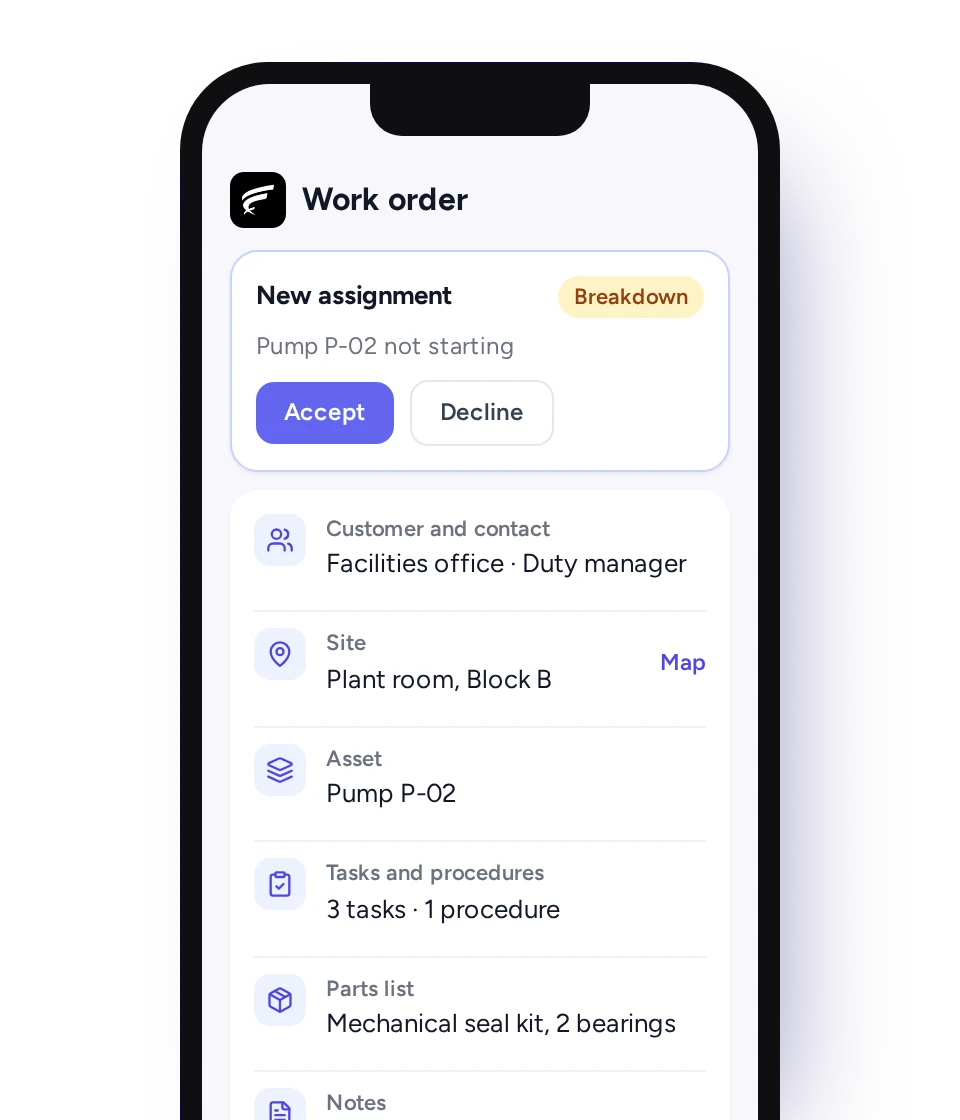
  • Take or turn down a new job straight from the phone.
  • Customer, site and unit details on the job before setting off.
  • The work order PDF viewable in the app.

On the way to site

  • Map location of the job, with route, distance and travel time.
  • A journey log that can be paused, so each job holds its own travel time.
  • Check-in and check-out per task.

At the unit

  • Scan the QR code or barcode on a unit to see its record or start the next action.
  • Scan to attach the right unit when raising a job on site.
  • Past jobs, maintenance plans, contracts and files on the unit's record.
  • An alert if this unit had a similar job only recently.
  • Meter readings with history.

Procedures, job forms and PPM

  • Planned preventive maintenance (PPM) jobs in the same list as breakdowns.
  • Task templates and procedures on the job, with steps done in order.
  • Required tasks finished before the job can be closed.
  • Number fields on custom job forms for readings like pressure, amps and water temperature.

Inspections and certificates

  • Inspection checklists matched to the unit, with follow-up jobs raised from findings.
  • A list of due, overdue and completed certificates and inspections across all units.
  • Certificates and inspections marked complete on the phone, with the PDF certificate uploaded.
  • Inspections and certifications marked complete on the phone, with the certificate file attached.

Photos and evidence

  • Photos and videos from camera or gallery, saved on the job instead of in a chat group.
  • Photo mark-up, plus a location and time stamp on camera photos.
  • Notes and files on each task, and the job's full activity history.

Spare parts

  • Parts used logged on the job, from the parts list or the technician's own stock.
  • Each technician's own stock shown in the app.
  • Search or scan to find a part or unit, down to its exact storage location.
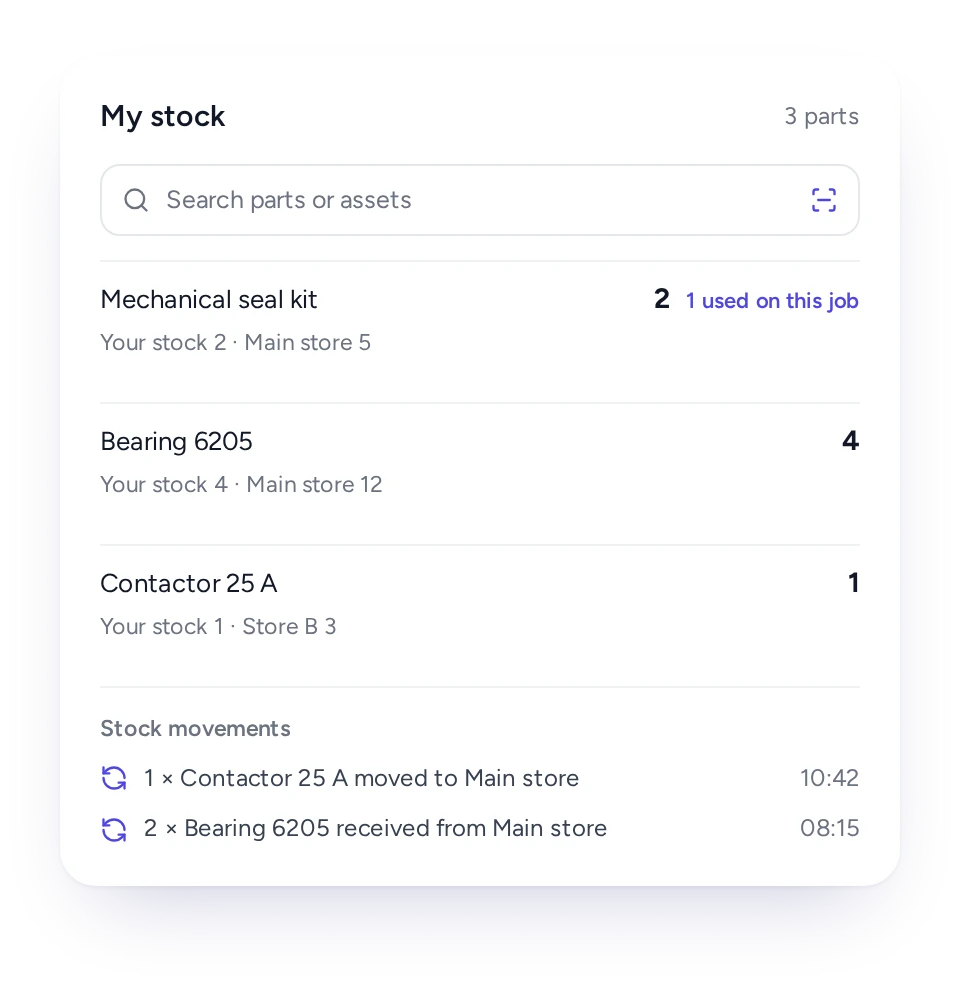
  • Stock moved between technicians and the store from the phone, with movement history.

Closing the job

  • Customer e-signature on the technician's phone.
  • The service report as a PDF, shown or emailed from the job.
  • New customers, sites and units added on site when needed.

No line, leave and shifts

  • Jobs and tasks work offline. Check-ins, check-outs and travel sync on reconnecting.
  • Apply for leave and see whether it has been approved.
  • Individual or group shift schedule on the phone.
  • Runs on Android and iOS, and the app comes with every FieldEx license.

From WhatsApp groups and paper job sheets to one job record

Photos, notes, parts, times and the signature go on the work order. Nothing is retyped or lost in a chat thread.

Many service teams in Malaysia still send job photos to a WhatsApp group and write the service report by hand. The admin then retypes both at the office. Photos get buried, handwriting gets misread, and the report reaches the client days later.

In FieldEx, the technician records everything on the job. That covers photos and videos, notes and parts used, plus task times, readings and the customer's signature. The service report comes out of the job as a PDF. The office sees the same record the moment it syncs, without anyone copying it across.

FieldEx app work order with Accept and Decline buttons, showing customer, site with map, asset, tasks, parts list and notes

Scan the unit, see what was done before

One QR scan shows the unit's past jobs and plans, or starts the checklist, so technicians stop guessing what the last person did.

Put a QR code or barcode on each unit: an air handling unit (AHU), a fire pump, a generator, a chiller. The technician scans it to see the unit's past jobs, maintenance plans, contracts and files. A scan can also start the checklist or a new job on the spot. Scanning on a new job attaches the right unit automatically.

When a new job repeats recent work on the same unit, FieldEx flags it. A supervisor can then see a unit that keeps breaking down before the client complains.

If the unit has had the same work recently, FieldEx warns that the new job repeats it. That repeat-job alert is how a supervisor spots a unit that keeps failing before the third visit, not after it.

Time and travel recorded on every task

Journey logs and task check-ins put distance, travel time and time on site on every job, giving the office a record it can trust.

Location tracking stays in the technician's hands: setting their app status to unavailable turns it off.

Technicians stay in control of their location: they can switch location tracking off at any time by setting their app status to unavailable.

Technicians record the drive to site, pausing for stops, and check in and out of every task. Each job then shows distance, travel time and time on each task. The office knows how long each visit really took, and the client gets a clear account of it. Hours come from the job itself, not from manual time cards.

The procedure is followed, step by step

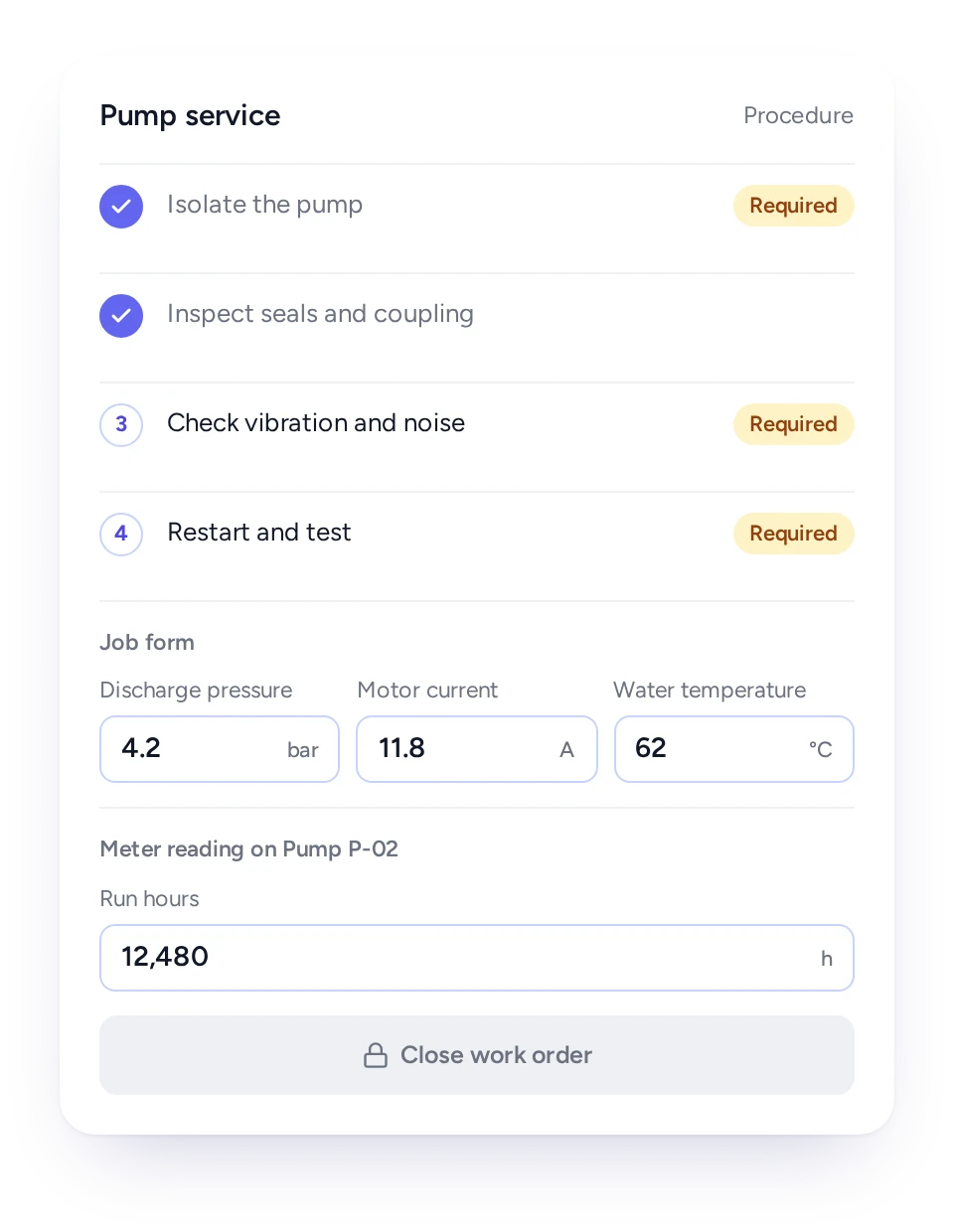
Procedures put tasks in the order you set and required tasks must be done before the job closes, so SOPs are followed on every visit.

Procedures put tasks in the order you set, and required tasks must be completed before the job closes. Custom job forms add number fields for readings such as pressure, amps and water temperature, so each exact value is recorded against the job. Meter readings go onto the unit and build a timestamped history.

Custom job forms, set up during onboarding, add number fields for readings such as pressures, amps and water temperatures. Technicians enter the exact values on site, and every reading is recorded against the job. Meter readings go onto the asset itself, building a timestamped history that keeps time- and meter-based maintenance plans accurate.

FieldEx procedure with required tasks in order, job form number fields for pressure, current and temperature, and a locked Close work order button

Inspections and certificates closed on site

Technicians open each unit's inspection checklist from a scan, raise follow-up jobs from findings, and upload the certificate before leaving.

Technicians also see a list of due, overdue and completed certificates and inspections across every unit. They can mark one complete on the phone and upload the PDF certificate, so the record is finished on site. Condition grades captured in a checklist can update the unit's status.

Fire systems, lifts, generators and other plant often need inspections on fixed cycles, and clients ask to see proof. In FieldEx, the inspection checklist for each unit opens from a QR scan. A finding that needs action becomes a follow-up job immediately, and the result stays on the unit's record.

Book a demo

Customer signs, report goes out, before the van leaves

The customer signs on the technician's phone and the PDF service report can be emailed on the spot.

When the work is finished, the customer signs on the phone, and the signature goes onto the job and its service report.

The standard service report covers the job and equipment, the fault and how it was resolved, and spare parts. It also shows arrival and departure times, the work done, attachments and the signature. It is ready as a PDF to show or email from the job.

Each job type can be set to lock completed jobs, so only the roles you pick can edit them.

Each job type can be set to lock completed jobs, so only the roles you choose can edit them.

Works where there's no line

Jobs and tasks carry on with no mobile coverage, and check-ins, check-outs and travel sync once there's a line again.

Basements, plant rooms, estates, plantations and factory floors often have weak or no mobile coverage. Technicians download the day's jobs and tasks and keep going offline, and their check-ins, check-outs and travel are kept on the phone until coverage returns.

Nobody needs to remember what happened in the basement and type it in later. The record is made where the work is done.

Spare parts in each technician's own stock

Give each technician their own stock in FieldEx, record parts used straight from it, and move parts between technicians with every movement recorded.

On site, technicians pick parts from the parts list or take them from what they carry. They can move parts to another technician or back to the store from the phone, with every movement recorded. Searching or scanning shows exactly where a part or unit is held.

The storekeeper sees what is used and what each technician holds, and each unit shows the parts used on its past jobs.

FieldEx technician stock list with search and scan, where each part is held, a part used on this job and stock movements

How each person in the team uses the technician app

Technicians run the job from the phone, coordinators see progress without chasing, and managers get records ready for client reports and audits.

  • Technician

    Today's jobs, unit history on a scan, the checklist in order, and the customer's signature.

  • Team lead

    Parts used and returned logged on the phone, task check-ins and leave.

  • Coordinator

    Job progress without phoning around, and assignments accepted or declined from site.

  • Storekeeper

    Every part a technician uses, logged against the job it went into.

  • Manager

    Time, parts and readings on every job, plus photos and signatures, ready for client reports and audits.

  • Customer

    A signature on the phone and a completion PDF by email.

PPM and breakdown jobs in the same app

FieldEx is field service management and a CMMS in one system, so every job on the phone builds the unit's service history.

The app holds more than a job list. PPM visits, scheduled inspections and breakdown call-outs land in the same list, link to the unit and build its history. Readings and inspection results captured on site keep the unit's status and meter current, so time- and meter-based PPM stays accurate.

Related features: Scheduling and Dispatch, Work Order Management and Preventive Maintenance. The app also links to Asset Management, Spare Parts and Inventory and Inspections and Compliance. There is also a guide to Field Service Management software.

How EC Solutions runs equipment replacements from the FieldEx app

EC Solutions (aviation equipment, Uruguay): technicians scan a QR code on the equipment with the FieldEx mobile app to create a replacement job. They record one or several part replacements in a single mobile form and capture technician and customer sign-offs. The result is a full, timestamped record of every swap.

Read the EC Solutions Story

How Coffex replaced paper service reports with the FieldEx app

Coffex Coffee Malaysia, an Australian coffee roaster with a high-capacity roastery in Malaysia: handwritten service reports had slowed operations and were often hard to read.

Now technicians log service tasks through the FieldEx mobile app, customers sign off on the phone screen, and the service report is generated automatically. As Coffex's Technical Manager puts it, "it's all electronic and digital."

Read the Coffex Story

Questions Malaysian service teams ask about the FieldEx app

What is a good maintenance work order app for technicians?

One that puts the job, the unit and its history in the technician's hand. The FieldEx app shows the day's jobs and opens a unit's history from a QR scan. It runs the checklist and records photos and parts. Each job closes with the customer's e-signature and a PDF service report. PPM and breakdowns share one list.

FieldEx is built that way, for technicians who service and maintain equipment. From one app they see the day's jobs and scan an asset to open its history. They work through tasks and inspections and record photos, parts and readings.

Each job closes with a customer signature and a PDF report. Planned visits and breakdowns are handled the same way on site.

Can FieldEx replace our WhatsApp group for job photos?

Yes. Photos and videos are saved on the work order itself, marked up if needed and stamped with location and time. They stay with the job and the unit instead of in a chat thread. The office sees them on the job, and they appear in the service report.

Does the FieldEx app work in basements and plant rooms with no line?

Yes. Jobs and tasks can be downloaded and worked with no line, with check-ins, check-outs and travel synced once the phone reconnects.

Can the customer sign the service report on the technician's phone?

Yes. The customer signs on the phone at the end of the job, and the PDF service report can be shown or emailed on the spot.

What does the digital job sheet in FieldEx include?

The work order holds the customer and site, the unit worked on, and the fault and resolution. It also holds the tasks done and the time on each, and travel time. Parts used, readings and notes are on it too, with photos and videos and the customer's signature.

The PDF service report shows the job and unit details, the fault and resolution, and parts used. It also shows check-in and check-out times, the work done, attachments and the signature.

Can technicians scan a QR code to see a unit's service history?

Yes. A scan opens the unit's record with past jobs, maintenance plans and contracts, or starts the checklist or a new job on the spot. FieldEx also warns when a new job repeats recent work on the same unit.

Can technicians record parts used from their own stock?

Yes. FieldEx can hold a separate stock for each technician. Parts used come straight off that stock, and transfers to other technicians or the store are made on the phone with a movement history.

Does the app record travel time and time on site?

Yes. Technicians log the journey to each job, pausing where they stop, and check in and out of every task. Distance, travel time and time on site are all held on the job.

Can technicians follow a PPM checklist and raise follow-up jobs on site?

Yes. Scan the unit to open its checklist. Any finding that needs action turns into a follow-up job right away, and the results stay on the unit's record.

Can technicians upload inspection certificates from the app?

Yes, straight to the unit's record, as covered under Inspections and certificates closed on site. The coordinator back at the office sees the certificate as soon as it is uploaded, with no need to chase a photo on WhatsApp.

Can a technician close a job without finishing the required steps?

No. Required tasks must be completed before the job can close, and the procedure keeps steps in the order you set.

Can technicians see their shifts and apply for leave in the app?

Technicians apply for leave from the app and see whether it was approved, and managers see leave requests from their reporting line. Technicians can also see their own or their group's shift schedule.

Is the FieldEx app available in Bahasa Malaysia?

Yes. The FieldEx web and mobile apps are available in English, Bahasa Malaysia, Chinese, German and Spanish, and each user picks their own.

Most of the work is scanning, choosing and photographing rather than typing, and the job shows what the technician needs before they arrive. The web and mobile apps are available in English, Bahasa Malaysia, Chinese, German and Spanish, and each user picks their own.

Does every technician need a separate app license?

No. Every FieldEx license includes the mobile app, which runs on Android and iOS, and every license is priced the same for technicians and office users.

How long does it take to set up FieldEx?

There's no setup fee. Training is at your office or online, in Bahasa Malaysia or English, and your team can learn as it goes with guides, videos and the in-app AI assistant.

Customers, sites, units and past jobs can be uploaded. FieldEx helps with setup, and training is included. See Setup and Training.

Once we know your requirements and your data is ready, FieldEx can be implemented in as little as a week with standard features for small businesses. Larger setups and custom work take longer.

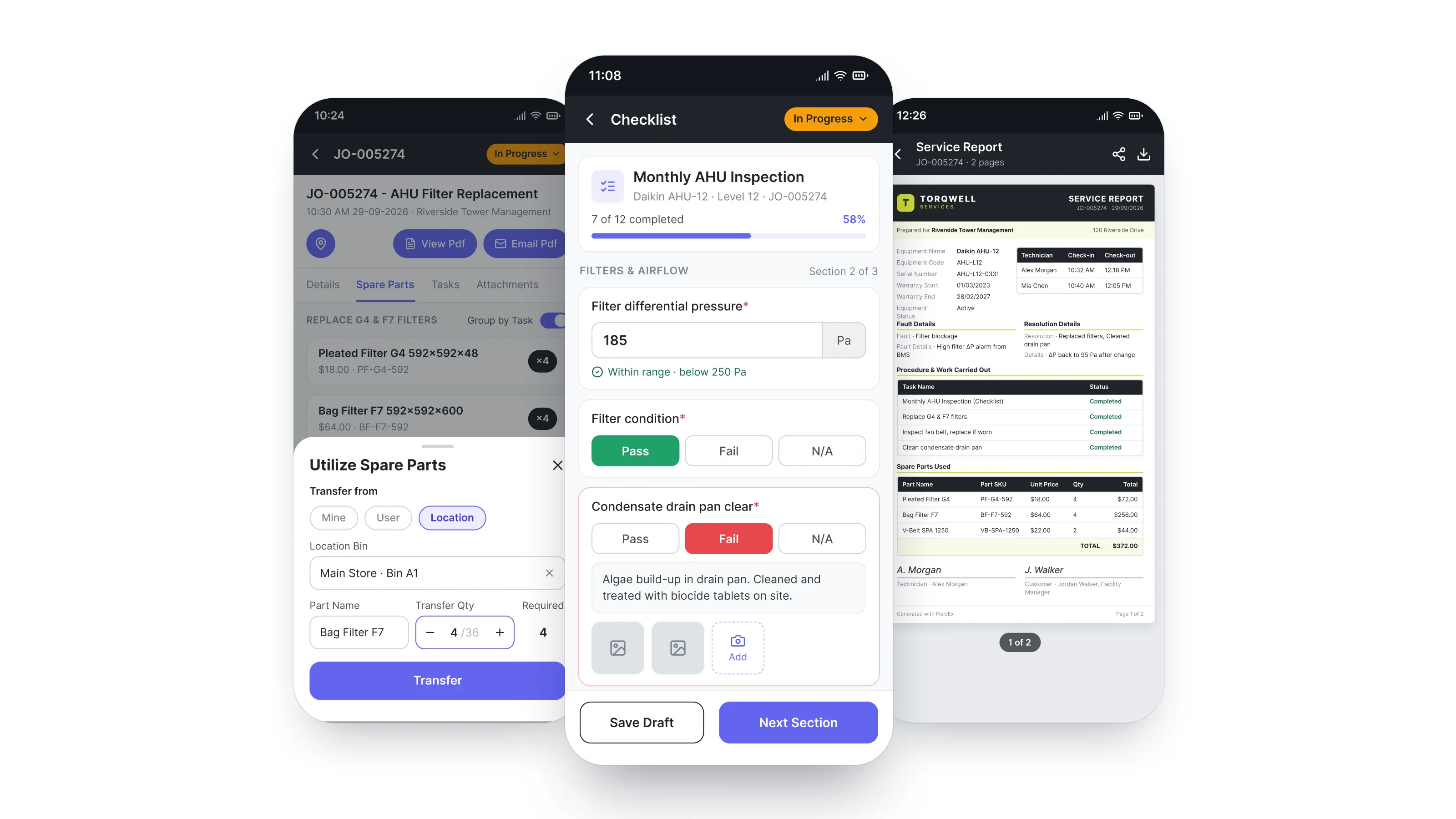
Watch one job go from QR scan to signed report

Book a Demo