
Parts list
- SKU, type, family, unit of measure and photo for each part.
- Make, model, warranty months and unit price.
- QR labels for parts.
From the main store to a technician's van to the customer's machine: FieldEx counts parts at every step and warns you before stock runs short.
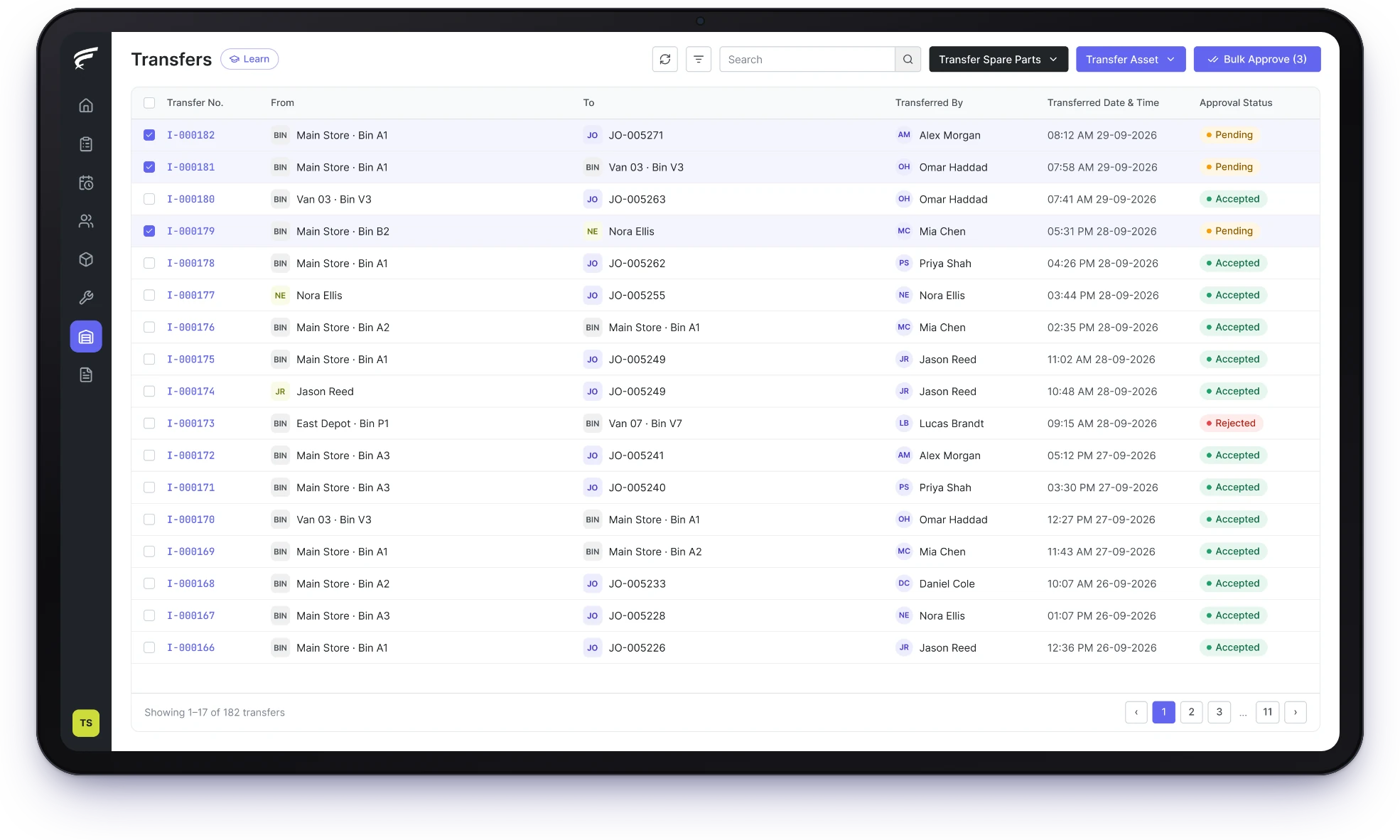
FieldEx is a field service and asset management (FSM+CMMS) application. Its spare parts inventory management software counts stock in each branch, store and technician's van. It takes parts off when a job records them and warns the right team at reorder levels. It logs every stock movement with the person responsible.
One view of stock across branches, stores and vans.
Parts deducted as technicians record them on jobs.
Low-stock and reorder alerts for each store.
Every part has one catalog entry and a count for every branch, store and van, so coordinators know where stock is before they dispatch.
Each movement keeps the before and after quantity.
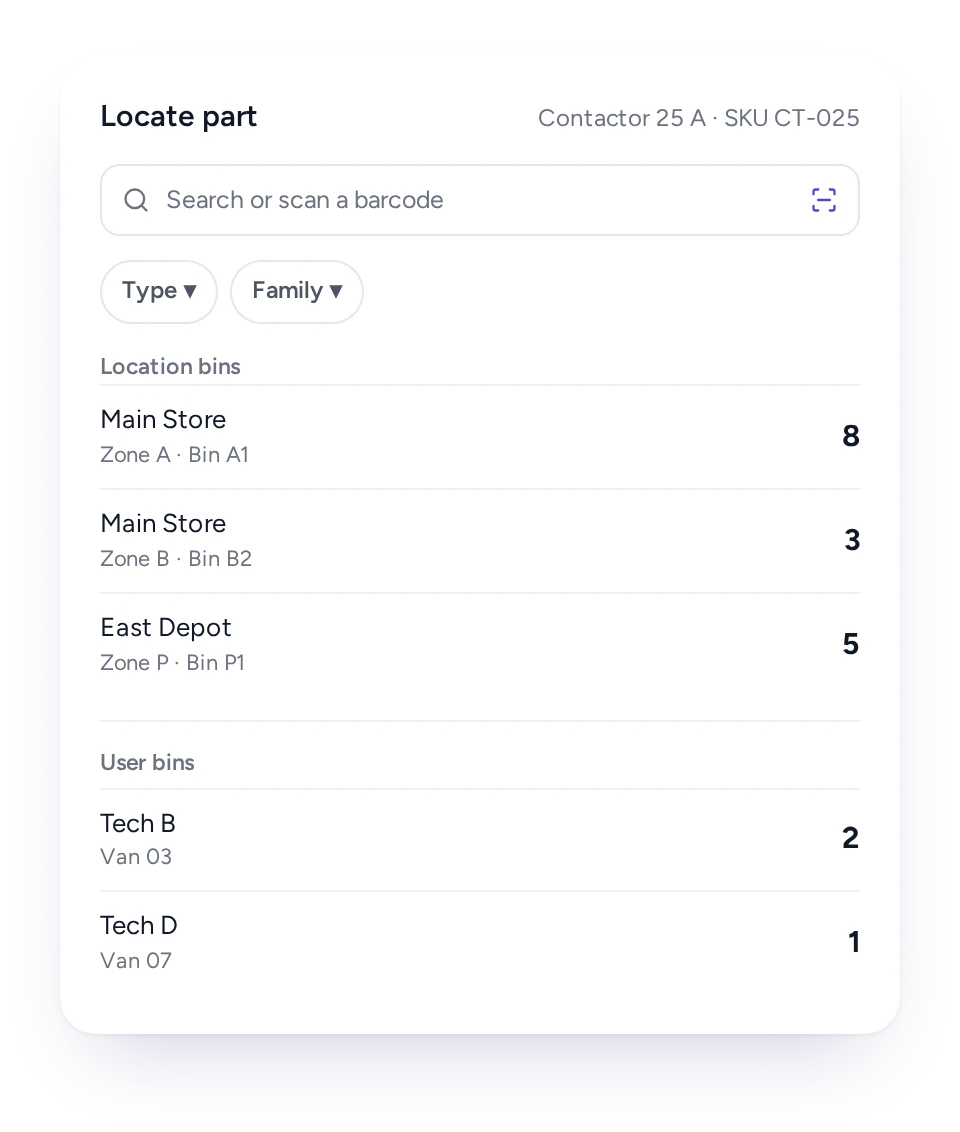
Search a part in FieldEx and see the count at every branch, zone, storage location and technician.
Many Malaysian service companies run a main store, a few branch stores and a fleet of vans. When each keeps its own Excel sheet, nobody knows where the nearest compressor or PCB is.
FieldEx sets up stock once as locations, zones and storage locations, with each technician's van stock tracked the same way. The availability search then finds a part by type, family or store. It also searches by zone, storage location or technician.
A coordinator can send the part from the closest store, or send the technician who already has it in the van.
A part recorded on a job comes off its stock and appears on the service report, with no second entry in the store book.
In FieldEx, technicians pick parts from the list, scan a barcode or use their van stock. The count of that storage location drops at once, and the service report lists each part with quantity and price. Refrigerant and other materials used on a job are recorded the same way, so the record shows what went into each unit.
The part also appears in the asset's history, so you can see what each machine has used over its life.
Give each storage location its own reorder and low-stock level, and FieldEx warns the zone's team when stock reaches it.
A main store and a technician's van can then hold different buffers, set for how each one is used.
In FieldEx, each storage location can carry a reorder level and a low-stock level for every part. When stock drops to either, the responsible team gets an alert in the app and by email.
A transfer moves parts or assets from one place or person to another, approved by the team responsible before it counts.
Surplus at one branch and a shortage at another usually ends in a fresh purchase order. A WhatsApp message asking someone to send stock across leaves no record.
In FieldEx, a transfer states the items, where they come from and where they go: a storage location, a store or a technician. The zone's team approves it, and approvers can clear many transfers at once. Approved movements are logged with quantities before and after.
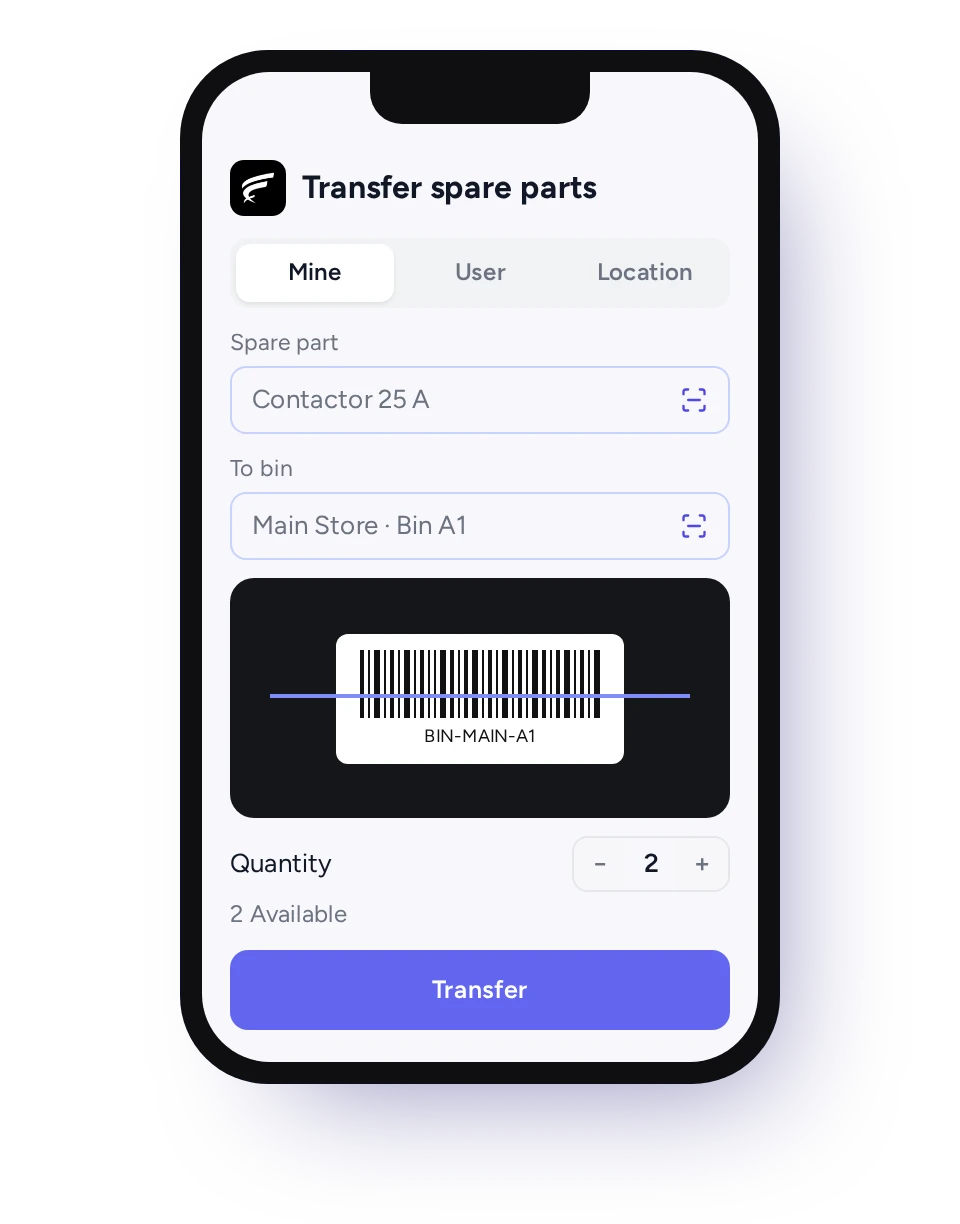
Technicians start transfers from the phone and scan parts and storage locations instead of typing codes.
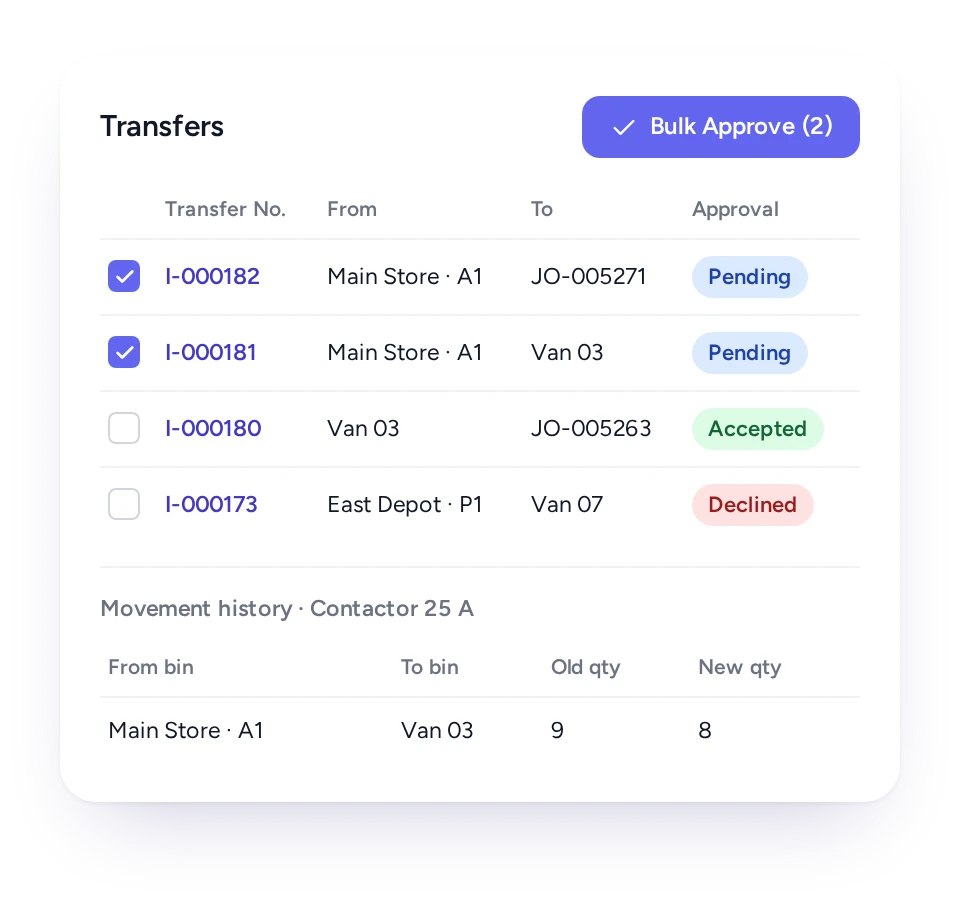
Enter a count as an adjustment with a note, and FieldEx logs the old and new quantity, the person and the time.
In FieldEx, a stock take is a set of adjustments for each storage location. Each adjustment holds quantity in, quantity out and a note, on the web or the phone.
The movement log keeps every adjustment, use, transfer and removal with its before and after quantity. A gap between shelf and system can be traced to the movement that caused it.
Parts taken out of service can be moved back to a store or removed from stock, and each movement stays in the log.
That gives your environmental officer a dated trail of what came back from site, alongside your own waste records.
In FieldEx, a part or asset taken off site can be transferred back to a returns store, or removed from stock with a note. The log shows when it moved, from where and by whom.
Requisitions and consignment notes let the office request or send stock, with the right people approving before it moves.
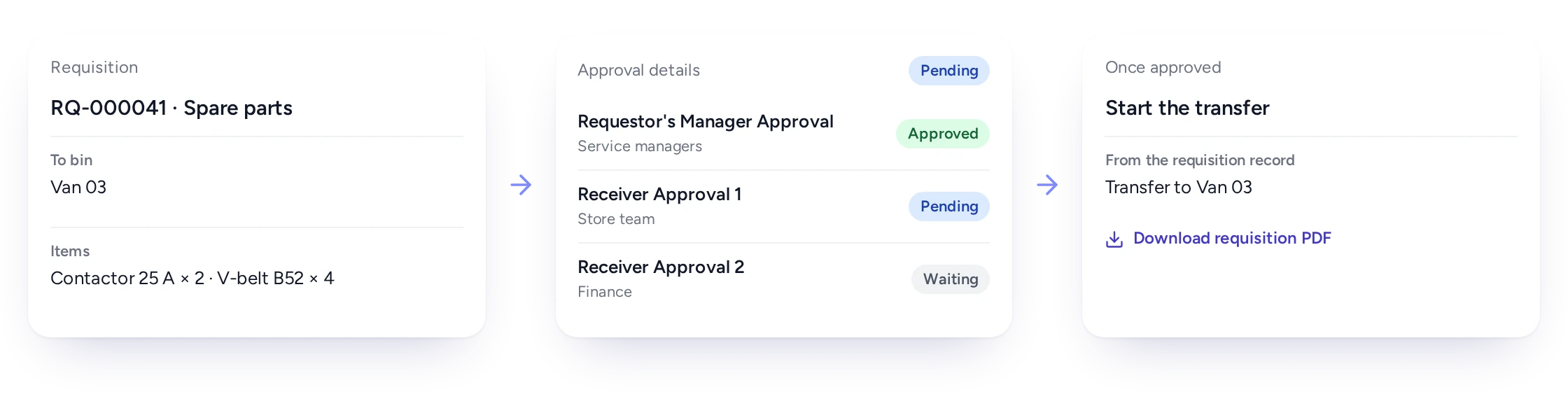
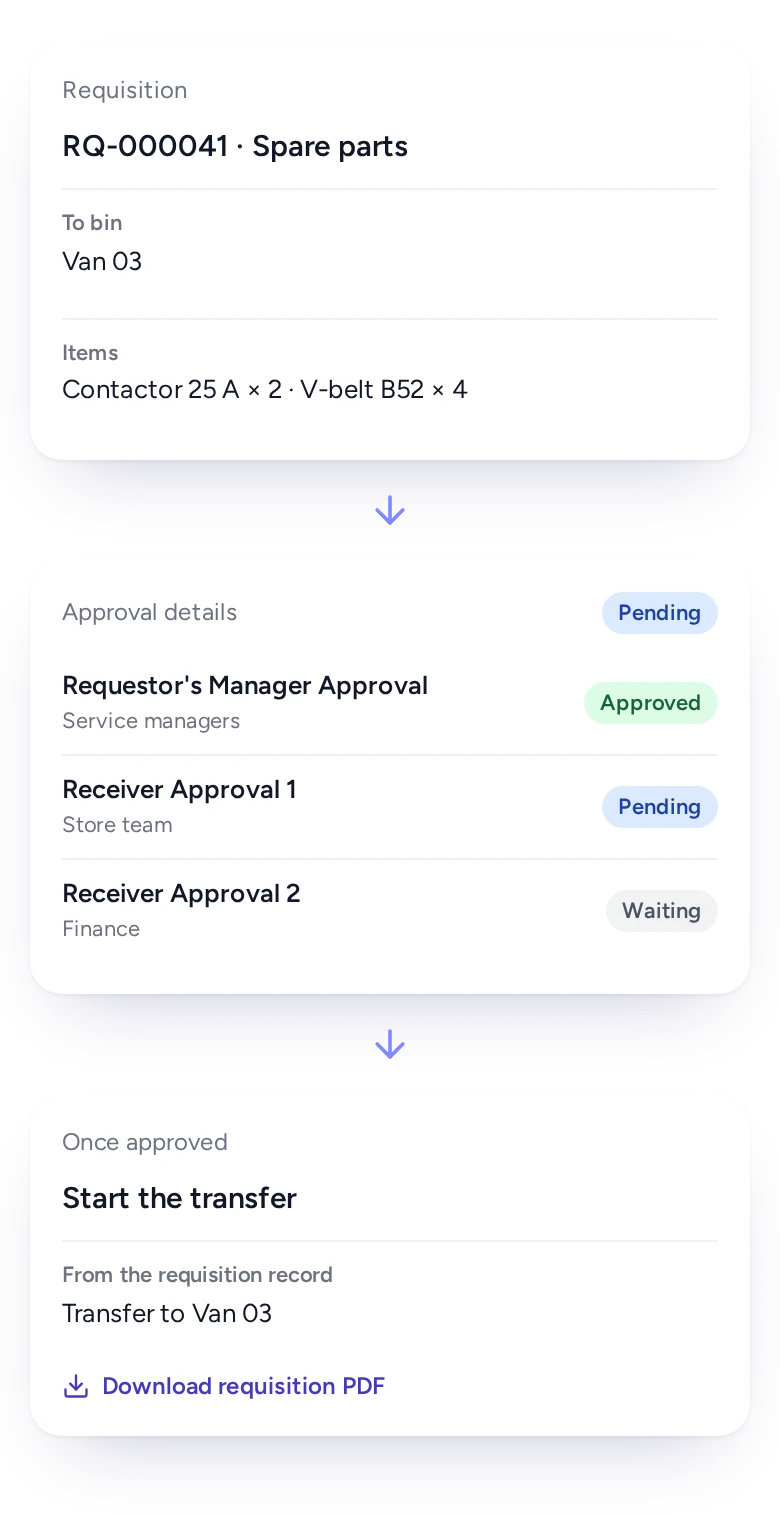
Larger teams need a step before any stock leaves the store: a request, a manager's approval, then the transfer.
In FieldEx, a requisition lists the parts or assets needed and the store they should go to, then passes through one or more approval levels. Consignment notes do the same for outgoing stock. The requester is notified of each approval or rejection, and the transfer can be started from the approved record.
Requisitions and consignment notes can each be printed as a PDF.
QR labels on parts and barcodes on storage locations let technicians record stock without typing part numbers.
Typing a long part number on a phone, in a hot store room, is where mistakes start.
In FieldEx, parts can carry QR labels printed in several sizes and layouts, and each storage location has a barcode. Technicians scan them in the app to add parts to a job or set up a transfer.
During a stock take, scanning the location first shows what should be there.
Parts used on jobs are listed on each asset, so you can see what a machine has used and how often.
Records of what went into equipment, such as refrigerant or filters, are often needed years later. In FieldEx, the asset record has a spare parts list built from its jobs: which parts were used, how many and when. Asset records keep their full job history, so those parts can still be traced years later.
A part that keeps appearing on the same machine is often the first sign of a deeper fault.
The asset, the job and the stock movement all record the same part. So a storekeeper, a planner and an auditor see one consistent answer about where it went.
Storekeepers see every movement, technicians know what is in the van, and managers see surplus before buying more.
Storekeeper
Counts per storage location and a full movement log.
Technician
Van stock on the phone, and parts recorded on each job.
Service coordinator
The nearest available part before dispatching.
Branch team
Low-stock alerts and transfers waiting for approval.
Operations manager
Requisitions approved before stock moves.
Accounts
Parts with quantity and price on every service report.
FieldEx is field service management and a CMMS in one, so breakdown jobs and PPM visits draw on the same stock.
With inventory in one system and jobs in another, field parts get entered twice or forgotten. In FieldEx, job templates can bring their usual parts, technicians record what they used, and the stock count and the machine's history update together.
Each asset's record lists the parts its jobs used, so a part that keeps coming back points to a deeper fault.
Related pages: Asset Management, the Mobile App and Work Order Management. See also Reports and Insights, Preventive Maintenance, and our guide to choosing CMMS Software.
TapEffect (piped water systems, Cambodia) had satellite sites each managing their inventory on their own. With FieldEx, central management monitors stock levels at each site and moves equipment between them, and TapEffect reports a 25% increase in inventory management efficiency.
Coffex Coffee Malaysia, an Australian coffee roaster with a high-capacity roastery in Malaysia, relied on paperwork and manual work orders as it scaled.
With FieldEx, planners monitor stock levels with alerts for low inventory. Stock movements are traceable through transfers and collection logs. Automated alerts help prevent both stock-outs and overstocking.
For a service company, choose one that follows parts into vans and onto jobs. FieldEx counts parts in every branch, store and technician's van, and deducts them when jobs record them. It warns the zone's team at reorder and low-stock levels, and logs every movement. As field service software too, it keeps stock and jobs in one system.
FieldEx tracks parts in every store, zone and technician's van, and takes them off stock when they are recorded on jobs. It alerts the responsible team at reorder and low-stock levels, and logs every movement. Because it is also field service software, stock and jobs share one system.
Yes. Each technician's stock is tracked like a small store, and parts they record on jobs come off it.
Yes. Recording a part on a job takes it off the storage location it came from, and the service report lists it with quantity and price.
Yes. Reorder and low-stock levels are set per storage location, and the responsible team gets an alert in the app and by email.
Yes. Transfers move parts and assets between storage locations, stores and technicians, approved by the responsible team. Technicians can create them on the phone.
Yes. Enter counts as adjustments with a note, on the web or the phone, and every change is logged with the before and after quantity.
Yes. Adjustments, use, transfers and removals are logged with the quantity before and after, who made the change and when.
Yes. Parts can carry QR labels and storage locations have barcodes, so technicians scan them to record parts or start transfers.
Yes. Requisitions and consignment notes pass through one or more approval levels before stock moves, and each can be printed as a PDF.
Yes. Each asset's record lists the parts its jobs used, with quantities and dates.
Yes. The FieldEx app offers English, Bahasa Malaysia and Chinese, and each technician picks the language they prefer.
Yes. Job templates can carry a parts list, and technicians record what they actually used on the job.
Give every part one catalog entry and a count for each location, including each technician's van. In FieldEx, moves between locations are transfers, with approval if you want it. Parts used on jobs come off the count, and low stock alerts the team in charge.
Yes. A spreadsheet only shows the count from the last time someone updated it. It doesn't change when a technician fits a part on site, so the numbers drift between stock takes.
In FieldEx, your parts list and stock levels can be uploaded once, store by store and van by van. After that, every job keeps the count current, so the next stock take starts close to the truth.
There's no setup fee. Training is at your office or online, in Bahasa Malaysia or English. Your team can learn as it goes with guides, videos and the in-app AI assistant.
Customers, sites, assets and past jobs can be uploaded, as can the parts catalog and stock levels. FieldEx helps with setup, and training is included. See Setup and Training.
Once we know your requirements and your data is ready, FieldEx can be implemented in as little as a week with standard features for small businesses. Larger setups and custom work take longer.
