
Required SOP tasks
- Required tasks that must be done before a job closes.
- Tasks that follow a set order.
- SOPs carried in from job templates.
SOP steps that must be done, inspection checklists on the phone, certificate reminders and branded service reports, so every audit has its evidence ready.
FieldEx is a field service and asset management (FSM+CMMS) application. Its inspection software enforces SOP steps before a job can close and runs digital checklists on the phone. It reminds you before each asset's certificates fall due and produces branded service reports. Evidence for an inspection or a client audit builds as the work is done.
SOP steps enforced on every job.
Certificates and inspections tracked for each asset.
Branded service reports and protected job records.
Compliance evidence in FieldEx is built during the job, from required SOP steps to site photos and the client's signature.
Checklists stay on the asset. The rest stays on the job.
Make the steps that matter required, and FieldEx keeps the job open until every one is done.
In FieldEx, each job carries its SOP as tasks from the job template. Tasks can follow a set order, each done before the next begins. Any task can be required, and while a required task is open, the job can't be completed.
Supervisors then see, job by job, that each SOP step was done and who did it. The SOP lives on the job, not just in a file at the office.
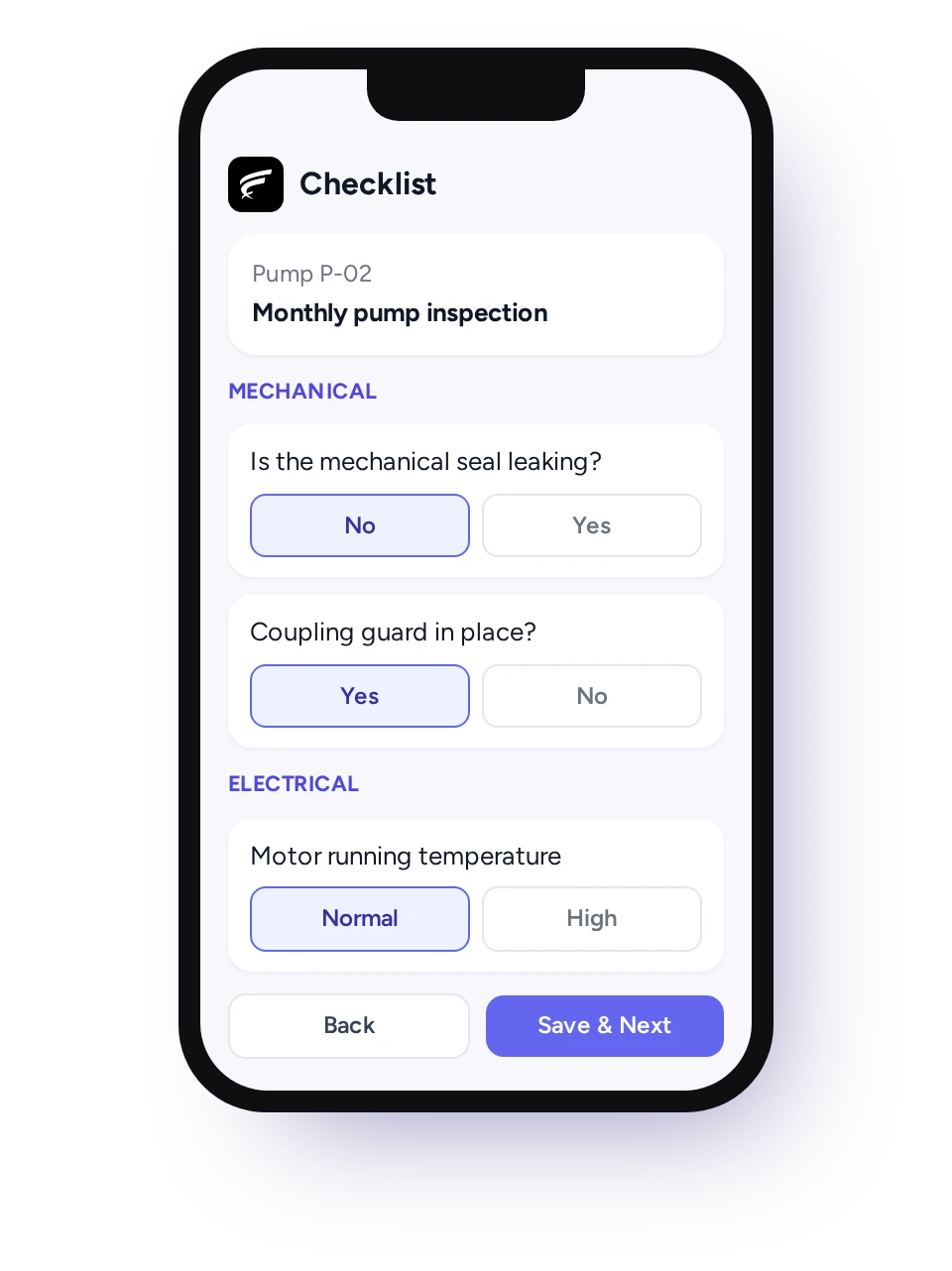
Your existing inspection forms become checklists on the phone, and FieldEx's AI can build one from a scan of the paper form.
Paper forms in Malaysian service teams are often filled in at day's end, smudged, or lost between site and office.
In FieldEx, a checklist is a set of questions in sections, with answers technicians tap on the phone. A new checklist can be built with AI from a description, or from a PDF or PNG of your existing checklist or procedure. Each one is matched to the asset types and zones it applies to.
Completed checklists stay on the asset and can be reported on.
Completed checklists stay on the asset's record and appear in reports, so a whole year of checks on one unit can be reviewed together.
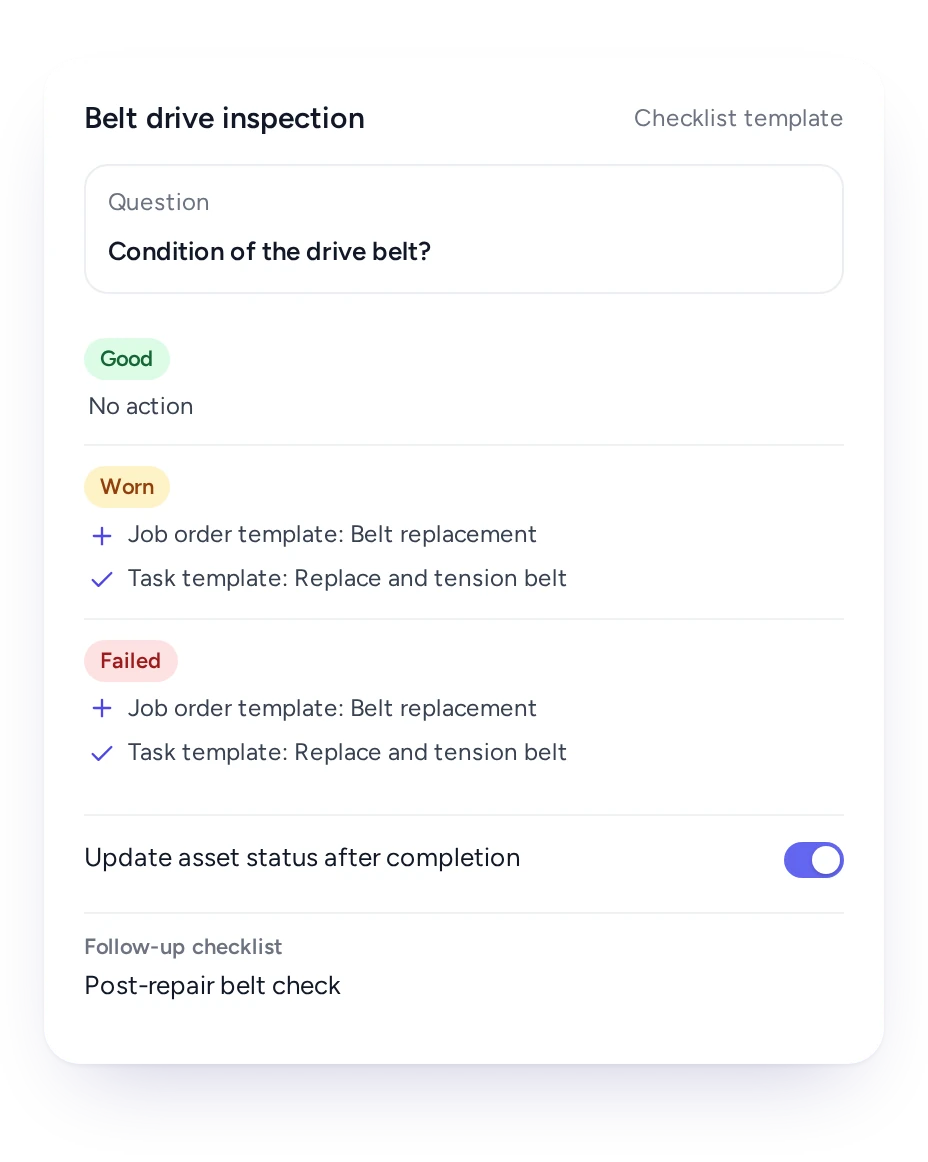
Link a checklist answer to a repair job, and a defect found on site turns into tracked work immediately.
A defect written on a paper form waits until somebody in the office reads it, then waits again for a technician to be free.
In FieldEx, each checklist answer can be set to create a job from the template you choose, complete with its tasks. A condition answer can also update the asset's status, and finishing one checklist can start the next.
The checklist, the repair job and the asset are linked, so the record shows what was found and how it was fixed.
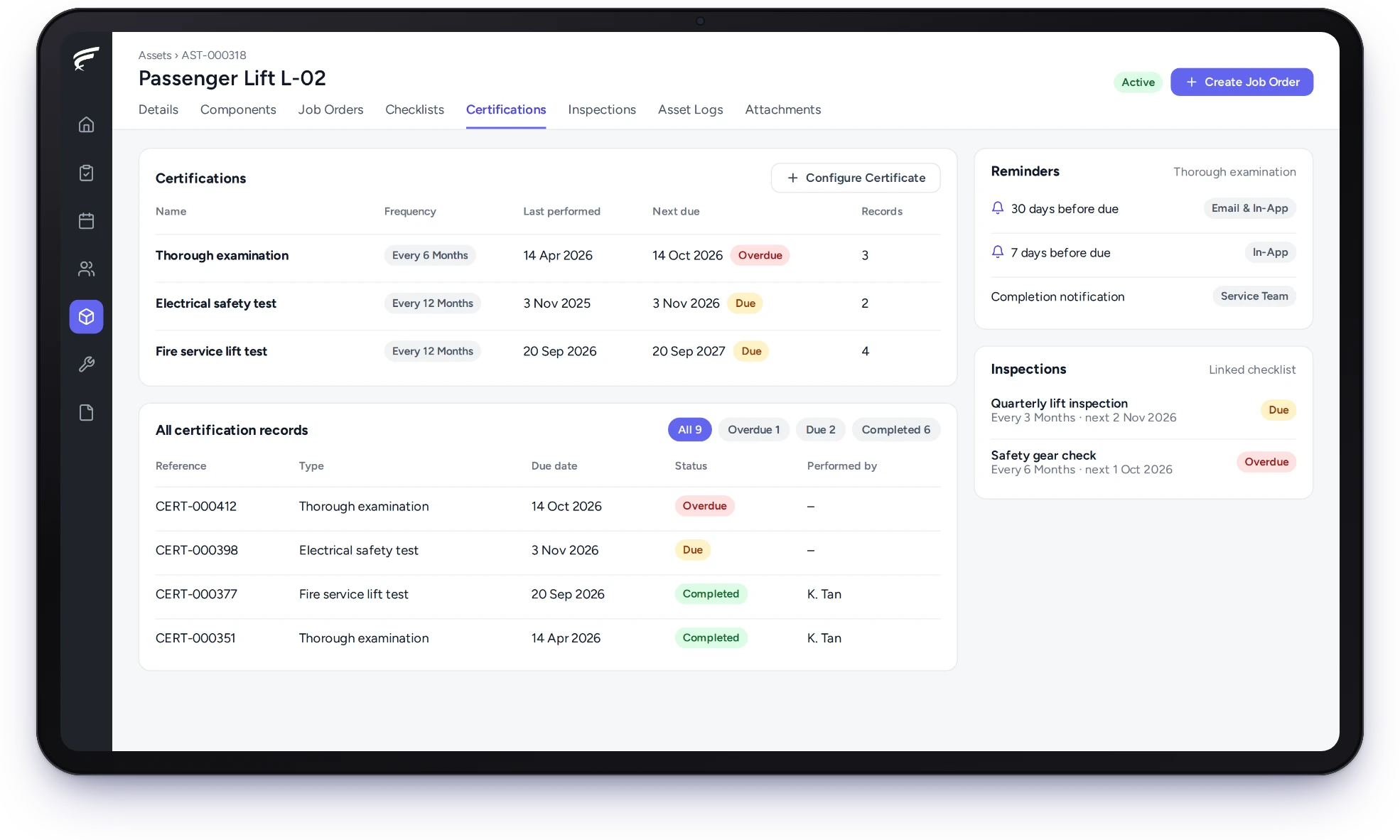
Each asset's certificates have their own cycle and reminders, so renewals are planned before they lapse.
Reminders go out ahead of the due date, by email, in the app or both. The renewed certificate is uploaded to its record, and a chosen team can be told.
In FieldEx, each certificate on an asset has its own cycle, the issuing authority and a start date. A certificate of fitness (CF), a fire certificate and an electrical test can each keep their own dates on one asset.
Give each asset its inspection cycle and the checklist to use, and FieldEx creates each inspection record when it is due.
In FieldEx, an asset can carry inspections on the schedule it needs, each linked to its checklist. Records show as overdue, due or completed, so a missed one stands out. The next date can follow the last completion or keep to the original schedule.
The compliance dashboard brings certificates and inspections together, with a calendar. Every inspection record, with its report, stays on the asset for the owner or client to see.
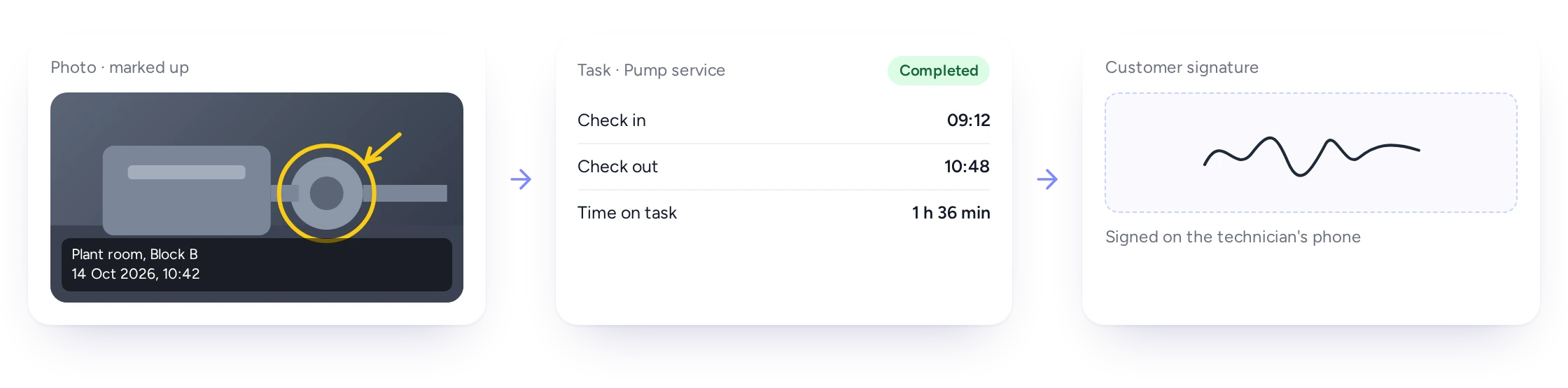
Photos, check-in times and the client's signature are captured in the FieldEx app and kept on the job for the report.
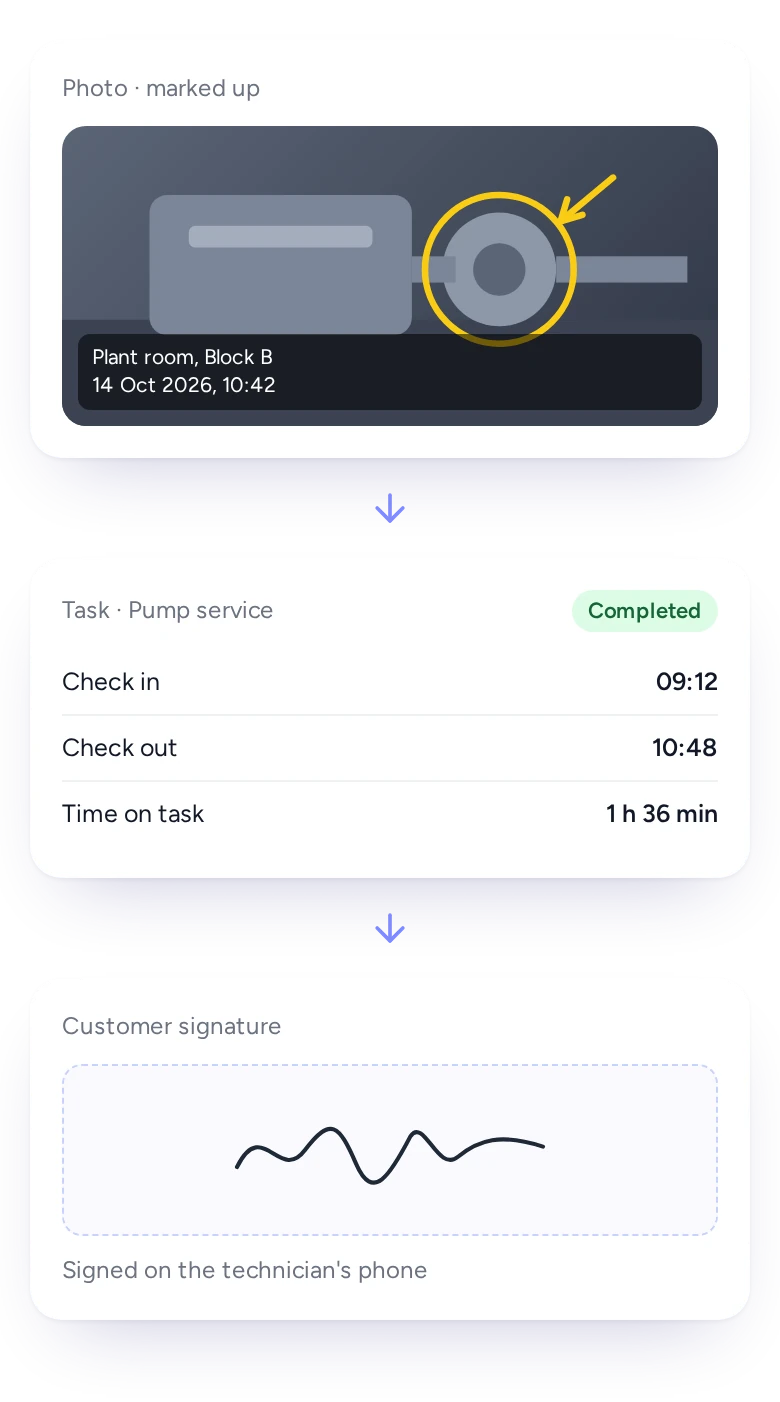
Disputes are seldom about whether someone came. They are about what was done, and when.
In FieldEx, technicians take photos or video and save them to the job. They can draw on a photo to show a fault, and each one carries the place and time it was taken. Task check-ins show time spent, and the client signs on the phone at the end.
Everything stays on the job and goes into the service report, so nothing travels by WhatsApp.
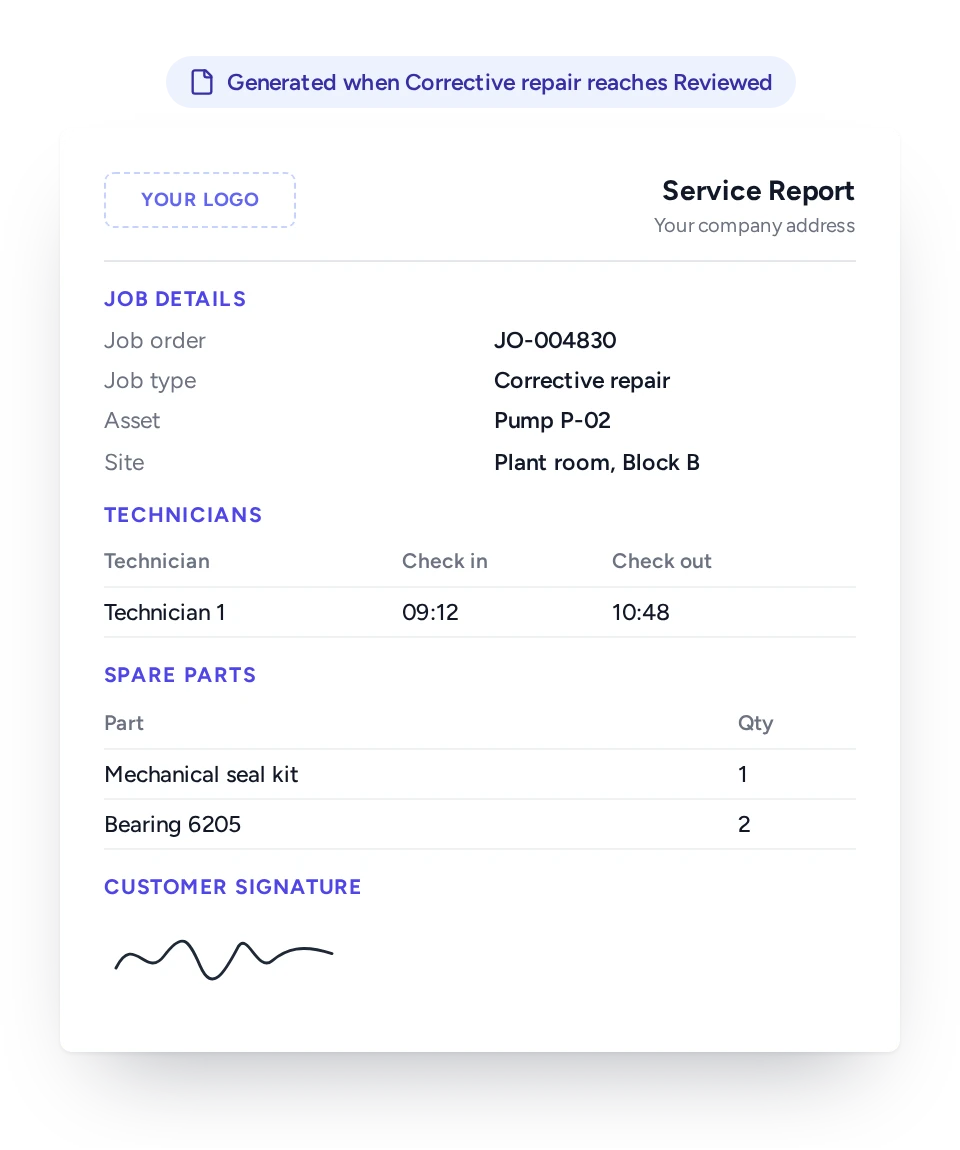
Build report layouts with your letterhead for each job type, and FieldEx generates the report when the job reaches the status you choose.
Malaysian clients and inspectors often expect a report in their own format. FieldEx builds these formats as branded custom PDFs that generate automatically from the job.
Each layout carries your logo and the sections you need: job and client details, technicians and their times, parts, attachments and the client's signature. The report is attached to the job at the status you choose, or held until a supervisor marks the job reviewed.
Every regenerated report stays on the job.
Finished jobs can be locked, every edit is logged, and the full record stays on the asset for its working life.
Maintenance records only hold up if they can't be quietly changed later. In FieldEx, each job type can be set to lock finished jobs, so only the roles you nominate can edit them. Deleting is limited by role. The job's change log shows each edit: what changed, from what, to what, by whom and when.
Jobs, checklists, certificates and inspections all stay on the asset.
Technicians follow required SOP steps, supervisors review before reports go out, and safety officers see each certificate's next date.
Technician
SOP steps and checklists on the phone, with no paperwork afterward.
Supervisor
A check of each job before the client gets the report.
Safety and health officer
Certificates and inspections per asset, with reminders.
PPM planner
Defects from inspections turned into repair jobs.
Contract manager
Service reports on the company letterhead.
Client
A signed report after every visit.
Because FieldEx is field service management and a CMMS in one, the job record, the asset record and the compliance record are the same.
When inspections sit in one tool, jobs in WhatsApp and certificates in Excel, an audit means piecing them together. In FieldEx, the inspection runs on the asset and a defect raises a job. The service report records the fix, and all of it stays on the asset.
PPM plans schedule the regular visits, and clients see their jobs and upcoming maintenance in the customer portal.
Related pages: Preventive Maintenance, Asset Management and the Mobile App. Also see Work Order Management, Reports and Insights and our guide to choosing CMMS Software.
Royal Facilities Management (facilities management, Oman) works across many properties. It delivers electrical, air conditioning, plumbing and cleaning work, plus safety inspection and preventive maintenance. With FieldEx, technicians follow every required maintenance step on site through standardized mobile checklists. That helps maintain compliance where some steps carry potential penalties if missed.
Chubb, an integrated security provider in Malaysia, found jobs often had to be revisited because of missing forms or skipped SOPs. At the time, photos and updates were sent through WhatsApp.
With FieldEx, jobs can't be marked complete unless all SOP steps are fulfilled. Technicians upload mandatory photos directly in the app, and Chubb reports a 15% boost in technician productivity.
Pick one that keeps the inspection, the defect and the repair in one record. FieldEx enforces required SOP steps, runs digital checklists on the phone, reminds you before each asset's certificates fall due, and produces branded service reports. As field service software too, it turns defects found on inspection into repair jobs in the same system.
FieldEx runs digital checklists and makes key steps required before a job can close. It tracks each asset's certificates and inspections with reminders and produces branded reports from the job. Because it is also field service software, defects found on inspection become repair jobs in the same system.
Yes. SOP steps can be required tasks, set to follow an order, and a job with a required task open can't be completed.
Yes. FieldEx's AI can build a checklist from a description, or from a PDF or PNG of your current form or procedure. You adjust it before use.
Yes. Each checklist answer can raise a repair job from a chosen template with its tasks, and condition answers can update the asset's status.
Yes. The CF on each machine gets its own reminders, like any other certificate. The compliance dashboard also lists every certificate falling due, so a coordinator can book the inspection weeks ahead.
Yes. Each inspection runs on the cycle its asset needs, such as monthly or quarterly, with its own checklist.
Yes. FieldEx builds your client's report format as a branded custom PDF on your letterhead, generated automatically from the job.
Yes. The report can wait until a supervisor marks the job reviewed, and each regenerated report is kept.
Yes. Photos saved to a job carry the place and time they were taken, and technicians can draw on them.
Yes. Each job type can be set to lock finished jobs to the roles you nominate. Deleting is limited by role, and every edit is logged.
Yes. Technicians open the checklist from the unit's QR code, answer it on the phone, mark the inspection complete and upload the certificate before leaving site.
Yes. The FieldEx app is available in English, Bahasa Malaysia and Chinese, and each user picks their own language.
There's no setup fee. Training is at your office or online, in Bahasa Malaysia or English. Your team can learn as it goes with guides, videos and the in-app AI assistant.
Customers, sites, assets and past jobs can be uploaded. FieldEx helps with setup, and training is included. See Setup and Training.
Once we know your requirements and your data is ready, FieldEx can be implemented in as little as a week with standard features for small businesses. Larger setups and custom work take longer.
There's no setup fee. Customers, sites, assets and past jobs can be uploaded. FieldEx helps with setup, and training is included. See Setup and Training.
You can also set FieldEx up yourself with guides, videos and the in-app AI assistant, which answers questions as you go.
Once we know your requirements and your data is ready, FieldEx can be implemented in as little as a week with standard features for small businesses. Larger setups and custom work take longer.
