
Plans by time
- Repeat daily, weekly, every two weeks or monthly.
- Repeat quarterly, every six months, yearly or on longer cycles.
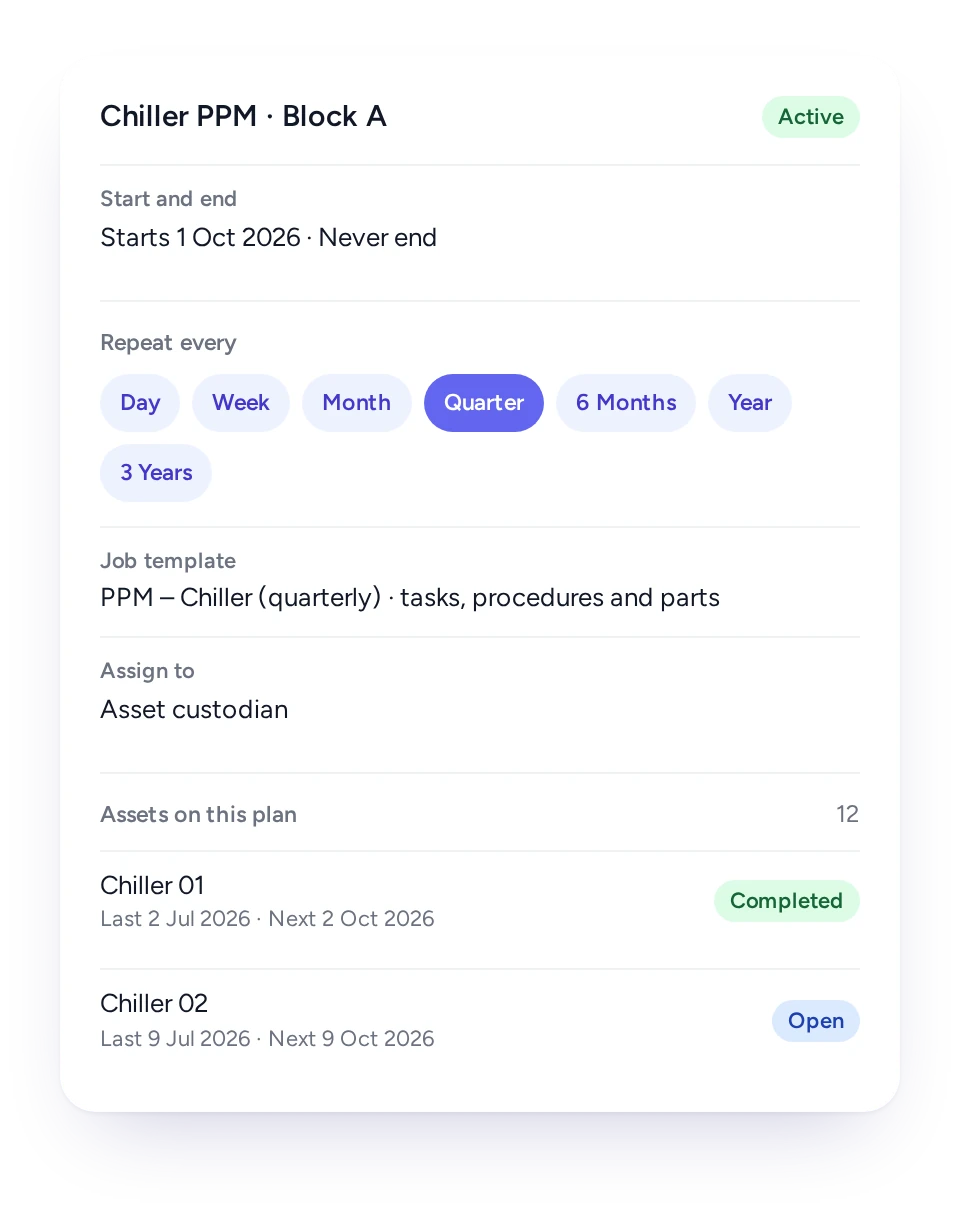
- Plans that end on a date, after a set period, or never.
- Each plan creates jobs from the template you choose.
Plans by date, by meter or both, jobs created ahead of time for the right technician, and one view of everything overdue or coming up.
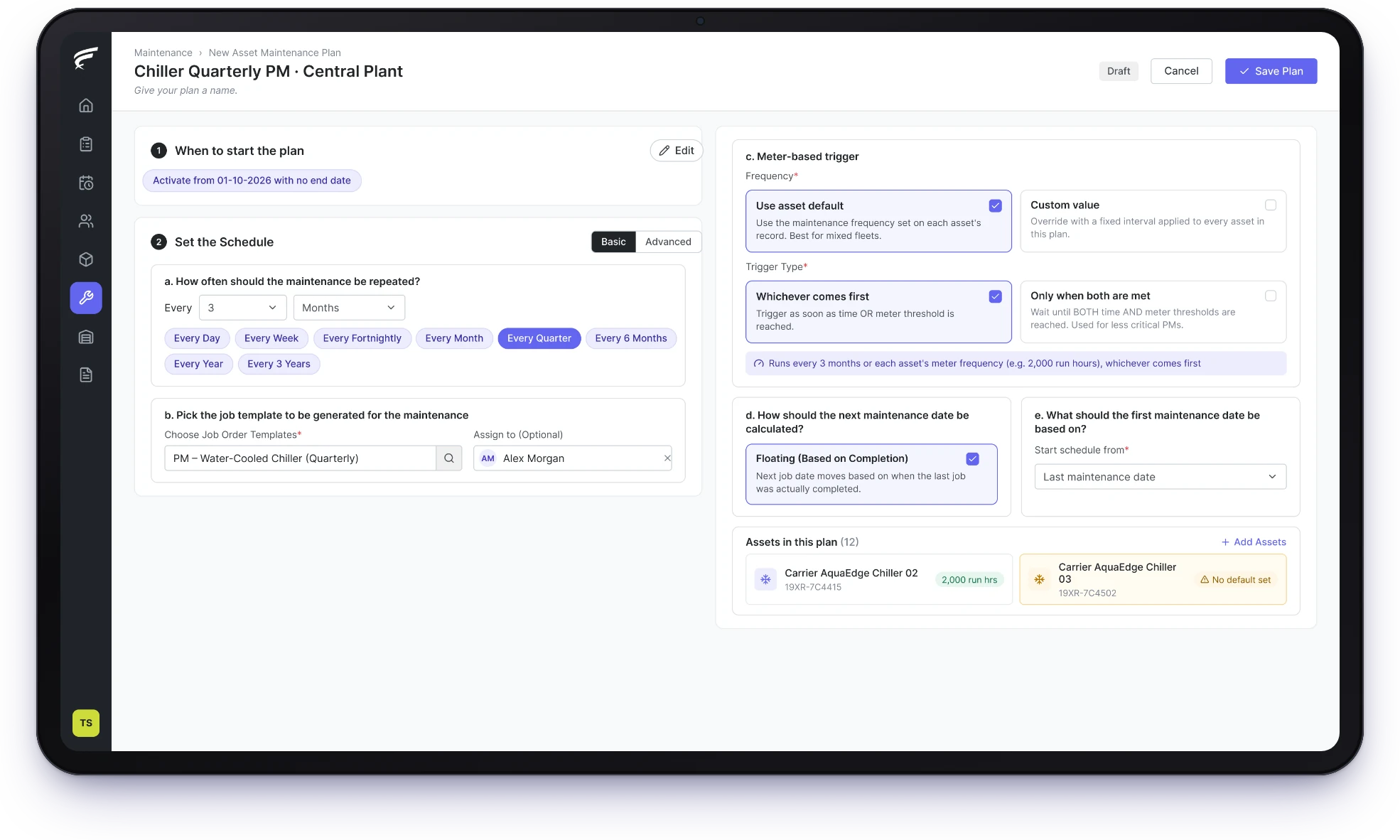
FieldEx is a field service and asset management (FSM+CMMS) application. Its preventive maintenance plans run by date, by meter reading or both. FieldEx creates each job ahead of its due date and sends it to the right technician. One dashboard shows everything overdue or due this week.
Plans by calendar, by usage, or both together.
Jobs created ahead of time and sent to the right person.
One view of what is overdue and what is coming up.
FieldEx turns each maintenance plan into real jobs on the schedule, for every asset on the plan, without anyone keeping a spreadsheet of due dates.
Each job carries the asset, its history and the right template.
Set the cycle, the template and the team once, and FieldEx raises every PPM job on time for every asset on the plan.
For most teams, a PPM schedule starts as a spreadsheet of assets and due months, which works until a month is skipped.
In FieldEx, a plan holds the cycle, the assets and the job template. On a time-based plan, the cycle is whatever each asset needs. Each job the plan creates arrives with its tasks, procedures and parts, so the technician gets the same service sheet every time.
Plans can run indefinitely, end after a set period, or stop on a date, which suits fixed-term maintenance contracts.
A FieldEx plan can run by date, by meter reading or both, so each asset is serviced on the measure that wears it.
FieldEx supports both bases for preventive maintenance. A time-based plan repeats on the cycle you set for each asset. A time-and-meter plan adds a usage limit in hours, kilometers or cycles. You choose whether the first limit reached triggers the job, or only both limits together.
Every plan creates jobs from a template, so each service arrives with its tasks, procedures and parts already in place. Technicians don't need to know the plan exists: they simply see a job on their phone when it is due.
Choose fixed dates when a contract or an inspection cycle sets the calendar, or floating dates when the next service should follow the last one.
For wear-related servicing, floating dates often make more sense. FieldEx counts the next due date from the day the last visit was completed. An asset serviced late then doesn't come due again a week later. Fixed calendar dates apply to time-based plans.
FieldEx can fix a plan to the calendar. Choose a set date of the month, a set weekday, or the first Monday of every quarter. The due date stays put even if a visit runs late, so the agreed interval holds.
Equipment that works harder needs servicing sooner, so FieldEx plans can follow meter readings as well as the calendar.
A crane, a generator or a delivery van that works double shifts wears out faster than one that sits idle. In FieldEx, technicians record meter readings on the asset as part of their work, which builds a dated history.
A time-and-meter plan uses those readings. When an asset reaches its hour, kilometer or cycle limit, FieldEx creates the next service job, even if the calendar date is still weeks away.
Meter intervals can be set once for the whole plan, or each asset can keep its own. That lets one plan cover a mixed fleet in which each machine has its own service interval.
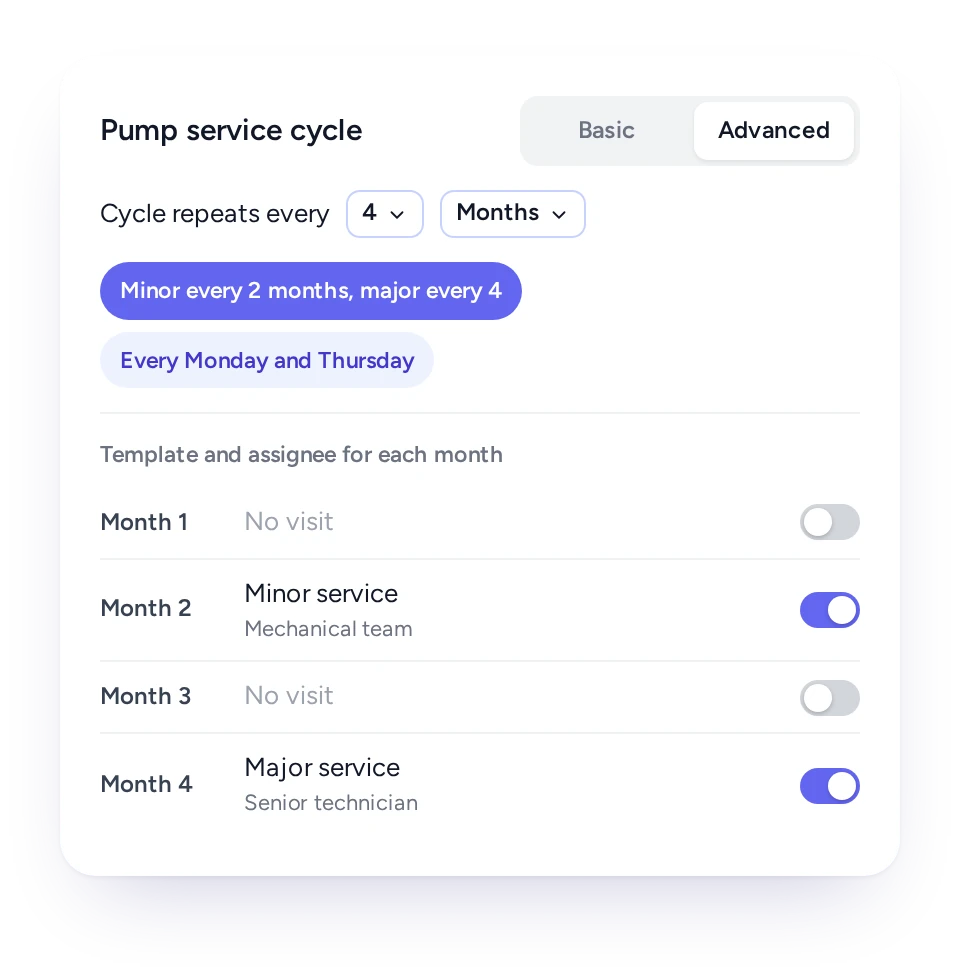
One plan can use different templates in different months, so a minor service and a major overhaul follow one cycle without two plans clashing.
Many maintenance schedules alternate: a quick check most months, a full service a few times a year. Running these as two separate plans often creates two jobs in the same week or leaves the major service off the calendar.
In FieldEx, a plan's cycle can give each month its own template and assignee. A minor service can run every two months and a major one every four, with each visit bringing the right tasks and parts. Twice-weekly patterns, such as every Monday and Thursday, can be set up the same way.
Because the whole cycle sits in one plan, the asset's maintenance history shows the full sequence of minor and major visits in order.
Attach many assets to one plan, each with its own last and next service date, and let new assets join automatically.
Different equipment classes need different intervals, such as quarterly checks for large refrigeration and yearly ones for comfort cooling. In FieldEx you build one plan per interval and attach every asset it applies to, by hand or many at once.
Rules can add new assets automatically by type and status, so the next unit installed joins the right plan without anyone remembering to add it. When an asset's status changes, for example to decommissioned, it can leave the plan.
Each asset on the plan shows its last and next maintenance, the template used and the job created. A due date can be moved for one asset without changing the rest.
Each plan creates its job days before it is due and sends it to the responsible person, a named technician or a team.
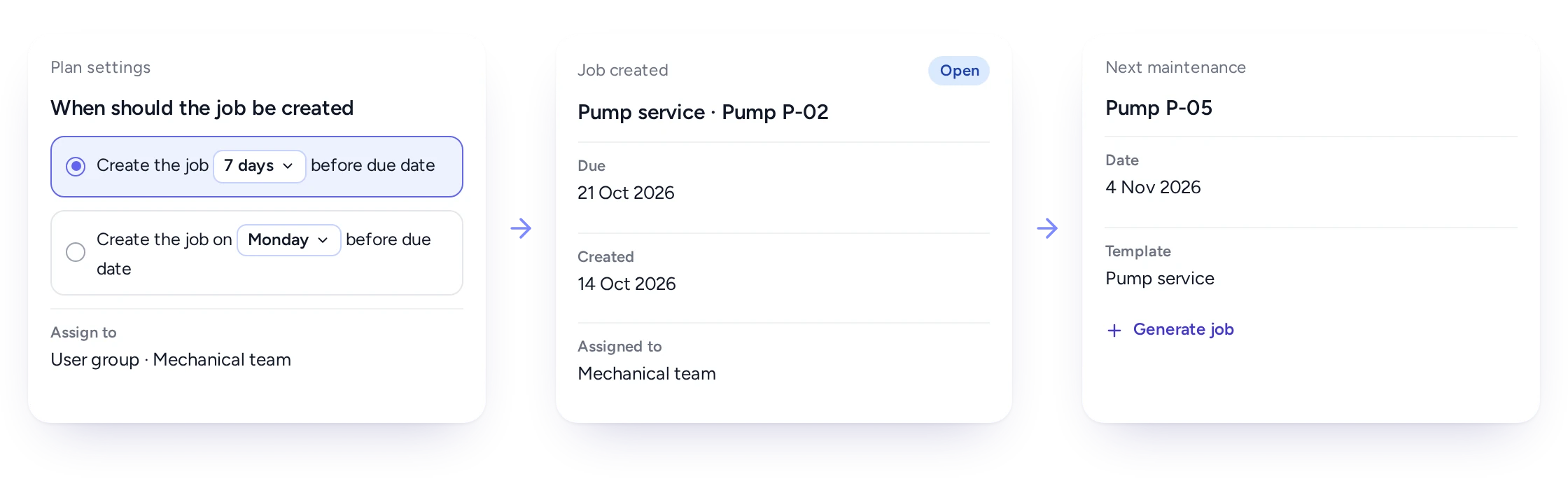
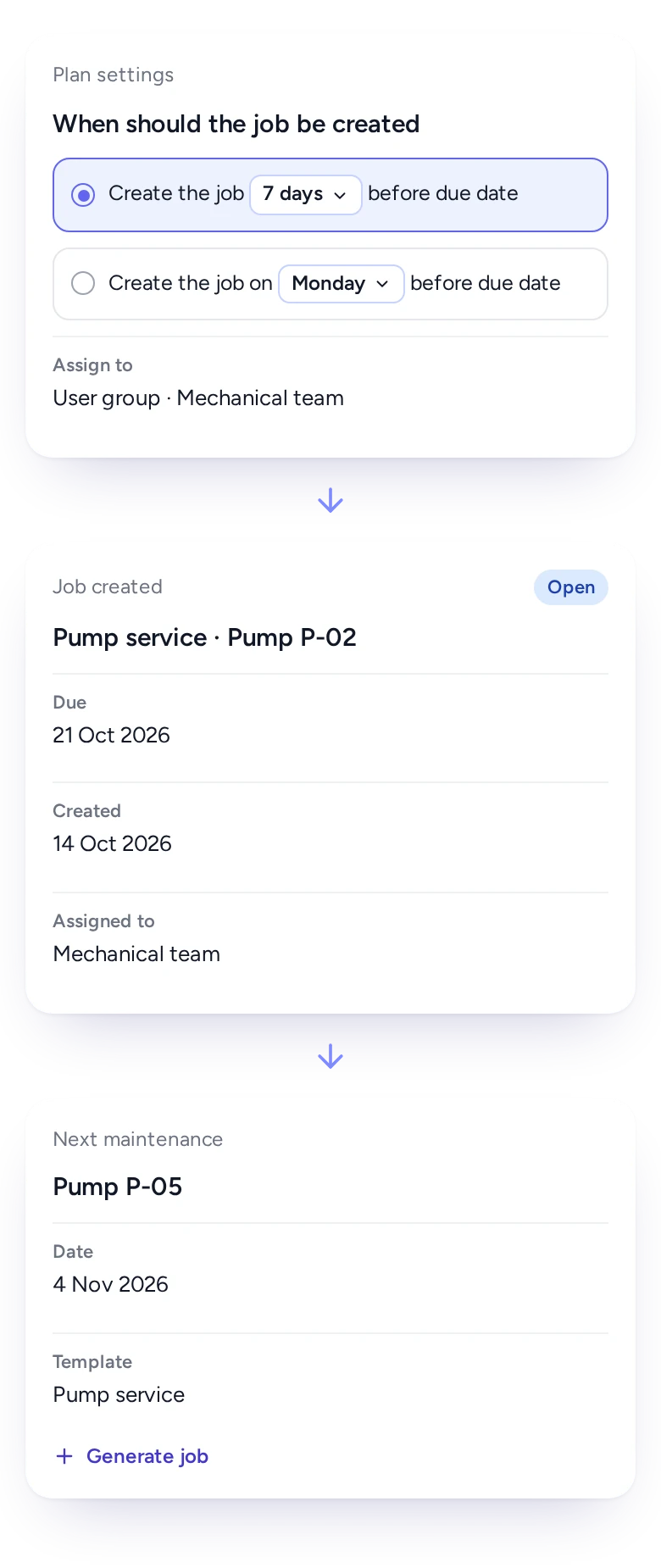
A job that appears on the due date is already late for anyone who needs to order parts or book access. In FieldEx, you choose how far ahead each plan creates its job. It can be a set number of days before the due date, or a set weekday before it.
Each plan also says who the work goes to. It can go to the person responsible for that asset, to a named technician or to a team. A team shares its jobs fairly across its members. FieldEx notifies the assignee when the job is created.
If the work needs to happen early, a planner can generate the next job by hand for one asset, and the plan carries on from there.
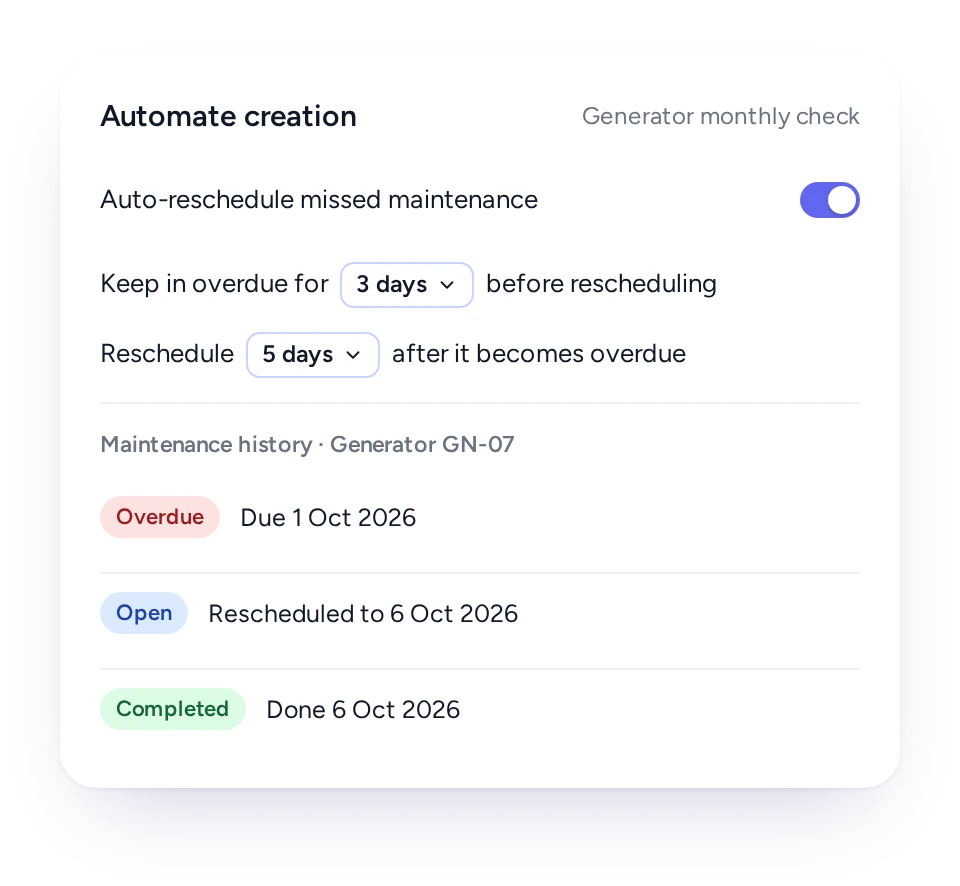
If a planned job goes overdue, FieldEx can reschedule it after the days you choose, so missed visits are caught up.
On a paper schedule, a missed visit is easy to forget once the next month starts. The asset is then a full cycle behind, and nobody notices until something fails.
In FieldEx you can switch on automatic rescheduling for any plan. Choose how long a job stays overdue before it is moved, and how far ahead it is rebooked. The job stays on the record, so the history shows it was missed and when it was done.
Overdue jobs also stay visible on the maintenance dashboard until they are completed, so a planner can see which assets have fallen behind.
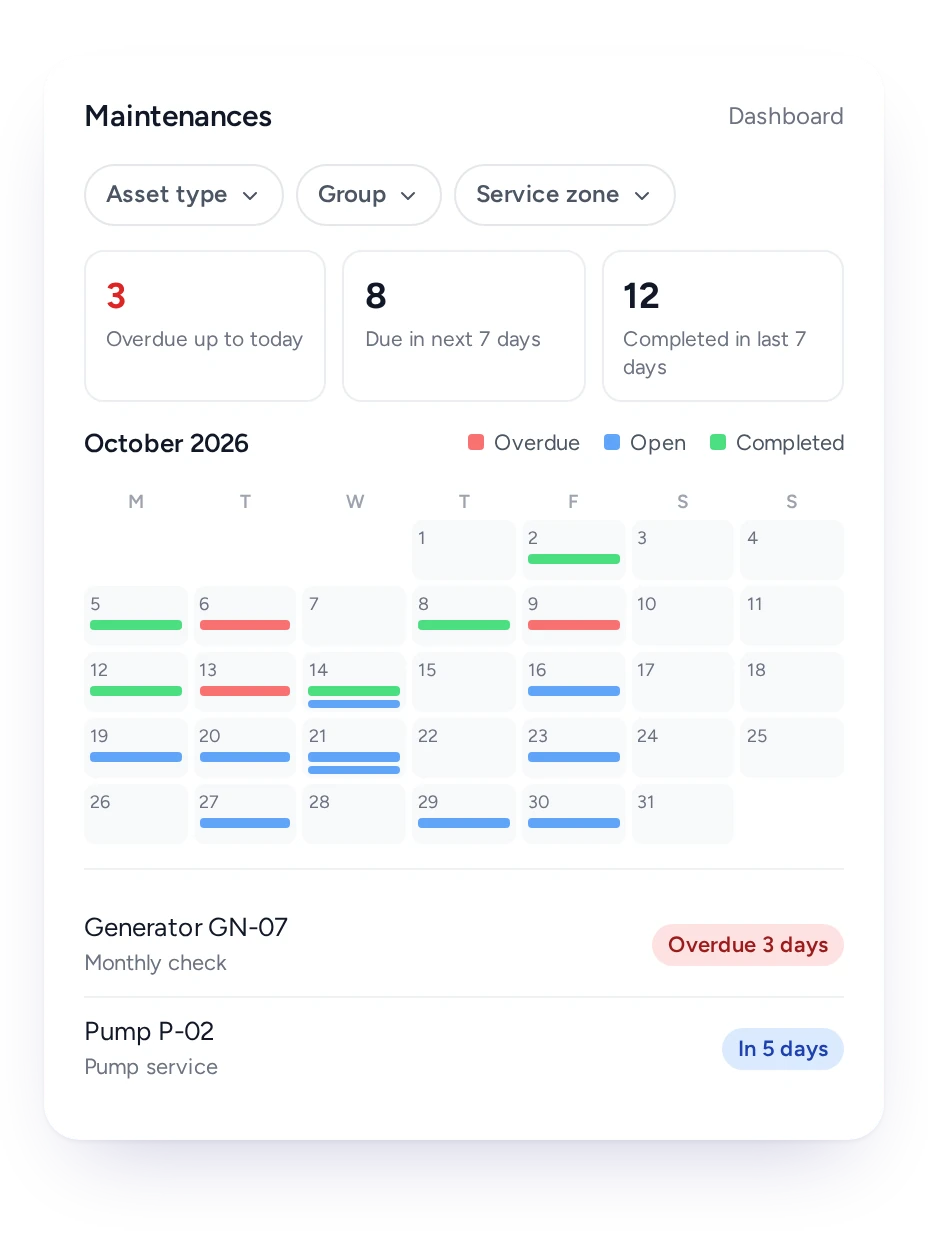
The maintenance dashboard shows overdue work, work due in seven days and work completed in the last seven, plus a month calendar.
Planners need one place to start the day. In FieldEx the maintenance dashboard brings every plan's jobs together, whichever plan or asset they came from.
Three counts sit at the top: overdue up to today, due in the next seven days and completed in the last seven days. Below them, a month calendar shows every planned job, colored as overdue, open or completed. A list shows how many days each job is overdue, or how long until it is due.
Filters by asset type, team and service zone narrow the view to one region or one crew, and any job opens with a click.
Planners set plans once, technicians simply get jobs when they are due, and managers see whether maintenance is keeping up.
Maintenance planner
Plans by date, meter or both, with jobs created ahead of time.
Technician
Due jobs on the phone, with the right tasks and parts for that service.
Team lead
Jobs shared fairly across the team, and overdue work on one screen.
Maintenance manager
A dated history of every planned visit on every asset.
Service manager
Planned visits for contract customers created without anyone retyping them.
Customer
Upcoming maintenance on their equipment, shown in the customer portal.
FieldEx is field service management and a CMMS in one system, so planned jobs and breakdowns share one schedule and one asset history.
Maintenance software often stops at the plan and leaves dispatch to another tool. In FieldEx, each planned job lands on the scheduling board beside reactive work. A dispatcher sees both and keeps planned work from being squeezed out.
What technicians record during a service, from parts to meter readings to faults, goes back to the asset. Usage-based plans then use those readings to set the next service, and the asset's history shows planned and unplanned work together.
Planned maintenance connects to these features:
To compare tools, read what to look for in CMMS Software.
AMRTUR (oilfield services, Southeast Asia) found that servicing by the calendar alone didn't account for how much equipment was actually being used. FieldEx now tracks equipment usage directly from field reports. It creates a maintenance job automatically once a machine hits 300 hours of use or 6 months, whichever comes first.
DKSM is an MEP and fire safety contractor in Malaysia. It had to keep maintenance on track across 300+ client sites, on cycles that ran monthly, every two months, quarterly and every six months.
With FieldEx, automatic reminders cover all of those schedules, so nothing gets missed at any client site. Team leads log used and returned parts on their phones.
For teams that service equipment, the best choice creates the jobs, not just a list of due dates.
FieldEx runs plans by date, by meter or both. It creates each job ahead of its due date from the right template and sends it to the right technician. FieldEx is also field service software, so planned jobs share one schedule with call-outs and add to each asset's history.
Yes. A time-and-meter plan uses the meter readings recorded on each asset. You choose whether the job is created when either limit is reached first, or only when both are met.
A fixed schedule keeps the due date on the calendar, such as the first Monday of each month, even if a visit runs late. A floating schedule counts the next due date from the day the last visit was completed. Fixed calendar dates apply to time-based plans.
Yes. Attach as many assets as you need, by hand or many at once, and each keeps its own last and next service date. Rules can add new assets of a chosen type automatically and remove them when their status changes.
Yes. A plan's cycle can give each month its own template and assignee, so minor and major services run in one plan without clashing.
You choose per plan: a set number of days before the due date, or on a set weekday before it. A planner can also generate the next job early for one asset.
Each plan sends its jobs to the person responsible for the asset, a named technician or a team, where jobs are shared fairly. The assignee is notified when the job is created.
If you switch on automatic rescheduling, an overdue job is rebooked after the number of days you choose. Overdue jobs also stay on the maintenance dashboard until they are done.
Yes. The maintenance dashboard shows overdue jobs, jobs due in the next seven days and jobs completed in the last seven. A month calendar shows every planned job. You can filter by asset type, team and service zone.
Yes. The customer portal shows clients the upcoming maintenance on their assets, along with their jobs and requests.
Yes. Site plans create jobs for visits that cover a whole site, and recurring jobs run on a fixed cycle without being tied to one asset.
Yes. Every job a plan creates is a work order linked to its asset. The asset's history shows each planned visit with its tasks, parts, photos and completion report.
Yes. Each plan can end on a set date, after a set period such as one or two years, or run with no end date. A finished plan can be cloned to start the next contract term.
Start with the assets, which can be uploaded. Then create a plan for each cycle with its job template, and attach the assets it covers. Choose date, meter or both, and fixed or floating dates. FieldEx then creates each job ahead of time and sends it to the person responsible.
There's no setup fee. Customers, sites, assets and past jobs can be uploaded. FieldEx helps with setup, and training is included. See Setup and Training.
You can also set FieldEx up yourself with guides, videos and the in-app AI assistant, which answers questions as you go.
Once we know your requirements and your data is ready, FieldEx can be implemented in as little as a week with standard features for small businesses. Larger setups and custom work take longer.
