
SLA targets
- Targets for each stage, such as response and completion.
- Times set in days, hours and minutes.
- An at-risk point before each target.
Response and completion clocks on every contract job, alerts before a target is missed, and contracts tied to the assets and plans they cover.
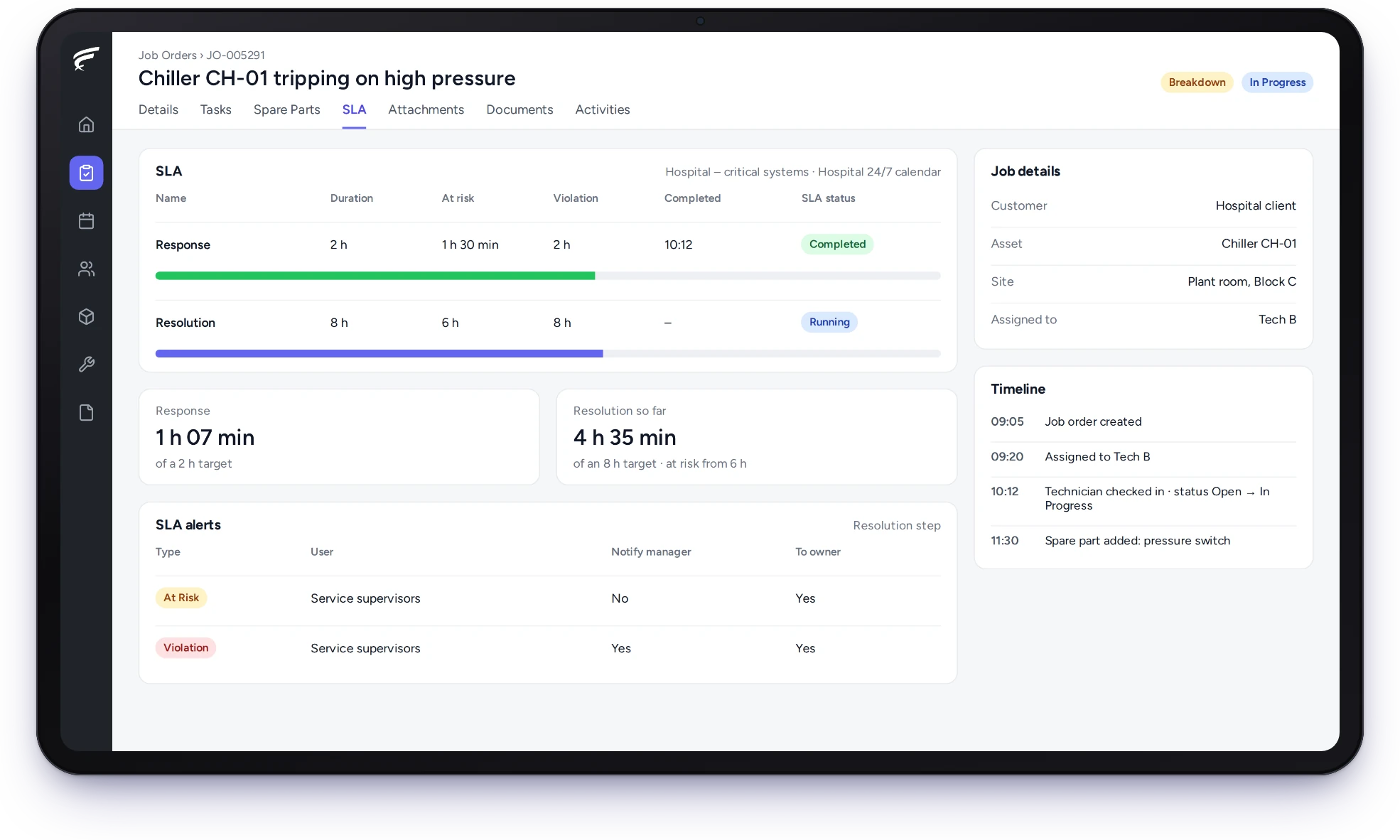
FieldEx is field service management and a computerised maintenance management system (CMMS) in one system. As service level agreement software, it runs response and completion clocks on contract jobs in each client's business hours, alerts your team before a target is missed, and ties each service contract to the assets and maintenance plans it covers.
SLA clocks on every job a contract covers.
Alerts when a job is at risk and when it breaches.
Contracts linked to their assets and maintenance plans.
FieldEx puts the terms of each service contract onto the jobs it covers, so the office sees which promises are on track and which are at risk.
Contracts, assets and plans stay linked.
Set targets for each stage of a job, such as response and completion, so every contract job carries the promise you made.
Service level agreements replace that uncertainty with numbers. In FieldEx, each SLA is built from stages, such as response and completion, each with its own target in days, hours and minutes and an earlier point at which the job counts as at risk.
When a job matches the SLA, its clock starts automatically, and its SLA status shows on the job.
Without an agreed time, the law fills the gap. Under section 52 of the UK's Consumer Rights Act 2015, where a contract doesn't fix the time for a service, the trader must perform it within a reasonable time, and what is reasonable is a question of fact.
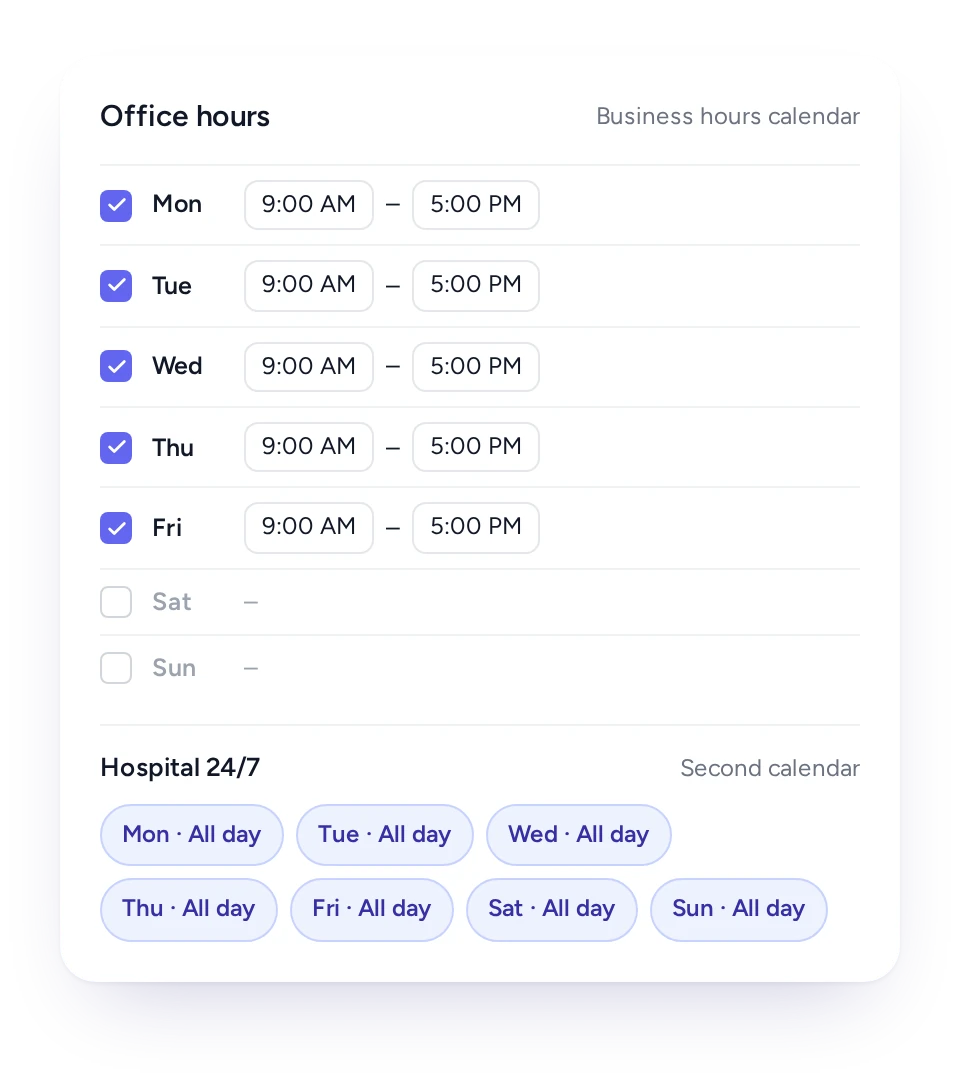
Give each SLA its own working-hours calendar, so a four-hour response target means four working hours where the contract says so.
In FieldEx, business-hours calendars are set day by day, with start and end times or all day for each day, and weekends switched on or off. Each SLA uses the calendar that matches its contract, so a 24-hour hospital contract and an office-hours retail contract run side by side.
Clocks can also pause and restart as the job's status changes, for example while waiting for a client.
Some duties run around the clock. Under regulation 7 of the Fire Safety (England) Regulations 2022, a fault with a firefighting lift that can't be fixed within 24 hours must be reported to the fire and rescue service. Others don't: a weekday contract's request logged at 6 pm on Friday shouldn't breach by Saturday.
Each SLA uses its own calendar, so a four-hour response under an office-hours contract counts four working hours.
A fault logged at 7 pm on a Friday under a Monday-to-Friday contract shouldn't count as breached by Saturday. Timers that ignore working hours make reports nobody believes.
In FieldEx, calendars are built per weekday, each with its own hours or set to all day, and weekends included or not. A 24-hour hospital contract and an office-hours bank contract can run side by side, each on its own calendar.
Timers can also pause and resume as the job's status changes, for example while waiting for site access.
FieldEx alerts the people you choose when a job reaches its at-risk point and again if it breaches, so there is time to act.
In FieldEx, each SLA stage can alert a chosen person or role when a job becomes at risk and when it breaches, optionally copying their manager or the job's owner. The alert arrives while the job can still be saved, not in next month's report.
The job itself shows its SLA status, so a dispatcher looking at the schedule can see which jobs need moving up.
Some deadlines are short and absolute. Under Awaab's Law in England, social landlords must investigate and make safe emergency hazards within 24 hours of becoming aware of them.
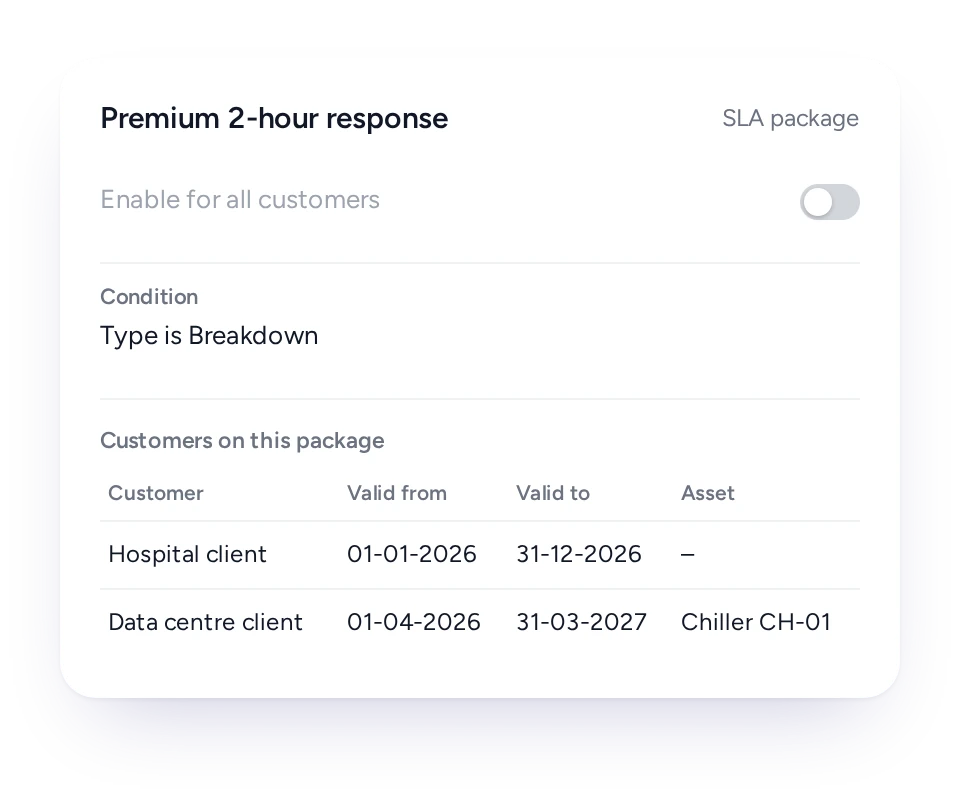
Apply an SLA to all clients or chosen ones, with its own dates, and tie it to one asset where the contract does.
Contracts rarely share one target. A hospital's critical systems may need a two-hour response, while the same contractor's office clients accept next-day visits.
In FieldEx, an SLA can apply to every client or be attached to chosen clients, each with a start and end date that matches their contract. It can also be tied to one asset, so the chiller under a premium agreement gets the faster clock while other equipment on the same site does not.
Conditions decide which jobs an SLA applies to, such as the job type or fault type.
A service contract in FieldEx lists its client, dates, assets and maintenance plans, so the office knows exactly what is covered.
In FieldEx, a contract records the client, the client's contact, start and end dates, a reference number and your own contract type. Its assets are listed with quantities, and maintenance plans can be attached to it, so the planned visits the contract promises are scheduled from the same record.
Each asset's record also lists the contracts it falls under.
UK law also expects the work itself to meet a standard. Section 49 of the Consumer Rights Act 2015 treats every contract to supply a service as including a term that the trader will perform it with reasonable care and skill.
SLA status is recorded on every contract job and available in reports, so reviews start from evidence rather than memory.
In FieldEx, every job under an SLA records whether each stage was completed in time, became at risk or breached. Reports can group those results by client, site, job type or month, and can be emailed to the client on a schedule.
That gives both sides the same record at a quarterly review or a renewal discussion.
Late service has a price. Under section 54(5) of the Consumer Rights Act 2015, if a trader doesn't perform a service within a reasonable time, the consumer has the right to a price reduction.
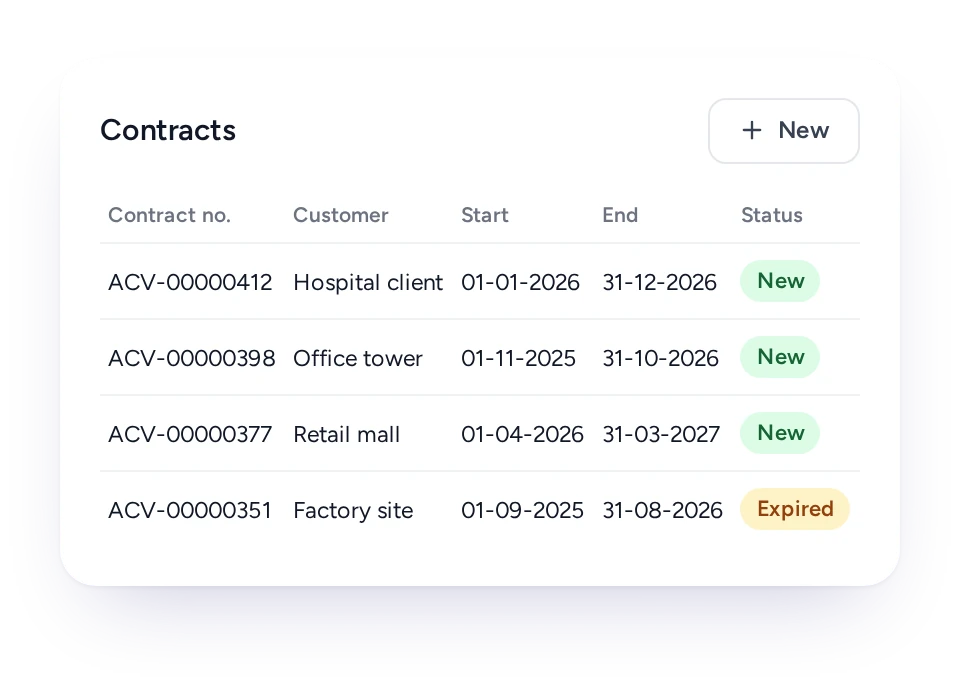
Every contract carries its start and end dates, and email notifications, such as a contract-ending reminder, can be set up, so renewals are planned.
Renewals slip when end dates live in a spreadsheet nobody opens. A lapsed maintenance contract can mean a client served for months without a valid agreement.
In FieldEx, each contract shows its start and end dates and its status. Email notifications can be set up for contracts, for example a reminder ahead of the end date, using your own message.
The contract list shows each contract's dates and status, so the office can see which contracts end this quarter.
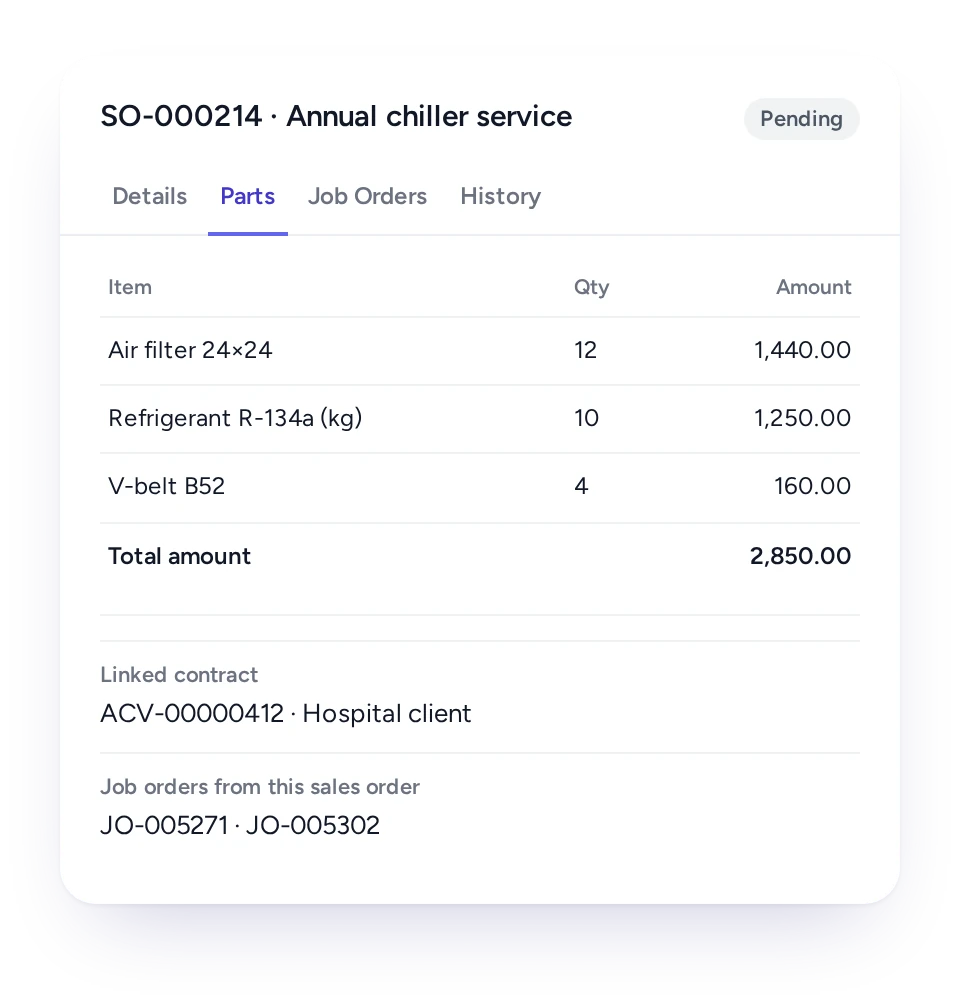
Record what a client bought on a sales order, with products and prices, and link it to the contract and the jobs that deliver it.
Contract terms often start as a commercial order: a number of service visits, a set of parts, an installation.
In FieldEx, each client can have sales orders with products, pricing and billing details. A sales order can be linked to the contract it created and to the jobs that fulfil it, so the office can trace work back to what was sold.
FieldEx can connect to any open system through REST APIs and has connectors for QuickBooks and Xero.
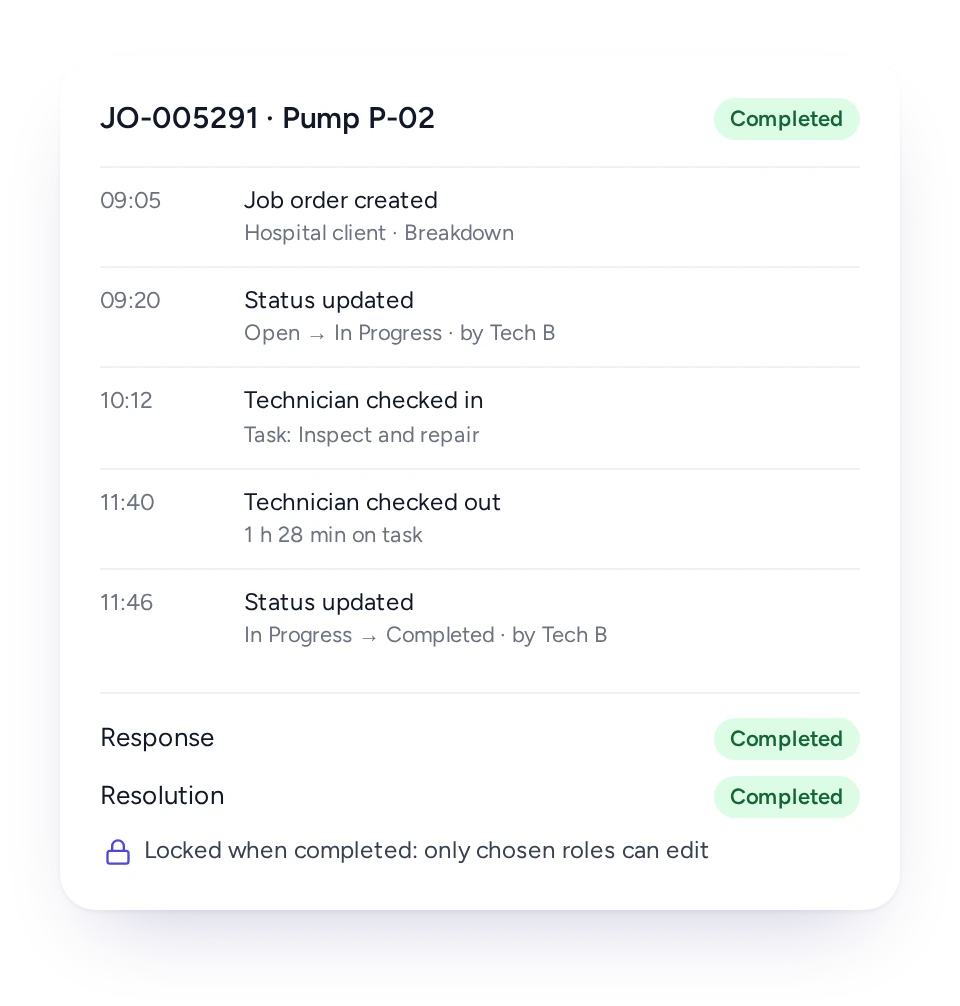
When a client questions a response time, the job shows when it was raised, when the technician arrived and every change made since.
SLA disputes usually come down to times: when the call came in, when someone arrived, when the fault was fixed. Memories and phone logs rarely agree.
In FieldEx, each job records when it was created, and each task records the technician's check-in and check-out. The job's change history logs every edit with the old and new value, who made it and when, and completed jobs can be locked so that only chosen roles can change them.
Put beside the SLA status on the same job, that gives both sides one timeline to discuss, rather than two competing accounts.
Contract managers see which promises are at risk, dispatchers see which jobs to move up, and clients see the same record at review.
Contract manager
Each contract's assets, plans, dates and SLA results.
Dispatcher
SLA status on jobs in the schedule.
Supervisor
Alerts before and when a target is missed.
Service manager
SLA results by client, site and month.
Finance
Sales orders linked to contracts and jobs.
Client
Scheduled reports of SLA performance.
FieldEx is field service management and a CMMS in one system, so one contract times breakdowns and schedules its planned maintenance.
Most service contracts promise two things: a fast response when something fails, and planned visits that stop it failing. In FieldEx, the SLA runs on the reactive jobs and the maintenance plans attached to the contract create the planned ones, all on the same assets.
The asset's history then shows both, under the contract that paid for them.
See how contracts connect to preventive maintenance, scheduling and dispatch, service requests and the customer portal, reports and insights and asset management, or read what to look for in field service management software.
Royal Facilities Management (facilities management, Oman) needed property owners to be able to follow the progress of a job and view completed work, which was critical for assessing performance and supporting contract renewals.
With FieldEx, a dedicated portal gives property owners access to log issues, track technician progress and review completed service reports, and maintenance work orders are created automatically before a deadline is missed.
Magnum, a Malaysian leisure and entertainment brand since 1968, moved its maintenance operations from paper to FieldEx.
FieldEx centralises SLA management and notifies the team when deadlines approach, helping them stay on target. "With FieldEx's SLA feature, our team completes tasks more efficiently, keeping us on track with our key performance index."
Yes. FieldEx runs response and completion clocks on contract jobs in each client's business hours, alerts your team before and when a target is missed, and links each contract to its assets and maintenance plans. Because it is also a CMMS, the planned visits a contract promises are scheduled from it.
Yes. Each SLA has stages, such as response and completion, with targets in days, hours and minutes, and each job shows whether it met them.
Yes. Each SLA uses a working-hours calendar set day by day, or a round-the-clock calendar for 24-hour contracts.
Yes. Clocks can start, pause and stop as the job's status changes, for example while waiting for the client.
Yes. Chosen people are alerted when a job reaches its at-risk point and again if it breaches, with the option to copy their manager or the job owner.
Yes. An SLA can apply to all clients or chosen ones, each with its own start and end dates, and can be tied to a specific asset.
Yes. Conditions decide which jobs an SLA applies to, such as the job type or fault type.
Yes. SLA status is recorded on each job and available in reports, which can be emailed to clients on a schedule.
Yes. A contract lists the assets it covers, with quantities, and each asset's record shows its contracts.
Yes. Maintenance plans can be attached to a contract, so the planned visits it promises are scheduled from the same record.
Yes. Email notifications can be set up for contracts, such as a reminder before the end date.
Yes. Each task records the technician's check-in and check-out, and the job's change history shows every edit with who made it and when.
Yes. Contracts can be classified by your own contract types.
Customers, sites, assets and past jobs can be uploaded. FieldEx helps with setup, and training is included.
Once we know your requirements and your data is ready, FieldEx can be implemented in as little as a week with standard features for small businesses. Larger setups and custom work take longer.
FieldEx can connect to any open system through REST APIs and has connectors for QuickBooks and Xero.
There's no setup fee. Customers, sites, assets and past jobs can be uploaded. FieldEx helps with setup, and training is included.
You can also set FieldEx up yourself with guides, videos and the in-app AI assistant, which answers questions as you go.
Once we know your requirements and your data is ready, FieldEx can be implemented in as little as a week with standard features for small businesses. Larger setups and custom work take longer.
