
.png)
.png)
Managing heavy machinery with messy spreadsheets and frantic group chats is a recipe for expensive downtime. A modern CMMS (computerized maintenance management system) like FieldEx digitizes the chaos into a clean, structured workflow. Here are the 5 best practices to keep your fleet out of the shop:
Heavy machinery is the undisputed lifeblood of the construction, agriculture and manufacturing worlds. When an excavator, crane or massive generator decides to throw a tantrum and shut down, the entire project grinds to a highly expensive, agonizingly slow halt.
If you’re a fleet manager or operations director, you already know the sinking feeling of getting that phone call from the field.
But here’s the thing: managing these metal beasts shouldn't require a crystal ball, nor should it involve a chaotic flurry of text messages, missing paper forms, and a spreadsheet that hasn't been updated since last Tuesday.
Heavy equipment maintenance tracking is the structured process of monitoring, scheduling, and documenting the upkeep of large machinery to prevent breakdowns, ensure safety, and extend the lifespan of the assets. It’s the bridge between hoping a machine works and knowing it will.
In this guide, we’re going to look at the true costs of reactive maintenance and, more importantly, dive into the best practices for digitizing your workflows using a modern FSM (field service management) and CMMS (computerized maintenance management system). Let's get right into it.
%20(1).png)
We often talk about "downtime" as if it’s just a minor inconvenience, like a coffee machine needing to be descaled. But in the heavy machinery sector, downtime is a financial wrecking ball.
According to industry data, unplanned downtime costs industrial manufacturers as much as $50 billion a year. When a critical asset fails, you aren't just paying for the rush-ordered spare parts or the mechanic's overtime. You’re paying for idle crews, missed project deadlines, and potentially crippling SLA (service level agreement – a contracted performance guarantee) penalties.
Beyond the glaring financial hit, poor maintenance tracking leads to premature asset depreciation and serious safety and compliance risks. If an inspector shows up and your only proof of a quarterly safety check is a coffee-stained piece of loose-leaf paper ... well, you're going to have a bad day.
So, how do we fix this? By ditching the clipboard and leaning into structured, digital workflows. Here are 5 best practices that industry leaders are using right now.
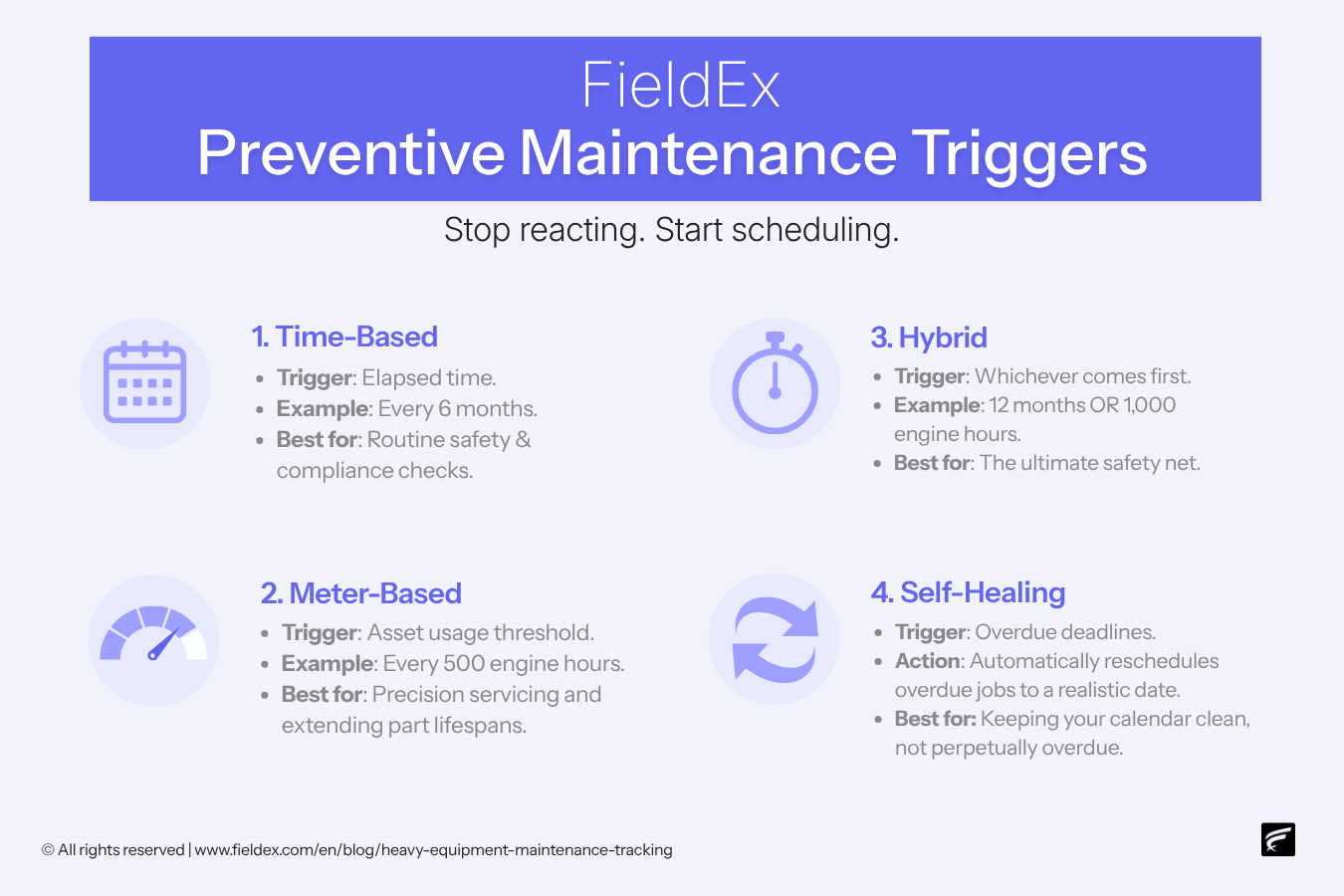
Running a machine until it breaks (often called "reactive maintenance" or "run-to-fail") is a gamble you will eventually lose. The gold standard is a proactive approach.
Modern CMMS (like FieldEx) includes a comprehensive preventive maintenance (PM) module that allows companies to plan and schedule maintenance work proactively rather than only reacting to failures. A robust CMMS lets you set up hybrid scheduling:
BONUS Tip! Look for software that features "self-healing" schedules. If a scheduled maintenance job becomes overdue by a configured amount of time, the system automatically reschedules it to a new date rather than leaving it perpetually overdue. This keeps your calendar rooted in reality, rather than guilt.
Heavy equipment is rarely just one simple asset. A bulldozer isn't a toaster; it’s a complex collection of highly expensive systems. Tracking the "bulldozer" as one giant entity doesn't give you the granularity you need.
Instead, track components individually. CMMS like FieldEx supports multi-level asset hierarchies, allowing components to be tracked as child assets under a parent asset. For example, you can track the engine, the hydraulic lift system, and the transmission as individual child assets under the parent vehicle. This enables granular maintenance tracking and parts management at the component level.
Imagine a technician walking up to a massive crane. Instead of calling the office to figure out when it was last serviced, they just pull out their phone.
Every asset in FieldEx can have a QR code associated with it. Any user with the FieldEx app can scan the QR code to instantly open the asset record, view its details, history, and any open work orders associated with it.
But it gets better. An administrator can enable a form on an asset's QR code. When enabled, anyone who scans the QR code – including members of the public with no FieldEx account – can fill out and submit a report. If an operator notices a frayed cable, they scan the code, report it, and boom – it automatically enters the system as a new work order. No phone calls required.
Your field mechanics are out in the dirt, the rain, and the noise. They do not want to lug around a laptop or a stack of clipboards.
Equipping them with a dedicated app is crucial. FieldEx is available as a native mobile application on both Android and iOS. When a work order is assigned to a technician, they receive a push notification on their mobile device. From there, they can execute the entire job without ever booting up a PC. They can:
One of the most frustrating tangents in equipment maintenance is realizing a job is finished, but the inventory was never updated. Suddenly, the warehouse thinks they have five air filters when they actually have none.
Maintenance tracking and inventory management must be tightly integrated.
In FieldEx, each technician has their own user bin – a virtual inventory representing the parts they are carrying. When a technician uses a part on a job, they log it within the work order on the mobile app. The system processes this as a transfer from the technician's user bin to the work order, recording the part as consumed. The result? A full, auditable trail of parts usage from warehouse to job.
We get it. Spreadsheets are comfortable … and they’re free. BUT they’re also static, siloed, and entirely unhelpful when it comes to enforcing compliance in the mud and dirt of a job site.
Coordinating a field repair usually means juggling text messages, manual forms and messy spreadsheets just to dispatch a tech, track their parts, and ensure compliance. FieldEx scraps all that noise, replacing it with a single, seamless digital workflow from start to finish.
Think about it: if a mechanic forgets to check the hydraulic pressure on a crane, a spreadsheet isn't going to stop them from calling the job "done". A CMMS, however, enforces reality in the field.
Here’s how a dedicated system keeps your operations locked in:
By moving away from static spreadsheets, you create a closed-loop system where NOTHING is left to chance, memory or guesswork.
Tracking maintenance on heavy equipment isn't just about keeping the engine running; it is about:
By moving away from reactive chaos and embracing tools like parent-child asset tracking, mobile workflows, and integrated inventory, you transform your maintenance department from a cost center into a finely tuned, strategic advantage.
Ready to digitize your heavy equipment maintenance tracking? Book a free demo to see FieldEx in action. Or just reach out – we’re here to help you take control of your fleet.
CMMS stands for computerized maintenance management system. It is software designed to centralize maintenance data, automate scheduling, and track work orders and inventory, making equipment upkeep significantly easier and more reliable.
Reactive maintenance (fixing things after they break) leads to unplanned downtime, expensive emergency parts, and project delays. Preventive maintenance fixes issues before they cause a breakdown, saving time and money in the long run.
Time-based maintenance happens on a calendar schedule (eg every 3 months). Meter-based maintenance is triggered by actual machine usage, such as engine hours or mileage (eg every 500 hours of operation).
It is a way of organizing equipment data hierarchically. A large piece of equipment (the parent) is broken down into its major components (the children), like tracking an engine separately from the tractor it sits in. This allows for incredibly detailed service histories.
Yes! By placing QR codes on your equipment, operators can scan the code with their smartphone camera to open a public-facing form. They can report a defect instantly without needing an account or login credentials.
Using a mobile-first CMMS, technicians have a "virtual bin" of parts assigned to their truck. When they complete a work order, they simply log the parts used directly in the app, which automatically updates the company's central inventory.
Absolutely. By making specific checklists and safety procedures mandatory before a technician can close a digital work order, you guarantee that compliance steps are actually being followed and documented in the field.
SLA stands for service level agreement. It is a contracted standard of performance – like a guarantee that a piece of equipment will have a 99% uptime rate. Failing to meet an SLA often results in hefty financial penalties.
While real-time syncing requires an internet connection, robust field service apps are designed to function in offline environments, allowing technicians to capture data, take photos, and finish tasks in remote areas, syncing the data once a connection is reestablished.

.avif)


This website and its content are the property of FieldEx and are protected by copyright laws. © 2026 FieldEx. Any redistribution or reproduction of part or all of the contents in any form is prohibited, except with our express written permission.
FieldEx Pte Ltd Singapore