
.png)
.png)
Managing an equipment rental fleet with whiteboards and spreadsheets is a quick way to lose track of your most valuable assets. Moving to a digital platform changes the game.
Here are the top ways to lock down your rental operations:
Renting out heavy machinery is a bit like handing the keys of a very expensive, metal toddler over to a total stranger. You cross your fingers, hope they treat it well, and pray it comes back in one piece.
When an excavator is deployed at Site A, a massive generator is humming away at Site B, and half your skid steers are returning to the yard with mysterious new dents, managing it all can feel like spinning plates on a tightrope.
For those of you asking the search engines, equipment rental fleet management is the process of tracking asset locations, scheduling preventive maintenance, and documenting the condition of leased machinery to maximize ROI and minimize downtime. It is the operational backbone that ensures you are actually making money on your gear, rather than constantly paying to fix it.
In this guide, we’re going to look at the massive headaches of tracking rentals manually and dive into the absolute best practices for digitizing your workflows.
.png)
Before we dive into the strategy, let's clear up a couple of acronyms that get thrown around a lot in this industry: CMMS and FSM. If you want to manage a modern rental fleet, you need to understand both.
To run a truly optimized equipment rental business, you need a platform that blends both – a system that knows when a machine needs fixing (CMMS) and gives you the tools to effectively deploy a human to fix it (FSM).
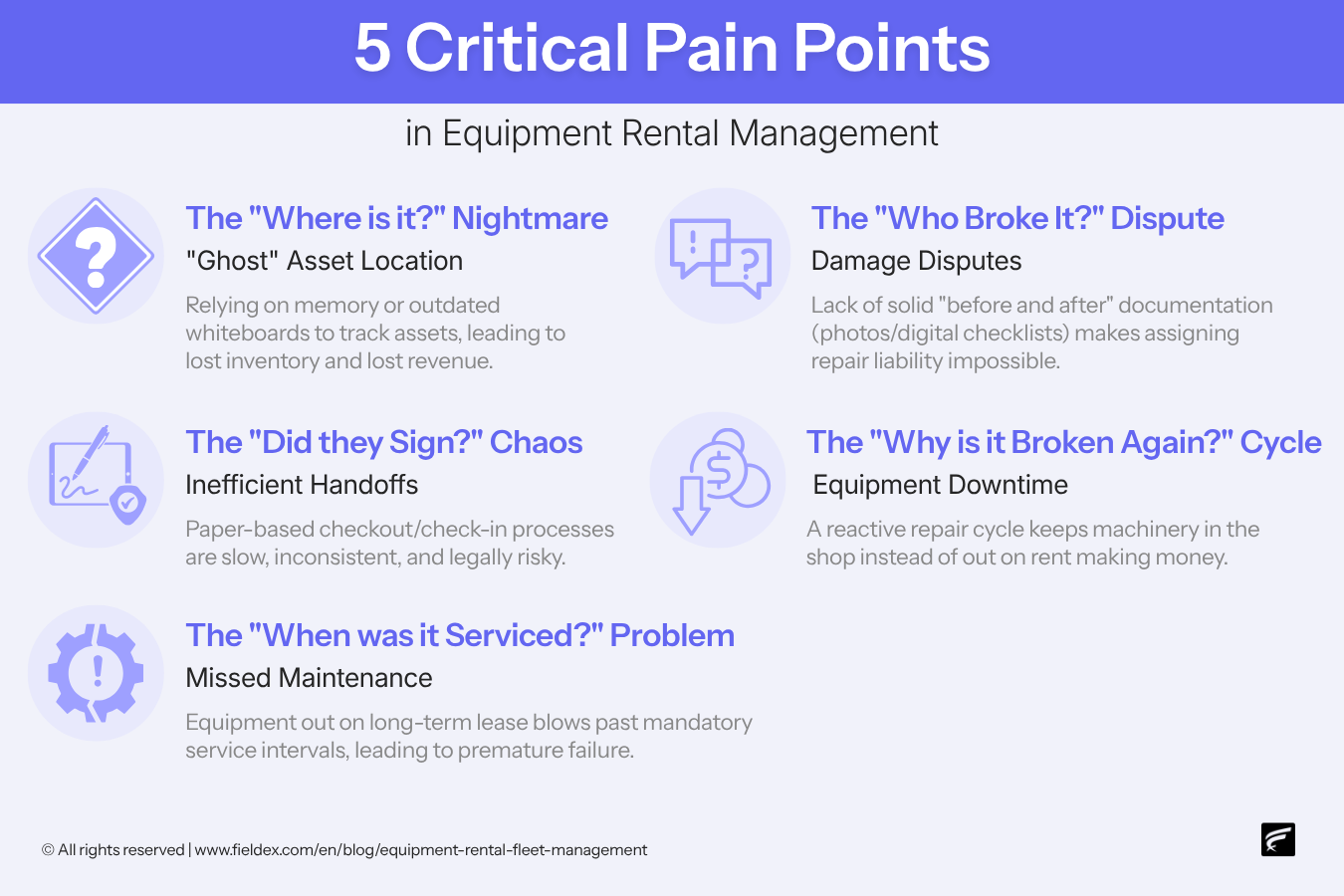
If you have been in the rental game for more than five minutes, you already know the pain. But let's look at the 5 specific nightmares that keep operations managers awake at night – and drain your bottom line.
This is when you know you own 14 light towers, but you can only physically locate 12 of them. Your whiteboard says they are at a construction site downtown, but the customer swears they were picked up last Tuesday. Relying on memory or outdated tracking leads directly to lost inventory and lost revenue.
A boom lift comes back with a shredded hydraulic hose, and the customer claims it was like that when they got it. Because your outbound inspection lacks solid "before and after" documentation (like time-stamped photos or digital checklists), assigning liability is impossible, and you end up eating the repair cost.
When a machine is out on a long-term lease for eight months, it is incredibly easy to blow right past its mandatory service intervals. This lack of tracking leads to premature component failure, expensive emergency repairs, and voided warranties.
Paper-based checkout and check-in processes are slow, inconsistent, and legally risky. If that signed piece of loose-leaf paper vanishes into the abyss of a technician's truck cab, you have zero proof of the transaction or the equipment's exact condition at handoff.
Ultimately, all these manual failures feed into a reactive repair cycle. Instead of being out on a job site making money, your machinery is constantly stuck in the shop, crippling your fleet's overall ROI.
So, how do we stop the bleeding? You have to ditch the clipboard and embrace a structured, digital workflow. Here’s how the top players manage their rental fleets.
You cannot manage what you cannot find. Relying on memory or static spreadsheets to know where your gear is deployed is a recipe for lost revenue.
The best practice is to use a digital system that organizes your equipment into a clear operational hierarchy. When a generator is rented out, it should be digitally assigned to that specific customer and their specific job site, giving your office total visibility over your inventory.
Protect yourself from liability by standardizing exactly what happens when a machine leaves your yard and when it returns.
Instead of relying on the honor system, modern rental fleets use mandatory digital procedures. This ensures that technicians must follow the correct inspection steps in the correct sequence before a handover is finalized, complete with digital sign-offs from the customer.
Don't let a returned, damaged machine sit idle in the yard just because someone forgot to mention it to the head mechanic.
Modern workflows utilize automated triggers. If an inspector flags a problem during a return inspection (like a damaged hydraulic hose), the system should automatically generate a follow-up repair ticket and assign it to a mechanic. No manual data entry required.
Equipment breaks down on job sites. It’s a fact of life. But when it happens, you want it to be ridiculously easy for the customer to let you know.
By tagging every asset with a QR code, anyone in the field can scan the machine with their smartphone and instantly submit an issue report straight to your office, bypassing chaotic phone calls and text messages.
Think of this as a detailed medical record for your machinery. Every work order, inspection, and spare part used should be logged in a centralized chronological timeline.
This provides a full service history for each individual asset, which is crucial for proving warranty claims, passing compliance audits, and knowing exactly when it is time to retire an old unit.
Understanding the best practices is one thing; executing them seamlessly is another.
When physical intervention is required – like dispatching a mechanic to fix a broken rental unit – the process of ensuring they have the right parts, ensuring the work is done correctly, and capturing all relevant documentation is typically a messy web of spreadsheets and messaging apps.
FieldEx is a hybrid CMMS+FSM platform that replaces that chaos with a structured, end-to-end digital workflow explicitly designed for heavy-duty operations.
Here’s how FieldEx handles a real-world rental scenario:
Spreadsheets are great for doing your taxes or planning a potluck. But they’re absolutely terrible at managing moving pieces of heavy iron. Spreadsheets are static, siloed, and rely entirely on human discipline.
When a remote fix is not possible and a technician must be physically dispatched, FieldEx manages everything that happens from that point forward – the people, the work, the parts, the compliance, and the documentation.
Managing an equipment rental fleet doesn't have to feel like organized chaos. By moving away from reactive, paper-based methods and embracing modern tools like mandatory digital check-ins, automated checklist triggers, and QR code reporting, you protect your assets and drastically improve your bottom line.
Ready to stop losing track of your machinery? Book a free demo with FieldEx today to see how our platform can completely transform your rental operations. Or simply reach out – we’re here to help.
Equipment rental fleet management is the process of actively tracking the location, condition, and maintenance schedule of leased machinery. Effective management ensures assets are safe, compliant, and generating revenue rather than sitting broken in a yard.
CMMS stands for computerized maintenance management system (the software that tracks asset history and schedules maintenance). FSM stands for field service management (the software that manages dispatching and mobile workforces).
The best way to prevent disputes is by using mandatory digital checklists and capturing photos of the equipment's condition immediately before handoff. Having the customer sign off digitally locks in an indisputable record of the asset's state.
In FieldEx, Checklist Triggers automate your follow-up workflows so nothing falls through the cracks. If a technician is completing a digital form and provides a negative response – like answering "No" when asked if a hydraulic hose is intact – the system's logic automatically creates a new work order from a pre-set template. It then instantly assigns that follow-up repair ticket to a mechanic using round-robin logic, entirely removing the need for manual data entry.
Yes. By using QR codes placed directly on the equipment, a customer can simply scan the code with their smartphone camera to open a public-facing issue report – no app download or login credentials required.
Time-based maintenance is scheduled by the calendar (eg service every 6 months). Meter-based maintenance is triggered by how much the machine is actually used (eg service after every 500 hours of operation).
Modern systems link equipment records directly to specific customer and site profiles. When a machine is deployed, its digital profile is moved to that specific location, giving the office a real-time view of asset distribution.
SLA stands for service level agreement. It is a contracted promise to a customer. In rentals, an SLA might guarantee that if a machine breaks down on site, a mechanic will be dispatched to fix or replace it within 4 hours.
Spreadsheets are static and siloed. They cannot enforce safety compliance in the field, they don't automatically update inventory, and they usually rely on manual data entry that is days or weeks out of date.

.avif)


This website and its content are the property of FieldEx and are protected by copyright laws. © 2026 FieldEx. Any redistribution or reproduction of part or all of the contents in any form is prohibited, except with our express written permission.
FieldEx Pte Ltd Singapore